
| Developer: | BoardTack (2) | ||
| Price: | * Free | ||
| Rankings: | 0 | ||
| Reviews: | 0 Write a Review | ||
| Lists: | 1 + 0 | ||
| Points: | 5 + 15 (4.6) ¡ | ||
| Mac App Store | |||
Description

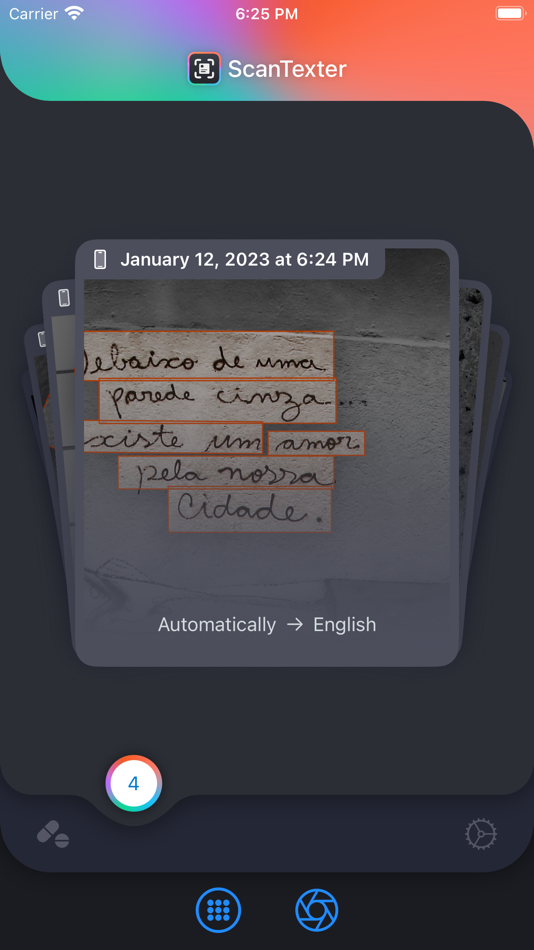
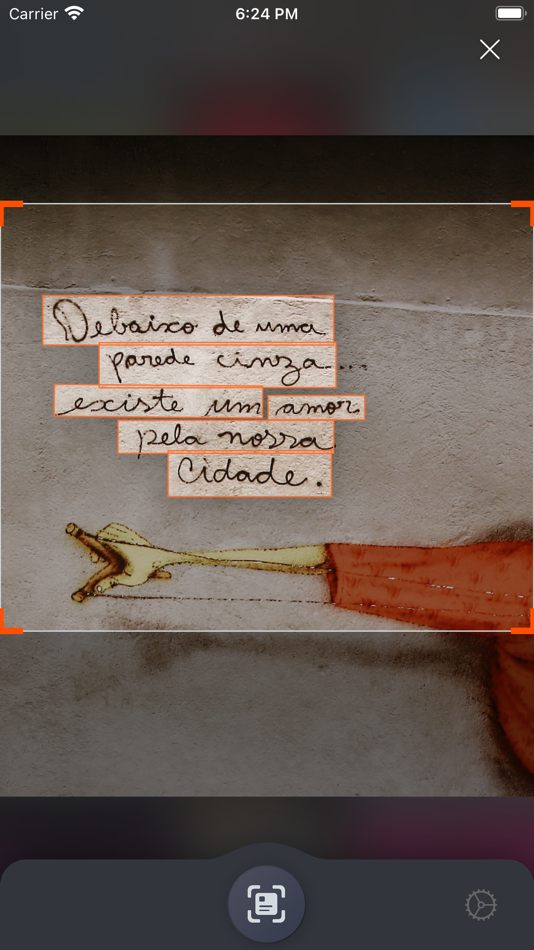
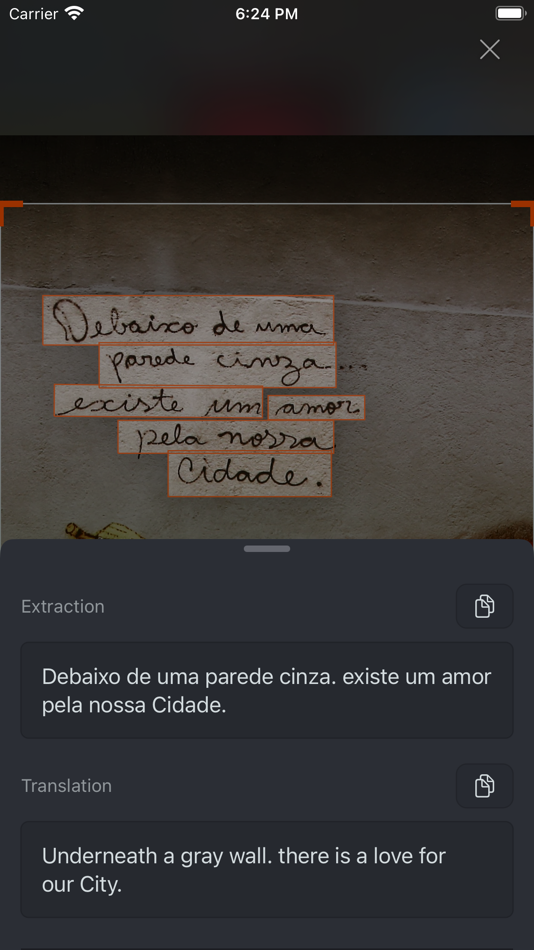
• Select or take a picture of the image you want to extract and translate text from.
That is it. So simple right?
This app provides the optimized productivity for iPhone/iPad users. It is easier than copying the text and using a translator. You no longer need to select and copy text from the screen. Also there is no need for additional effort to extract text from images and videos. Just select an image or take a picture.
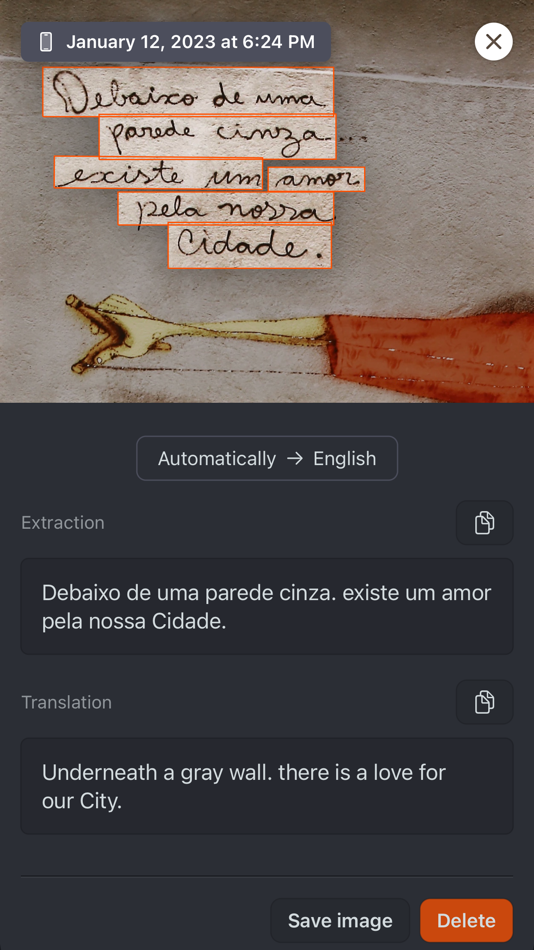
Just select an image or take a picture to automatically extract and translate the text. Your productivity will change dramatically through the ScanTexter app.
With this app you can
• Extract text from the image
• Translate the extracted text to various languages
• Scan bar codes (QR, AZTEC, UPC-E)
• Links can be recognized.
• Data is synchronized between iPhone / iPad / macOS apps via iCloud.
Pro Version
• Upgrade to the pro version and you can use it an unlimited number of times.
Premium Version (subscription)
• With a subscription, you can use all features without restrictions.
• You can additionally use DeepL, the world's leading machine translation service.
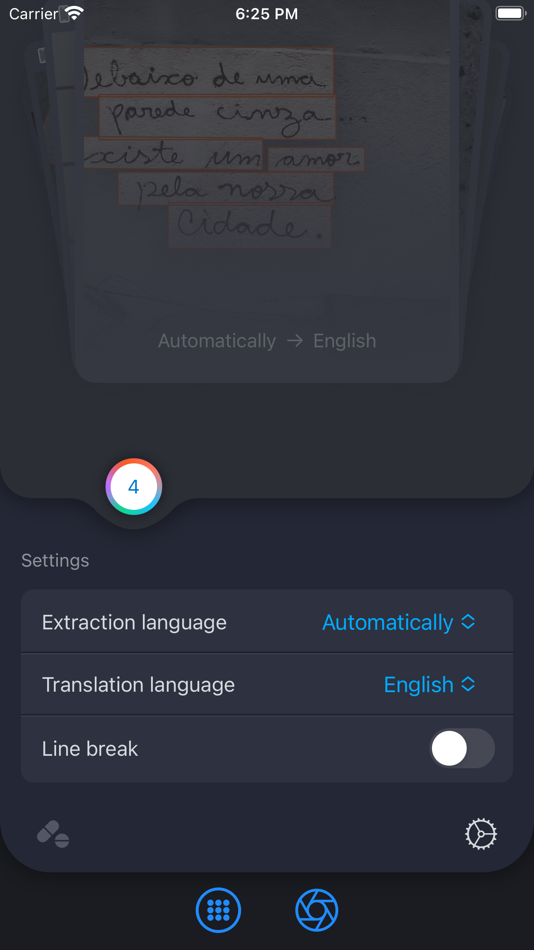
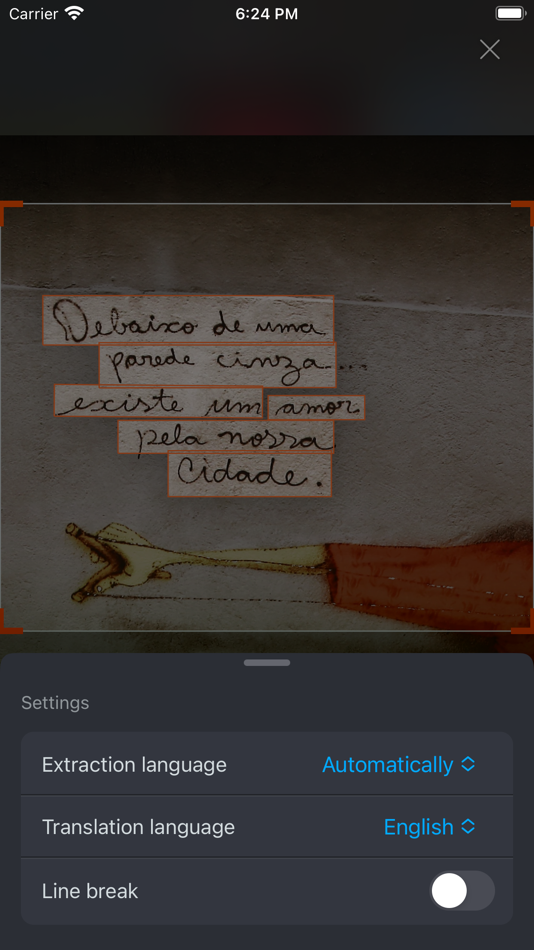
In this app you can set the
• You can select DeepL or the Default translation engine.
• Turn line wrapping on and off
• Set the extraction language (more languages will be added consistently)
: Cantonese (yue-Hans), Cantonese (yue-Hant), German, Russian, Vietnamese, Spanish, English, Ukrainian, Italian, Japanese, Chinese (zh-Hans), Chinese (zh-Hant), Thai, Portuguese, French, Korean, and Vietnamese.
Automatic language recognition function will be supported from iOS 16 version and up. (Specifying the extraction language increases accuracy.)
• Set the language for translation.
: Afrikaans, Albanian, Amharic, Arabic, Armenian, Assamese, Aymara, Azerbaijani, Bambara, Basque, Belarusian, Bengali, Bhojpuri, Bosnian, Bulgarian, Catalan, Cebuano, Chinese (Simplified), Chinese (Traditional), Corsican, Croatian, Czech, Danish, Dzongkha, Dogri, Dutch, English, Esperanto, Estonian, Ewe, Filipino (Tagalog), Finnish, French, Frisian, Galician, Georgian, German, Greek, Guarani, Gujarati, Haitian Creole, Hausa, Hawaiian, Hebrew, Hindi, Mongolian, Hungarian, Icelandic, Igbo, Iloko, Indonesian, Irish, Italian, Japanese, Javanese, Kannada, Kazakh, Khmer, Kinyarwanda, Konkani, Korean, Krio, Kurdish, Kurdish (Sorani), Kyrgyz, Lao, Latin, Latvian, Lingala, Lithuanian, Luganda, Luxembourgish, Macedonian, Malagasy, Malay, Malayalam, Maltese, Maori, Marathi, Meitei (Manipuri), Mizo, Mongolian, Myanmar (Burmese), Nepali, Norwegian, Nyanja (Chichewa), Oriya, Oromo, Pashto, Persian, Polish, Portuguese (Portugal, Brazil), Punjabi, Quechua, Romanian, Russian, Samoan, Sanskrit, Scottish Gaelic, Northern Sotho, Serbian, Sesotho, Shona, Sindhi, Sinhala, Slovak, Slovenian, Somali, Spanish, Sundanese, Swahili, Swedish, Tagalog (Philippines), Tajik, Tamil, Tatar, Telugu, Thai, Tigrinya, Tongan, Turkish, Turkmen, Twi (Akan), Ukrainian, Urdu, Uyghur, Uzbek, Vietnamese, Welsh, Xhosa, Yiddish, Yoruba, Zulu
Privacy Policy : https://boardtack.com/ScanTexter/privacy.html
Terms of Service : https://boardtack.com/ScanTexter/terms.html
Screenshots
What's new
- Version: 1.3.7
- Updated:
- - Support for iOS 26, fixed a bug with the image sharing feature.
- Fixed other bugs.
Price History
-
* In-App Purchases - Today: Free
- Minimum: Free
- Maximum: Free
Track prices
Developer
Points
-

- 662 Mudu
- +1
-
- 3,055 Dragon
- +1
-
- 753 Ali Latif
- +1
-
- 161 Hind Zahem
- +1


Rankings
0 ☹️
Lists

Reviews
Be the first to review 🌟
Additional Information
- Version: 1.3.7
- Category:
macOS Apps›Productivity - OS:
iPad,iPhone,macOS,macOS 16.0 and up - Size:
9 Mb - Supported Languages:
Arabic,Chinese,Czech,Danish,Dutch,English,Estonian,Finnish,French,German,Greek,Hungarian,Indonesian,Italian,Japanese,Korean,Norwegian,Polish,Portuguese,Romanian,Russian,Slovak,Spanish,Swedish,Thai,Turkish,Ukrainian,Vietnamese - Content Rating:
4+ - Mac App Store Rating:
4.6(15) - Updated:
- Release Date:
Contacts
- Website:
 https://boardtack.com/ScanTexter
«ScanTexter - OCR AI translate» is a Productivity app for macOS, developed by «BoardTack». It was first released on and last updated on . This app is currently free. This app has not yet received any ratings or reviews on AppAgg. It has been added to 1 public lists and 0 private lists created by users. AppAgg has tracked 5 confirmed points plus 15 indirect points for this app. On Mac App Store, the current store rating is 4.6 based on 15 votes. Available languages: Arabic, Chinese, Czech, Danish, Dutch, English, Estonian, Finnish, French, German, Greek, Hungarian, Indonesian, Italian, Japanese, Korean, Norwegian, Polish, Portuguese, Romanian, Russian, Slovak, Spanish, Swedish, Thai, Turkish, Ukrainian, Vietnamese. AppAgg continuously tracks the price history, ratings, and user feedback for «ScanTexter - OCR AI translate». Subscribe to this app or follow its RSS feed to get notified about future discounts or updates.
ScanTexter - OCR AI translate Short URL: Copied!- 🌟 Share
- Mac App Store
You may also like
-
- AI Chat: Super AI Assistant
- macOS Apps: Productivity By: SevenSeas AI Studio
- * Free
- Lists: 0 + 0 Rankings: 0 Reviews: 0
- Points: 1 + 0 Version: 1.0.1 Discover the ultimate AI assistant on Mac, designed to boost your productivity, creativity, and problem-solving skills. Built on GPT-4o, Gemini, and DeepSeek, our app delivers seamless ⥯
-
- MiiTrans - AI Translate
- macOS Apps: Productivity By: 宏基 庄
- * Free
- Lists: 0 + 0 Rankings: 0 Reviews: 0
- Points: 0 + 1 (1.0) Version: 1.2.2 MiiTrans is a comprehensive translation tool that combines AI and offline translation modes, delivering multi-dimensional translation capabilities for text, voice, images, and ... ⥯
-
- SnapText: OCR, Copy, Translate
- macOS Apps: Productivity By: 满 李
- $0.99
- Lists: 0 + 0 Rankings: 0 Reviews: 0
- Points: 0 + 0 Version: 1.2 Introducing SnapText, your go-to macOS app for easy text extraction from images. This efficient tool harnesses the power of optical character recognition (OCR) to transform screen ... ⥯
-
- Fello AI: Chat Bot Assistant
- macOS Apps: Productivity By: AI Apps Brewery s.r.o.
- * Free
- Lists: 0 + 1 Rankings: 0 Reviews: 0
- Points: 7 + 1 (1.0) Version: 6.3.4 Fello AI - The Most Popular All-in-One AI App for Mac, Now on iPhone & iPad! Loved by Mac users around the world, Fello AI brings the same top-rated experience to your iPhone and iPad. ⥯
-
- Translate : Chat Translator
- macOS Apps: Productivity By: Shams Alam
- Free
- Lists: 0 + 0 Rankings: 0 Reviews: 0
- Points: 0 + 1 (5.0) Version: 1.8 Voice Translator - AI Translate is your ultimate language companion, designed to break down communication barriers and make translation easier than ever. Whether you're traveling, ... ⥯
-
- OCR Fast Translation
- macOS Apps: Productivity By: WenJie Studio
- * Free
- Lists: 0 + 0 Rankings: 0 Reviews: 0
- Points: 0 + 0 Version: 1.3 OCR Quick Translate is a macOS app designed for local OCR recognition and instant translation. Use customizable hotkeys to capture your screen or select text and get translations ... ⥯
-
- AI Pro: Private AI Assistant
- macOS Apps: Productivity By: Crypto Inc.
- Free
- Lists: 1 + 2 Rankings: 0 Reviews: 0
- Points: 16 + 201 (4.7) Version: 3.0.3 AI Pro is the essential ChatGPT client for your Apple ecosystem. Enjoy seamless conversations with GPT 4.1 on your iPhone, iPad, Mac, and Apple Vision Pro, with iCloud sync ensuring ... ⥯
-
- Translate for Safari
- macOS Apps: Productivity By: Denk Alexandru
- $4.99
- Lists: 0 + 2 Rankings: 0 Reviews: 0
- Points: 3 + 0 Version: 3.1.4 Translate for Safari is a wonderful extension, just a click away, ready to use every time you need to translate entire webpages or just paragraphs. It can also translate text you write ⥯
-
- AI Writer
- macOS Apps: Productivity By: Cenk Alti
- Free
- Lists: 0 + 0 Rankings: 0 Reviews: 0
- Points: 1 + 0 Version: 1.2 AI Writer: Boost Your Creativity with AI AI Writer is a simple macOS application that improves your writing and productivity. It uses the power of LLMs. With a simple command, you can ... ⥯
-
- AI Seek - Multiple AI models
- macOS Apps: Productivity By: 创 曹
- * Free
- Lists: 0 + 0 Rankings: 0 Reviews: 0
- Points: 0 + 0 Version: 1.0.4 Ai Seek Your AI-Powered Productivity Partner Harnessing the advanced R1 and V3 language models, Ai Seek+ revolutionizes how you work, learn, and create. Designed as your intelligent ... ⥯
- New
- AI Transcribe - Note & Speech
- macOS Apps: Productivity By: Ghulam Rasool
- * Free
- Lists: 0 + 0 Rankings: 0 Reviews: 0
- Points: 0 + 0 Version: 1.1 AI Transcribe Audio & Video to Text AI Transcribe is your all-in-one solution for converting audio and video into accurate, editable text. Whether you re a student, content creator, ... ⥯
-
- AI Chatbot • Ask AI Anything
- macOS Apps: Productivity By: Shaukat Ali
- * Free
- Lists: 0 + 0 Rankings: 0 Reviews: 0
- Points: 1 + 0 Version: 1.5 AI Chatbot - Now with K2 is your all-in-one AI assistant for macOS. Whether you re writing, researching, planning, or brainstorming, it helps you think, create, and learn faster, all ... ⥯
-
- AI Detector & Humanize AI Text
- macOS Apps: Productivity By: Hafiz Hassan Mukhtar
- * Free
- Lists: 0 + 0 Rankings: 0 Reviews: 0
- Points: 0 + 0 Version: 1.2.2 AI Humanizer & Detector Make AI Text Sound Human Instantly Turn robotic AI writing into natural, human-like text and detect whether any text was written by AI in just seconds. AI ... ⥯
-
- AI Podcast Studio Voice Studio
- macOS Apps: Productivity By: Usama Daood
- * Free
- Lists: 0 + 0 Rankings: 0 Reviews: 0
- Points: 0 + 0 Version: 1.2 AI Podcast Creator is an all-in-one podcast creation tool that allows anyone to create studio-quality podcasts using the power of artificial intelligence no microphone, no recording ... ⥯