
| ผู้พัฒนา: | Suresh Shetty (2) | ||
| ราคา: | * ฟรี | ||
| การจัดอันดับ: | 0 | ||
| ความเห็น: | 0 เขียนความเห็น | ||
| รายการ: | 0 + 0 | ||
| แต้มแล: | 0 + 0 ¡ | ||
| Mac App Store | |||
คำอธิบาย

CAPTURE TEXT EFFORTLESSLY
- Capture text from anywhere - Images, videos, PDFs, presentations, photos, zoom/team meetings, app screens or any other sources. No internet connection is needed.
- Supports OCR in multiple languages – Textly recognizes text in many familiar languages across the globe, including: English, French, Italian, German, Spanish, Portuguese, Chinese (Simplified & Traditional), Korean, Japanese, Ukrainian, Russian, and more!
- Instant URL actions : If a URL is detected in the captured text, Textly can copy it and open it in your browser instantly.
INSTANT CLIPBOARD OF COPIED TEXTS.
Never lose a copied text.
- Browse your clipboard history, with easy-to-read short previews of your text for fast retrieval.
- You can find any text you remember as copied with just a click
- Quick Search - Find your text from your clipboard history in a fraction of a second
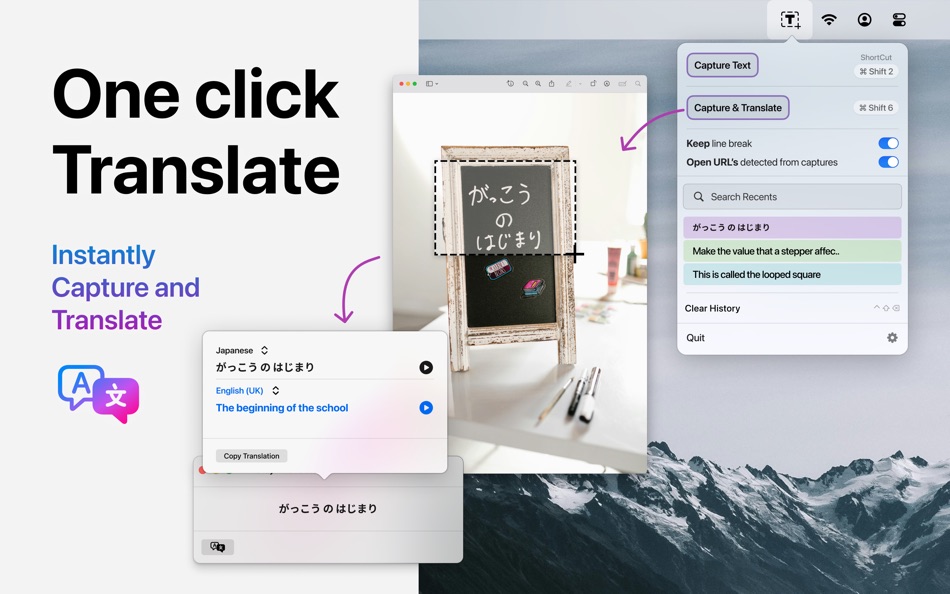
CAPTURE & TRANSLATE
- Textly makes translating captured text fast, seamless, and private — right from your Mac.
- Powered by Apple’s native translation framework, it delivers quick, accurate translations. With support for widely spoken languages across the globe, switching between them is effortless.
- Simply use customizable hotkeys to capture any on-screen text and translate it instantly. Textly ensures your translations are always fast, secure, and ready when you need them.
- Translation is supported from MacOS 14.4 and later.
QUICK SHORTCUTS
Customizable shortcuts – Assign custom keyboard shortcuts to extract text quickly and efficiently.
Quick access from the menu bar – One-click or shortcut activation for seamless use.
Textly app can be used completely offline. The application does not share any user data.
Whether you're a student, developer, designer, content creator, or part of a sales or support team, Textly is the ultimate productivity ally for anyone working with digital content. Transform how you capture, organize, and leverage text—effortlessly.
Textly offers a 3-day free trial, allowing you to explore all features. After the trial, you can select a 6 months subscription plan or Lifetime purchase to continue enjoying unlimited access to our premium features.
- Payment will be charged to your Apple Account upon confirmation of purchase.
- Your subscription will automatically renew unless auto-renewal is disabled at least 24 hours before the end of the current period.
- You can manage your subscription and disable auto-renewal by visiting your Apple Account Settings after purchase.
- Your Apple Account will be charged for renewal within 24 hours before the end of the current period.
- You can manage your subscription and disable auto-renewal by visiting your Apple Account Settings after purchase.
- No cancellation of the current subscription is allowed during the active subscription period.
- Any unused portion of the free trial will be forfeited once a subscription is purchased.
Privacy policy - https://www.macthru.com/privacy-policy
Terms of service - https://www.macthru.com/termscondition
For in-app purchases and subscription terms, see https://www.apple.com/legal/internet-services/itunes/dev/stdeula/
ภาพหน้าจอ





มีอะไรใหม่
- เวอร์ชัน: 1.0.5
- อัปเดต:
- Translate Anything, Instantly
Now supporting translations in most widely used languages, translates completely without internet — right inside the app.
Quick Translate with ⌘⇧1
Use the Command + Shift + 1 hotkey to instantly capture and translate any text on your screen.
ราคา
-
* การซื้อภายในแอพ - วันนี้: ฟรี
- ต่ำสุด: ฟรี
- มากที่สุด: ฟรี
ติดตามราคา
ผู้พัฒนา
- Suresh Shetty
- แพลตฟอร์ม: macOS แอป (2)
- รายการ: 0 + 0
- แต้มแล: 0 + 0 ¡
- การจัดอันดับ: 0
- ความเห็น: 0
- ลดราคา: 0
- วิดีโอ: 0
- RSS: ติดตาม
แต้มแล
0 ☹️
การจัดอันดับ
0 ☹️
รายการ
0 ☹️
ความเห็น
แสดงรีวิวเป็นคนแรกเลย 🌟
ข้อมูลเพิ่มเติม
- เวอร์ชัน: 1.0.5
- หมวดหมู่:
macOS แอป›ประสิทธิภาพการผลิต - ระบบปฏิบัติการ:
macOS,macOS 13.0 และสูงกว่า - ขนาด:
5 Mb - ภาษาที่สนับสนุน:
English - การจัดประเภทเนื้อหา:
4+ - Mac App Store คะแนนโดย:
0 - อัปเดต:
- วันที่วางจำหน่าย:
รายชื่อติดต่อ
- เว็บไซท์:
 https://www.macthru.com/
Textly: Capture, Copy & Paste URL แบบสั้น: คัดลอกแล้ว!- 🌟 แชร์
- Mac App Store
คุณอาจชอบ
-
- Copy Paste Clipboard Manager!
- macOS แอป: ประสิทธิภาพการผลิต โดย: LUKA FILAJDIC
- $2.99
- รายการ: 0 + 0 การจัดอันดับ: 0 ความเห็น: 0
- แต้มแล: 0 + 0 เวอร์ชัน: 1.0 CopyPaste is the ultimate clipboard manager for macOS that runs seamlessly in your menu bar. Never lose important text or images again with unlimited clipboard history and powerful ... ⥯
-
- PasteQ - Search Copy Paste
- macOS แอป: ประสิทธิภาพการผลิต โดย: 旭 徐
- * ฟรี
- รายการ: 1 + 0 การจัดอันดับ: 0 ความเห็น: 0
- แต้มแล: 4 + 0 เวอร์ชัน: 1.1.32 PasteQ is a clipboard tool for macOS and iOS with iCloud synchronization, emphasizing full keyboard operation (via hotkeys for window show/hide, record filtering, etc.) and privacy ... ⥯
-
- Paste – Limitless Clipboard
- macOS แอป: ประสิทธิภาพการผลิต โดย: Paste Team
- ฟรี
- รายการ: 6 + 1 การจัดอันดับ: 0 ความเห็น: 0
- แต้มแล: 9 + 1,162 (4.2) เวอร์ชัน: 6.2.1 Paste stores everything you copy on your Mac, iPhone, and iPad so it s always there when you need it. From text and links to images and files, Paste saves it all. Just copy once, and ... ⥯
-
- Copy Me That recipe manager
- macOS แอป: ประสิทธิภาพการผลิต โดย: Copy Me That
- ฟรี
- รายการ: 0 + 0 การจัดอันดับ: 0 ความเห็น: 0
- แต้มแล: 2 + 0 เวอร์ชัน: 1.0.2 Copy Me That combines a recipe manager, shopping list, and meal planner into one seamless flow. Easily add recipes from any website with a single click, or add your own recipes. Copy ... ⥯
-
- Pastery - copy-paste history
- macOS แอป: ประสิทธิภาพการผลิต โดย: Marcos Morais
- ฟรี
- รายการ: 0 + 0 การจัดอันดับ: 0 ความเห็น: 0
- แต้มแล: 5 + 0 เวอร์ชัน: 1.3.0 Pastery lets you have control of your copying and pasting. You'll never lose any copied link, text or code snippet! Just open the app, use your Mac as you would and, when you want to ... ⥯
-
- SnapText Pro — OCR, Copy&Paste
- macOS แอป: ประสิทธิภาพการผลิต โดย: Muhammad Farhan Akram
- $4.99
- รายการ: 0 + 0 การจัดอันดับ: 0 ความเห็น: 0
- แต้มแล: 0 + 0 เวอร์ชัน: 2.0 Boost your productivity with SnapText Pro the simplest, fastest way to extract text from any part of your screen using Optical Character Recognition (OCR). No more retyping text or ... ⥯
-
- Switch Browser: No copy-paste
- macOS แอป: ประสิทธิภาพการผลิต โดย: Vladimir Kucherenko
- $0.99
- รายการ: 0 + 0 การจัดอันดับ: 0 ความเห็น: 0
- แต้มแล: 0 + 0 เวอร์ชัน: 1.2.3 A Share Menu extension that opens any installed browser with the page you're currently looking at. No need to copy-paste urls anymore. ⥯
-
- Pallet - Copy Paste Manager
- macOS แอป: ประสิทธิภาพการผลิต โดย: Jason Louw
- ฟรี
- รายการ: 0 + 0 การจัดอันดับ: 0 ความเห็น: 0
- แต้มแล: 0 + 0 เวอร์ชัน: 1.0 A simple copy paste manager. ⥯
-
- Copyboard – Copy-Paste Tool
- macOS แอป: ประสิทธิภาพการผลิต โดย: David Steppenbeck
- * ฟรี
- รายการ: 0 + 0 การจัดอันดับ: 0 ความเห็น: 0
- แต้มแล: 2 + 2 (3.0) เวอร์ชัน: 1.8.2 Copyboard is a simple productivity tool to copy frequently-used text snippets to your device pasteboard with just a single tap. Create items that are displayed in an intuitive list: ... ⥯
-
- Paste Queue
- macOS แอป: ประสิทธิภาพการผลิต โดย: Hoi Chang
- $7.99
- รายการ: 2 + 0 การจัดอันดับ: 0 ความเห็น: 0
- แต้มแล: 4 + 0 เวอร์ชัน: 1.6.4 Paste Queue makes it super fast and easy to copy and paste multiple data items! No more hassle of copying and pasting one thing at a time. With Paste Queue, you can consecutively copy ... ⥯
-
- Capture Note - Note On Screen
- macOS แอป: ประสิทธิภาพการผลิต โดย: Jaeil Roh
- ฟรี
- รายการ: 0 + 0 การจัดอันดับ: 0 ความเห็น: 0
- แต้มแล: 1 + 0 เวอร์ชัน: 0.1.15 "Capture Note" provides fastest and easiest way to make notes over the screenshot. You can easily take screenshots and writes notes on them. You can easily save it image file or copy ... ⥯
-
- Paste Quick
- macOS แอป: ประสิทธิภาพการผลิต โดย: 楚江 王
- * ฟรี
- รายการ: 0 + 0 การจัดอันดับ: 0 ความเห็น: 0
- แต้มแล: 1 + 0 เวอร์ชัน: 2.0.0 PasteQuick is a privacy-focused and simple clipboard management tool designed to help you efficiently manage various temporary data such as text, links, images, and code. It records ... ⥯
-
- Copy URL Extension
- macOS แอป: ประสิทธิภาพการผลิต โดย: Tuan Nguyen
- $0.99
- รายการ: 0 + 1 การจัดอันดับ: 0 ความเห็น: 0
- แต้มแล: 2 + 0 เวอร์ชัน: 1.0 Simple extension to copy URL in plaintext or markdown format to clipboard. This minimalist extension only accesses your current tab to read the URL, protecting your privacy and ... ⥯
-
- Copy Transmit - Clipboard
- macOS แอป: ประสิทธิภาพการผลิต โดย: Claudio Guirunas
- * ฟรี
- รายการ: 0 + 0 การจัดอันดับ: 0 ความเห็น: 0
- แต้มแล: 0 + 0 เวอร์ชัน: 1.0.1 Copy Transmit is a clipboard manager for macOS and iOS that transmits clippings (⌘+C, copy-and-paste) across all your devices connected to your iCloud account. For example, you can ... ⥯