
| ผู้พัฒนา: | Jiulong Zhao (80) | ||
| ราคา: | $7.99 | ||
| การจัดอันดับ: | 0 | ||
| ความเห็น: | 0 เขียนความเห็น | ||
| รายการ: | 0 + 1 | ||
| แต้มแล: | 2 + 0 ¡ | ||
| Mac App Store | |||
คำอธิบาย

Auto Eject(autoEJECT) will automatically eject all your removable disks when you close your MacBook's lid and will remount them upon Mac's wakeup!
Your external disks, flash drives, USB devices, SD cards, Firewire backup disks, DVDs, and even mounted dmg files will be safely ejected automatically when your Mac sleeps. Besides remounting all USB flash drives, it can also force all ejected portable hard disks to remount upon wake-up...
"I coded this app because I always forget to eject my iPod and flash drives before I close the lid of my Macbook Air and just yank it out of the computer at the last minute before running out… Each time I open the lid again, the red alert will pop up, telling me to be good! " - Jiulong, 2011
With the help of Auto Eject(autoEJECT), all your removable will be automatically ejected BEFORE your Mac goes to sleep and reconnects when it wakes up. That way, your files, Mac system, and devices are kept safe and secure. Of course, you can also use it as a device ejector to eject devices individually and manually.
features:
- automatically ejects all removable disks i.e.: iPods, flash drives, USB devices, Firewire drives, DVDs, and even opened dmg files
- simple status menu operation, easy and handy
- all disks can be ejected individually by simply clicking their name
- all disks can be ejected at once at one click
Version History:
v2.00 -> v2.02
- 'hide dock icon' option was added according to the user's feature request
v2.02 -> v2.05
- add the option "Change Menu Icon Color Instantly" according to the user's feature request.
- 'more by dragonBTV' panel updated
v2.05 -> v2.20
a very important upgrade according to the user's feature request
- add an option of force remounting all portable hard disks upon waking up automatically
- app tips modified
- more by dragonBTV panel updated
v2.20 -> v2.28
- fix bug of "mounted disk list become empty after restart under OS 10.8"
v2.28 -> v2.30
- more verification of removable partitions
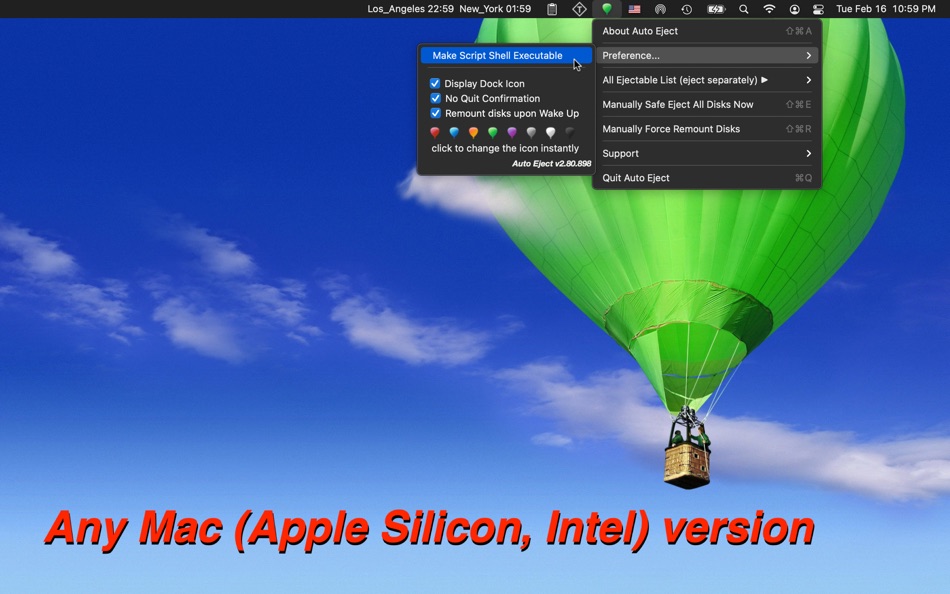
v2.30 -> v2.80
- Any Mac (Apple Silicon, Intel) version for macOS Big Sur
- 'auto-open at login' tip added
- startup tip added
- control interface modified
- quickly detect all already mounted disks and refresh the disk list
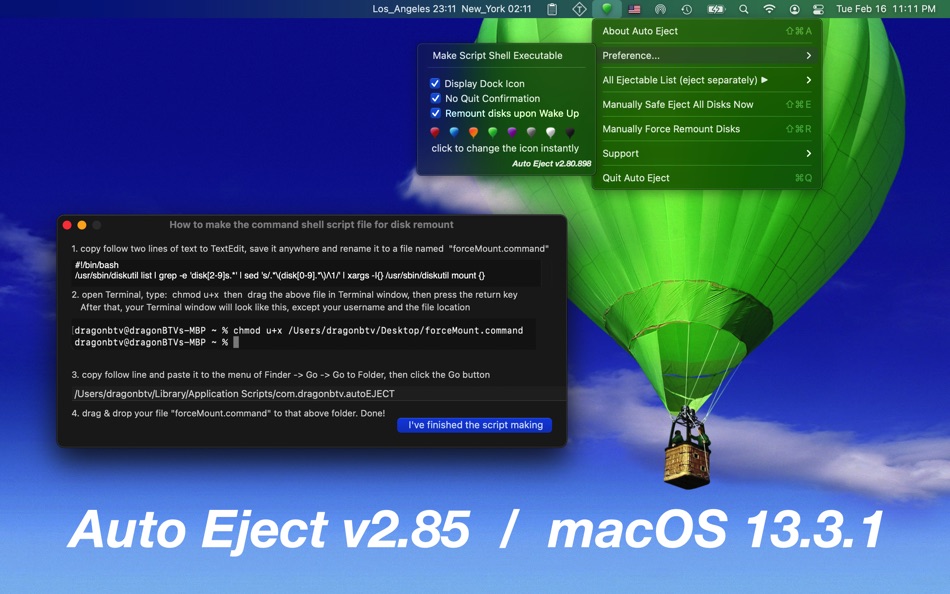
- user command shell script making added for force remount all disks function under Sandbox
- app menu updated
- app version display added
- app icon color changed
- support menu updated
- all deprecated functions rewritten
v2.80 -> v2.85
- all deprecated code rewritten
- More by dragonBTV menu updated
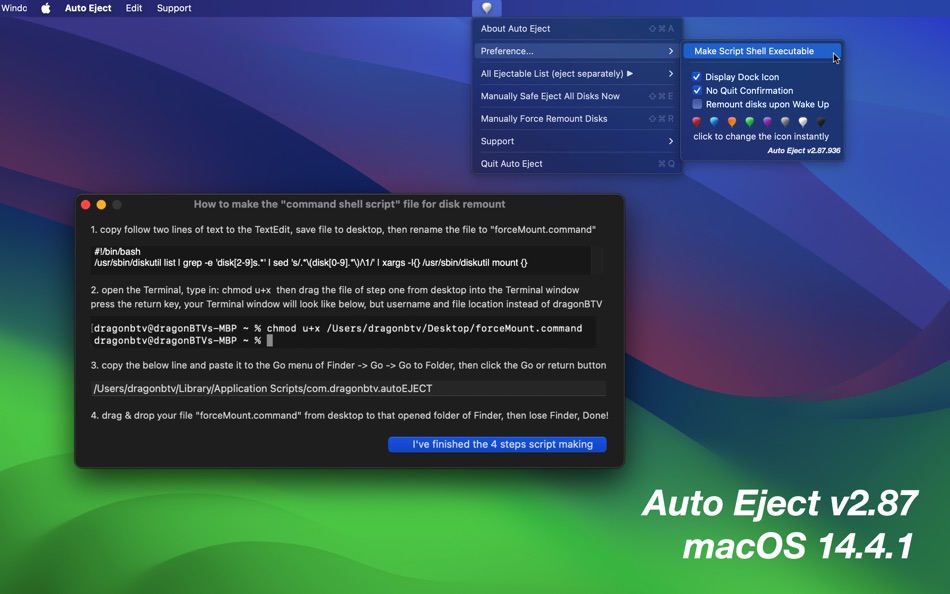
v2.85 -> v2.87
- command shall script-making interface modified
- start-up tip modified
- partly re-coded for the current macOS 14.4 and upcoming
Tips:
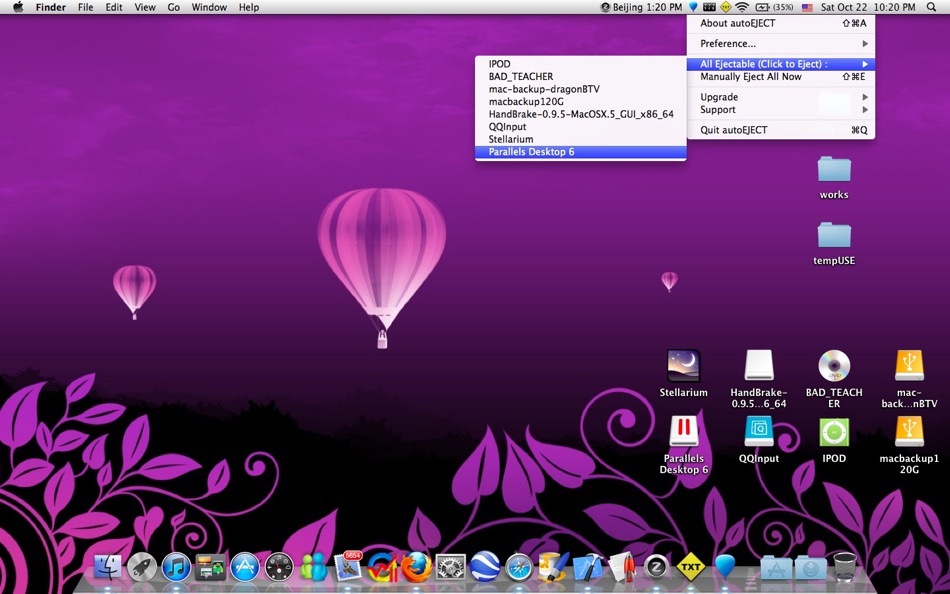
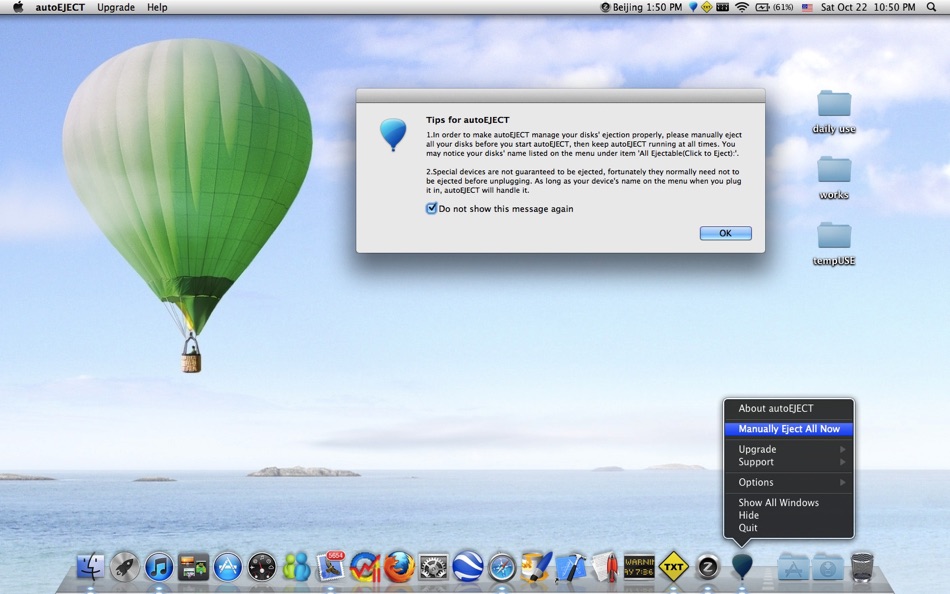
1. To make autoEJECT manage your disks' ejection properly, please manually eject all your disks before you start autoEJECT, then keep autoEJECT running at all times. You may notice your disks' name listed on the menu under the item 'All Ejectable(Click to Eject):'.
2. Special devices are not guaranteed to be ejected, fortunately, they normally need not be ejected before unplugging. As long as your device's name is on the menu when you plug it in, autoEJECT will handle it.
3. Not as fast as the modern flash drive, some old USB portable hard disks may take additional time to wake themselves up or go to sleep. You may notice the actions by their sounds, so please just wait a few more seconds. :)
4. If some of your external hard drives do not remount themself automatically when Mac wakes up, please make the new option 'Force Remount upon Wake Up' checked.
ภาพหน้าจอ
มีอะไรใหม่
- เวอร์ชัน: v2.87
- อัปเดต:
- v2.85 -> v2.87
- command shall script-making interface modified
- start-up tip modified
- partly re-coded for the current macOS 14.4 and upcoming
ราคา
- วันนี้: $7.99
- ต่ำสุด: ฟรี
- มากที่สุด: $7.99
ติดตามราคา
ผู้พัฒนา
แต้มแล
-

- 2,624 Alan
- +1
-
- 10,877 Simon Chan
- +1


การจัดอันดับ
0 ☹️
รายการ
0 ☹️
- Auto Eject
ความเห็น
แสดงรีวิวเป็นคนแรกเลย 🌟
ข้อมูลเพิ่มเติม
รายชื่อติดต่อ
- เว็บไซท์:
 http://tinyurl.com/iRest108
Auto Eject URL แบบสั้น: คัดลอกแล้ว!- 🌟 แชร์
- Mac App Store
คุณอาจชอบ
-
- Eject
- macOS แอป: ยูทิลิตี้ โดย: Shiro Wilde
- $3.99
- รายการ: 0 + 0 การจัดอันดับ: 0 ความเห็น: 0
- แต้มแล: 0 + 0 เวอร์ชัน: 1.8.5 Eject is an extremely simple and convenient menu that allows you to eject removable disk volumes with a single click from within any application. Visual notifications can also be ... ⥯
-
- Auto Scroll and Find
- macOS แอป: ยูทิลิตี้ โดย: Alfredo Grassau
- $2.99
- รายการ: 0 + 1 การจัดอันดับ: 0 ความเห็น: 0
- แต้มแล: 1 + 0 เวอร์ชัน: 1.0.15 "Auto Scroll and Find" for Safari: Dive Deeper into Infinite Scrolling Pages! Ever tried searching for something specific on a social media feed, only to manually scroll endlessly, ... ⥯
-
- Auto Clicker Manager
- macOS แอป: ยูทิลิตี้ โดย: Mustafa SEYIS
- ฟรี
- รายการ: 0 + 0 การจัดอันดับ: 0 ความเห็น: 0
- แต้มแล: 1 + 0 เวอร์ชัน: 1.0.2 Auto Clicker Manager: Simple & Powerful Automation Stop wasting time with repetitive clicks. Auto Clicker Manager helps you automate complex clicking sequences on your Mac with ... ⥯
-
- Auto Refresh Pro for Safari
- macOS แอป: ยูทิลิตี้ โดย: Cristian Gav
- $3.99
- รายการ: 0 + 0 การจัดอันดับ: 0 ความเห็น: 0
- แต้มแล: 0 + 0 เวอร์ชัน: 1.0.2 Auto Refresh Pro for Safari is a nice looking and easy to use Safari extension that will help you to auto-refresh/reload web pages at a predefined interval time. Just run the ... ⥯
-
- Eject Drives - Disk Unmounter
- macOS แอป: ยูทิลิตี้ โดย: Letricia Angeloni
- $2.99
- รายการ: 0 + 0 การจัดอันดับ: 0 ความเห็น: 0
- แต้มแล: 0 + 0 เวอร์ชัน: 1.0 Quickly and safely remove external drives from your Mac from the menubar. Key Features: - Menubar interface showing connected drive count - Organized drives by type (USB, SD Card, Disk ⥯
-
- Auto Clicker - Tapper
- macOS แอป: ยูทิลิตี้ โดย: Marcus Gunn
- ฟรี
- รายการ: 0 + 0 การจัดอันดับ: 0 ความเห็น: 0
- แต้มแล: 1 + 0 เวอร์ชัน: 1.9 Tapper is an accessibility-focused auto clicker for macOS that helps reduce repetitive strain and support users with motor impairments. It provides an easy way to trigger clicks ... ⥯
-
- Auto Scroll Web for Safari
- macOS แอป: ยูทิลิตี้ โดย: Pierre Stanislas
- $1.99
- รายการ: 0 + 0 การจัดอันดับ: 0 ความเห็น: 0
- แต้มแล: 0 + 1 (1.0) เวอร์ชัน: 1.0 Whether you're catching up on news, diving into long articles, or simply browsing your favorite sites, Auto Scroll Web intelligently scrolls pages for you, allowing you to focus on the ⥯
-
- Auto-Screen-Brightness
- macOS แอป: ยูทิลิตี้ โดย: 忠彬 田
- $0.99
- รายการ: 0 + 0 การจัดอันดับ: 0 ความเห็น: 0
- แต้มแล: 0 + 0 เวอร์ชัน: 1.0.6 Important tips: The app only works with laptop build-in screens. Auto-Screen-Brightness is a menu bar application that automatically sets the screen brightness based on your screen ... ⥯
-
- Eject Volumes
- macOS แอป: ยูทิลิตี้ โดย: Sachin Deshpande
- $0.99
- รายการ: 1 + 0 การจัดอันดับ: 0 ความเห็น: 0
- แต้มแล: 0 + 0 เวอร์ชัน: 1.0 Eject Volumes is a small menu bar app that allow you to eject mounted volumes in your macOS. Your can use this app to eject any mounted external disks, disk images, network volumes.The ⥯
-
- Auto AI Transcription
- macOS แอป: ยูทิลิตี้ โดย: Ahmad Naeem
- $19.99
- รายการ: 0 + 0 การจัดอันดับ: 0 ความเห็น: 0
- แต้มแล: 1 + 0 เวอร์ชัน: 1.1.0 Auto AI Transcription is a powerful macOS app that allows you to effortlessly convert audio recordings into text. With a simple and intuitive interface, this app is designed to ... ⥯
- ใหม่
- Auto Refresh - Page Monitor
- macOS แอป: ยูทิลิตี้ โดย: 裕涛 兰
- ฟรี
- รายการ: 0 + 0 การจัดอันดับ: 0 ความเห็น: 0
- แต้มแล: 1 + 0 เวอร์ชัน: 1.0 Auto Refresh is a Safari extension that automatically reloads web pages at user-defined intervals, helping you stay up to date with frequently changing content no manual refreshing ... ⥯
-
- Auto Set Desktop
- macOS แอป: ยูทิลิตี้ โดย: 苏州方绘光电技术有限公司
- ฟรี
- รายการ: 0 + 0 การจัดอันดับ: 0 ความเห็น: 0
- แต้มแล: 2 + 0 เวอร์ชัน: 1.0.1 Auto Set Desktop It can help you set an automatic desktop wallpaper switching based on folder. ⥯
-
- Auto Skip
- macOS แอป: ยูทิลิตี้ โดย: mobilComm Ltd, organizační složka
- * ฟรี
- รายการ: 0 + 0 การจัดอันดับ: 0 ความเห็น: 0
- แต้มแล: 0 + 0 เวอร์ชัน: 2.0 Auto Skip makes your streaming experience seamless. Stop wasting time manually skipping intros, recaps, or credits Auto Skip detects and clicks the official Skip/Next buttons for you. ... ⥯
-
- Eject All
- macOS แอป: ยูทิลิตี้ โดย: GEORGE MARK TURNER
- $0.99
- รายการ: 0 + 0 การจัดอันดับ: 0 ความเห็น: 0
- แต้มแล: 0 + 0 เวอร์ชัน: 1.0 This app unlocks a feature that should be part of macOS, the ability to eject all removable media with one click. Simply click the eject button that lives in an app in you menu bar, ... ⥯