
| ผู้พัฒนา: | 刚刚 孔 (23) | ||
| ราคา: | $4.99 | ||
| การจัดอันดับ: | 0 | ||
| ความเห็น: | 0 เขียนความเห็น | ||
| ความเห็น: | 0 โพสต์ความคิดเห็น | ||
| รายการ: | 0 + 0 | ||
| แต้มแล: | 0 + 0 ¡ | ||
| Mac App Store | |||
คำอธิบาย

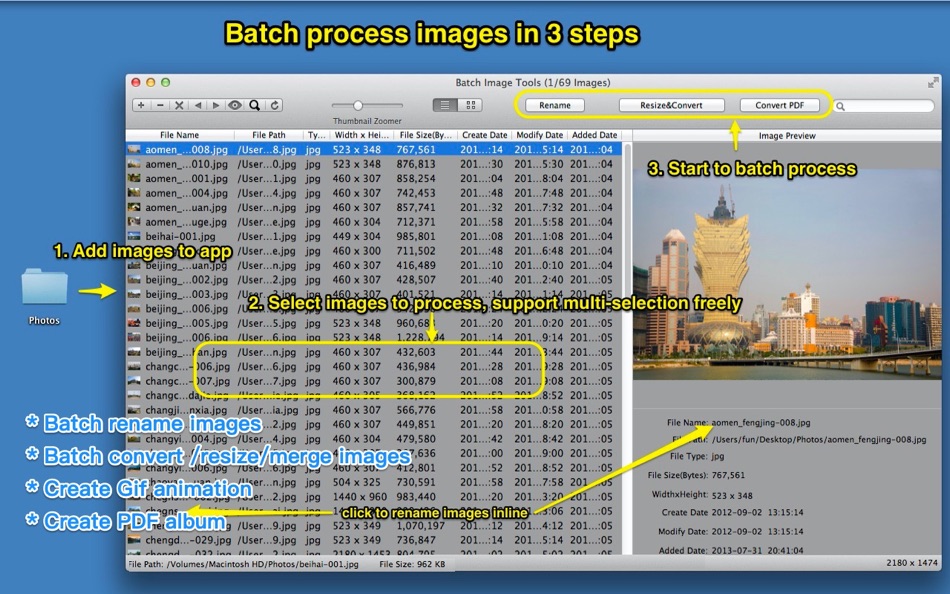
* Batch resize/convert/merge/crop images.
* Create Gif Animation.
* Batch convert images to PDF format, and support to make PDF album and encrypt with password.
* Support all popular image format
* Support to reorder image freely by click table list header or by dragging images in thumbnail list.
[Contact: ]
Email: dummyapps@163.com
**********USER FAQ***************
1. How can I convert images to PDF?
A: 1) Drag images or folders contain image to app, and select images that you want to convert.
2) Click "Convert PDF" in toolbar
3) Selecte folder to store PDF files
4) Click "Start" button, after finished, click "Done" button to return.
2. Why nothing happened when I clicked "Start Convert" button? and there is no PDF file created?
A:
1. Please confirm that you have selected images to convert.
2. Please check if you've selected a folder to save PDF file, and make sure you have the permission to write to the folder.
3. How to set PDF file cover?
A: Drag&drop image to front/back cover placeholder when converting PDF file.
4. How to delete PDF file cover?
A: Delete front/back cover by selecting each of them and press "delete" key.
5. How to reorder the images?
A: There are 3 way to reorder images:
1) click the table column header to reorder the images.
2) Select the images you want to reorder in file list or in thumbnail list, click left arrow or right arrow button in the first segment controller of the toolbar.
3) Select the images in thumbnail list, and drag them to the destination position.
6. Why sometimes merge images to JPG format fail?
A:
1. Because the max resolution of JPG is 65535x65535 pixels, please change merge format to PNG or other format and try again.
2. If source file is gif animation file, the gif filename can not contain whitespace
Ad
ภาพหน้าจอ


ราคา
- วันนี้: $4.99
- ต่ำสุด: $2.99
- มากที่สุด: $9.99
ติดตามราคา
Ad
ผู้พัฒนา
แต้มแล (0)
0 ☹️
การจัดอันดับ (0)
0 ☹️
รายการ (0)
0 ☹️
- Batch Image Toolset
ความเห็น (0)
แสดงรีวิวเป็นคนแรกเลย 🌟
ความเห็น (0)
เป็นคนแรกที่แสดงความเห็น 🌟
ข้อมูลเพิ่มเติม
รายชื่อติดต่อ
- เว็บไซท์:
 https://shop476934163.taobao.com
Batch Image Toolset URL แบบสั้น: คัดลอกแล้ว!- 🌟 แชร์
- Mac App Store
คุณอาจชอบ
-
- Batch Image Converter Pro
- macOS แอป: ยูทิลิตี้ โดย: Gustav Gutsche
- $1.99
- รายการ: 0 + 0 การจัดอันดับ: 0 ความเห็น: 0
- แต้มแล: 0 + 0 ความเห็น: 0 เวอร์ชัน: 1.1.0 Batch Image Converter Pro is the fastest way to convert thousands of images on your Mac. Drag, drop, and convert between HEIC, WebP, PNG, JPEG, TIFF, and BMP instantly. * Batch Power: ... ⥯
-
- Batch Image
- macOS แอป: ยูทิลิตี้ โดย: 春生 熊
- ฟรี
- รายการ: 0 + 1 การจัดอันดับ: 0 ความเห็น: 0
- แต้มแล: 3 + 0 ความเห็น: 0 เวอร์ชัน: 1.0.3 "Functions and Features" Batch watermark (support text and pictures as watermark, support shadow transparency, custom zoom and position, etc.) Bulk photo frame posters (update pictures ⥯
-
- Image Optimizer - Compression
- macOS แอป: ยูทิลิตี้ โดย: 万林 彭
- ฟรี
- รายการ: 0 + 1 การจัดอันดับ: 0 ความเห็น: 0
- แต้มแล: 7 + 0 ความเห็น: 0 เวอร์ชัน: 3.0 Image Optimizer - Professional Lossless Image Compression Software. Batch Image Compression Tool for PNG, JPG, TIF, GIF, BMP, PSD, HEIC Formats 「Main Features」 Reduce image file size ... ⥯
-
- Image Converter: HEIC WebP PDF
- macOS แอป: ยูทิลิตี้ โดย: DRISH LABS
- $4.99
- รายการ: 0 + 0 การจัดอันดับ: 0 ความเห็น: 0
- แต้มแล: 0 + 0 ความเห็น: 0 เวอร์ชัน: 2.2 Image Converter: HEIC WebP PDF is the fast, all-in-one image conversion and processing tool built exclusively for Mac. Convert between every major format in seconds HEIC ↔ JPG ↔ PNG ↔ ... ⥯
-
- Image to text-Accurate & Easy
- macOS แอป: ยูทิลิตี้ โดย: 旭东 刘
- ฟรี
- รายการ: 0 + 0 การจัดอันดับ: 0 ความเห็น: 0
- แต้มแล: 0 + 0 ความเห็น: 0 เวอร์ชัน: 4.5 Quickly extract text from pictures Small but powerful, it may be the simplest text extraction application Now that you have the Monterey live text, why do you still need us? Because we ⥯
-
- Image Extractor for Word Docs
- macOS แอป: ยูทิลิตี้ โดย: App Tyrant Corp
- $2.99
- รายการ: 0 + 0 การจัดอันดับ: 0 ความเห็น: 0
- แต้มแล: 0 + 0 ความเห็น: 0 เวอร์ชัน: 1.2.2 Do you have a Microsoft Word Document (.doc or .docx) filled with images you need to extract quickly? Look no further! Image Extractor for Microsoft Word Documents is your ultimate ... ⥯
-
- Image Guard - Data Blur
- macOS แอป: ยูทิลิตี้ โดย: Direct Solutions
- ฟรี
- รายการ: 0 + 0 การจัดอันดับ: 0 ความเห็น: 0
- แต้มแล: 0 + 0 ความเห็น: 0 เวอร์ชัน: 1.0 Introducing Image Guard: Your Ultimate Privacy Protector for Images! Key Features: - Detect Sensitive Information: Image Guard uses advanced AI technology to automatically detect and ... ⥯
-
- Image Kit
- macOS แอป: ยูทิลิตี้ โดย: 上海蓝伞科技有限责任公司
- * ฟรี
- รายการ: 0 + 0 การจัดอันดับ: 0 ความเห็น: 0
- แต้มแล: 2 + 0 ความเห็น: 0 เวอร์ชัน: 1.1.1 Image Kit is a feature rich image processing toolset that: - support all major image formats: JPEG / PNG / Webp / BMP / HEIC / HEIF / GIF / SVG /... and most types of raw images - ... ⥯
- -100%
- Image Resizer: Batch Convert
- macOS แอป: ยูทิลิตี้ โดย: omer kose
- ▼ * ฟรี
$3.99-100% - รายการ: 0 + 1 การจัดอันดับ: 0 ความเห็น: 0
- แต้มแล: 6 + 0 ความเห็น: 0 เวอร์ชัน: 4 Image Resizer helps you resize and convert images in seconds on macOS. Drag and drop images or folders, choose a target resolution, then export in the format you need. Why users love ... ⥯
-
- Image Ninja Compress, Convert
- macOS แอป: ยูทิลิตี้ โดย: Christopher Kreymborg
- ฟรี
- รายการ: 0 + 0 การจัดอันดับ: 0 ความเห็น: 0
- แต้มแล: 0 + 0 ความเห็น: 0 เวอร์ชัน: 1.0 Image Ninja is the fastest way to batch convert and compress images on your Mac. Drop in your photos, pick your format, and let the ninja work its magic. POWERFUL FORMAT CONVERSION ... ⥯
-
- Image Converter for PNG, JPEG & GIF for Mac OS X
- macOS แอป: ยูทิลิตี้ โดย: FIPLAB Ltd
- ฟรี
- รายการ: 0 + 1 การจัดอันดับ: 0 ความเห็น: 0
- แต้มแล: 1 + 0 ความเห็น: 0 เวอร์ชัน: 1.0 Image Converter is an indispensable and incredibly easy to use utility app for all your crucial image conversion requirements. KEY FEATURES: Quickly resize images to predetermined ... ⥯
-
- Image Converter Quick
- macOS แอป: ยูทิลิตี้ โดย: Manuel Worlitzer
- $1.99
- รายการ: 0 + 0 การจัดอันดับ: 0 ความเห็น: 0
- แต้มแล: 0 + 0 ความเห็น: 0 เวอร์ชัน: 1.0 Image Converter Fast & Easy File Conversion Transform your images into the perfect format in seconds. Image Converter is the ultimate tool to convert, resize, and optimize your ... ⥯
-
- Image Processor - imageoptim
- macOS แอป: ยูทิลิตี้ โดย: 凌云 张
- * ฟรี
- รายการ: 1 + 0 การจัดอันดับ: 0 ความเห็น: 0
- แต้มแล: 2 + 0 ความเห็น: 0 เวอร์ชัน: 1.6.1 Image Processor is a professional tool for compressing images and converting image formats. Without uploading the network, you can compress PNG, JPG and other pictures losslessly, and ... ⥯
-
- Image Converter
- macOS แอป: ยูทิลิตี้ โดย: Eduardo Almeida
- $2.99
- รายการ: 0 + 0 การจัดอันดับ: 0 ความเห็น: 0
- แต้มแล: 0 + 0 ความเห็น: 0 เวอร์ชัน: 4.0.4 Image Converter is the ultimate image type converter for your computer! Convert to and from PNG, JPEG, TIFF, GIF among others! For more advanced users, you can also convert lots of ... ⥯