
| Vývojář: | Toni Foerster (2) | ||
| Cena: | $0.99 | ||
| Hodnocení: | 0 | ||
| Recenze: | 0 Napsat recenzi | ||
| Seznamy: | 0 + 0 | ||
| Body: | 0 + 0 ¡ | ||
| Mac App Store | |||
Popis

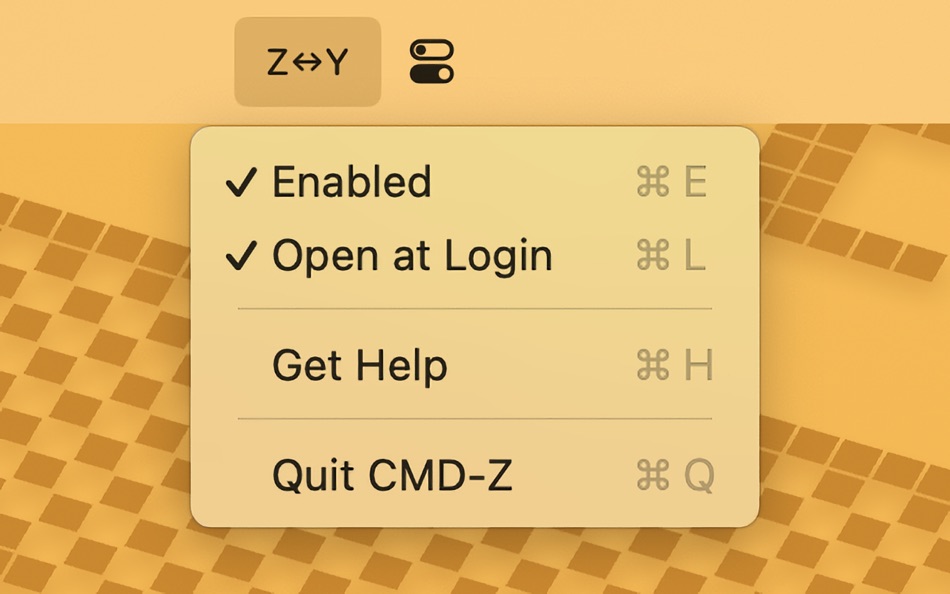
— Intuitive Undo Shortcut: Maps Command-Y to Command-Z, making undo effortless.
— Consistent Redo Action: Ensures Command-Shift-Z works in all apps.ⓘ
— Simple and Elegant: Lives in your menu bar—no clutter, just a toggle away.
— Launches Automatically: Starts with your Mac, so shortcuts remain intuitive.
— Easy Setup: Step-by-step guidance to grant necessary permissions.
Simplify your workflow and say goodbye to keyboard frustration. CMD-Z makes undo and redo shortcuts effortless.
–––
ⓘ Currently supports remapping Command-Y to Command-Shift-Z in Microsoft Office apps and LibreOffice. If CMD-Z is started after an Office app is already open, the remapping may not take effect immediately. In such cases, reopening the Office app is required. To ensure seamless functionality, it is recommended to start CMD-Z at login.
Snímky obrazovky

Novinky
- Verze: 1.0
- Aktualizováno:
Cena
- Dnes: $0.99
- Minimální: $0.99
- Maximální: $0.99
Sledovat ceny
Vývojář
- Toni Foerster
- Platformy: macOS Aplikace (2)
- Seznamy: 0 + 0
- Body: 0 + 0 ¡
- Hodnocení: 0
- Recenze: 0
- Slevy: 0
- Videa: 0
- RSS: Odebírat
Body
0 ☹️
Hodnocení
0 ☹️
Seznamy
0 ☹️
Recenze
Buďte první, kdo bude hodnotit 🌟
Další informace
- Verze: 1.0
- Kategorie:
macOS Aplikace›Utility - OS:
macOS,macOS 13.5 a vyšší - Velikost:
2 Mb - Podporovaný jazyk:
English,German - Hodnocení obsahu:
4+ - Mac App Store Hodnocení:
0 - Aktualizováno:
- Datum vydání:
CMD-Z Krátká adresa URL: Zkopírováno!- 🌟 Sdílet
- Mac App Store
Mohlo by se Vám také líbit
-
- cmd+x
- macOS Aplikace: Utility Podle: 圣罡 汤
- * Zdarma
- Seznamy: 0 + 0 Hodnocení: 0 Recenze: 0
- Body: 0 + 0 Verze: 1.2 cmd+x keeps Windows muscle memory alive on macOS 15+. Launch Activity Monitor with Control+Option+Delete, cut-and-move files in Finder. - Control+Option+Delete opens Activity Monitor ... ⥯
-
- ReTab for Safari
- macOS Aplikace: Utility Podle: Lychee Isle Co
- $1.99
- Seznamy: 0 + 1 Hodnocení: 0 Recenze: 0
- Body: 0 + 2 (5.0) Verze: 2.4 Cmd+E to jump between the most recent tabs, Cmd+G to cycle through recent tabs history, Cmd+Shift+G to cycle backwards, and Close Tab also jumps to the most recent tab (toggleable). ... ⥯
-
- Presentation Helper
- macOS Aplikace: Utility Podle: Wise Tech Labs Private Limited
- $4.99
- Seznamy: 1 + 0 Hodnocení: 0 Recenze: 0
- Body: 11 + 0 Verze: 1.8 Presentation Helper is a light weight menu bar app that assists you, when you are presenting anything from your desktop, to highlight, annotate, mark anything to explain things better ... ⥯
-
- Time to Paste
- macOS Aplikace: Utility Podle: Filipe Sa
- $2.99
- Seznamy: 2 + 1 Hodnocení: 0 Recenze: 0
- Body: 15 + 0 Verze: 1.2 Paste the current date and/or time anywhere you like, Easily. No copy-paste. Just press Cmd+Option+V anywhere, to generate the time stamp... Then paste it (cmd+v). Or... Just launch ... ⥯
-
- Screen Annotation+
- macOS Aplikace: Utility Podle: 金玲 李
- $0.99
- Seznamy: 1 + 0 Hodnocení: 0 Recenze: 0
- Body: 8 + 0 Verze: 3.0.2 Screen Annotation+ is a lightweight but powerful screen annotation tool, especially suitable for users who need to frequently perform screen annotation and demonstration. It has the ... ⥯
-
- GrabIt
- macOS Aplikace: Utility Podle: majimakHARU
- $1.99
- Seznamy: 1 + 0 Hodnocení: 0 Recenze: 0
- Body: 5 + 0 Verze: 4.933 ////////////////////////////////////////////// // Please watch the tutorial !! http://goo.gl/Fsqnoe // ////////////////////////////////////////////// Email: harusari@majimakharu.com ... ⥯
-
- Handy Calculator for Mac OS X
- macOS Aplikace: Utility Podle: Alice Dev Team
- Zdarma
- Seznamy: 1 + 0 Hodnocení: 0 Recenze: 0
- Body: 1 + 0 Verze: 2.3.2 Handy Calculator: nothing unneeded just functional, convenient and stylish! IN BRIEF: Single-color Apple-style that won t strain your eyes Becomes nearly invisible when inactive! Basic ⥯
-
- Reader | Basic
- macOS Aplikace: Utility Podle: The Augmented Text Company LTD
- Zdarma
- Seznamy: 1 + 1 Hodnocení: 0 Recenze: 0
- Body: 4 + 0 Verze: 4.6 Free version of the full Reader. Minimalist design with powerful tools for reading, particularly academic documents: Select text and cmd-F to see only the sentences in the document ... ⥯
-
- Calendar-Widget
- macOS Aplikace: Utility Podle: Ebey Tech LLC
- Zdarma
- Seznamy: 1 + 0 Hodnocení: 0 Recenze: 0
- Body: 11 + 0 Verze: 1.0 Great for when you just need to eyeball a calendar. Calendar-Widget is a lightweight app to show a calendar view of a month. Switch to other months by using the Previous/Next buttons. ... ⥯
-
- Noo mouse
- macOS Aplikace: Utility Podle: Tanin Na Nakorn
- Zdarma
- Seznamy: 1 + 1 Hodnocení: 0 Recenze: 0
- Body: 3 + 0 Verze: 3.2 Noo is the simplest mouse and touchpad configuration app you can find. It enables you to map a mouse button and a trackpad gesture to a set of keys. Here are some examples of how Noo ... ⥯
-
- Screenshot Grab
- macOS Aplikace: Utility Podle: Gavin Matthews
- $2.99
- Seznamy: 0 + 0 Hodnocení: 0 Recenze: 0
- Body: 0 + 0 Verze: 1.5 Screenshot Grab makes taking screenshots of individual apps, windows and the entire desktop quick and easy. When Screenshot Grab is launched it grabs images of all the apps and their ... ⥯
-
- QuitGuard
- macOS Aplikace: Utility Podle: Adrian Jagielak
- $9.99
- Seznamy: 0 + 0 Hodnocení: 0 Recenze: 0
- Body: 0 + 0 Verze: 1.0 QuitGuard is a lightweight menu bar app that helps prevent accidental Cmd+Q presses, which can unintentionally close your entire application. This often happens due to the proximity of ⥯
-
- Troogle Translator
- macOS Aplikace: Utility Podle: Vladimir Kuzomenskyi
- $0.99
- Seznamy: 1 + 0 Hodnocení: 0 Recenze: 0
- Body: 6 + 0 Verze: 2.5.0 Easy translate in any app. Safari extension for seamless integration! Press CMD + Shift + C to translate clipboard at any time! Double click on any word in Safari for translation! ... ⥯
-
- Super Coder - A Clipboard Tool
- macOS Aplikace: Utility Podle: 志远 杨
- Zdarma
- Seznamy: 0 + 1 Hodnocení: 0 Recenze: 0
- Body: 0 + 0 Verze: 1.7.1 Super Coder includes four functions: clipboard, localization, code generation, and application icon generation. --Clipboard: 1. History: switch history in any page by cmd option + v, ... ⥯