
| Entwickler: | Ebey Tech LLC (58) | ||
| Preis: | $4.99 | ||
| Klassifizierungen: | 0 | ||
| Rezensionen: | 0 Rezension schreiben | ||
| Kommentare: | 0 Kommentar posten | ||
| Listen: | 0 + 0 | ||
| Punkte: | 1 + 0 ¡ | ||
| Mac App Store | |||
Beschreibung
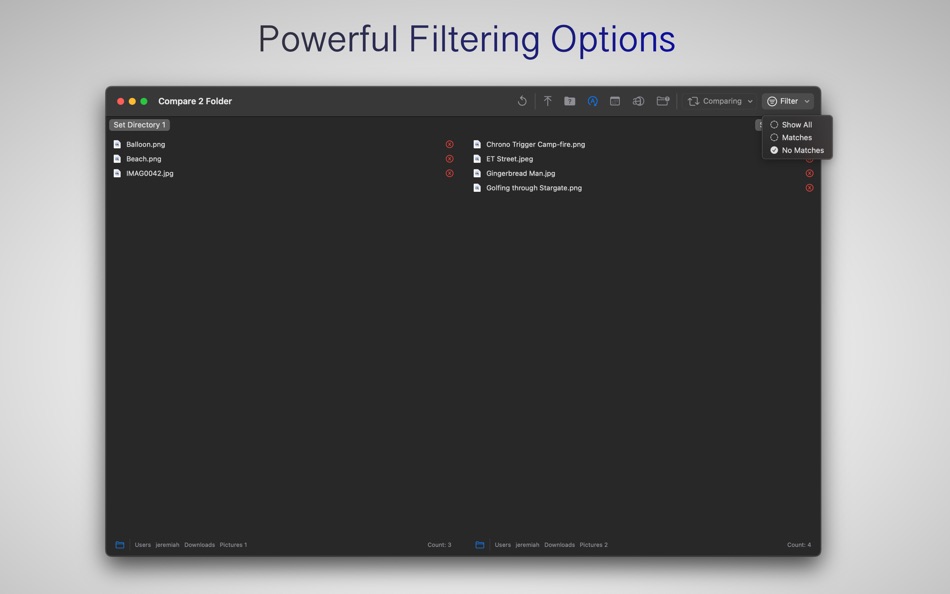
Utilize the comprehensive comparison features to efficiently analyze directories. Comparison criteria include file names, modification dates, sizes, or a combination of these attributes. The app offers rapid filtering options, enabling you to display all results, only matches, or only non-matches. Additionally, you have the flexibility to hide or show properties related to modification dates and sizes.
Results Customization:
Customize the folder display to suit your preferences. You can arrange folders at the top before files or sort them among files alphabetically. The “Include Subfolders” option allows you to list all files and folders, including items nested within other folders. However, exercise caution when using this option, as the processing time for comparison will significantly increase for large directories.
Integrated Quicklook:
The app incorporates a standard Quicklook feature, providing fast previews of selected files and folders.
Smart Selection Methods:
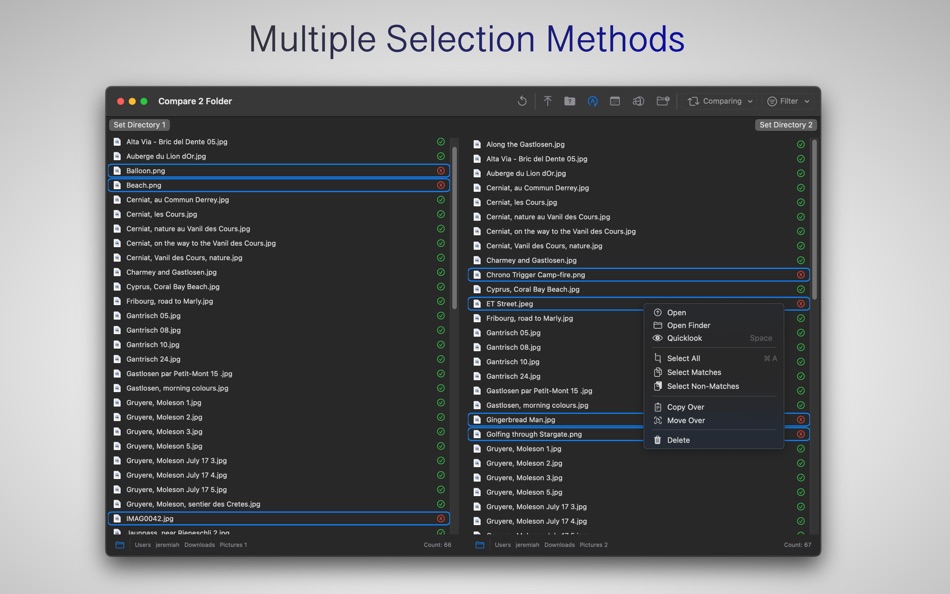
Right-click options enable you to employ intelligent selection methods, including selecting all items, matching items, or selecting non-matching items.
Copy/Move Over:
The app offers the capability to copy or move selected items either from the left side to the right or vice versa.
File and Folder Deletion:
Right-click commands facilitate the deletion of selected files or folders.
Instructions for app operation:
1.) Launch app.
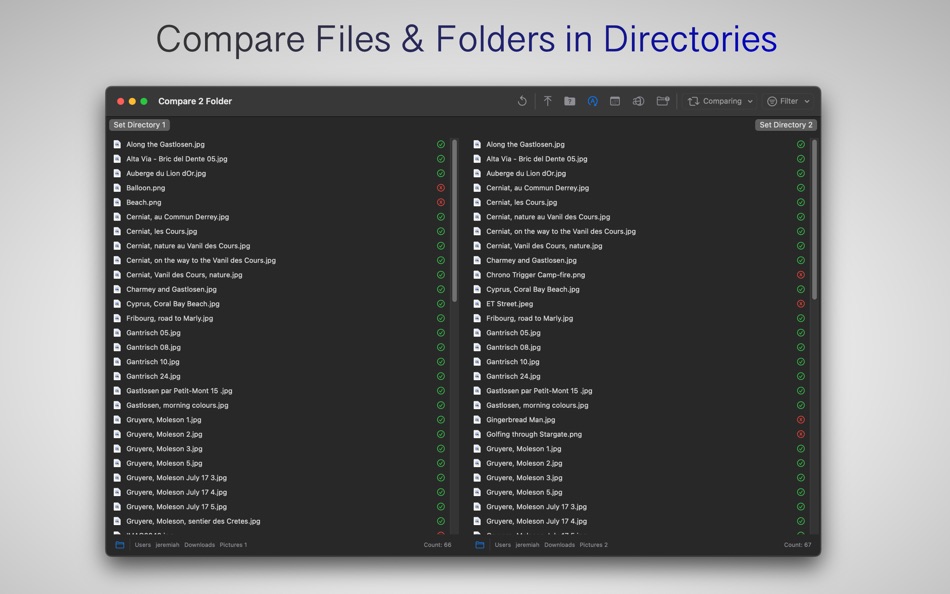
2.) Click button for Set Directory 1. Choose a directory for comparison. Directory should include files or folders. Can also drag/drop folder to left area.
3.) Click button for Set Directory 2. Choose a directory for comparison. Directory should include files or folders. Can also drag/drop folder to right area.
4.) The left/right lists will update to show files/folders and a comparison status green/red checkmark/x to indicate comparison results. A green checkmark indicates the item appeared in the other list. An X indicates no match was found for selected comparison attribute.
5.) Toggle toolbar buttons appropriately.
6.) Change 'Comparison' toolbar selection for desired comparison. E.g. choosing 'Name' will compare file/folder names between the two lists.
7.) Change 'Filter' for desired filtered result for Lists.
8.) Double-click a list's file/folder to launch the item.
9.) Right-click a list's file/folder to see 'Open' to launch the item. Open Finder will launch a Finder window, navigated automatically to the selected item.
10.) Right-click pathbar along bottom to see 'Open' to open the path location in Finder.
11.) Select an item in left side, right-click it and choose either Copy/Move to copy/move the item over to the right-side. Repeat process for an item on the right-side, to copy/move it to the left-side.
12.) Select an item and choose Delete to move the file/folder to the trash.
Ad
Screenshots
Neue Funktionen
- Version: 1.6
- Aktualisiert:
- - Added multiple selection capability.
- Added Delete right-click option.
- Added Quicklook via spacebar or right-click option.
- Changed Open Finder right-click option to include selection of file.
- Added Select All via Cmd+A and Deselect All via Cmd+Option+A. Functions are also available via right-click.
- Added Select Matches.
- Added Select Non-Matches
- Added Copy Over function.
- Added Move Over function.
- Added Cmd+R to refresh results.
Preisentwicklung
- Heute: $4.99
- Mindestens: $2.99
- Maximale: $9.99
Preise beobachten
Ad
Entwickler
- Ebey Tech LLC
- Plattformen: iOS Apps (8) macOS Apps (35) Windows Apps (15)
- Listen: 3 + 6
- Punkte: 215 + 29 ¡
- Klassifizierungen: 0
- Rezensionen: 0
- Kommentare: 0
- Rabatte: 0
- Videos: 0
- RSS: Abonnieren
Punkte (1)
-

- 208 Study Planner
- +1

Klassifizierungen (0)
0 ☹️
Listen (0)
0 ☹️
- Compare 2 Folder
Rezensionen (0)
Schreiben Sie die erste Bewertung 🌟
Kommentare (0)
Seien Sie der Erste, der einen Kommentar abgibt 🌟
Weitere informationen
- Version: 1.6
- Kategorie:
macOS Apps›Dienstprogramme - Betriebssysteme:
macOS,macOS 14.6 oder höher - Größe:
334 Kb - Unterstützte Sprachen:
English - Altersfreigabe:
4+ - Mac App Store Bewertung:
0 - Aktualisiert:
- Veröffentlichungsdatum:
Kontakte
- Webseite:
 https://ebeytech.com
«Compare 2 Folder». Plattform: macOS. Kategorie: Dienstprogramme. Entwickler: «Ebey Tech LLC». Erste Veröffentlichung: . Letzte Aktualisierung: . Aktueller Preis: $4.99. Niedrigster aufgezeichneter Preis: $2.99 (). Höchster aufgezeichneter Preis: $9.99 (). Dieser Titel hat noch keine Bewertungen oder Rezensionen auf AppAgg erhalten. Verfolgte Punkte: bestätigte 1, indirekte 0. Verfügbare Sprachen: English. AppAgg verfolgt den Preisverlauf, Bewertungen und Benutzerfeedback für «Compare 2 Folder». Verfolgen Sie zukünftige Rabatte und Updates über RSS. AppAgg hostet keine Anwendungen und vertreibt keine Software. Alle Marken, Logos und Screenshots gehören ihren jeweiligen Eigentümern.
Compare 2 Folder Kurz-URL: Kopiert!- 🌟 Teilen
- Mac App Store
Das könnte Ihnen auch gefallen
-
- Folder by Color - Change color
- macOS Apps: Dienstprogramme Von: 清碧 饶
- Kostenlos
- Listen: 1 + 1 Klassifizierungen: 0 Rezensionen: 0
- Punkte: 6 + 0 Kommentare: 0 Version: 1.8.1 [Folder by Color] is a folder color changing tool. Using different colored folder icons can keep your files well organized, thereby increasing the efficiency of file management. you ... ⥯
-
- Folder Snapshot Utility
- macOS Apps: Dienstprogramme Von: David Gradwell
- $4.99
- Listen: 0 + 0 Klassifizierungen: 0 Rezensionen: 0
- Punkte: 0 + 0 Kommentare: 0 Version: 2021.06.11 Folder Snapshot Utility will make a rapid backup copy (a snapshot ) of anything you throw at it. This is much faster than a traditional backup copy (think ~1200x faster) and uses ... ⥯
-
- Compare 2 Image
- macOS Apps: Dienstprogramme Von: Ebey Tech LLC
- $1.99
- Listen: 0 + 0 Klassifizierungen: 0 Rezensionen: 0
- Punkte: 2 + 0 Kommentare: 0 Version: 1.0 Compare images in directory or compare multiple directories using include subfolders toggle button. Comparison can be made by name, date modified, size, data, or all of the above to ... ⥯
-
- Folder Dater
- macOS Apps: Dienstprogramme Von: Dalamser
- $2.99
- Listen: 1 + 0 Klassifizierungen: 0 Rezensionen: 0
- Punkte: 0 + 0 Kommentare: 0 Version: 2.3.2 Folder Dater sets a folder s modification date or creation date attributes based on the attributes of its descendants. All changes can be previewed in the Finder and undone before ... ⥯
-
- Folder - Custom your folder
- macOS Apps: Dienstprogramme Von: 玉 李
- $0.99
- Listen: 0 + 0 Klassifizierungen: 0 Rezensionen: 0
- Punkte: 1 + 0 Kommentare: 0 Version: 1.0.1 Folder App is an app for customizing folders on macOS. You can set folders to different colors, and you can also add text, emoji, or icons to folders. Of course, the colors of text and ⥯
-
- Folder Previewer Pro
- macOS Apps: Dienstprogramme Von: Nikhil Anshuman
- $1.99
- Listen: 0 + 0 Klassifizierungen: 0 Rezensionen: 0
- Punkte: 0 + 0 Kommentare: 0 Version: 1.0 Folder Previewer Pro lets you instantly preview the contents of any folder or archive (ZIP) directly in Finder s Quick Look, without opening or extracting files. Just select a folder ... ⥯
-
- Folder Rack
- macOS Apps: Dienstprogramme Von: Ivo Wessel
- * Kostenlos
- Listen: 0 + 0 Klassifizierungen: 0 Rezensionen: 0
- Punkte: 0 + 0 Kommentare: 0 Version: 1.16 FOLDER RACK Bossing your Files and Folders The Finder was always my most-used tool apart from the development environment Xcode, which is of course indispensable for me. However, there ⥯
-
- Folder Peek
- macOS Apps: Dienstprogramme Von: Sindre Sorhus
- Kostenlos
- Listen: 4 + 3 Klassifizierungen: 0 Rezensionen: 0
- Punkte: 9 + 0 Kommentare: 0 Version: 1.12.0 Quickly access documents, files, folders, and apps from the menu bar. Think of it as an alternative to Dock folders, just more powerful and customizable. Each folder you add gets its ... ⥯
-
- Folder - Colorful folder maker
- macOS Apps: Dienstprogramme Von: 余 张
- * Kostenlos
- Listen: 1 + 1 Klassifizierungen: 0 Rezensionen: 0
- Punkte: 12 + 0 Kommentare: 0 Version: 1.3.1 How many folders do you have on your computer? Scores of them? Hundreds? Thousands? Are all of them are alike: default folder, default folder, default folder, default folder... It's so ⥯
-
- Folder Analyze
- macOS Apps: Dienstprogramme Von: 培基 王
- * Kostenlos
- Listen: 0 + 0 Klassifizierungen: 0 Rezensionen: 0
- Punkte: 1 + 0 Kommentare: 0 Version: 2.0.1 A powerful and easy-to-use folder content analysis tool that displays content as charts, making the size and number of files clearly visible. It also supports an edit mode, where you ... ⥯
-
- Folder Crazy Desktop
- macOS Apps: Dienstprogramme Von: Steve Mills
- $0.99
- Listen: 0 + 0 Klassifizierungen: 0 Rezensionen: 0
- Punkte: 0 + 0 Kommentare: 0 Version: 1.5.3 Remember how great the Desktop image feature in macOS was before they removed the Tile option? Just like Folder Crazy vastly improves the screensaver experience, Folder Crazy Desktop ... ⥯
-
- Folder Sizes
- macOS Apps: Dienstprogramme Von: Roberto Piccirilli
- $2.99
- Listen: 0 + 0 Klassifizierungen: 0 Rezensionen: 0
- Punkte: 0 + 0 Kommentare: 0 Version: 2.2.1 Show in easy and intuitive way the space occupied by files and folders . With this app you can immediately identify the space occupied for easy cleaning of their own archives. Now you ... ⥯
-
- Folder Sync 2
- macOS Apps: Dienstprogramme Von: Craig Skinner
- * Kostenlos
- Listen: 1 + 0 Klassifizierungen: 0 Rezensionen: 0
- Punkte: 2 + 0 Kommentare: 0 Version: 2.28.0 Compare pairs of folders and display differences using colour coding. After comparing, choose to automatically sync the folders or manually manipulate the files (copy, move, rename or ... ⥯
-
- Folder Factory
- macOS Apps: Dienstprogramme Von: UAB Macmanus
- $3.99
- Listen: 1 + 1 Klassifizierungen: 0 Rezensionen: 0
- Punkte: 3 + 0 Kommentare: 0 Version: 4.0 Folder Factory is a neat little app for changing the design of your folder icons. It will help you to match similar folders by the color, text or picture and this will keep your Mac ... ⥯