
| ผู้พัฒนา: | Suresh Shetty (2) | ||
| ราคา: | $2.99 | ||
| การจัดอันดับ: | 0 | ||
| ความเห็น: | 0 เขียนความเห็น | ||
| รายการ: | 0 + 0 | ||
| แต้มแล: | 0 + 0 ¡ | ||
| Mac App Store | |||
คำอธิบาย

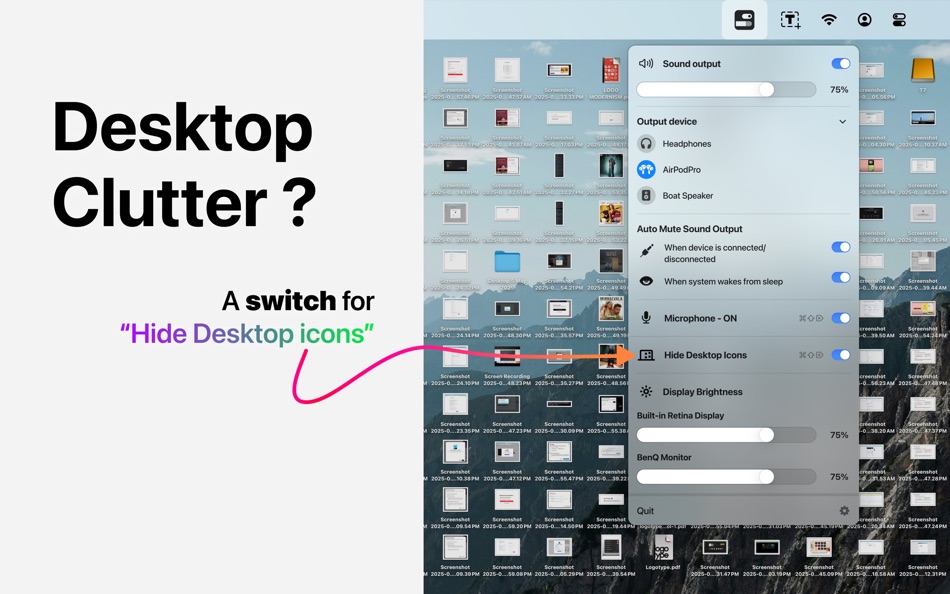
Easily is a lightweight, powerful utility designed to help you manage key aspects of your Mac with just a few clicks. Whether you're working, presenting, or simply keeping your setup tidy, Easily gives you quick access to essential system controls — all in one place.
Sound Output Switching Made Simple
Browse and instantly switch between available audio output devices — no need to dive into System Settings every time.
Auto-Mute sound output to avoid unexpected output device volume when:
- A new audio device is connected
- Your system awakes from sleep
Say goodbye to unexpected sound interruptions.
Mute Microphone Instantly
Quickly mute your Mac’s input audio — perfect for privacy, meetings, or when you're away from your desk.
Hide Desktop Icons
Keep your desktop clean and distraction-free — perfect for screen sharing, presentations, or simply staying focused.
Control Any Display's Brightness
Adjust brightness on both your primary Mac display and any connected external monitors — even those macOS doesn’t normally support.
Easily is designed for Mac users who value convenience, focus, and control. Whether you're a power user or just want to simplify your workflow, Easily helps you stay in command — effortlessly.
Privacy policy - https://www.macthru.com/privacy-policy-easily
Terms of service - https://www.macthru.com/termscondition-easily
ภาพหน้าจอ




มีอะไรใหม่
- เวอร์ชัน: 1.0.0
- อัปเดต:
ราคา
- วันนี้: $2.99
- ต่ำสุด: $2.99
- มากที่สุด: $2.99
ติดตามราคา
ผู้พัฒนา
- Suresh Shetty
- แพลตฟอร์ม: macOS แอป (2)
- รายการ: 0 + 0
- แต้มแล: 0 + 0 ¡
- การจัดอันดับ: 0
- ความเห็น: 0
- ลดราคา: 0
- วิดีโอ: 0
- RSS: ติดตาม
แต้มแล
0 ☹️
การจัดอันดับ
0 ☹️
รายการ
0 ☹️
ความเห็น
แสดงรีวิวเป็นคนแรกเลย 🌟
ข้อมูลเพิ่มเติม
รายชื่อติดต่อ
- เว็บไซท์:
 https://www.macthru.com/
Easily: Quick Utility Controls URL แบบสั้น: คัดลอกแล้ว!- 🌟 แชร์
- Mac App Store
คุณอาจชอบ
-
- SwiftOne Quick Utility
- macOS แอป: ยูทิลิตี้ โดย: Cornell University
- ฟรี
- รายการ: 1 + 0 การจัดอันดับ: 0 ความเห็น: 0
- แต้มแล: 1 + 0 เวอร์ชัน: 1.1.0 SwiftOne Quick Utility is a tool for quickly connecting to a Swift or SwiftOne Recorder. The tool can quickly retrieve the device information on a macOS computer and set it into a boot ⥯
-
- Quick New File Pro
- macOS แอป: ยูทิลิตี้ โดย: Eduardo Revilla Vaquero
- $0.99
- รายการ: 0 + 0 การจัดอันดับ: 0 ความเห็น: 0
- แต้มแล: 0 + 0 เวอร์ชัน: 1.2 Quick New File Pro transforms your macOS workflow and restores functionality that many users miss when migrating from Windows: the ability to create new files directly from the file ... ⥯
-
- Quick Translate Pro for Mac OS X
- macOS แอป: ยูทิลิตี้ โดย: Bastian Roessler
- $1.99
- รายการ: 0 + 0 การจัดอันดับ: 0 ความเห็น: 0
- แต้มแล: 0 + 0 เวอร์ชัน: 2.0.0 Quick Translate Pro is an intuitive and easy to use translation tool for quick translations into 80 languages. Thereby Quick Translate lives in your Mac's menu bar, so it is never more ⥯
-
- Quick Subtitles
- macOS แอป: ยูทิลิตี้ โดย: Matt Birchler
- * ฟรี
- รายการ: 0 + 0 การจัดอันดับ: 0 ความเห็น: 0
- แต้มแล: 0 + 1 (5.0) เวอร์ชัน: 1.3 Quick Subtitles is a powerful, but simple app that transforms audio and video files into accurate text transcriptions and subtitle files using Apple's advanced Speech APIs, 100% on ... ⥯
-
- Quick Stopwatch
- macOS แอป: ยูทิลิตี้ โดย: Hong Wee Teo
- $0.99
- รายการ: 0 + 0 การจัดอันดับ: 0 ความเห็น: 0
- แต้มแล: 0 + 0 เวอร์ชัน: 1.0.1 Quick Stopwatch is a beautifully designed stopwatch that's easy to setup and use. #features include: - eye catching stopwatch with multiple colors - able to run multiple stopwatches at ⥯
-
- Quick Digest
- macOS แอป: ยูทิลิตี้ โดย: 宇英 江
- $1.99
- รายการ: 0 + 0 การจัดอันดับ: 0 ความเห็น: 0
- แต้มแล: 0 + 0 เวอร์ชัน: 1.1.0 Quick Digest is a lightweight and efficient hash tool for macOS. It lets you instantly calculate hash values for both text and files all from a clean, minimal interface. Features: ... ⥯
-
- Utility+
- macOS แอป: ยูทิลิตี้ โดย: Michael Newell
- $0.99
- รายการ: 0 + 0 การจัดอันดับ: 0 ความเห็น: 0
- แต้มแล: 0 + 0 เวอร์ชัน: 1.0.3 A utility app that shows battery, memory, activity and disk usage. ⥯
-
- Quick Launch Switcher
- macOS แอป: ยูทิลิตี้ โดย: 泳诗 陈
- $7.99
- รายการ: 1 + 0 การจัดอันดับ: 0 ความเห็น: 0
- แต้มแล: 13 + 0 เวอร์ชัน: 6.5.3 "Quick Launch Switcher" is a productivity tool designed for macOS, aiming to provide a fast and intuitive way to launch and switch applications. It uses a unique radial menu interface, ⥯
-
- Quick Camera
- macOS แอป: ยูทิลิตี้ โดย: Simon Guest
- ฟรี
- รายการ: 0 + 0 การจัดอันดับ: 0 ความเห็น: 0
- แต้มแล: 2 + 0 เวอร์ชัน: 1.5 Quick Camera is a utility to display the output from any supported USB web cameras. Quick Camera can be used for video conferences or presentations where you need to show an external ... ⥯
-
- Quick Info - One click info
- macOS แอป: ยูทิลิตี้ โดย: Kauntey Suryawanshi
- * ฟรี
- รายการ: 0 + 0 การจัดอันดับ: 0 ความเห็น: 0
- แต้มแล: 2 + 0 เวอร์ชัน: 2.1.2 Quick Info will help you search your info with a spotlight like search view. Features - Launch with shortcut - Store records in folder - Preview record - Copy records to clipboard ... ⥯
-
- Quick Click - mouse clicker
- macOS แอป: ยูทิลิตี้ โดย: Sai Praneeth
- $2.99
- รายการ: 0 + 0 การจัดอันดับ: 0 ความเห็น: 0
- แต้มแล: 1 + 0 เวอร์ชัน: 1.4 Quick click has 2 modes of operation. ** Time based ** Repeated clicks (as slowly as once every 60 seconds to as rapidly as 10 times a second!) that keep sending mouse clicks ... ⥯
-
- Quick QR Generator
- macOS แอป: ยูทิลิตี้ โดย: Takahide Noro
- $2.99
- รายการ: 0 + 0 การจัดอันดับ: 0 ความเห็น: 0
- แต้มแล: 0 + 0 เวอร์ชัน: 1.0 Quick QR Generator is an app that allows you to swiftly generate your own QR codes. Simply launch the app and input your URL or text to instantly create a QR code. You also have the ... ⥯
-
- Quick New File
- macOS แอป: ยูทิลิตี้ โดย: 兰桂 吴
- $1.99
- รายการ: 0 + 0 การจัดอันดับ: 0 ความเห็น: 0
- แต้มแล: 0 + 0 เวอร์ชัน: 1.0 Quick New File allows you to create new files quickly. You can create any type of file, anywhere. Desktop and cloud storage folders (iCloud, OneDrive, Dropbox, Google Drive, etc.) are ... ⥯
-
- Quick Hash
- macOS แอป: ยูทิลิตี้ โดย: xin jin
- $0.99
- รายการ: 0 + 0 การจัดอันดับ: 0 ความเห็น: 0
- แต้มแล: 0 + 0 เวอร์ชัน: 1.0 Quick Hash is a files' hash calculator. Key Features: - MD5, SHA1, SHA256 and CRC32 - Hash code Check -Supports multiple files How to use: - Click the "Open File" button and choose the ⥯