
| Udvikler: | 刚刚 孔 (23) | ||
| Pris: | $4.99 | ||
| Rangeringer: | 0 | ||
| Anmeldelser: | 0 Skriv en anmeldelse | ||
| Lister: | 0 + 0 | ||
| Point: | 1 + 0 ¡ | ||
| Mac App Store | |||
Beskrivelse

How to use it:
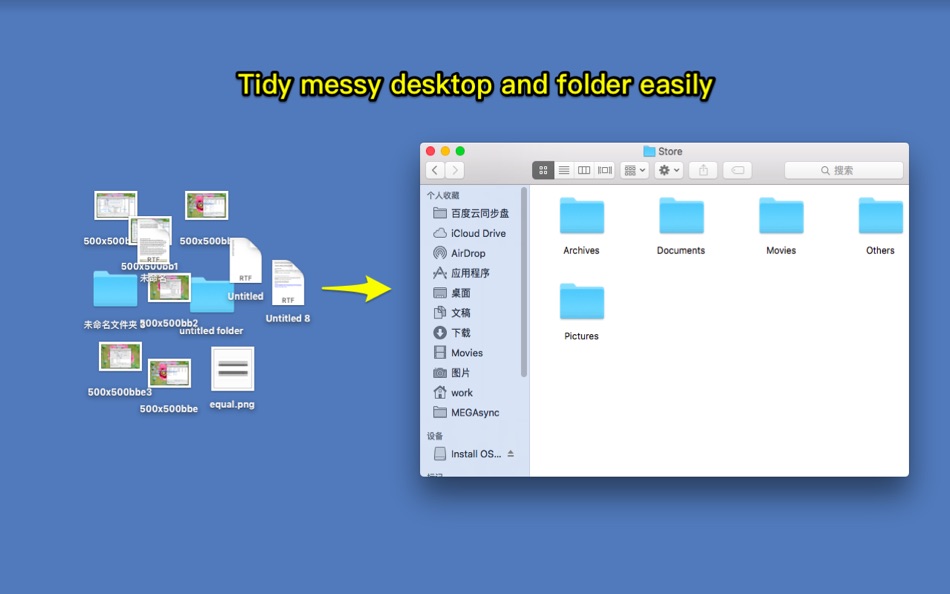
1) Drag or add files&folders to App,and check on the files&folder to be organized.
2) Set the organize options and click button with "..." to choose the target folder to save the organized files.
3) Click "Submit" button to start to organize
Key Features:
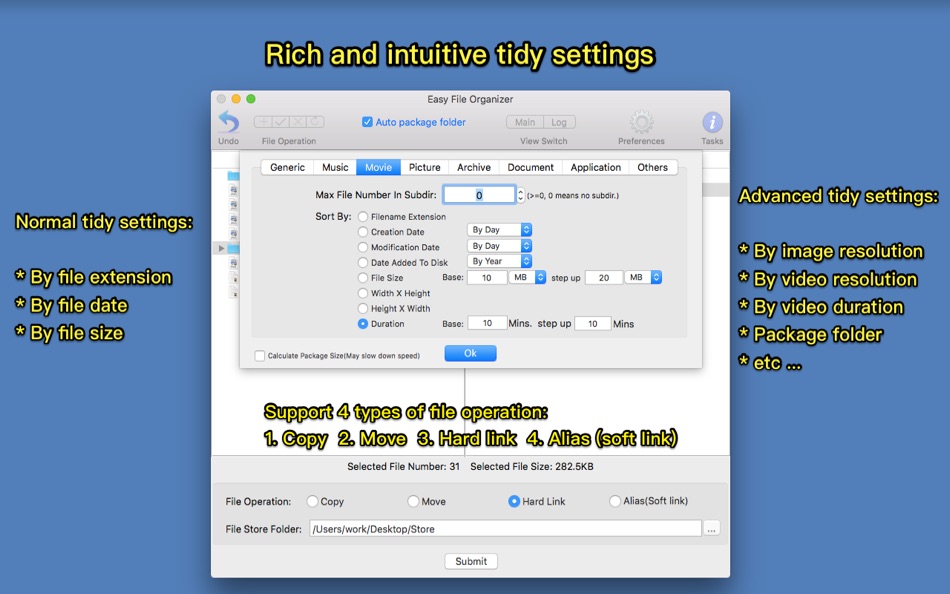
1. Support to sort files by various options, such as file type, file size, image resolution,video resolution, video duration, create date, modify date and etc. support to package folder as a whole.
2. Support file copy, move, hard link and alias(soft link) when organising.
3.Support file recovery to avoid mis-operation.
4. Support files/folders drag&drop, support file/folder browse, support file preview.
5. Support organize AI images created by stable diffusion or draw things by model,sampler and etc
[Support organize type]
1. By File type
2. By file creation date, modify date
3. By file size
4. By image resolution, image direction, ai parameters
5. By video resolution,video codec,video fps, video duration,video ratio,video direction
6. By audio duration,audio ratio,audio codec
7. By custom rule
*******FAQs*******
1. why I can not drag folder path to "File Store Folder" input box?
A: Please click the "File Store Folder" input box first, then drag folder path into it
2. what is hard link ? what is alias(soft link)? what are they used for? what's the difference between them?
A:
1)Hard link and soft link are all references to the original file and folder, they are always used as a replacement of copy, but hard link and alias(soft link) don't occupy disk space, not like copy, and the creation of link is much faster then copy.
2) Hard link can only be created on the same disk as the original file, alias(soft link) can cross different disk. Creating hard link is much faster then alias.
3. How to use custom sort option set?
A: it is used to use combined sort option set to organize files. for example, user can use (filename extension + file size) as a single sort rule to organize file. to use this function, first, check "custom sort option set" option, then input the indexes of sort options to the custom sort option set field.
for example, if you want to organize image by using (filename extension + image resolution) to organize image, you can input 0,1 to the text field after "custom sort option set" of image type
Skærmbilleder

Pris
- I dag: $4.99
- Minimum: $2.99
- Maksimalt: $4.99
Overvåg priser
Udvikler
Point
-

- 271 pantype
- +1

Rangeringer
0 ☹️
Lister
0 ☹️
Anmeldelser
Vær den første til at gennemgå 🌟
Yderligere oplysninger
- Version: 4.40
- Kategori:
macOS Apps›Hjælpeprogrammer - Operativsystem:
macOS,macOS 11.0 eller nyere - Størrelse:
49 Mb - Understøttet sprog:
Chinese,English - Indholdsklassificering:
4+ - Mac App Store Bedømmelse:
0 - Opdateret:
- Udgivelsesdato:
Kontaktpersoner
 https://www.jianshu.com/p/703311990e4bEasy File Organizer Kort webadresse: Kopieret!
- 🌟 Del
- Mac App Store
Du vil måske også kunne lide
-
- File Organizer Pro
- macOS Apps: Hjælpeprogrammer Ved: Vivek Vardhan Reddy Singireddy
- Gratis
- Lister: 0 + 0 Rangeringer: 0 Anmeldelser: 0
- Point: 0 + 0 Version: 1.0 File Organizer Pro helps you streamline your digital workflow by sorting, categorizing, and managing your files with just a few clicks. - Effortlessly organize files and folders - ... ⥯
-
- Easy File Date Changer
- macOS Apps: Hjælpeprogrammer Ved: Wolfgang Schwarz
- $0.99
- Lister: 0 + 0 Rangeringer: 0 Anmeldelser: 0
- Point: 0 + 0 Version: 1.0.2 With Easy File Date Changer you can easily change the Creation date or Modification date of Files and Folders. Simply drag & drop a File or Folder in the white area and change the Date ⥯
-
- Easy File Encryptor
- macOS Apps: Hjælpeprogrammer Ved: Tong Zhang
- Gratis
- Lister: 1 + 0 Rangeringer: 0 Anmeldelser: 0
- Point: 1 + 0 Version: 1.1.4 - Encrypt Messages The feature allows you to encrypt messages before you can send them. The tool allows you to generate encrypted messages by converting the text to unreadable strings. ⥯
-
- Easy File Hider
- macOS Apps: Hjælpeprogrammer Ved: Rebrand Software
- $1.99
- Lister: 0 + 0 Rangeringer: 0 Anmeldelser: 0
- Point: 0 + 0 Version: 1.1.1 Quickly and easily hide files and folders! Your password-protected list of files and folders can be toggled between hidden and visible with the push of a button! What the app can do: ... ⥯
-
- Tiny Sort: File Organizer
- macOS Apps: Hjælpeprogrammer Ved: Codeloop
- $0.99
- Lister: 0 + 0 Rangeringer: 0 Anmeldelser: 0
- Point: 0 + 0 Version: 1.2.0 Tidy up your files. Instantly. Tiny Sort for macOS uses on-device intelligence to automatically classify and organize your files images, PDFs, documents, code, and more. Whether you re ⥯
-
- File Sortify - Auto Organizer
- macOS Apps: Hjælpeprogrammer Ved: 波 黄
- $9.99
- Lister: 0 + 0 Rangeringer: 0 Anmeldelser: 0
- Point: 0 + 0 Version: 1.0.3 FILE SORTIFY - YOUR INTELLIGENT FILE ORGANIZER Tired of messy Downloads folders? File Sortify automatically organizes your files by type - instantly and effortlessly! KEY FEATURES ... ⥯
-
- File Cabinet Pro
- macOS Apps: Hjælpeprogrammer Ved: App Tyrant Corp
- $29.99
- Lister: 0 + 1 Rangeringer: 0 Anmeldelser: 0
- Point: 4 + 0 Version: 8.7.1 File Cabinet Pro is the file manager for the macOS menu bar. Quickly navigate to files without cluttering your desktop. Open, move, rename, compress, tag, trash, copy and paste files, ... ⥯
-
- Easy PDF-PDF Edit & Converter
- macOS Apps: Hjælpeprogrammer Ved: 崴 杨
- * Gratis
- Lister: 0 + 0 Rangeringer: 0 Anmeldelser: 0
- Point: 4 + 0 Version: 3.2.1 Easy PDF is an all-in-one PDF editing tool. Add custom page numbers to PDF files, add watermarks, and can merge, split, encrypt, unlock, adjust page order, delete pages, and rotate ... ⥯
-
- File Rename Pro
- macOS Apps: Hjælpeprogrammer Ved: Gavin Matthews
- * $12.99
- Lister: 1 + 0 Rangeringer: 0 Anmeldelser: 0
- Point: 1 + 0 Version: 2025.3 File Rename Pro lets you rename a number of files quickly and easily, saving you time and effort. Drag and drop one or more files or folders from Finder onto the app and you're ready ... ⥯
-
- Easy Shortcuts
- macOS Apps: Hjælpeprogrammer Ved: reinert.dev
- * Gratis
- Lister: 0 + 0 Rangeringer: 0 Anmeldelser: 0
- Point: 4 + 0 Version: 1.1.1 Easy Shortcuts allows you to access a list of configurable shortcut items with the press of a button. Activating a shortcut is then as simple as clicking it or by using its keyboard ... ⥯
-
- Easy Unzip Compress Password
- macOS Apps: Hjælpeprogrammer Ved: 蓬 刘
- $12.99
- Lister: 1 + 0 Rangeringer: 0 Anmeldelser: 0
- Point: 6 + 0 Version: 2.2 Easy to unzip/compress with password. 1. Create zip with password 2. Unzip with password. 3. Drag files to StatusBar 4. Right Click Menu Services Support ⥯
-
- File Transfer Secure Drop
- macOS Apps: Hjælpeprogrammer Ved: Huizhou Kingtog Technology Co., Ltd
- * Gratis
- Lister: 0 + 0 Rangeringer: 0 Anmeldelser: 0
- Point: 1 + 10 (4.8) Version: 1.0.24 Looking for an ultra-fast and secure way to transfer photos and videos across devices? This powerful cross-device photo & video transfer app is exactly what you need! Whether you want ... ⥯
-
- File Content Finder
- macOS Apps: Hjælpeprogrammer Ved: GEO SYSTEMS DEV PTY LTD
- $12.99
- Lister: 0 + 0 Rangeringer: 0 Anmeldelser: 0
- Point: 2 + 0 Version: 3.0 Highlights: - Searches files by their contents, not just names; - Supports all popular document types (PDF, MS Word, Excel, etc.); - Works in real time without indexing; - Advanced ... ⥯
-
- File Zip & Encryptor
- macOS Apps: Hjælpeprogrammer Ved: 成浩 吴
- $4.99
- Lister: 2 + 1 Rangeringer: 0 Anmeldelser: 0
- Point: 4 + 0 Version: 1.0.6 If you need convenient encryption for your private files, try FileEncryption. FileEncryption provides you with the following convenient and useful features. - Normal mode: One-click ... ⥯