
| ผู้พัฒนา: | 家贺 万 (25) | ||
| ราคา: | $2.99 | ||
| การจัดอันดับ: | 0 | ||
| ความเห็น: | 0 เขียนความเห็น | ||
| รายการ: | 0 + 0 | ||
| แต้มแล: | 0 + 0 ¡ | ||
| Mac App Store | |||
คำอธิบาย

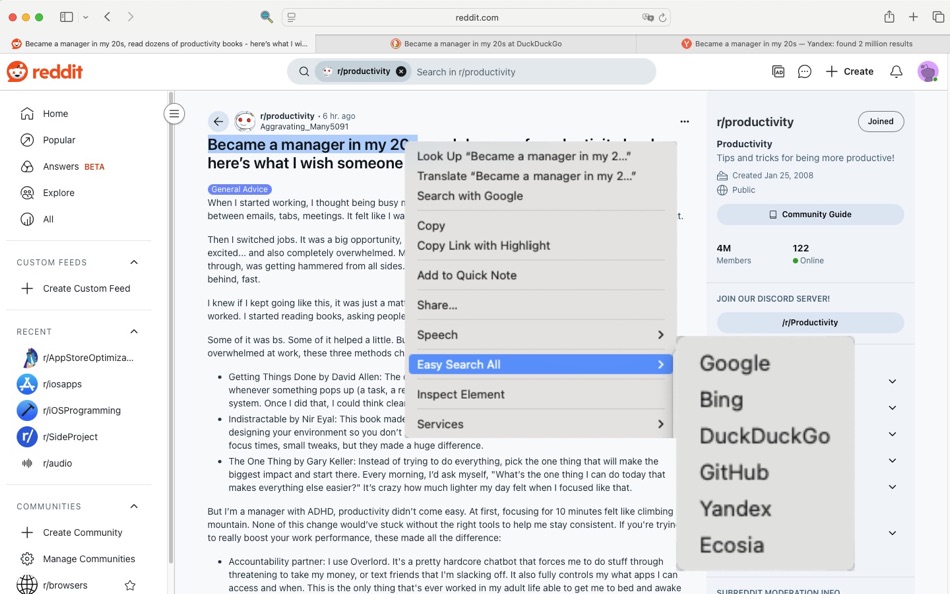
Stop the copy-paste hassle. With EasySearch, just highlight text, right-click, and instantly launch a search using your favorite engine. It’s the seamless productivity boost you need for browsing.
Why Choose EasySearch?
Search Instantly: Right-click any selected text to search without ever leaving your page.
Your Favorite Engines: Get quick access to Google, Bing, DuckDuckGo, and more directly from the menu.
Ideal for Research: Effortlessly look up definitions, find related content, or translate words.
Built for Safari: A lightweight and secure extension designed to work perfectly with your browser.
Download EasySearch today and transform how you search online. Work smarter, not harder.
ภาพหน้าจอ

มีอะไรใหม่
- เวอร์ชัน: 1.0.1
- อัปเดต:
ราคา
- วันนี้: $2.99
- ต่ำสุด: $2.99
- มากที่สุด: $2.99
ติดตามราคา
ผู้พัฒนา
แต้มแล
0 ☹️
การจัดอันดับ
0 ☹️
รายการ
0 ☹️
ความเห็น
แสดงรีวิวเป็นคนแรกเลย 🌟
ข้อมูลเพิ่มเติม
- เวอร์ชัน: 1.0.1
- หมวดหมู่:
macOS แอป›ยูทิลิตี้ - ระบบปฏิบัติการ:
macOS,macOS 10.14 และสูงกว่า - ขนาด:
3 Mb - ภาษาที่สนับสนุน:
Catalan,Chinese,Croatian,Czech,Danish,Dutch,English,Finnish,French,German,Greek,Hindi,Hungarian,Indonesian,Italian,Japanese,Korean,Malay,Norwegian,Polish,Portuguese,Romanian,Russian,Slovak,Spanish,Swedish,Thai,Turkish,Ukrainian,Vietnamese - การจัดประเภทเนื้อหา:
4+ - Mac App Store คะแนนโดย:
0 - อัปเดต:
- วันที่วางจำหน่าย:
EasySearch: Right-Click Search URL แบบสั้น: คัดลอกแล้ว!- 🌟 แชร์
- Mac App Store
คุณอาจชอบ
-
- Right Click App
- macOS แอป: ยูทิลิตี้ โดย: Andreas Stokidis
- $0.99
- รายการ: 0 + 0 การจัดอันดับ: 0 ความเห็น: 0
- แต้มแล: 0 + 0 เวอร์ชัน: 1.2 Right Click Easily Create New Files in Finder Right Click is the ultimate extension for Finder, designed to simplify the creation of new files on your Mac. With just a simple ... ⥯
-
- Right Click - Mouse Extender
- macOS แอป: ยูทิลิตี้ โดย: 意 田
- * ฟรี
- รายการ: 0 + 0 การจัดอันดับ: 0 ความเห็น: 0
- แต้มแล: 3 + 0 เวอร์ชัน: 1.8 Features 1. Encryption and compression Right-click to complete any folder or file to encryption and compression in one step suppor unarchiver zip 7z rar and so on 2. New file Currently ⥯
-
- Right Click Fixer for Safari
- macOS แอป: ยูทิลิตี้ โดย: Lotus Core
- ฟรี
- รายการ: 0 + 0 การจัดอันดับ: 0 ความเห็น: 0
- แต้มแล: 0 + 0 เวอร์ชัน: 1.0 Frustrated by websites that block right-click and context menu options? Right Click Fixer for Safari restores your ability to right-click, copy, paste, inspect elements and more. Just ... ⥯
-
- Right Click
- macOS แอป: ยูทิลิตี้ โดย: groosoft
- ฟรี
- รายการ: 0 + 0 การจัดอันดับ: 0 ความเห็น: 0
- แต้มแล: 0 + 0 เวอร์ชัน: 1.0.3 This is a native Safari extension. "Right Click" re-enables right click, select and copy on web sites. You can use the context menu, select and copy on websites which disable those ... ⥯
-
- Enable Right Click for Safari
- macOS แอป: ยูทิลิตี้ โดย: Alfredo Grassau
- $2.99
- รายการ: 0 + 1 การจัดอันดับ: 0 ความเห็น: 0
- แต้มแล: 1 + 1 (5.0) เวอร์ชัน: 1.0.31 Discover the ultimate freedom in web browsing with "Enable Right Click for Safari," the essential Safari extension that transforms your Safari experience. Tired of being restricted by ... ⥯
-
- Enable Right Click
- macOS แอป: ยูทิลิตี้ โดย: Anjey Tsibylskij
- $0.99
- รายการ: 0 + 0 การจัดอันดับ: 0 ความเห็น: 0
- แต้มแล: 0 + 0 เวอร์ชัน: 1.0 Enable Right Click is a powerful yet simple Safari extension that removes website restrictions on right-clicking and text selection. Whether you need to copy content, paste text, or ... ⥯
-
- Allow Right Click for Safari
- macOS แอป: ยูทิลิตี้ โดย: 柱荣 李
- $1.99
- รายการ: 1 + 0 การจัดอันดับ: 0 ความเห็น: 0
- แต้มแล: 8 + 2 (5.0) เวอร์ชัน: 1.3 This software allows right-click, copy, cut, and paste functionality on all websites. It has a simple interface and is easy to use. You can copy any content, whether it s text, images, ⥯
-
- eMousePRO – Right-click menu
- macOS แอป: ยูทิลิตี้ โดย: 志振 杨
- $9.99
- รายการ: 0 + 0 การจัดอันดับ: 0 ความเห็น: 0
- แต้มแล: 0 + 0 เวอร์ชัน: 2.0.2 eMouse is a powerful right-click menu enhancer designed for macOS. It extends Finder s functionality, allowing you to perform common file actions faster and more intuitively right from ⥯
-
- Easy Unzip Compress Password
- macOS แอป: ยูทิลิตี้ โดย: 蓬 刘
- $12.99
- รายการ: 1 + 0 การจัดอันดับ: 0 ความเห็น: 0
- แต้มแล: 6 + 0 เวอร์ชัน: 2.2 Easy to unzip/compress with password. 1. Create zip with password 2. Unzip with password. 3. Drag files to StatusBar 4. Right Click Menu Services Support ⥯
-
- Search Everything
- macOS แอป: ยูทิลิตี้ โดย: Sascha Simon
- ฟรี
- รายการ: 0 + 0 การจัดอันดับ: 0 ความเห็น: 0
- แต้มแล: 3 + 0 เวอร์ชัน: 2.1.2 Search Everything is the perfect app for finding files and folders lightning fast. The app features: Blazing Fast Search Search Everything indexes all files and folders, then searches ... ⥯
-
- Easy PDF-PDF Edit & Converter
- macOS แอป: ยูทิลิตี้ โดย: 崴 杨
- * ฟรี
- รายการ: 0 + 0 การจัดอันดับ: 0 ความเห็น: 0
- แต้มแล: 4 + 0 เวอร์ชัน: 3.2.1 Easy PDF is an all-in-one PDF editing tool. Add custom page numbers to PDF files, add watermarks, and can merge, split, encrypt, unlock, adjust page order, delete pages, and rotate ... ⥯
-
- Easy Shortcuts
- macOS แอป: ยูทิลิตี้ โดย: reinert.dev
- * ฟรี
- รายการ: 0 + 0 การจัดอันดับ: 0 ความเห็น: 0
- แต้มแล: 4 + 0 เวอร์ชัน: 1.1.1 Easy Shortcuts allows you to access a list of configurable shortcut items with the press of a button. Activating a shortcut is then as simple as clicking it or by using its keyboard ... ⥯
-
- Click Counter
- macOS แอป: ยูทิลิตี้ โดย: INGI Consulting ApS
- $1.99
- รายการ: 0 + 0 การจัดอันดับ: 0 ความเห็น: 0
- แต้มแล: 0 + 0 เวอร์ชัน: 1.0 Click Counter allows you to count just about anything with the click of button. Use the mouse button to click the Click button, or simply tab the return key in order to increase the ... ⥯
-
- Search and Replace
- macOS แอป: ยูทิลิตี้ โดย: Thomas Günzel
- $1.99
- รายการ: 0 + 0 การจัดอันดับ: 0 ความเห็น: 0
- แต้มแล: 0 + 0 เวอร์ชัน: 1.2.6 Don't worry about those many files where you have to change a few things! There's no need to open every single file and edit them manually, Search and Replace does it all for you! ... ⥯