
| ผู้พัฒนา: | Jinyu Meng (6) | ||
| ราคา: | * ฟรี | ||
| การจัดอันดับ: | 0 | ||
| ความเห็น: | 0 เขียนความเห็น | ||
| รายการ: | 0 + 0 | ||
| แต้มแล: | 1 + 0 ¡ | ||
| Mac App Store | |||
คำอธิบาย

FishScreenReader uses OCR to recognize texts on the screen, help you to use apps that voiceover can't work with. This app can also read images on the clipboard.
We all know VoiceOver is a very good way to use Apple devices for visually impaired people, but many apps are not optimized for it. VoiceOver can't read the interface of these apps. FishScreenReader is the way to solve this.
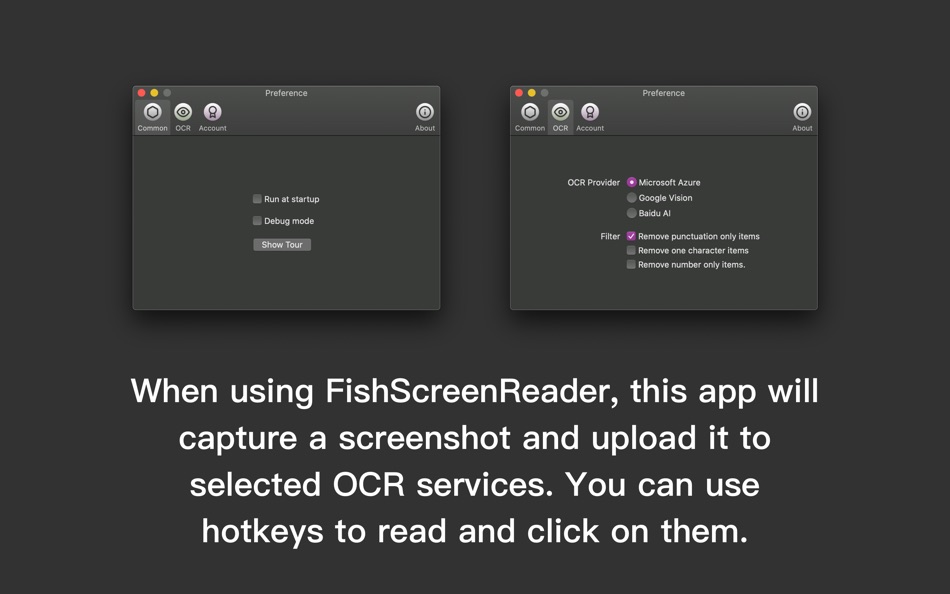
This app will capture the screen or any window to recognize, then give you a list to interact with. You can use hotkeys to read the list. When you found something you want, you can use hotkeys to click, double click or right-click on them.
You can learn more from the tour show at first.
You can change which OCR service to use in the preference window. We also provide some filters to help to increase result quality.
OCR Services: Microsoft Azure, Google Vision.
The offline engine is also available. (macOS 10.15 or above)
Filters:
Remove punctuation only items
Remove one character items
Remove number-only items.
This app will not upload your screen for purposes other than OCR.
[About auto-renewing subscriptions]
This app provides auto-renew subscriptions monthly and yearly. You can also purchase times if you don't use that much. You can use 5 times recognization for trial. And after a subscription, you can use it with no limit.
Payment: payment will be recorded in iTunes after the user confirms.
Payment cancellation: Please cancel 24 hours before the expiration date of the current subscription. Please manually cancel automatic payment renewal in Settings in iTunes/Apple ID. If you cancel within 24 hours before the expiration day, you will be charged for the subscription.
Renewal: Apple iTunes will automatically deduct 24 hours before the expiration day. Subscription will renew for another period after payment is deducted from your account.
Terms and Conditions: https://github.com/megabitsenmzq/Information-Pages-Of-My-Apps/blob/master/Terms.md
Privacy Policy: https://github.com/megabitsenmzq/Information-Pages-Of-My-Apps/blob/master/FishScreenReader.md
This app may upload your screenshot to OCR services to recognize.
You can send feedback to megabitsenmzq@gmail.com
Ad
ภาพหน้าจอ

ราคา
-
* การซื้อภายในแอพ - วันนี้: ฟรี
- ต่ำสุด: ฟรี
- มากที่สุด: ฟรี
ติดตามราคา
Ad
ผู้พัฒนา
แต้มแล
-

- 878 Net
- +1

การจัดอันดับ
0 ☹️
รายการ
0 ☹️
- FishScreenReader
ความเห็น
แสดงรีวิวเป็นคนแรกเลย 🌟
ข้อมูลเพิ่มเติม
FishScreenReader URL แบบสั้น: คัดลอกแล้ว!- 🌟 แชร์
- Mac App Store
คุณอาจชอบ
-
- Screen Guard
- macOS แอป: ยูทิลิตี้ โดย: Life Changing AI LLC
- ฟรี
- รายการ: 0 + 0 การจัดอันดับ: 0 ความเห็น: 0
- แต้มแล: 0 + 0 เวอร์ชัน: 1.2 Screen Guard keeps your private windows out of sight the moment you start screen mirroring or connect an external monitor or unlock your Mac so you can focus on your presentation ... ⥯
-
- Screen Grabber
- macOS แอป: ยูทิลิตี้ โดย: Cornelius Rautenbach
- ฟรี
- รายการ: 0 + 0 การจัดอันดับ: 0 ความเห็น: 0
- แต้มแล: 0 + 0 เวอร์ชัน: 1.1.3 Screen Grabber is a powerful yet simple screenshot tool for macOS that lets you capture, annotate, and save screenshots with ease. FEATURES: - Quick capture with customizable keyboard ... ⥯
-
- Reader | Basic
- macOS แอป: ยูทิลิตี้ โดย: The Augmented Text Company LTD
- ฟรี
- รายการ: 0 + 2 การจัดอันดับ: 0 ความเห็น: 0
- แต้มแล: 4 + 0 เวอร์ชัน: 4.6 Free version of the full Reader. Minimalist design with powerful tools for reading, particularly academic documents: Select text and cmd-F to see only the sentences in the document ... ⥯
-
- Screen Expander
- macOS แอป: ยูทิลิตี้ โดย: Vitalii Vashchenko
- $6.99
- รายการ: 0 + 0 การจัดอันดับ: 0 ความเห็น: 0
- แต้มแล: 0 + 0 เวอร์ชัน: 1.3.2 Let the display of your MacBook to automatically adjust to the apps you're using. Screen Expander is not a resolution switcher even though it can be used as one. It was designed as a ... ⥯
-
- Screen Replay - 屏幕回放
- macOS แอป: ยูทิลิตี้ โดย: 冰心 李
- $0.99
- รายการ: 0 + 0 การจัดอันดับ: 0 ความเห็น: 0
- แต้มแล: 0 + 0 เวอร์ชัน: 1.0.8 Always On, Always Ready Screen Replay is a revolutionary app that transforms your screen into a powerful memory tool. With a single click, you can rewind and instantly replay the last ... ⥯
-
- Screen Curtain
- macOS แอป: ยูทิลิตี้ โดย: Alexandr Dimerets
- $2.99
- รายการ: 0 + 0 การจัดอันดับ: 0 ความเห็น: 0
- แต้มแล: 0 + 0 เวอร์ชัน: 1.3.1 This small and non-intrusive application helps you "hide" all your icons from the desktop instantly and, of course, you can have them back at any time! Screen Curtain is highly ... ⥯
-
- Screen Annotation+
- macOS แอป: ยูทิลิตี้ โดย: 金玲 李
- $0.99
- รายการ: 0 + 1 การจัดอันดับ: 0 ความเห็น: 0
- แต้มแล: 8 + 0 เวอร์ชัน: 3.0.2 Screen Annotation+ is a lightweight but powerful screen annotation tool, especially suitable for users who need to frequently perform screen annotation and demonstration. It has the ... ⥯
-
- Screen Mirror
- macOS แอป: ยูทิลิตี้ โดย: 代莉 陈
- $4.99
- รายการ: 2 + 1 การจัดอันดับ: 0 ความเห็น: 0
- แต้มแล: 0 + 0 เวอร์ชัน: 4.0 Screen Mirror is the simplest and easiest way to capture, edit and share your iDevice's screen with friends. Screen Mirror is the most powerful app for mirroring and display your ... ⥯
-
- Screen Brush Ultra
- macOS แอป: ยูทิลิตี้ โดย: 君 许
- * ฟรี
- รายการ: 0 + 1 การจัดอันดับ: 0 ความเห็น: 0
- แต้มแล: 2 + 0 เวอร์ชัน: 7.1 Screen Brush Ultra is a useful utility which allows you to draw and write directly on your desktop above all of your running application windows. It is a tool which designed for ... ⥯
-
- Screen Recorder - App Recorder
- macOS แอป: ยูทิลิตี้ โดย: 裕涛 兰
- ฟรี
- รายการ: 0 + 1 การจัดอันดับ: 0 ความเห็น: 0
- แต้มแล: 2 + 0 เวอร์ชัน: 1.0.10 Screen Recorder is a powerful Mac screen recording software that allows you to record any on-screen activity in high definition. Features: - Record system sound - Record screen - ... ⥯
-
- Screen Annotation
- macOS แอป: ยูทิลิตี้ โดย: Nguyen Vu
- ฟรี
- รายการ: 1 + 0 การจัดอันดับ: 0 ความเห็น: 0
- แต้มแล: 1 + 0 เวอร์ชัน: 1.0 Screen Annotation, Drawing Desktop or Presentation Annotation You can draw line, arrow, rectangle, circle on Desktop Screen to help describe you presentation effectively and clearly. ... ⥯
-
- Fish Image Viewer
- macOS แอป: ยูทิลิตี้ โดย: Jinyu Meng
- $1.99
- รายการ: 0 + 0 การจัดอันดับ: 0 ความเห็น: 0
- แต้มแล: 0 + 0 เวอร์ชัน: 1.6.1 Fish Image Viewer is a lightweight image-viewing tool with the following features: Minimalistic user interface. Supports common image file formats: .jpeg, .png, .heic, .tiff, .gif, ... ⥯
-
- Screen Translate
- macOS แอป: ยูทิลิตี้ โดย: 韩 明洁
- ฟรี
- รายการ: 0 + 0 การจัดอันดับ: 0 ความเห็น: 0
- แต้มแล: 1 + 0 เวอร์ชัน: 1.0 Screen translate uses macOS's built-in translation interface, supporting mutual translation between up to 19 languages. By capturing the screen image, performing Apple's text ... ⥯
-
- Screen Record Lite - Recorder
- macOS แอป: ยูทิลิตี้ โดย: 仕涛 张
- ฟรี
- รายการ: 0 + 0 การจัดอันดับ: 0 ความเห็น: 0
- แต้มแล: 0 + 0 เวอร์ชัน: 3.4.5 Screen Record Lite is a professional screen record software, what you see is what you get. It is easy to record your screen, which capture system audio, record audio from built-in such ⥯