
| ผู้พัฒนา: | hirokazu murabe (86) | ||
| ราคา: | ฟรี | ||
| การจัดอันดับ: | 0 | ||
| ความเห็น: | 0 เขียนความเห็น | ||
| รายการ: | 0 + 0 | ||
| แต้มแล: | 0 + 0 ¡ | ||
| Mac App Store | |||
คำอธิบาย

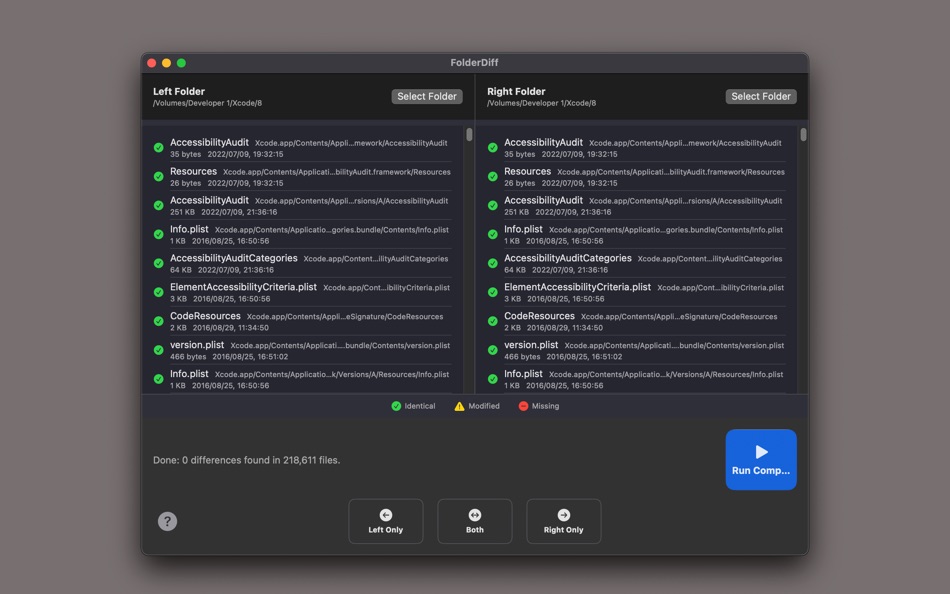
FolderDiff is a native Mac application designed to compare two folders side-by-side, instantly listing file differences and missing items.
Whether you are verifying the integrity of a backup, organizing old and new folders, or checking files during a website update... this app eliminates the anxiety of checking files manually.
[Perfect For]
Backup Verification: Ensure no data was lost when copying files to an external HDD.
File Organization: Compare the contents of cluttered folders like "Copy 1" and "Copy 2" to see exactly what changed.
Web Development: Check for discrepancies in file structures between testing and production environments.
[Key Features]
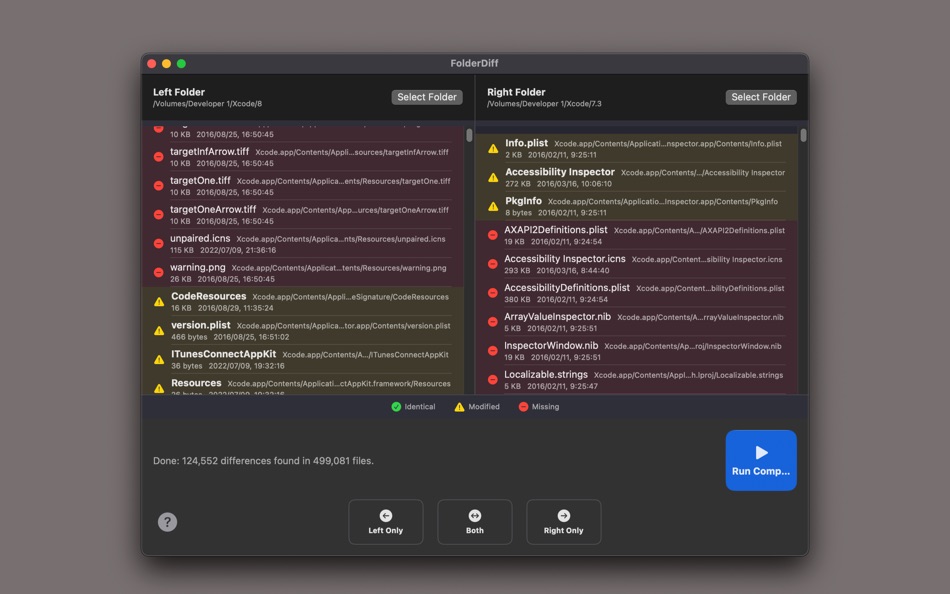
Side-by-Side View: Intuitively compare two folders arranged left and right.
Color-Coded Status:
Green: Match (Identical)
Yellow: Changed (Difference in size or modification date)
Red: Missing (Exists in only one folder)
Powerful Filtering: Instantly filter and display only the files that are missing on one side.
Native App: Built with super fast Diff Engine and fast performance. No bloated features—specialized purely for comparison.
No complex settings required. Just select your folders and click "Compare."
A simple tool that turns the "anxiety" of daily file management into "confidence."
ภาพหน้าจอ
มีอะไรใหม่
- เวอร์ชัน: 1.0
- อัปเดต:
ราคา
- วันนี้: ฟรี
- ต่ำสุด: ฟรี
- มากที่สุด: ฟรี
ติดตามราคา
ผู้พัฒนา
แต้มแล
0 ☹️
การจัดอันดับ
0 ☹️
รายการ
0 ☹️
ความเห็น
แสดงรีวิวเป็นคนแรกเลย 🌟
ข้อมูลเพิ่มเติม
Folder Diff - Simple Compare URL แบบสั้น: คัดลอกแล้ว!- 🌟 แชร์
- Mac App Store
คุณอาจชอบ
-
- Folder by Color - Change color
- macOS แอป: ยูทิลิตี้ โดย: 清碧 饶
- ฟรี
- รายการ: 1 + 1 การจัดอันดับ: 0 ความเห็น: 0
- แต้มแล: 6 + 0 เวอร์ชัน: 1.8.1 [Folder by Color] is a folder color changing tool. Using different colored folder icons can keep your files well organized, thereby increasing the efficiency of file management. you ... ⥯
-
- Folder Snapshot Utility
- macOS แอป: ยูทิลิตี้ โดย: David Gradwell
- $4.99
- รายการ: 0 + 0 การจัดอันดับ: 0 ความเห็น: 0
- แต้มแล: 0 + 0 เวอร์ชัน: 2021.06.11 Folder Snapshot Utility will make a rapid backup copy (a snapshot ) of anything you throw at it. This is much faster than a traditional backup copy (think ~1200x faster) and uses ... ⥯
-
- Folder Dater
- macOS แอป: ยูทิลิตี้ โดย: Dalamser
- $2.99
- รายการ: 1 + 0 การจัดอันดับ: 0 ความเห็น: 0
- แต้มแล: 0 + 0 เวอร์ชัน: 2.3.2 Folder Dater sets a folder s modification date or creation date attributes based on the attributes of its descendants. All changes can be previewed in the Finder and undone before ... ⥯
-
- Compare 2 Image
- macOS แอป: ยูทิลิตี้ โดย: Ebey Tech LLC
- $4.99
- รายการ: 0 + 0 การจัดอันดับ: 0 ความเห็น: 0
- แต้มแล: 1 + 0 เวอร์ชัน: 1.0 Compare images in directory or compare multiple directories using include subfolders toggle button. Comparison can be made by name, date modified, size, data, or all of the above to ... ⥯
-
- Folder - Custom your folder
- macOS แอป: ยูทิลิตี้ โดย: 玉 李
- $0.99
- รายการ: 0 + 0 การจัดอันดับ: 0 ความเห็น: 0
- แต้มแล: 1 + 0 เวอร์ชัน: 1.0.1 Folder App is an app for customizing folders on macOS. You can set folders to different colors, and you can also add text, emoji, or icons to folders. Of course, the colors of text and ⥯
-
- Simple Refresh for Safari
- macOS แอป: ยูทิลิตี้ โดย: William Walker
- $1.99
- รายการ: 0 + 2 การจัดอันดับ: 0 ความเห็น: 0
- แต้มแล: 2 + 24 (3.5) เวอร์ชัน: 3.5.0 Simple Refresh brings automatic webpage refresh functionality to Safari on iOS and macOS. Stop manually refreshing pages let Simple Refresh do it for you. With an intuitive slider ... ⥯
-
- Simple FTP Server
- macOS แอป: ยูทิลิตี้ โดย: Omer UCEL
- $2.99
- รายการ: 0 + 1 การจัดอันดับ: 0 ความเห็น: 0
- แต้มแล: 4 + 0 เวอร์ชัน: 4.0 Simple FTP Server is a lightweight, powerful, and native macOS application designed for developers, sysadmins, and power users who need a local FTP server without the complexity. Skip ... ⥯
-
- Folder Previewer Pro
- macOS แอป: ยูทิลิตี้ โดย: Nikhil Anshuman
- $1.99
- รายการ: 0 + 0 การจัดอันดับ: 0 ความเห็น: 0
- แต้มแล: 0 + 0 เวอร์ชัน: 1.0 Folder Previewer Pro lets you instantly preview the contents of any folder or archive (ZIP) directly in Finder s Quick Look, without opening or extracting files. Just select a folder ... ⥯
-
- Folder Rack
- macOS แอป: ยูทิลิตี้ โดย: Ivo Wessel
- * ฟรี
- รายการ: 0 + 0 การจัดอันดับ: 0 ความเห็น: 0
- แต้มแล: 0 + 0 เวอร์ชัน: 1.10 FOLDER RACK Bossing your Files and Folders The Finder was always my most-used tool apart from the development environment Xcode, which is of course indispensable for me. However, there ⥯
-
- Simple Whois Client
- macOS แอป: ยูทิลิตี้ โดย: Daniel Linsenmeier
- $1.99
- รายการ: 0 + 0 การจัดอันดับ: 0 ความเห็น: 0
- แต้มแล: 4 + 0 เวอร์ชัน: 1.0.0 Simple Whois Client offers you an easy way to check the Whois status of one or more domains. Key features : - Single Whois - Multi Whois for up to 15 TLDs - Supporting over 1000 TLDs ... ⥯
-
- Simple Dict Lite
- macOS แอป: ยูทิลิตี้ โดย: 培基 王
- ฟรี
- รายการ: 1 + 0 การจัดอันดับ: 0 ความเห็น: 0
- แต้มแล: 1 + 0 เวอร์ชัน: 1.9 Simple and easy to use offline dictionary. Currently provides limited support dsl and mdx dictionary file, and will provide more supports in following App versions. Warning: This ... ⥯
-
- Simple Menu STATUS
- macOS แอป: ยูทิลิตี้ โดย: Duyo Son
- ฟรี
- รายการ: 0 + 0 การจัดอันดับ: 0 ความเห็น: 0
- แต้มแล: 1 + 0 เวอร์ชัน: 1.4 **Simple Menu STATUS** is a lightweight, elegant system monitor that lives in your menu bar, providing real-time insights into your Mac's performance. **SYSTEM MONITORING** Real-time ... ⥯
-
- Simple Overlay Timer
- macOS แอป: ยูทิลิตี้ โดย: KOHEI KAWAGUCHI
- $0.99
- รายการ: 0 + 0 การจัดอันดับ: 0 ความเห็น: 0
- แต้มแล: 0 + 0 เวอร์ชัน: 1.1.8.2 Simple Overlay Timer is a lightweight yet powerful time-management tool designed to help you stay on track, no matter what you re working on. Whether you re coding, designing, gaming, ... ⥯
-
- Folder Peek
- macOS แอป: ยูทิลิตี้ โดย: Sindre Sorhus
- ฟรี
- รายการ: 4 + 3 การจัดอันดับ: 0 ความเห็น: 0
- แต้มแล: 9 + 0 เวอร์ชัน: 1.12.0 Quickly access documents, files, folders, and apps from the menu bar. Think of it as an alternative to Dock folders, just more powerful and customizable. Each folder you add gets its ... ⥯