
| ผู้พัฒนา: | Diogo Santos (2) | ||
| ราคา: | ▼ $2.99 | ||
| การจัดอันดับ: | 0 | ||
| ความเห็น: | 0 เขียนความเห็น | ||
| ความเห็น: | 0 โพสต์ความคิดเห็น | ||
| รายการ: | 0 + 0 | ||
| แต้มแล: | 1 + 0 ¡ | ||
| Mac App Store | |||
คำอธิบาย

When you apply a color or label to a folder, macOS does not propagate it to subfolders.
On large folder trees, this quickly becomes slow, inconsistent, and error-prone.
FolderCascade applies Finder colors and labels to an entire folder hierarchy in one controlled operation. One action, total clarity.
Built for people who care about structure, developers, designers, project managers, photographers, researchers, and anyone managing complex folder trees.
--
What it does
• Select or drop any folder to start a cascade
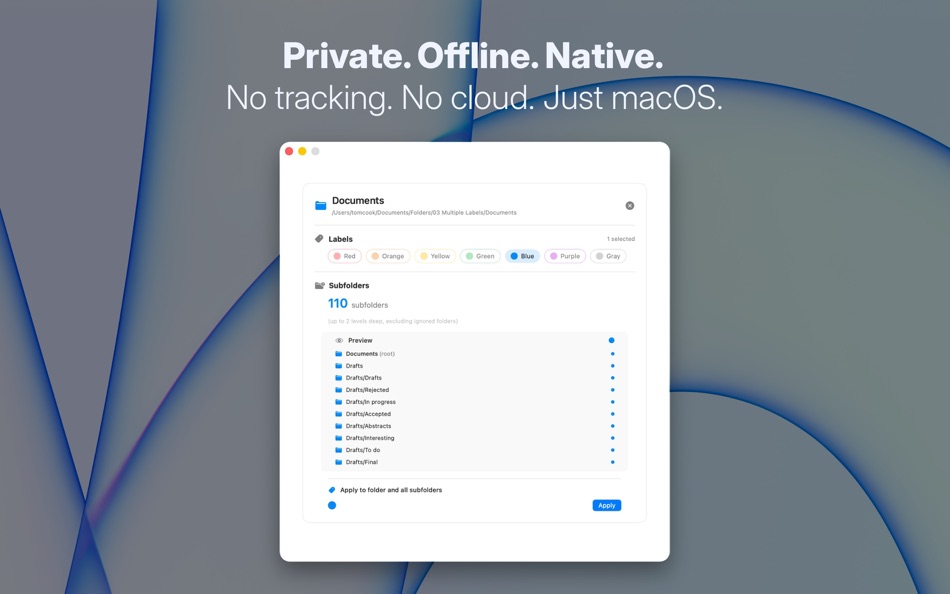
• Apply Finder colors and labels to the root folder and all subfolders
• Change labels directly inside the app before applying
• Live subfolder count, including folders excluded by depth limits or ignore rules
• Preview panel showing exactly how folders will look before changes are applied
• Fully native macOS app, fast, offline, no setup required
--
Why it matters
• Keeps folder hierarchies visually consistent
• Eliminates repetitive manual labeling
• Makes large projects readable at a glance
• Prevents silent failures by showing exactly what happened
• Adds the control Finder never shipped
• Turns a risky bulk action into a transparent, predictable decision
--
Privacy
Everything runs locally on your Mac.
No analytics, no tracking, no cloud, no background processes.
Ad
ภาพหน้าจอ


มีอะไรใหม่
- เวอร์ชัน: 1.2
- อัปเดต:
- • Fixed an issue where certain Finder labels were not displayed correctly after applying
• Added additional checks to ensure label changes always produce visible results
• General stability improvements
ราคา
- วันนี้: $2.99
$4.99-40% - ต่ำสุด: ▼ $2.99
- มากที่สุด: $4.99
ติดตามราคา
Ad
ผู้พัฒนา
- Diogo Santos
- แพลตฟอร์ม: Android แอป (1) macOS แอป (1)
- รายการ: 0 + 0
- แต้มแล: 1 + 0 ¡
- การจัดอันดับ: 0
- ความเห็น: 0
- ลดราคา: 1
- วิดีโอ: 0
- RSS: ติดตาม
แต้มแล (1)
-

- 2,024 Lu Chin
- +1

การจัดอันดับ (0)
0 ☹️
รายการ (0)
0 ☹️
- FolderCascade
ความเห็น (0)
แสดงรีวิวเป็นคนแรกเลย 🌟
ความเห็น (0)
เป็นคนแรกที่แสดงความเห็น 🌟
ข้อมูลเพิ่มเติม
รายชื่อติดต่อ
- เว็บไซท์:
 https://foldercascade.app
FolderCascade URL แบบสั้น: คัดลอกแล้ว!- 🌟 แชร์
- Mac App Store
คุณอาจชอบ
-
- Folder by Color - Change color
- macOS แอป: ยูทิลิตี้ โดย: 清碧 饶
- ฟรี
- รายการ: 1 + 1 การจัดอันดับ: 0 ความเห็น: 0
- แต้มแล: 6 + 0 ความเห็น: 0 เวอร์ชัน: 1.8.1 [Folder by Color] is a folder color changing tool. Using different colored folder icons can keep your files well organized, thereby increasing the efficiency of file management. you ... ⥯
-
- Folder Snapshot Utility
- macOS แอป: ยูทิลิตี้ โดย: David Gradwell
- $4.99
- รายการ: 0 + 0 การจัดอันดับ: 0 ความเห็น: 0
- แต้มแล: 0 + 0 ความเห็น: 0 เวอร์ชัน: 2021.06.11 Folder Snapshot Utility will make a rapid backup copy (a snapshot ) of anything you throw at it. This is much faster than a traditional backup copy (think ~1200x faster) and uses ... ⥯
-
- Folder Dater
- macOS แอป: ยูทิลิตี้ โดย: Dalamser
- $2.99
- รายการ: 1 + 0 การจัดอันดับ: 0 ความเห็น: 0
- แต้มแล: 0 + 0 ความเห็น: 0 เวอร์ชัน: 2.3.2 Folder Dater sets a folder s modification date or creation date attributes based on the attributes of its descendants. All changes can be previewed in the Finder and undone before ... ⥯
-
- Folder - Custom your folder
- macOS แอป: ยูทิลิตี้ โดย: 玉 李
- $0.99
- รายการ: 0 + 0 การจัดอันดับ: 0 ความเห็น: 0
- แต้มแล: 1 + 0 ความเห็น: 0 เวอร์ชัน: 1.0.1 Folder App is an app for customizing folders on macOS. You can set folders to different colors, and you can also add text, emoji, or icons to folders. Of course, the colors of text and ⥯
-
- Folder Previewer Pro
- macOS แอป: ยูทิลิตี้ โดย: Nikhil Anshuman
- $1.99
- รายการ: 0 + 0 การจัดอันดับ: 0 ความเห็น: 0
- แต้มแล: 0 + 0 ความเห็น: 0 เวอร์ชัน: 1.0 Folder Previewer Pro lets you instantly preview the contents of any folder or archive (ZIP) directly in Finder s Quick Look, without opening or extracting files. Just select a folder ... ⥯
-
- Folder Rack
- macOS แอป: ยูทิลิตี้ โดย: Ivo Wessel
- * ฟรี
- รายการ: 0 + 0 การจัดอันดับ: 0 ความเห็น: 0
- แต้มแล: 0 + 0 ความเห็น: 0 เวอร์ชัน: 1.16 FOLDER RACK Bossing your Files and Folders The Finder was always my most-used tool apart from the development environment Xcode, which is of course indispensable for me. However, there ⥯
-
- Folder Peek
- macOS แอป: ยูทิลิตี้ โดย: Sindre Sorhus
- ฟรี
- รายการ: 4 + 3 การจัดอันดับ: 0 ความเห็น: 0
- แต้มแล: 9 + 0 ความเห็น: 0 เวอร์ชัน: 1.12.0 Quickly access documents, files, folders, and apps from the menu bar. Think of it as an alternative to Dock folders, just more powerful and customizable. Each folder you add gets its ... ⥯
-
- Folder - Colorful folder maker
- macOS แอป: ยูทิลิตี้ โดย: 余 张
- * ฟรี
- รายการ: 1 + 1 การจัดอันดับ: 0 ความเห็น: 0
- แต้มแล: 12 + 0 ความเห็น: 0 เวอร์ชัน: 1.3.1 How many folders do you have on your computer? Scores of them? Hundreds? Thousands? Are all of them are alike: default folder, default folder, default folder, default folder... It's so ⥯
-
- Folder Analyze
- macOS แอป: ยูทิลิตี้ โดย: 培基 王
- * ฟรี
- รายการ: 0 + 0 การจัดอันดับ: 0 ความเห็น: 0
- แต้มแล: 1 + 0 ความเห็น: 0 เวอร์ชัน: 2.0.1 A powerful and easy-to-use folder content analysis tool that displays content as charts, making the size and number of files clearly visible. It also supports an edit mode, where you ... ⥯
-
- Folder Crazy Desktop
- macOS แอป: ยูทิลิตี้ โดย: Steve Mills
- $0.99
- รายการ: 0 + 0 การจัดอันดับ: 0 ความเห็น: 0
- แต้มแล: 0 + 0 ความเห็น: 0 เวอร์ชัน: 1.5.3 Remember how great the Desktop image feature in macOS was before they removed the Tile option? Just like Folder Crazy vastly improves the screensaver experience, Folder Crazy Desktop ... ⥯
-
- Folder Sizes
- macOS แอป: ยูทิลิตี้ โดย: Roberto Piccirilli
- $2.99
- รายการ: 0 + 0 การจัดอันดับ: 0 ความเห็น: 0
- แต้มแล: 0 + 0 ความเห็น: 0 เวอร์ชัน: 2.2.1 Show in easy and intuitive way the space occupied by files and folders . With this app you can immediately identify the space occupied for easy cleaning of their own archives. Now you ... ⥯
-
- Folder Factory
- macOS แอป: ยูทิลิตี้ โดย: UAB Macmanus
- $3.99
- รายการ: 1 + 1 การจัดอันดับ: 0 ความเห็น: 0
- แต้มแล: 3 + 0 ความเห็น: 0 เวอร์ชัน: 4.0 Folder Factory is a neat little app for changing the design of your folder icons. It will help you to match similar folders by the color, text or picture and this will keep your Mac ... ⥯
-
- Folder Color Changer:RightMenu
- macOS แอป: ยูทิลิตี้ โดย: 奕琦 冯
- ฟรี
- รายการ: 1 + 1 การจัดอันดับ: 0 ความเห็น: 0
- แต้มแล: 4 + 0 ความเห็น: 0 เวอร์ชัน: 1.4.0 [Folder Icon Customization Artifact] - Right click to replace folder icon Just right-click on the folder to change the icon - Batch operation Multi-select folders can also be quickly ... ⥯
-
- Folder Colorizer
- macOS แอป: ยูทิลิตี้ โดย: 兰桂 吴
- $1.99
- รายการ: 1 + 1 การจัดอันดับ: 0 ความเห็น: 0
- แต้มแล: 0 + 0 ความเห็น: 0 เวอร์ชัน: 1.3.2 Folder Colorizer allows you to customize your folders with just about any color. Would like to make your folders looks cool? Or want to organize your folders to make things easier to ... ⥯