
| ผู้พัฒนา: | 昭 张 (6) | ||
| ราคา: | ฟรี | ||
| การจัดอันดับ: | 0 | ||
| ความเห็น: | 0 เขียนความเห็น | ||
| รายการ: | 0 + 2 | ||
| แต้มแล: | 4 + 0 ¡ | ||
| Mac App Store | |||
คำอธิบาย

Features:
1. Location modification: iNavMock allows you to modify your iPhone location, you can choose any location as your current location, whether it is for international travel, location testing or other purposes, it can be easily realized.
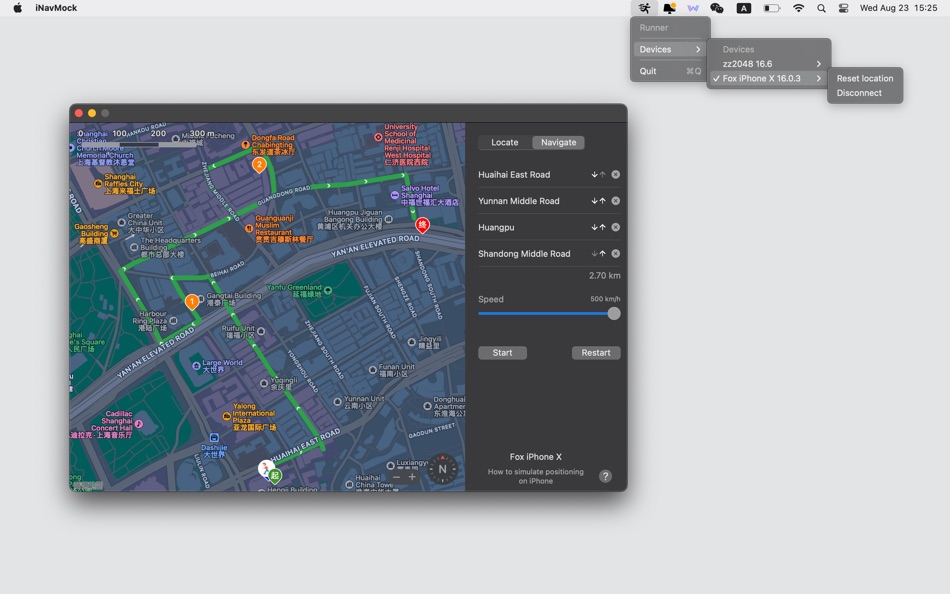
2. Mock navigation: Not only positioning modification, iNavMock also provides a realistic mock navigation function. You can set the start point, end point, and way point, and the app will simulate a real navigation experience, including route planning, navigation instructions, etc., to provide you with a comprehensive navigation experience.
3. Privacy protection: protecting personal privacy is our top priority. iNavMock only simulates the location and does not obtain your real location information, ensuring that your privacy is respected and protected to the greatest extent.
4. Easy to use: The user interface of iNavMock is simple and intuitive, no matter you are a novice or an experienced user, you can easily get started. The operation is simple, just a few steps to set up, and you can start to simulate navigation.
5. Various application scenarios: iNavMock has a wide range of applications in many fields. Whether you're a developer needing to test location-dependent apps, or a regular user just for fun, iNavMock has you covered.
How to get started:
1. Download and install iNavMock app to your macOS device.
2. Download and install the device connection tool Runner to your macOS device. iNavMock is not directly connected to the phone, so it needs to be used in conjunction with the Runner. Click App Store "App Support" to view more information about the use of Runner.
3. Connect your iPhone to the computer, and make sure Developer Mode is turned on.
4. Open the iNavMock app, select the location you want to modify or set the start and end points of the simulated navigation on the interface.
5. Start to experience virtual position modification and simulated navigation.
Whether you're developing apps, protecting privacy, or just for fun, iNavMock will be your right-hand man. Download now and start exploring your virtual location journey!
Ad
ภาพหน้าจอ

ราคา
- วันนี้: ฟรี
- ต่ำสุด: ฟรี
- มากที่สุด: $0.99
ติดตามราคา
Ad
ผู้พัฒนา
แต้มแล
-

- 10,998 Simon Chan
- +1
-
- 3,028 바람처어럼
- +1
-
- 1,344 first241
- +1
-
- 459 upto
- +1




การจัดอันดับ
0 ☹️
รายการ
0 ☹️
- iNavMock
ความเห็น
แสดงรีวิวเป็นคนแรกเลย 🌟
ข้อมูลเพิ่มเติม
iNavMock URL แบบสั้น: คัดลอกแล้ว!- 🌟 แชร์
- Mac App Store
คุณอาจชอบ
-
- Sidedesk
- macOS แอป: ยูทิลิตี้ โดย: Ebey Tech LLC
- $2.99
- รายการ: 0 + 2 การจัดอันดับ: 0 ความเห็น: 0
- แต้มแล: 10 + 0 เวอร์ชัน: 1.3 Sidedesk is like a virtual desktop. Useful for opening files, folders, or even websites. Its main view offers a near-endless canvas, where items can be added and organized to create ... ⥯
-
- Timely - menu bar app
- macOS แอป: ยูทิลิตี้ โดย: Rivolu LLC
- $0.99
- รายการ: 0 + 1 การจัดอันดับ: 0 ความเห็น: 0
- แต้มแล: 10 + 0 เวอร์ชัน: 2.3.2 The essential productivity timer, timezone tracker, and reminder app all in one app. Accessible right from the menu bar. 1) Productivity Timer Built-in countdown timer with ... ⥯
- -75%
- Power Scrutinizer
- macOS แอป: ยูทิลิตี้ โดย: OREN SHLOMO LEVY
- $0.99
$3.99-75% - รายการ: 0 + 0 การจัดอันดับ: 0 ความเห็น: 0
- แต้มแล: 0 + 0 เวอร์ชัน: 1.4 The Power Scrutinizer lets you model your battery powered system while keeping track of the losses so you can answer: how long will it last? The library has a growing list of elements ... ⥯
- ใหม่
- ModernGit
- macOS แอป: ยูทิลิตี้ โดย: iDevelopment LLC.
- * ฟรี
- รายการ: 0 + 0 การจัดอันดับ: 0 ความเห็น: 0
- แต้มแล: 0 + 0 เวอร์ชัน: 1.0.3 ModernGit is the definitive Git client for macOS developers who demand speed, aesthetics, and the power of Apple Intelligence. Built from the ground up with SwiftUI and optimized for ... ⥯