
| Developer: | 宁波上官科技有限公司 (25) | ||
| Price: | * Free | ||
| Rankings: | 0 | ||
| Reviews: | 0 Write a Review | ||
| Lists: | 0 + 0 | ||
| Points: | 1 + 0 ¡ | ||
| Mac App Store | |||
Description

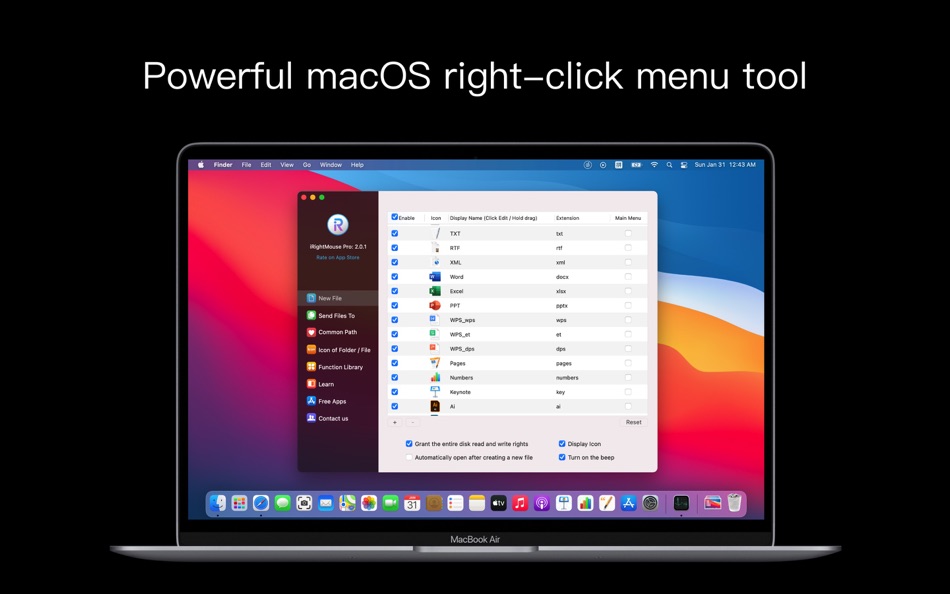
Super Right Click is the most powerful right-click menu tool on your Mac. Its rich functionality makes your right-click menu even more powerful, and its user-friendly interface design significantly enhances your macOS experience!
Features at a Glance:
● Create a new file
● Send a file to
● Copy a file to
● Frequently used directories
● Customize folder icons
● View file information (MD5, SHA1, SHA256, SHA512)
● Send shortcut to desktop
● AirDrop
● Copy file and folder names
● Create a new folder based on the file name
● Cut/Paste files
● Use iShot to take screenshots, stickers, and annotations
● Copy a path
● Specify an app to open the current path or file
● Hide/Show files
● Permanently delete files
● Grant write permissions to selected files
● Convert to ICNS format
● Convert to WebP format
● Convert to PNG format
● Convert to JPG format
● Convert images to macOS icon set
● Convert images to iOS icon set
● Baidu Translate
● Google Translate
● QR code conversion
● Unfold folders
● Set as wallpaper
● Compress and decompress with FastZip
● Use iCloud, OneDrive Display the right-click unzip menu in folders like Drive (macOS 14 and above)
Feature Description:
• Create a new file by right-clicking
1. Default supported file formats:
TXT/RTF/XML/Word/Excel/PPT/WPS Word/WPS Spreadsheet/WPS Presentation/Pages/Numbers/Keynote/AI/PSD/Markdown
• Add template files
Supports creating files with custom formatting and content using template files
• Send file to
Send files to a specified location
• Copy file to
Copy files to a specified location
• Frequently used directories
Add and set frequently used directories in the right-click menu. Select them to jump directly to a specific directory
• Customize folder icons
Is it difficult to find folders that look the same all the time? Don't worry, you can easily change your folder icons to beautiful ones. Super right-click provides a variety of beautiful folder icons. Select a folder and create a stylish one. • View file information
View a file's MD5, SHA1, SHA256, and SHA512 information.
• Send shortcuts to the desktop
Want to put important files or frequently used apps on the desktop? Just right-click and you're done.
• AirDrop
Select a file, right-click, and instantly start AirDrop. Intuitive, efficient, and a step faster!
• Copy file or folder names
• Create a new folder based on a file name
Quickly create a folder with the same file name as the currently selected file. • Use iShot to take screenshots, stickers, and annotations
• Cut/Paste Files
Cut/Paste files quickly and easily using the right-click menu
• Copy Path
Select a file or the current window and right-click to copy the path for ease of use
• Completely Delete Files
Select a file and delete it directly without leaving it in the Trash
• Specify an App to access the current path and open the current file
Use Terminal, iTerm2, VSCode, Sublime Text, Sublime Merge, Emacs, Clion, CotEditor, HBuilderX, PhpStorm, PyCharm, Typora, WebStorm, IDEA, AppCode, DataGrip, GoLand, Rider, RubyMine, etc. to access the path or open the file.
You can also customize the app that opens files/folders using [New App] to meet more personalized needs.
• Hide/Show Files
1. Show/Hide the selected file
2. Show/Hide all files in the current window
• Grant write permission to the selected file
• Convert images to ICNS, WP, or HEIC formats Format: jpg, png
• Convert image to macOS icon set
Select an image and convert it to an icon set in 16*16, 32*32, 64*64, 128*128, 256*256, 512*512, or 1024*1024 sizes
• Convert image to iOS icon set
Select an image and convert it to:
1. iPhone icon set
29*29, 40*40, 58*58, 57*57, 114*114, 120*120, 180*180
2. iPad icon set
29*29, 40*40, 50*50, 58*58, 80*80, 100*100
72*72, 76*76, 144*144, 153*153, 160*160
3. Apple Watch Icon Set
48*48, 55*55, 58*58, 87*87
80*80, 88*88, 172*172, 196*196
Terms of Use: https://www.better365.cn/Terms.html
QQ Group: 437642037
Screenshots


What's new
- Version: 2.4.6
- Updated:
- [Native Support for Apple M Chips and Intel Chips] Powerful right-click menu tools and rich features enhance your Mac, while intuitive interaction design significantly improves your macOS user experience!
1. Fixed an issue where the right-click menu was unusable in directories such as /Applications and /System (Special thanks to user "Allen" for their feedback on the official website's user support section).
2. Fixed an issue where the "Grant Write Permissions to Selected Files" function in the Toolbox was not working on some systems (Special thanks to user "linger" for their feedback on the official website's user support section).
3. Added a help function to merge right-click menu items in "Preferences -> Toolbox," allowing you to view detailed information with one click.
Thank you for your enthusiastic and active feedback. We welcome your feedback on the official website's user support page. Click the "Support" button in the App Store to submit your issue. A dedicated person will follow up and handle your issue one-on-one. Thank you.
QQ Group: 437642037
Price History
-
* In-App Purchases - Today: Free
- Minimum: Free
- Maximum: Free
Track prices
Developer
- 宁波上官科技有限公司
- Platforms: macOS Apps (25)
- Lists: 8 + 2
- Points: 76 + 2 ¡
- Rankings: 0
- Reviews: 0
- Discounts: 0
- Videos: 0
- RSS: Subscribe
Points
-

- 1,240 Anthony
- +1

Rankings
0 ☹️
Lists
0 ☹️
Reviews
Be the first to review 🌟
Additional Information
- Version: 2.4.6
- Category:
macOS Apps›Utilities - OS:
macOS,macOS 10.14 and up - Size:
20 Mb - Supported Languages:
Chinese,English,French,German,Japanese,Korean,Portuguese,Spanish - Content Rating:
4+ - Mac App Store Rating:
0 - Updated:
- Release Date:
Contacts
- Website:
 https://www.better365.cn/apps.html
«iRightMouse» is a Utilities app for macOS, developed by «宁波上官科技有限公司». It was first released on and last updated on . This app is currently free. This app has not yet received any ratings or reviews on AppAgg. AppAgg has tracked 1 confirmed points plus 0 indirect points for this app. Available languages: Chinese, English, French, German, Japanese, Korean, Portuguese, Spanish. AppAgg continuously tracks the price history, ratings, and user feedback for «iRightMouse». Subscribe to this app or follow its RSS feed to get notified about future discounts or updates.
iRightMouse Short URL: Copied!- 🌟 Share
- Mac App Store
You may also like
-
- Mouse Gestures
- macOS Apps: Utilities By: George MacKerron
- $1.99
- Lists: 0 + 1 Rankings: 0 Reviews: 0
- Points: 1 + 0 Version: 1.1.1 Mouse Gestures is a tiny macOS menu-bar app. It enables simple mouse gestures for navigation. Mouse Gestures recognises two gestures. Hold the right mouse button and drag leftwards to ... ⥯
-
- Mouse Clicker
- macOS Apps: Utilities By: INGI Consulting ApS
- $4.99
- Lists: 0 + 0 Rankings: 0 Reviews: 0
- Points: 0 + 0 Version: 1.1 Mouse Clicker can automatically click your mouse up to 1000 times per second or with regular intervals. There is no limit on the wait between intervals, meaning you can set the Mouse ... ⥯
-
- Mouse Jiggler – Mouse Mover
- macOS Apps: Utilities By: Bohdan Bilous
- * Free
- Lists: 1 + 1 Rankings: 0 Reviews: 0
- Points: 8 + 0 Version: 2.6 Mouse Jiggler - Mouse Mover is a simple utility that generates subtle cursor movements to assist accessibility and interaction needs. It performs smoothly and efficiently without ... ⥯
-
- Mouse Insomnia
- macOS Apps: Utilities By: Braden Aron Mc Corkle
- $0.99
- Lists: 0 + 0 Rankings: 0 Reviews: 0
- Points: 0 + 0 Version: 1.1.0 Mouse Insomnia Keep your Mac awake with gentle, human-like mouse movements. Whether you re vibe-coding, running long simulations, or simply need your Mac to stay awake, Mouse Insomnia ... ⥯
-
- Mouse Click Pro
- macOS Apps: Utilities By: 春生 熊
- $2.99
- Lists: 0 + 0 Rankings: 0 Reviews: 0
- Points: 3 + 0 Version: 1.0.4 "Auto click and combo functions and features" Top speed up to 80+ clicks per second Support fixed position click Support the definition of left and right mouse buttons Support timer ... ⥯
-
- Right Click - Mouse Extender
- macOS Apps: Utilities By: 意 田
- * Free
- Lists: 0 + 0 Rankings: 0 Reviews: 0
- Points: 3 + 0 Version: 1.8 Features 1. Encryption and compression Right-click to complete any folder or file to encryption and compression in one step suppor unarchiver zip 7z rar and so on 2. New file Currently ⥯
-
- Mouse Smoothy
- macOS Apps: Utilities By: Nha Ho
- * Free
- Lists: 0 + 0 Rankings: 0 Reviews: 0
- Points: 0 + 0 Version: 2.5 Mouse Smoothy makes your mouse scroll like Apple s Magic Mouse smooth, natural, and fluid. Works across all apps, including creative and editor tools Ideal for designers, ... ⥯
-
- Mouse Click Sound
- macOS Apps: Utilities By: 方成 印
- $2.99
- Lists: 0 + 0 Rankings: 0 Reviews: 0
- Points: 0 + 0 Version: 1.5 Mouse Click Sound - Add Feedback to Your Silent Mouse and Trackpad Mouse Click Sound enhances your macOS experience by providing audio feedback for every click. Whether you're using a ... ⥯
-
- Mouse Clicker
- macOS Apps: Utilities By: 波 冯
- Free
- Lists: 0 + 0 Rankings: 0 Reviews: 0
- Points: 0 + 0 Version: 3.0.0 Mouse Clicker 是一个简单的自动点击器 支持多种单击 双击 次数 间隔等设置。它可以帮助您自动执行重复的鼠标点击操作 节省时间和精力。无论是游戏还是其他需要频繁点击的场景 Mouse Clicker 都能为您提供便利。 ⥯
-
- Mouse Snap Clicker
- macOS Apps: Utilities By: 论 李
- $4.99
- Lists: 0 + 0 Rankings: 0 Reviews: 0
- Points: 0 + 0 Version: 1.1.1 Mouse Snap Clicker Essential Mac auto clicker! Customize click intervals (hours/minutes/seconds/ms), select mouse button/type. Define precise positions via coordinates or screenshot. ... ⥯
-
- Right Click App
- macOS Apps: Utilities By: Andreas Stokidis
- $0.99
- Lists: 0 + 0 Rankings: 0 Reviews: 0
- Points: 0 + 0 Version: 1.2 Right Click Easily Create New Files in Finder Right Click is the ultimate extension for Finder, designed to simplify the creation of new files on your Mac. With just a simple ... ⥯
-
- Mouse Clicker & Shaker
- macOS Apps: Utilities By: Wise Tech Labs Private Limited
- $7.99
- Lists: 1 + 0 Rankings: 0 Reviews: 0
- Points: 5 + 0 Version: 2.3 We've all faced this: You're playing a game and you need to click a lot for taking some coins or for another game play. Or you have an app that functions with clicks and you need to do ⥯
-
- Mouse++ & New File Menu
- macOS Apps: Utilities By: 威 蒋
- * Free
- Lists: 2 + 1 Rankings: 0 Reviews: 0
- Points: 3 + 0 Version: 3.4 You can directly create new documents and other content on the desktop. It has rich functions to make your right-click menu even more powerful. The deeply rooted interactive design ... ⥯
-
- Mouse Hider
- macOS Apps: Utilities By: SopoNext
- $0.99
- Lists: 0 + 0 Rankings: 0 Reviews: 0
- Points: 1 + 0 Version: 3.5.1 The unique App for hide the cursor on the Mac App Store, and the best app in absolute! Mouse Hider makes the presence of the mouse cursor on the monitor less intrusive. Thanks to Mouse ⥯