
| 개발자: | BoHoon Kim (5) | ||
| 가격: | $0.99 | ||
| 순위: | 0 | ||
| 리뷰: | 0 리뷰 작성 | ||
| 댓글: | 0 댓글 게시 | ||
| 목록: | 0 + 1 | ||
| 포인트: | 1 + 0 ¡ | ||
| Mac App Store | |||
기술

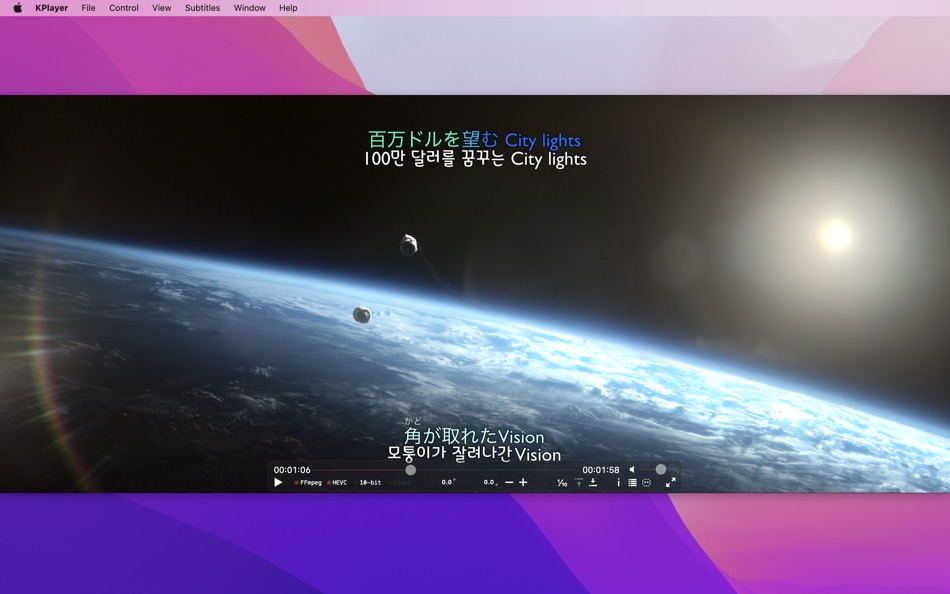
• 'H.264/HEVC Hardware Acceleration' support¹
• 'Aspect Ratio Settings' support
• 'Playback Speed Settings' support
• 'Skip' support
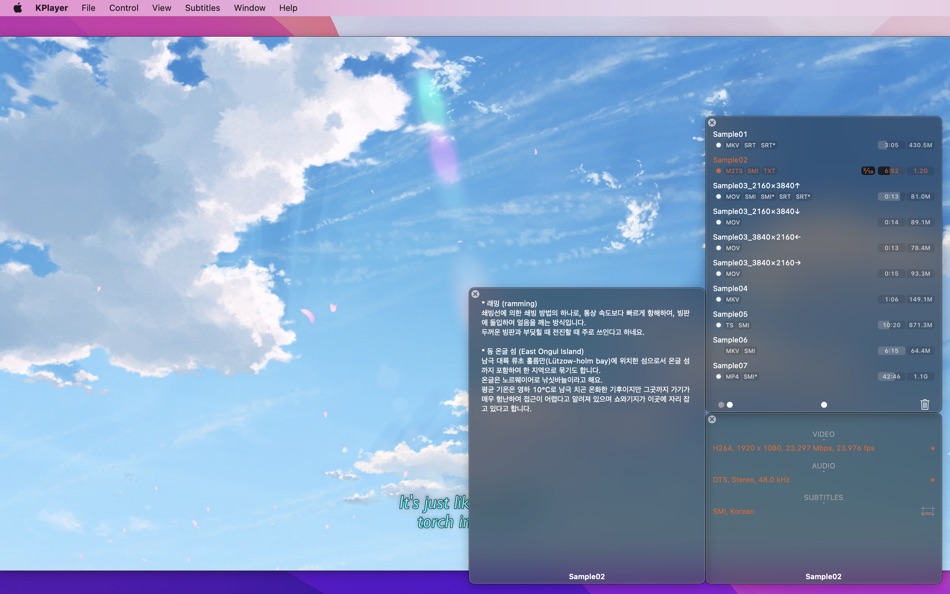
• 'Playlist' support²
• 'Continued Play' support
• 'Move to Trash’ support
• 'Plan B' support
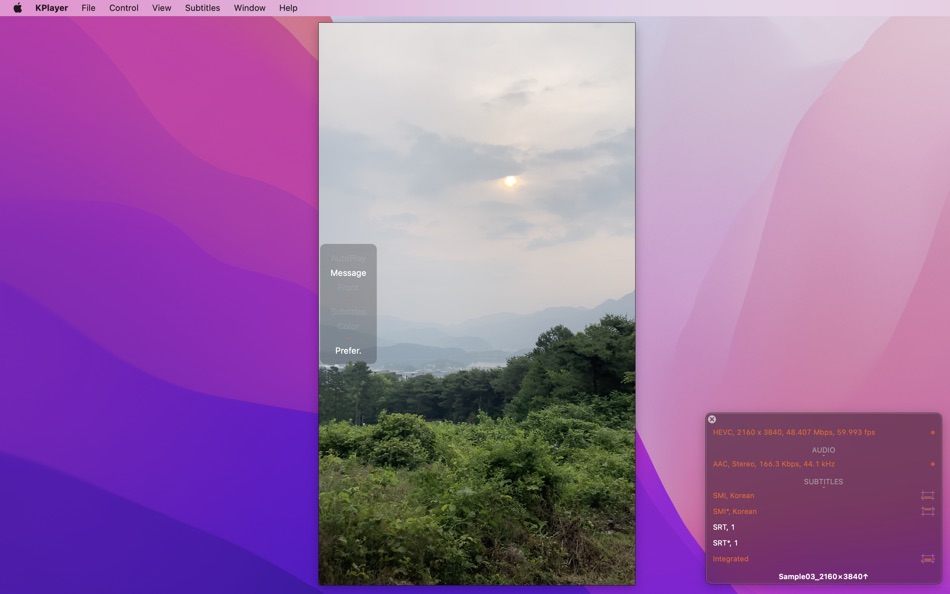
• 'Subtitles' (Sandbox²)
- It supports SMI, SRT type.
- Ruby tag is also available.
- Subtitles are displayed in real time even if it searches the playback position through the time slider.
- If it opens the video (file_name), it searches and opens the subtitles (named like these).
▹ (file_name/file_name*) at the same folder, or manually open (file_name/file_name*) from the same folder.
▹ Only if it opens the BDMV's folder, (folder_name/folder_name*) and then (file_name/file_name*) at the current ‘P Folder’, or manually open (folder_name/folder_name*) or (file_name/file_name*) from anywhere. (folder_name/folder_name*) is only for file with maximum duration in the playlist.
• 'Commentary' (Sandbox²)
- It supports TXT (plain text) type.
- It shows a plain text commentary file in a separate window.
- If it opens the video (file_name), it searches and opens the commentary (named like these).
▹ (file_name) at the same folder, or manually open (file_name) from the same folder.
▹ Only if it opens the BDMV's folder, (folder_name) and then (file_name) at the current ‘P Folder’, or manually open (folder_name) or (file_name) from anywhere. (folder_name) is only for file with maximum duration in the playlist.
• Playable Types³
- 'Native' mode: M4V, MP4, MOV.
- 'FFmpeg' mode: M4V, MP4, MOV, MKV, AVI, FLV, WMV, RMVB, M2TS, TP, TS, TRP.
It can get more detail informations about these features at "App Support". (https://bohoonkim.blogspot.com/2014/11/kplayer.html)
1. H.264/HEVC Hardware Acceleration
- 'H.264 Hardware Acceleration' may not be supported according to CPU/GPU or file format.
- 'HEVC(H.265) Hardware Acceleration' requires macOS 10.13 or later and recent CPU.
▹ 6th(8-bit)/7th(10-bit) Generation Intel CPU or later.
- On 'Native' mode, it requires M4V, MP4 or MOV types encoded in H.264(8-bit)/HEVC(8-bit) and AAC/ALAC
On 'FFmpeg' mode, it requires the video encoded in H.264(8-bit)/HEVC(8 or 10-bit).
- If the video track was encoded in settings that macOS doesn't support, it may not be supported.
If it is not supported, playback and navigating may not be smooth according to CPU. (especially when plays 1080p, 4K)
2. Sandbox
- If it opens not 'folders' but ‘video files' and these ‘files’ are not in the following folder or its subfolders; ‘P Folder' folders in 'Preferences’,
▹ it should open the same-named subtitle/commentary files manually,
▹ and it doesn't support the feature that playlist is automatically made up of the similar-named video files.
- 'P Folder' option remembers folders once opened by this option. So, even if changes the current 'P Folder' value, it can access old 'P Folder' folders.
3. Playable Types
- It doesn't support the playback of a protected video file.
- When it opens the BDMV’s folder, ‘m2ts' files that are contained in 'BDMV' will be automatically added to the playlist.
▹ For example, if DSK/BDMV, please open the ‘DSK’ folder.
- The video file encoded in 'YUV420P' pixel format can be played normally on Native/FFmpeg mode.
‘YUV420P 10-bit’, 'YUV444P 8/10-bit' pixel formats can be played only on FFmpeg mode.
※ KPlayer uses some dynamic libraries of 'FFmpeg' licensed under the LGPLv2.1. It can get more informations at 'https://ffmpeg.org'.
※ The 'ThecircleM' font provided by The Circle Foundation is applied to the screenshots. The 'ThecircleM' font can be downloaded from The Circle Foundation. (http://www.thecircle.or.kr/kor/data-room/circle-font.html)
Ad
스크린샷
새로운 기능
- 버전: 2.2.0
- 업데이트:
- • Requires macOS 10.13 or later.
• Updated FFmpeg libraries.
• Added ±10 seconds to subtitles sync.
- Click 'Sync +10.0', 'Sync -10.0' on 'Subtitles' menu.
- Or hold down ⌘ and click '+', '-' icons on the control bar.
• Optimized portrait(vertical) video playback.
• Improved stability.
• Fixed bugs.
가격 내역
- 오늘: $0.99
- 최소: $0.99
- 최대: $3.99
가격 추적
개발자
Ad
포인트 (1)
-

- 258 dl
- +1

순위 (0)
0 ☹️
목록 (0)
0 ☹️
- KPlayer
리뷰 (0)
첫 번째 리뷰를 남겨보세요 🌟
추가 정보
댓글 (0)
가장 먼저 댓글을 남겨주세요 🌟
«KPlayer». 플랫폼: macOS. 카테고리: 유틸리티. 개발자: «BoHoon Kim». 첫 번째 릴리스: . 마지막 업데이트: . 현재 가격: $0.99. 최저 기록 가격: $0.99 (). 최고 기록 가격: $3.99 (). 이 타이틀은 아직 AppAgg에서 평가나 리뷰를 받지 못했습니다. 추적된 포인트: 확인됨: 1, 간접: 0. 사용 가능한 언어: English. AppAgg는 «KPlayer»의 가격 기록, 평점 및 사용자 피드백을 추적합니다. 향후 할인 및 업데이트 받기: RSS에서 확인할 수 있습니다. AppAgg는 애플리케이션을 호스팅하거나 소프트웨어를 배포하지 않습니다. 모든 상표, 로고 및 스크린샷은 해당 소유자의 자산입니다.
KPlayer 단축 URL: 복사됨!- 🌟 공유하기
- Mac App Store
당신은 또한 같은 수 있습니다
-
- SwiftyMenu
- macOS 앱: 유틸리티 게시자: 圣罡 汤
- 무료
- 목록: 0 + 2 순위: 0 리뷰: 0
- 포인트: 22 + 0 댓글: 0 버전: 26.5.5 SwiftyMenu is a powerful macOS Finder extension that enhances your workflow with customizable context menus for quick file and folder operations. Key Features: Custom Context Menus: ... ⥯
-
- Parallel Disk Scanner
- macOS 앱: 유틸리티 게시자: Pedro Yamada
- 무료
- 목록: 0 + 1 순위: 0 리뷰: 0
- 포인트: 20 + 0 댓글: 0 버전: 1.2.2 FileSaver is a really fast disk usage scanner. It can scan a fully used SSD in a minute by scanning folder sizes in parallel. All information is displayed immediately with no waiting ... ⥯
-
- CrystalFetch ISO Downloader
- macOS 앱: 유틸리티 게시자: Turing Software, LLC
- 무료
- 목록: 6 + 0 순위: 0 리뷰: 0
- 포인트: 20 + 0 댓글: 0 버전: 2.2.0 CrystalFetch is a macOS application that creates Windows® 11 installer ISO images. It can be used with UTM virtual machines as well as other VM solutions. Note: CrystalFetch is not ... ⥯
-
- HotLaunch - App Launchpad
- macOS 앱: 유틸리티 게시자: 方 刘
- * 무료
- 목록: 2 + 3 순위: 0 리뷰: 0
- 포인트: 19 + 0 댓글: 0 버전: 2.5.9 Efficiently switch and open apps, folders, files, URLs. characteristic: 1 Support Option, Control, Command, Shift,fn combination shortcut keys to display switching window view. 2 When ... ⥯
-
- Duplicate Files Sweeper
- macOS 앱: 유틸리티 게시자: Wise Tech Labs Private Limited
- * 무료
- 목록: 0 + 1 순위: 0 리뷰: 0
- 포인트: 18 + 0 댓글: 0 버전: 3.1 Duplicate Files Sweeper is an ultimate Duplicate Files Cleaner that help you get rid of duplicate files from your Mac easily. Duplicate Files Sweeper helps you give a thorough scan to ... ⥯
-
- Shortery
- macOS 앱: 유틸리티 게시자: Unit Numberfive oHG
- * 무료
- 목록: 3 + 4 순위: 1 (1) 리뷰: 0
- 포인트: 18 + 0 댓글: 0 버전: 8.6 Run your Shortcuts automatically with Shortery. Automate your workflows without lifting a finger. Shortery allows you to run shortcuts automatically in response to system events, ... ⥯
-
- Max NTFS - NTFS Disk Helper
- macOS 앱: 유틸리티 게시자: 全利 谢
- * 무료
- 목록: 0 + 0 순위: 0 리뷰: 0
- 포인트: 17 + 0 댓글: 0 버전: 2.7.6 Max NTFS is a small tool that can open NTFS format disks in read-write mode. We can support the read and write of NTFS format disks very effectively. Start the application, it will ... ⥯
-
- Disk Diag
- macOS 앱: 유틸리티 게시자: Rocky Sand Studio Ltd.
- * 무료
- 목록: 4 + 1 순위: 5 (1) 리뷰: 0
- 포인트: 16 + 0 댓글: 0 버전: 2.0.7 Disk Diag is an amazing all-in-one disk cleaner to help you clean up your hard drive with ease. First time I ve been speechless & husband is amazed" It works with just two clicks and ... ⥯
-
- Clip Log
- macOS 앱: 유틸리티 게시자: WARNER WEB DEVELOPMENT LLC
- * 무료
- 목록: 0 + 1 순위: 0 리뷰: 0
- 포인트: 16 + 0 댓글: 0 버전: 3.3.84 Clip Log The Clipboard Manager You ve Been Waiting For! Say goodbye to losing important snippets of text and images! Clip Log is the ultimate clipboard manager, combining intelligent ... ⥯
-
- QuickFTP Server
- macOS 앱: 유틸리티 게시자: Leszek Szary
- 무료
- 목록: 0 + 2 순위: 0 리뷰: 0
- 포인트: 16 + 0 댓글: 0 버전: 1.1.0 QuickFTP Server allows you to share files stored on your Mac with other devices. FTP is a standard network protocol supported by many applications available on almost any device with a ⥯
-
- HomeControl Menu for HomeKit
- macOS 앱: 유틸리티 게시자: Pedro Jose Pereira Vieito
- * 무료
- 목록: 2 + 3 순위: 5 (1) 리뷰: 0
- 포인트: 15 + 0 댓글: 0 버전: 2.15.1 HomeControl is the ultimate HomeKit companion on macOS. Manage and automate your smart home directly from the menu bar: check your home status, trigger scenes, adjust devices, or ... ⥯