
| 개발자: | iwaxx Sarl (3) | ||
| 가격: | $59.99 | ||
| 순위: | 0 | ||
| 리뷰: | 0 리뷰 작성 | ||
| 목록: | 0 + 0 | ||
| 포인트: | 0 + 0 ¡ | ||
| Mac App Store | |||
기술

It uses the exact same codebase as the 'LanScan' application, but with all in-app features enabled.
LanScan is a simple and efficient IPv4 & IPv6 network scanner that discovers all active devices on any subnet: the local one, or any public subnet that you configure.
IPv4 Features:
→ Auto-detection of configured interfaces: Airport, Ethernet, Virtual interfaces ...
→ Scan the IP range you like, from 1 IP to the whole IPv4 address space!
→ Scan your local network with ARP packets
→ Scan public IP network ranges with Ping / SMB / mDNS packets
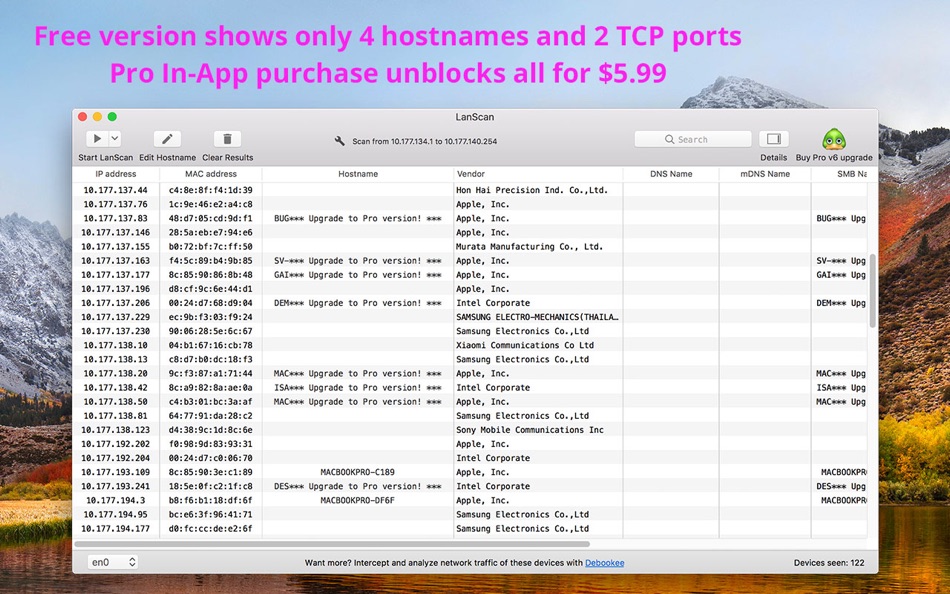
→ Display the IP address, MAC address, hostname (4 max) and vendor associated
→ Discover the SMB domain if any configured
→ Hostname resolution: DNS, mDNS (Apple devices) and SMB (Windows devices)
→ Custom hostname edition
→ Custom comment for each device
→ Open custom URL in browser
→ Export results in CSV files
→ Hide/show each column
→ Align each column as you want
→ No limitation on the number of devices found !
IPv6 Features:
→ Displays Link-Local (private) and Global (public) IPv6 addresses.
→ Like IPv4, some features in free trial and full unobfuscation through an In-App Purchase
→ Go in Help → In-App purchases for more details
Restrictions in free trial version compared to Pro In-App Purchase:
→ Some hostnames, comments, TCP ports or IPv6 addresses might be obfuscated in free trial
→ The free trial only obfuscate results, but display them all : if a column is blank or empty, buying a Pro In-App feature won't make any new result appear.
스크린샷


새로운 기능
- 버전: 8.0.26
- 업데이트:
- * New feature : File → Import / Export Custom Names
* MAC addresses updated (+320)
가격
- 오늘: $59.99
- 최소: $59.99
- 최대: $59.99
가격 추적
개발자
- iwaxx Sarl
- 플랫폼: macOS 앱 (3)
- 목록: 0 + 4
- 포인트: 6 + 0 ¡
- 순위: 0
- 리뷰: 0
- 할인: 0
- 동영상: 0
- RSS: 구독
포인트
0 ☹️
순위
0 ☹️
목록
0 ☹️
리뷰
첫 번째 리뷰를 남겨보세요 🌟
추가 정보
LanScan for Business 단축 URL: 복사됨!- 🌟 공유하기
- Mac App Store
당신은 또한 같은 수 있습니다
-
- LAN Scan - Network Scanner
- macOS 앱: 유틸리티 게시자: Dzianis Azarenka
- $4.99
- 목록: 1 + 1 순위: 5 (1) 리뷰: 0
- 포인트: 1 + 0 버전: 1.12 The fastest and most complete WiFi LAN Scanner available! See whats connected to your favorite public WiFi network or your home network. This all-in-one information application is an ... ⥯
- 새로운
- LAN Speed Meter
- macOS 앱: 유틸리티 게시자: 秋君 刘
- * $1.99
- 목록: 0 + 0 순위: 0 리뷰: 0
- 포인트: 0 + 0 버전: 1.0 LAN Speed Meter - Professional Network Performance Testing Accurately measure the speed of your local network connections between devices. Whether you're testing your home Wi-Fi, ... ⥯
-
- QR Scan
- macOS 앱: 유틸리티 게시자: Shizuka TORITANI
- $9.99
- 목록: 0 + 0 순위: 0 리뷰: 0
- 포인트: 0 + 0 버전: 1.9 This application reads an ordinary QR code on your Mac. It also reads a sequence of QR codes created by our app "QR Send" for iOS. [FEATURES] + Scanning QR codes (a small size QR code ... ⥯
-
- Text-Scan-Speak
- macOS 앱: 유틸리티 게시자: Taliyo Ltd
- $1.99
- 목록: 0 + 0 순위: 0 리뷰: 0
- 포인트: 0 + 0 버전: 2.0 Ever found yourself manually copying text from an image or typing a long number or text that you couldn't just copy/paste ? Well this app solves that by enabling you to scan and ... ⥯
-
- Brother iPrint&Scan
- macOS 앱: 유틸리티 게시자: Brother Industries, LTD.
- 무료
- 목록: 0 + 1 순위: 0 리뷰: 0
- 포인트: 5 + 0 버전: 14.0.1 Brother iPrint&Scan is a free application that lets you easily scan to and print from your Mac. New features are continuously implemented. We recommend periodically checking for ... ⥯
-
- Apple Business Essentials
- macOS 앱: 유틸리티 게시자: Apple
- 무료
- 목록: 0 + 2 순위: 0 리뷰: 0
- 포인트: 3 + 57 (4.2) 버전: 1.6.2 Apple Business Essentials is your one-stop shop to get the apps and support you need from your company, all in one place. Get up and running by installing all of the apps you need to ... ⥯
-
- RDP Business Pro
- macOS 앱: 유틸리티 게시자: Terminal Works Ltd.
- $9.99
- 목록: 0 + 0 순위: 0 리뷰: 0
- 포인트: 0 + 0 버전: 1.1 RDP Business Pro is a small and fast business-oriented RDP client that enables you to connect from your Mac to a remote Windows desktop session. The easy to use built-in printing ... ⥯
-
- Wake On Lan for Mac OS X
- macOS 앱: 유틸리티 게시자: Depicus
- $1.99
- 목록: 0 + 1 순위: 0 리뷰: 0
- 포인트: 0 + 0 버전: 1.6 Depicus Wake on Lan allows you to wake up any computer that is enabled from anywhere in the world. Previously woken machines are bookmarked so you can quickly wake them again without ... ⥯
-
- WOL — wake on lan
- macOS 앱: 유틸리티 게시자: Andreii Simaranov
- * $1.49
- 목록: 0 + 1 순위: 0 리뷰: 0
- 포인트: 8 + 1 (5.0) 버전: 1.15 Mobile Wake on LAN (WOL) app is a useful tool for remote system administrators who want to wake up computers from a distance. It is an application that uses the network interface card ... ⥯
-
- Wake on Lan - Menu Bar
- macOS 앱: 유틸리티 게시자: Lumibit GmbH
- $1.99
- 목록: 1 + 1 순위: 0 리뷰: 0
- 포인트: 2 + 0 버전: 1.0.6 WAKE YOUR DEVICES Quick and fast wake on lan of your devices from the menu bar FEATURES manage as many devices as you like send standard magic pakets wake up devices after login watch ... ⥯
-
- AntiVirus- Virus & Adware Scan
- macOS 앱: 유틸리티 게시자: Max Secure Software India Private Limited
- * 무료
- 목록: 0 + 0 순위: 0 리뷰: 0
- 포인트: 3 + 0 버전: 10.17 Features: AntiVirus- Virus & Adware Scan is designed to protect Mac against viruses, spyware and all other types of malware. Clear out Adware from your Mac! Our Mac Anti-Malware engine ⥯
-
- Antivirus Sniper: Virus Scan
- macOS 앱: 유틸리티 게시자: SniperGuard LTD
- * 무료
- 목록: 0 + 0 순위: 0 리뷰: 0
- 포인트: 2 + 0 버전: 1.20 As per a recent report, Cyber attacks on Macs have increased to a significant number compared to previous years . Hackers are now more active than ever at targeting you to steal your ... ⥯
-
- HP Easy Scan
- macOS 앱: 유틸리티 게시자: HP Inc.
- 무료
- 목록: 0 + 0 순위: 0 리뷰: 0
- 포인트: 1 + 0 버전: 2.0.0 HP Easy Scan is an UI application designed specifically to use with HP scanner or HP Multifunction Printer for scanning, editing, and saving of photos, documents and objects. The key ... ⥯
-
- Wake On Demand (Wake on LAN)
- macOS 앱: 유틸리티 게시자: Huilin Zhu
- 무료
- 목록: 0 + 0 순위: 0 리뷰: 0
- 포인트: 0 + 0 버전: 1.1 A small tool that wakes up computers on LAN through magic packet. The computers that are to be waken up need to be configured to receive magic packet in sleep mode. The application ... ⥯