
| 개발자: | Tap4Mobile do Brasil (2) | ||
| 가격: | 무료 | ||
| 순위: | 0 | ||
| 리뷰: | 0 리뷰 작성 | ||
| 댓글: | 0 댓글 게시 | ||
| 목록: | 0 + 0 | ||
| 포인트: | 2 + 0 ¡ | ||
| Mac App Store | |||
기술

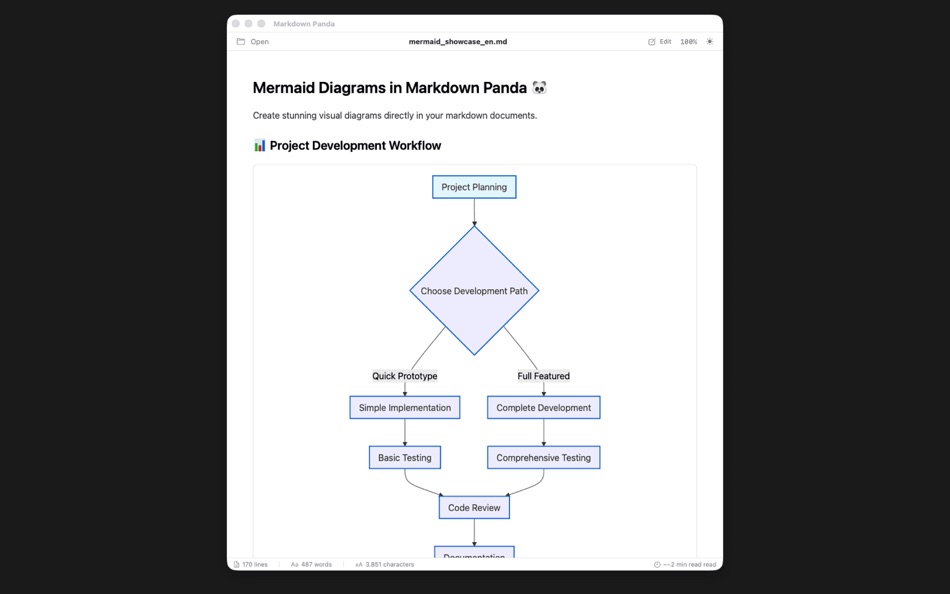
Discover the most beautiful way to read and view Markdown files on macOS. Markdown Panda is the perfect companion for viewing your documentation, README files, notes, and technical content with stunning visual clarity. With built-in support for Mermaid diagrams and a simple editor for quick adjustments, it's everything you need to work with Markdown files elegantly.
Key Features:
• Beautiful Markdown Rendering - Experience crystal-clear viewing of your Markdown files with perfect formatting of headers, lists, tables, links, and more
• Stunning Mermaid Diagrams - View complex flowcharts, graphs, and diagrams rendered beautifully within your documents
• Simple Editor for Quick Edits - Make small adjustments and corrections with an intuitive, distraction-free editing interface
• Advanced Syntax Highlighting - View code blocks with gorgeous color-coded formatting for 20+ programming languages
• Native macOS Performance - Built from the ground up for Apple Silicon with lightning-fast file loading and smooth scrolling
• Seamless Theme Integration - Automatically adapts to your system's light or dark mode preferences
• Multi-Language Support - Interface available in English, German, Spanish, and Portuguese (Brazil)
• Smart File Organization - Easily browse and open your Markdown files with intelligent file management
Perfect for:
Developers reading documentation and README files
Students and researchers reviewing notes
Anyone working with technical documentation
Teams sharing Markdown-based content
Why Choose Markdown Panda?
While other apps focus on heavy editing, Markdown Panda excels at what matters most: making your existing Markdown content look absolutely beautiful. With its native macOS design and crystal-clear rendering, it's the perfect tool for viewing and making quick edits to your Markdown files.
Experience the most elegant way to view Markdown. Download Markdown Panda today.
Ad
스크린샷



새로운 기능
- 버전: 2.4.0
- 업데이트:
- Block Editor — Edit your Markdown files directly in the app with the new block-based editor. Rearrange sections with drag and drop and
follow your changes with live preview.
Scroll Sync — Click a block in the editor and the preview automatically scrolls to the corresponding section.
PDF Export — Export your documents as PDF with proper pagination.
Liquid Glass — Refreshed look with macOS Tahoe's Liquid Glass design.
Localization — Now available in English, Portuguese, Spanish, and German.
Bug fixes and performance improvements.
가격 내역
- 오늘: 무료
- 최소: 무료
- 최대: 무료
가격 추적
Ad
개발자
- Tap4Mobile do Brasil
- 플랫폼: iOS 앱 (1) macOS 앱 (1)
- 목록: 0 + 0
- 포인트: 3 + 0 ¡
- 순위: 0
- 리뷰: 0
- 댓글: 0
- 할인: 0
- 동영상: 0
- RSS: 구독


순위 (0)
0 ☹️
목록 (0)
0 ☹️
- Markdown Panda
리뷰 (0)
첫 번째 리뷰를 남겨보세요 🌟
댓글 (0)
가장 먼저 댓글을 남겨주세요 🌟
추가 정보
- 버전: 2.4.0
- 카테고리:
macOS 앱›유틸리티 - 운영체제:
macOS,macOS 26.0 이상 - 크기:
2 Mb - 지원되는 언어:
German,Portuguese,Spanish - 콘텐츠 등급:
4+ - Mac App Store 개의 평가:
0 - 업데이트:
- 출시일:
«Markdown Panda». 플랫폼: macOS. 카테고리: 유틸리티. 개발자: «Tap4Mobile do Brasil». 첫 번째 릴리스: . 마지막 업데이트: . 현재 가격: 무료. 이 타이틀은 아직 AppAgg에서 평가나 리뷰를 받지 못했습니다. 추적된 포인트: 확인됨: 2, 간접: 0. 사용 가능한 언어: German, Portuguese, Spanish. AppAgg는 «Markdown Panda»의 가격 기록, 평점 및 사용자 피드백을 추적합니다. 향후 할인 및 업데이트 받기: RSS에서 확인할 수 있습니다. AppAgg는 애플리케이션을 호스팅하거나 소프트웨어를 배포하지 않습니다. 모든 상표, 로고 및 스크린샷은 해당 소유자의 자산입니다.
Markdown Panda 단축 URL: 복사됨!- 🌟 공유하기
- Mac App Store
당신은 또한 같은 수 있습니다
-
- Panda Tunnel
- macOS 앱: 유틸리티 게시자: 晓欢 谭
- * 무료
- 목록: 0 + 0 순위: 0 리뷰: 0
- 포인트: 0 + 0 댓글: 0 버전: 1.1.3 Panda Tunnel is a tunnel manager for local port forwarding. When a user creates a new port forwarding rule, they receive a public URL that anyone can use to connect to the service ... ⥯
-
- Markdown Preview - Quick Look
- macOS 앱: 유틸리티 게시자: Anybox LTD
- $2.99
- 목록: 1 + 0 순위: 0 리뷰: 0
- 포인트: 2 + 0 댓글: 0 버전: 2.1 Markdown Preview provides a Quick Look extension to preview Markdown files in Finder. Before started, you will need to enable Quick Look extension in System Settings. Afterwards you ... ⥯
- 새로운
- Markdown Lens
- macOS 앱: 유틸리티 게시자: John Decker
- * 무료
- 목록: 0 + 0 순위: 0 리뷰: 0
- 포인트: 1 + 0 댓글: 0 버전: 2.00 Markdown Lens is a fast, native Markdown viewer for macOS. Simply double-click any .md file to see it beautifully rendered with full GitHub Flavored Markdown support. EXPORT WITH ... ⥯
-
- Panda's Website Monitor
- macOS 앱: 유틸리티 게시자: Takeo Apitzsch
- 무료
- 목록: 0 + 0 순위: 0 리뷰: 0
- 포인트: 0 + 0 댓글: 0 버전: 1.02 Panda's Website Monitor Monitor web pages for visual changes with ease. Perfect for tracking price changes, product availability, news updates, or any website modifications. Or to see ... ⥯
-
- Copy to Markdown
- macOS 앱: 유틸리티 게시자: 谦 陈
- $3.99
- 목록: 0 + 0 순위: 0 리뷰: 0
- 포인트: 0 + 0 댓글: 0 버전: 1.0 Instantly extract clean content from any webpage and copy it as Markdown with a single click. WHAT IT DOES Copy to Markdown extracts the main article content from web pages and ... ⥯
-
- File2:Text Markdown Converter
- macOS 앱: 유틸리티 게시자: Cleverson
- * 무료
- 목록: 0 + 0 순위: 0 리뷰: 0
- 포인트: 0 + 0 댓글: 0 버전: 1.2.0 Turn any document into clean, portable Markdown or plain text without ever leaving your Mac. Discover File2Text Markdown Converter, your all-in-one solution for transforming documents, ⥯
-
- Side Markdown
- macOS 앱: 유틸리티 게시자: Shiming Chen
- 무료
- 목록: 0 + 0 순위: 0 리뷰: 0
- 포인트: 0 + 0 댓글: 0 버전: 1.0 A lightweight note-taking tool designed exclusively for Markdown enthusiasts, with its standout feature Side Mode that supercharges your productivity! One-click to snap the window to ... ⥯
- 새로운
- MD Editor - Simple & Convert
- macOS 앱: 유틸리티 게시자: hirokazu murabe
- 무료
- 목록: 0 + 0 순위: 0 리뷰: 0
- 포인트: 0 + 0 댓글: 0 버전: 1.0 The SIMPLEST Markdown editor. Create beautiful documents in minutes. Why Choose This App? Just 3 Steps to Perfect Documents 1. Type your text 2. See live preview 3. Export to PDF - ... ⥯
-
- LowHumming
- macOS 앱: 유틸리티 게시자: 晓枋 陈
- 무료
- 목록: 0 + 0 순위: 0 리뷰: 0
- 포인트: 0 + 0 댓글: 0 버전: 1.0.23 - markdown 编辑器 - 比传统markdown而已更加方便的 list - 支持把rss订阅也加入到文稿列表中 ⥯
-
- Tabs Saver for Safari
- macOS 앱: 유틸리티 게시자: Denk Alexandru
- * 무료
- 목록: 1 + 2 순위: 0 리뷰: 0
- 포인트: 11 + 0 댓글: 0 버전: 4.2.1 Featured by Apple in 3 stories: Standout Safari Extensions, Super Safari Extensions, and Browse Better If you want to save your browsing session for later or you have too many tabs ... ⥯
-
- Text Case
- macOS 앱: 유틸리티 게시자: Christopher R Hannah
- 무료
- 목록: 0 + 4 순위: 0 리뷰: 0
- 포인트: 7 + 0 댓글: 0 버전: 2023.3 Text Case is a text transformation utility, that can be as powerful as you make it, and accessible throughout iOS. Flows These are customisable combinations of formats, that can be put ⥯
-
- Tabs to Links
- macOS 앱: 유틸리티 게시자: Benjamin Mayo
- $3.99
- 목록: 3 + 4 순위: 0 리뷰: 0
- 포인트: 0 + 0 댓글: 0 버전: 1.2.4 Make a list of links from your open tabs in Safari, instantly. Take your browser window of research straight into an email to send to a friend, create footnotes for your paper, or drop ⥯
-
- iMenuX - New File & Tools
- macOS 앱: 유틸리티 게시자: 小芳 龙
- $4.99
- 목록: 0 + 1 순위: 0 리뷰: 0
- 포인트: 11 + 0 댓글: 0 버전: 2.0 iMenuX - New File & Tools iMenuX is a lightweight Finder extension that brings essential file operations to your right-click menu. Designed to fill the gaps in macOS Finder, it helps ... ⥯
- 새로운
- Outliner MD: Edit & Export
- macOS 앱: 유틸리티 게시자: Don Kora Jacob
- $9.99
- 목록: 0 + 1 순위: 0 리뷰: 0
- 포인트: 2 + 0 댓글: 0 버전: 1.0 Master Your Markdown Workflow. Outliner MD is the ultimate tool for writers, developers, and students who need a structured way to handle Markdown files. Whether you are managing ... ⥯