
| Developer: | Tiger Ng (31) | ||
| Price: | * Free | ||
| Rankings: | 0 | ||
| Reviews: | 0 Write a Review | ||
| Lists: | 0 + 0 | ||
| Points: | 0 + 0 ¡ | ||
| Mac App Store | |||
Description

Menu Bar App Settings
Personalize your menu bar apps by choosing custom icons and titles. Adjust the size of the app's window and keep your data fresh with automatic reloads upon opening. Easily reorder your menu bar apps to suit your workflow. Add and edit items directly in the menu bar apps.
Data Mapping
Select from a variety of layouts such as Grid, List, Card, Menu, Flip Card, Chart, Table, Form, Kanban, Gauge, Photo, and QR Code. Configure each layout by mapping data from your Google Sheets to the respective layout components.
Create Projects from Your Data or Templates
Whether using your own data or starting with one of our templates, create projects effortlessly. Templates include Notes, Mini Browser, Project Tracker, Expense Tracker, To-Do List, Translator, Currency, Timer, Cheat Sheet, Flash Card, Contact List, Places (Map), Stock Portfolio, Vocabulary List, Regular Tasks, and Birthday Reminders. Drill into detailed views including opening URL, viewing map and text page.
Rules and Filters
Enhance your display by filtering items based on column values and conditions, including date-based filters like today, this week, or next week. Sort items by columns in ascending or descending order, or group them using List, Grid, and Flow views. Implement Conditional Format Rules to dynamically change text colors based on specific conditions.
Interactivity
Add tabs to organize different views, incorporate search bars to filter records, and use checkboxes for data modifications. Enable text-to-speech functionality to audibly present information.
Design Customization
Customize the text style with options for font type, size, color, alignment, and line limits. Choose from various chart types for your Chart View, including line chart, bar chart, pie chart, and doughnut chart.
Terms of Use (EULA)
https://www.apple.com/legal/internet-services/itunes/dev/stdeula/
Screenshots

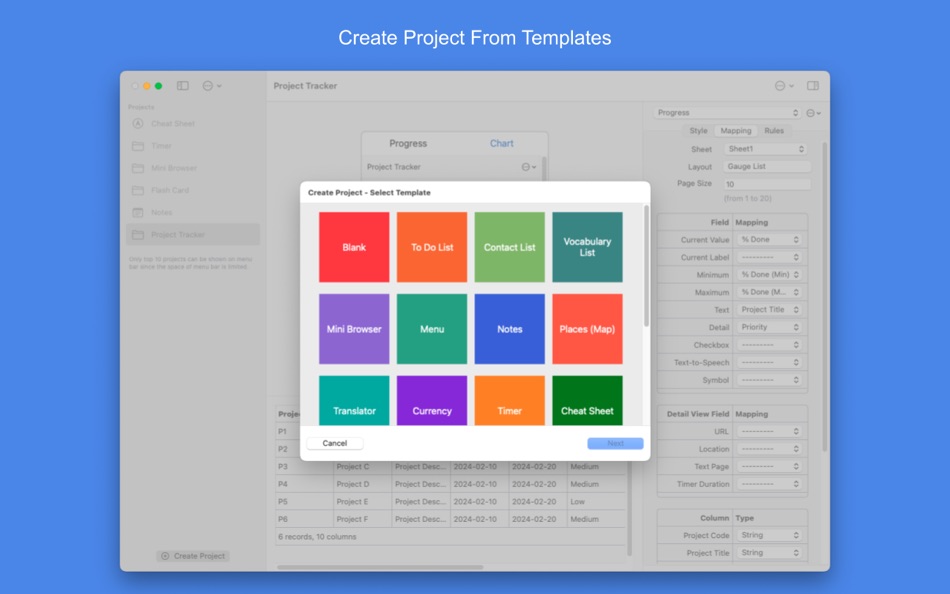


What's new
- Version: 3.0
- Updated:
- 1. New Templates: Translator, Currency, Timer & Cheat Sheet
2. Update field as formula
3. Delete item directly on the menu bar
4. Add icon to view tab
5. Change display mode of view tab: icon only, title only or both icon and title
6. New Detail View: Timer
7. New Symbol field
8. More style for item: padding, corner radius, etc.
9. Validate number when editing item
10. Browser: add reload button
11. Default detail view: list all the records for the selected item (no mapping for detail view)
12. Better flip animation for flip card
13. Add Row Number to make the record inserted be always at the top
14. Bug fix
Price History
-
* In-App Purchases - Today: Free
- Minimum: Free
- Maximum: Free
Track prices
Developer
- Tiger Ng
- Platforms: Android Apps (1) iOS Apps (7) iOS Games (10) macOS Apps (13)
- Lists: 2 + 1
- Points: 11 + 133 ¡
- Rankings: 0
- Reviews: 0
- Discounts: 0
- Videos: 1
- RSS: Subscribe
Points
0 ☹️
Rankings
0 ☹️
Lists
0 ☹️
Reviews
Be the first to review 🌟
Additional Information
- Version: 3.0
- Category:
macOS Apps›Utilities - OS:
macOS,macOS 15.0 and up - Size:
21 Mb - Supported Languages:
English - Content Rating:
4+ - Mac App Store Rating:
0 - Updated:
- Release Date:
Contacts
- Website:
 https://menubargrid.web.app/
«MenuBarGrid» is a Utilities app for macOS, developed by «Tiger Ng». It was first released on and last updated on . This app is currently free. This app has not yet received any ratings or reviews on AppAgg. Available languages: English. AppAgg continuously tracks the price history, ratings, and user feedback for «MenuBarGrid». Subscribe to this app or follow its RSS feed to get notified about future discounts or updates.
MenuBarGrid Short URL: Copied!- 🌟 Share
- Mac App Store
You may also like
-
- Menu Bar Shortcuts
- macOS Apps: Utilities By: Present Day Media LLC
- $3.99
- Lists: 0 + 0 Rankings: 0 Reviews: 0
- Points: 0 + 0 Version: 1.14 Menu Bar Shortcuts brings four everyday productivity tools to the one place you check all day long the macOS menu bar. Instant Calculator A full-featured calculator that supports ... ⥯
-
- Menu Bar UTC
- macOS Apps: Utilities By: Steve Foster
- Free
- Lists: 0 + 0 Rankings: 0 Reviews: 0
- Points: 1 + 0 Version: 1.01 Simply displays the UTC in the menu bar. That's it. ⥯
-
- Menu Bar Manager
- macOS Apps: Utilities By: 泳诗 陈
- $5.99
- Lists: 1 + 0 Rankings: 0 Reviews: 0
- Points: 14 + 0 Version: 1.7 With Menu Bar Manager, you can customize the display or hiding of your menu bar to help users solve the problem of cluttered menu bar icons. 1. Drag the Menu Bar Manager icon to the ... ⥯
-
- Menu Bar Quick Links
- macOS Apps: Utilities By: Florian Schweizer
- Free
- Lists: 3 + 0 Rankings: 0 Reviews: 0
- Points: 4 + 0 Version: 1.2 Easily access your most important links right in the menu bar. Add a link via the textfields. Copy links with a single button press or directly open it by right clicking the link's ... ⥯
-
- Menu bar AI Browser: One Chat
- macOS Apps: Utilities By: 超 程
- $59.99
- Lists: 0 + 0 Rankings: 0 Reviews: 0
- Points: 0 + 0 Version: 1.3 # Menu bar AI Browser: One Chat: Your Menubar AI Assistant The menu bar AI chatbot browser app is a menu bar AI browser that never defocus your current app. Seamlessly blend AI ... ⥯
-
- Menu Bar Currency Converter
- macOS Apps: Utilities By: Verbari LLC
- $3.99
- Lists: 0 + 0 Rankings: 0 Reviews: 0
- Points: 0 + 0 Version: 1.0 Effortlessly convert between 170+ currencies right from your macOS menubar with Menu Bar Currency Converter. -- KEY FEATURES -- Real-Time Currency Converter: Convert between multiple ... ⥯
-
- Menu Bar Percent Calculator
- macOS Apps: Utilities By: Cem Olcay
- Free
- Lists: 0 + 0 Rankings: 0 Reviews: 0
- Points: 1 + 0 Version: 1.0 A tiny menu bar application that calculates percents: - What is something percent of something - Something is what percent of something - Something is something percent of what It's ... ⥯
-
- Menu Bar Calculator
- macOS Apps: Utilities By: Caseiro Software LLC
- Free
- Lists: 0 + 0 Rankings: 0 Reviews: 0
- Points: 0 + 0 Version: 1.1.0 Ever wish your calculator was always *right there*? Now it is! This calculator is always just a click or key press away. Bring up the calculator at any time using the customizable ... ⥯
-
- Menu Bar Translator
- macOS Apps: Utilities By: Daniel Sadjadian
- $0.99
- Lists: 0 + 0 Rankings: 0 Reviews: 0
- Points: 2 + 0 Version: 1.0 Make quick translations right from the Mac MenuBar. - Quick translations in 94 different languages. - Save your favorite translations for future reference. - The History tab enables ... ⥯
- New
- Menu Bar Countdown Clock
- macOS Apps: Utilities By: Arcana Media
- $0.99
- Lists: 0 + 0 Rankings: 0 Reviews: 0
- Points: 0 + 0 Version: 1.0 Maintain a consistent sleep schedule by tracking time until bedtime. Regular sleep patterns support better health, improved focus, and overall well-being. This gentle reminder helps ... ⥯
-
- Shortcuts in Menu Bar
- macOS Apps: Utilities By: Binh Nguyen
- $2.99
- Lists: 1 + 0 Rankings: 0 Reviews: 0
- Points: 0 + 0 Version: 1.2.5 A small utility that provides links to your frequently used files, folders, websites, applications. Help you to keep your Desktop and Dock bar clean. Help you easier to organize your ... ⥯
-
- Hide Menu Bar
- macOS Apps: Utilities By: 仁超 张
- $5.99
- Lists: 0 + 0 Rankings: 0 Reviews: 0
- Points: 0 + 0 Version: 3.5.8 This is an excellent macOS menu bar management tool that can hide menu bar icons, allowing you to flexibly manage menu bar icons and improve work efficiency. The main functions ... ⥯
-
- Hue Menu Bar for Philips Hue
- macOS Apps: Utilities By: Andrew Roach
- $3.99
- Lists: 0 + 0 Rankings: 0 Reviews: 0
- Points: 1 + 0 Version: 2.8 Easily and quickly control all of your Hue lights directly from your menu bar Features - Stays in sync with your Hue Bridge Supports groups and zones Easily switch between multiple ... ⥯
-
- CPU Bar Graph on Menu Bar
- macOS Apps: Utilities By: Yuki Onoda
- $0.99
- Lists: 0 + 0 Rankings: 0 Reviews: 0
- Points: 0 + 0 Version: 1.0.0 The CPU utilization rate for each core is simply displayed on the menu bar. Light, dark, and monochrome appearance can be selected. ⥯