
| ผู้พัฒนา: | TenTal (17) | ||
| ราคา: | $1.99 | ||
| การจัดอันดับ: | 0 | ||
| ความเห็น: | 0 เขียนความเห็น | ||
| รายการ: | 0 + 0 | ||
| แต้มแล: | 0 + 0 ¡ | ||
| Mac App Store | |||
คำอธิบาย

Stay organized, save space, and safely remove drives with one click.
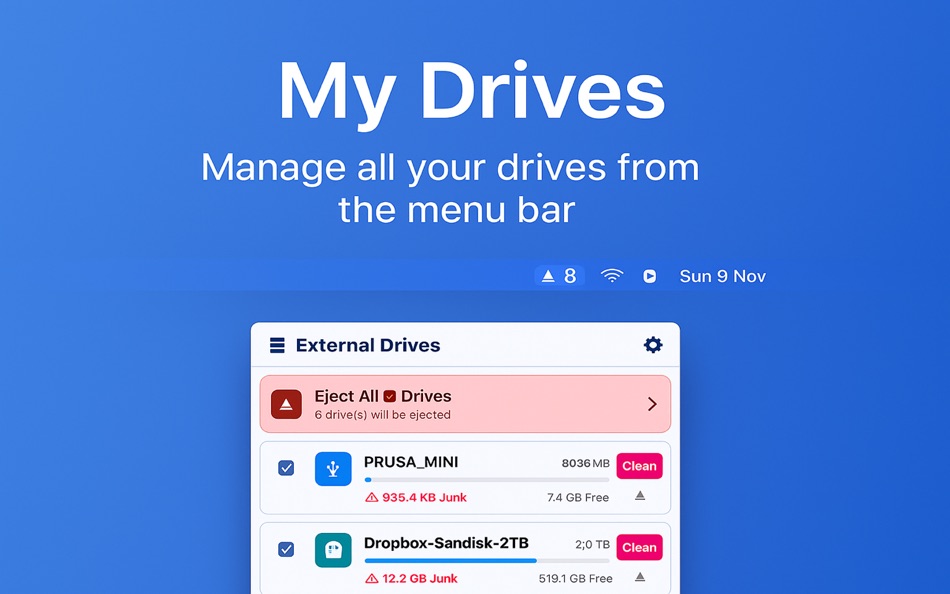
My Drives lets you manage, clean, and eject all your external disks directly from the macOS menu bar — beautifully and effortlessly.
Smart Drive Management
- View all connected external drives from the menu bar
- Eject with one click or eject all safely at once
- Pin important drives to prevent accidental ejection
- Optionally show drive count directly in the menu bar
- Automatically hides internal disks and system volumes
Clean Unwanted Junk
Automatically detects and on demand removes hidden junk files:
- .DS_Store, .Spotlight-V100, .Trashes, .fseventsd, AppleDouble (._*)
- Thumbs.db and cross-platform cache files
- See exactly how much junk is found with color-coded progress bars
Elegant macOS Design
- Modern, CleanMyDrive-inspired interface
- Visual drive indicators for space usage and health
- Lightweight — always available in your menu bar
Quick Actions
- One click to open drive in Finder
- Clean junk with one click
- Eject one or all drives instantly (except pinned ones)
- Real-time space and status updates
Settings
- Start automatically at login
- Toggle drive count in menu bar
- Access app info and support
ภาพหน้าจอ

มีอะไรใหม่
- เวอร์ชัน: 1.0.0
- อัปเดต:
ราคา
- วันนี้: $1.99
- ต่ำสุด: $1.99
- มากที่สุด: $1.99
ติดตามราคา
ผู้พัฒนา
แต้มแล
0 ☹️
การจัดอันดับ
0 ☹️
รายการ
0 ☹️
ความเห็น
แสดงรีวิวเป็นคนแรกเลย 🌟
ข้อมูลเพิ่มเติม
รายชื่อติดต่อ
- เว็บไซท์:
 https://www.tental.net/Mobile-apps/
My Drives - Menu Bar Manager URL แบบสั้น: คัดลอกแล้ว!- 🌟 แชร์
- Mac App Store
คุณอาจชอบ
-
- Menu Bar Manager
- macOS แอป: ยูทิลิตี้ โดย: 泳诗 陈
- $5.99
- รายการ: 1 + 0 การจัดอันดับ: 0 ความเห็น: 0
- แต้มแล: 14 + 0 เวอร์ชัน: 1.7 With Menu Bar Manager, you can customize the display or hiding of your menu bar to help users solve the problem of cluttered menu bar icons. 1. Drag the Menu Bar Manager icon to the ... ⥯
-
- Menu Bar Shortcuts
- macOS แอป: ยูทิลิตี้ โดย: Present Day Media LLC
- $3.99
- รายการ: 0 + 0 การจัดอันดับ: 0 ความเห็น: 0
- แต้มแล: 0 + 0 เวอร์ชัน: 1.14 Menu Bar Shortcuts brings four everyday productivity tools to the one place you check all day long the macOS menu bar. Instant Calculator A full-featured calculator that supports ... ⥯
-
- Menu Bar UTC
- macOS แอป: ยูทิลิตี้ โดย: Steve Foster
- ฟรี
- รายการ: 0 + 0 การจัดอันดับ: 0 ความเห็น: 0
- แต้มแล: 1 + 0 เวอร์ชัน: 1.01 Simply displays the UTC in the menu bar. That's it. ⥯
-
- Menu Bar Quick Links
- macOS แอป: ยูทิลิตี้ โดย: Florian Schweizer
- ฟรี
- รายการ: 3 + 0 การจัดอันดับ: 0 ความเห็น: 0
- แต้มแล: 4 + 0 เวอร์ชัน: 1.2 Easily access your most important links right in the menu bar. Add a link via the textfields. Copy links with a single button press or directly open it by right clicking the link's ... ⥯
-
- Menu bar AI Browser: One Chat
- macOS แอป: ยูทิลิตี้ โดย: 超 程
- $59.99
- รายการ: 0 + 0 การจัดอันดับ: 0 ความเห็น: 0
- แต้มแล: 0 + 0 เวอร์ชัน: 1.3 # Menu bar AI Browser: One Chat: Your Menubar AI Assistant The menu bar AI chatbot browser app is a menu bar AI browser that never defocus your current app. Seamlessly blend AI ... ⥯
-
- Menu Bar Currency Converter
- macOS แอป: ยูทิลิตี้ โดย: Verbari LLC
- $3.99
- รายการ: 0 + 0 การจัดอันดับ: 0 ความเห็น: 0
- แต้มแล: 0 + 0 เวอร์ชัน: 1.0 Effortlessly convert between 170+ currencies right from your macOS menubar with Menu Bar Currency Converter. -- KEY FEATURES -- Real-Time Currency Converter: Convert between multiple ... ⥯
-
- Menu Bar Percent Calculator
- macOS แอป: ยูทิลิตี้ โดย: Cem Olcay
- ฟรี
- รายการ: 0 + 0 การจัดอันดับ: 0 ความเห็น: 0
- แต้มแล: 1 + 0 เวอร์ชัน: 1.0 A tiny menu bar application that calculates percents: - What is something percent of something - Something is what percent of something - Something is something percent of what It's ... ⥯
-
- Menu Bar Calculator
- macOS แอป: ยูทิลิตี้ โดย: Caseiro Software LLC
- ฟรี
- รายการ: 0 + 0 การจัดอันดับ: 0 ความเห็น: 0
- แต้มแล: 0 + 0 เวอร์ชัน: 1.1.0 Ever wish your calculator was always *right there*? Now it is! This calculator is always just a click or key press away. Bring up the calculator at any time using the customizable ... ⥯
-
- Menu Bar Translator
- macOS แอป: ยูทิลิตี้ โดย: Daniel Sadjadian
- $0.99
- รายการ: 0 + 0 การจัดอันดับ: 0 ความเห็น: 0
- แต้มแล: 2 + 0 เวอร์ชัน: 1.0 Make quick translations right from the Mac MenuBar. - Quick translations in 94 different languages. - Save your favorite translations for future reference. - The History tab enables ... ⥯
-
- Shortcuts in Menu Bar
- macOS แอป: ยูทิลิตี้ โดย: Binh Nguyen
- $2.99
- รายการ: 1 + 0 การจัดอันดับ: 0 ความเห็น: 0
- แต้มแล: 0 + 0 เวอร์ชัน: 1.2.5 A small utility that provides links to your frequently used files, folders, websites, applications. Help you to keep your Desktop and Dock bar clean. Help you easier to organize your ... ⥯
-
- Barbee - Hide Menu Bar Items
- macOS แอป: ยูทิลิตี้ โดย: 翔 何
- * ฟรี
- รายการ: 4 + 2 การจัดอันดับ: 0 ความเห็น: 0
- แต้มแล: 14 + 0 เวอร์ชัน: 4.1.2 Barbee The Ultimate Menu Bar Manager Need a Bartender alternative? Barbee gives you full control over your menu bar! Why Choose Barbee? It s lightweight, powerful, and designed to make ⥯
-
- Hide Menu Bar
- macOS แอป: ยูทิลิตี้ โดย: 仁超 张
- $5.99
- รายการ: 0 + 0 การจัดอันดับ: 0 ความเห็น: 0
- แต้มแล: 0 + 0 เวอร์ชัน: 3.5.8 This is an excellent macOS menu bar management tool that can hide menu bar icons, allowing you to flexibly manage menu bar icons and improve work efficiency. The main functions ... ⥯
-
- Hue Menu Bar for Philips Hue
- macOS แอป: ยูทิลิตี้ โดย: Andrew Roach
- $3.99
- รายการ: 0 + 0 การจัดอันดับ: 0 ความเห็น: 0
- แต้มแล: 1 + 0 เวอร์ชัน: 2.8 Easily and quickly control all of your Hue lights directly from your menu bar Features - Stays in sync with your Hue Bridge Supports groups and zones Easily switch between multiple ... ⥯
-
- CPU Bar Graph on Menu Bar
- macOS แอป: ยูทิลิตี้ โดย: Yuki Onoda
- $0.99
- รายการ: 0 + 0 การจัดอันดับ: 0 ความเห็น: 0
- แต้มแล: 0 + 0 เวอร์ชัน: 1.0.0 The CPU utilization rate for each core is simply displayed on the menu bar. Light, dark, and monochrome appearance can be selected. ⥯