
| Sviluppatore: | Daniel Witt (14) | ||
| Prezzo: | $17.99 | ||
| Classificazioni: | 1 (1) | ||
| Recensioni: | 0 Scrivi una recensione | ||
| Commenti: | 0 Pubblica commento | ||
| Listes: | 0 + 2 | ||
| Punti: | 1 + 0 ¡ | ||
| Mac App Store | |||
Descrizione

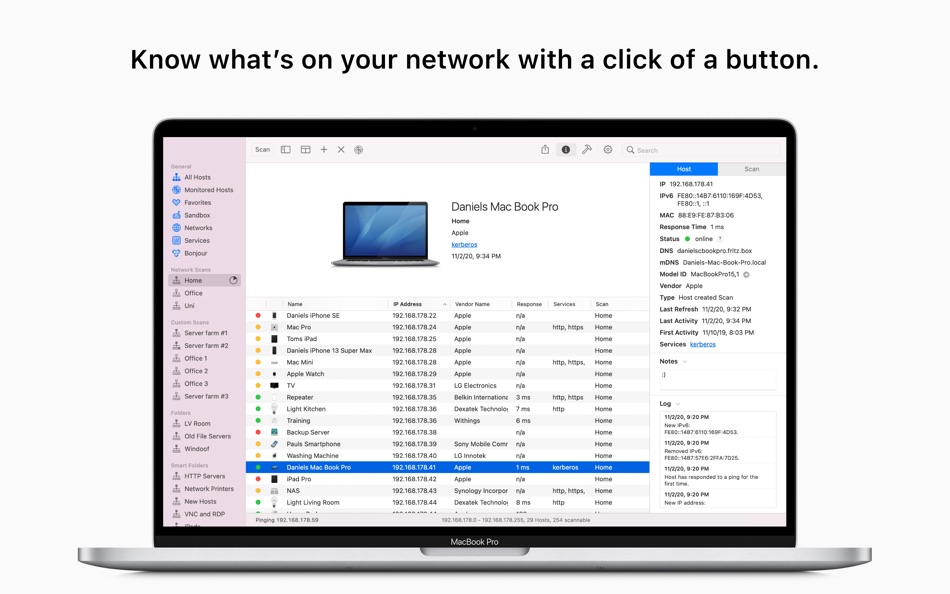
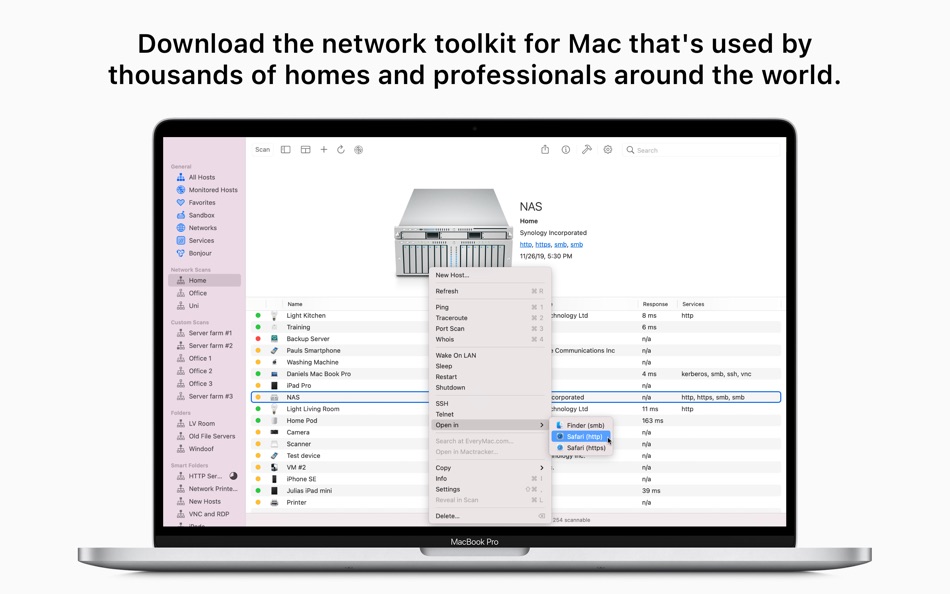
Network Radar is a robust network scanning and management tool accessible to everyone. Easily identify which devices are connected to your network, detect intruders, troubleshoot network issues, and receive notifications about changes.
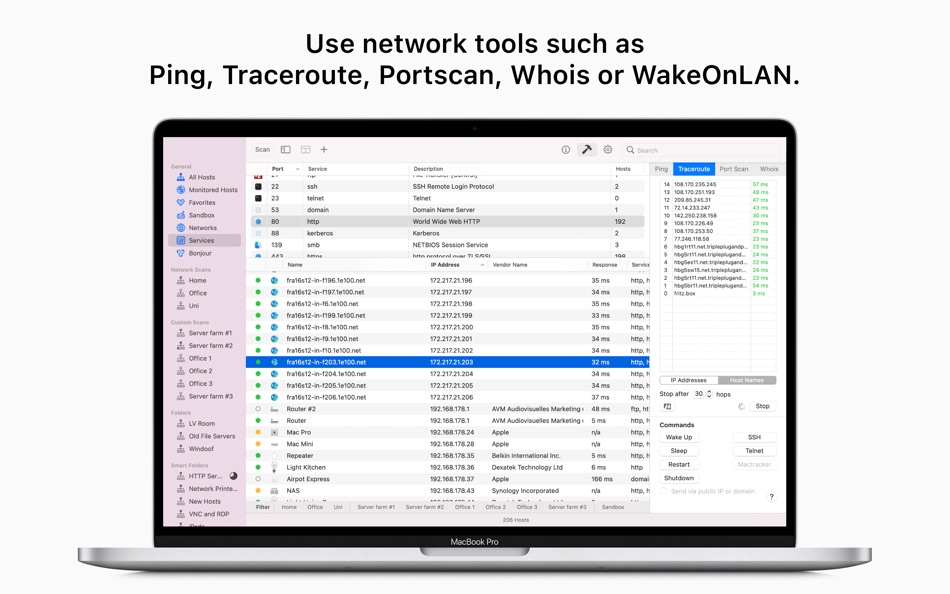
Using Network Radar is as simple as clicking the Scan button—no configuration required. But it’s more than just an IP scanner. Network Radar includes essential network tools such as Ping, Portscan, Traceroute, and Whois. Additionally, you can send commands to your devices with a single click. Utilize Wake On LAN for any compatible device and remotely shut down, restart, or put other Macs to sleep, even if they are outside your local network.
After scanning your network, Network Radar lists all devices, including those that were online before the initial scan. Select a device to view detailed information such as IP, IPv6, and MAC addresses, vendor name, DNS names, mDNS name, NetBIOS name, NetBIOS domain, open ports, response time, and more.
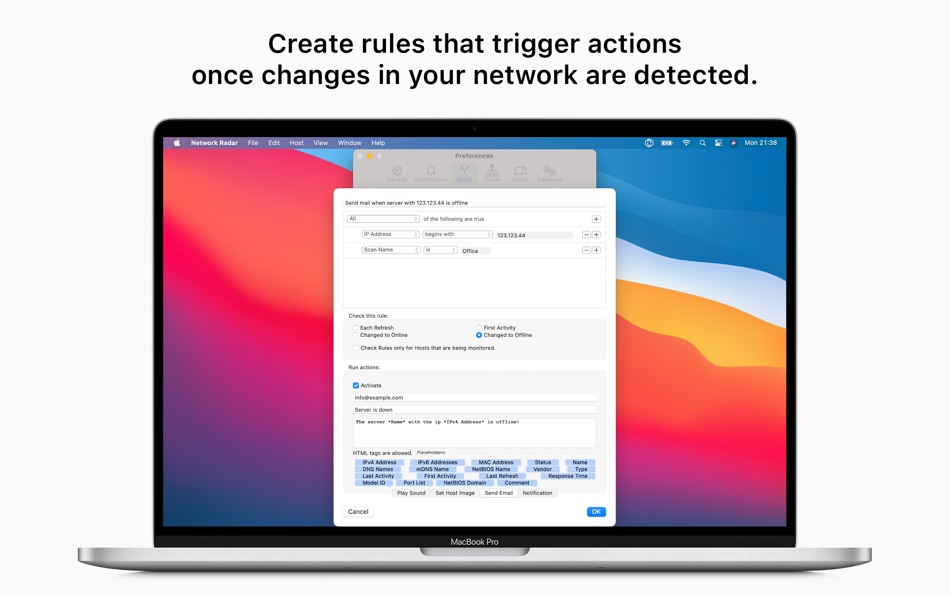
Monitor your network in real-time with Network Radar. It logs all changes, ensuring you always know what happened and when. You can also configure notifications for when a device joins or leaves your network. With customizable rules and actions, Network Radar can send you an email when a specific server goes offline or play a sound when an FTP server appears on your network. The configuration possibilities are endless.
Organize your hosts into folders effortlessly. Want all your iPads in one folder? Simply create a smart folder and let Network Radar handle it. By binding scans to networks, Network Radar always knows if a device is reachable, making it easy to refresh or monitor multiple devices across different networks.
Experience seamless network management with Network Radar.
KEY FEATURES:
Network Radar offers many features in a single, elegant interface. Here are just a few of them:
• Scan your network and retrieve detailed information about network devices
• Run useful network tools and commands with the click of a button
• Monitor devices and get notified about changes in your network
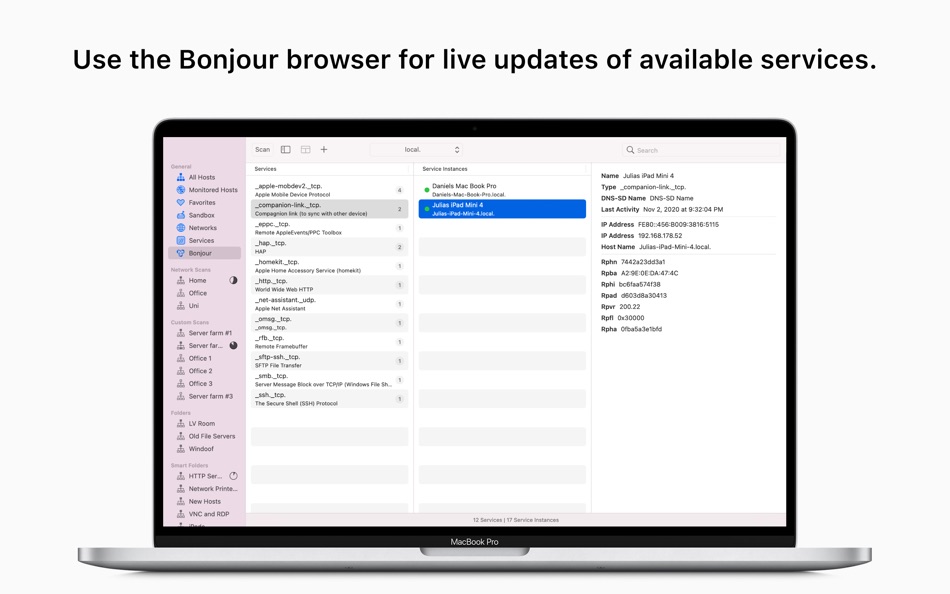
• Discover devices using the integrated Bonjour (mDNS) monitor
• Use the simple rules / actions system for automatic processing of devices
• Establish a connection to a device by simply double-clicking it in the list
• Customise your devices by assigning your own names, icons, type and vendor names
• Organise your hosts in folders and smart folders
• Create scans with custom IP ranges
• Use the bundled Shortcut Actions to create your own workflow
• Export a scan to XML, CSV, TXT, PDF or NETRADR and import back to Network Radar
Please note that the amount of information Network Radar can find depends on the network it scans.
Ad
Screenshot



Novità
- Versione: 3.2
- Aggiornata:
- NEW: The user interface has been updated to make use of new UI elements of macOS 26 Tahoe like the Liquid Glass buttons in the file preview and much more.
NEW: The app icon has been updated to match the new macOS 26 Tahoe style.
NEW: Support for the latest SSH version has been added.
NEW: The scrolling bar is now hidden in the filter bar.
NEW: The new min macOS version is macOS 13.5. (was 12.0 before)
NEW: The services database and MAC database has been updated.
FIX: entering the license code may dod not work under macOS 26
Cronologia dei prezzi
- Oggi: $17.99
- Minimo: $8.99
- Massimo: $29.99
Monitora prezzi
Sviluppatore
- Daniel Witt
- Piattaforme: iOS App (9) macOS App (5)
- Listes: 3 + 7
- Punti: 40 + 352 ¡
- Classificazioni: 1 (2)
- Recensioni: 0
- Commenti: 0
- Sconti: 0
- Video: 0
- RSS: Sottoscrivi
Punti (1)
-

- 320 pantype
- +1

Classificazioni (1)
-
- 106 YH
- 1

Listes (0)
0 ☹️
- Network Radar
Recensioni (0)
Scrivi tu la prima recensione 🌟
Informazioni aggiuntive
Contatti
- Sito web:
 https://witt-software.com/networkradar/
«Network Radar». Piattaforma: macOS. Categoria: Utility. Sviluppatore: «Daniel Witt». Prima uscita: . Ultimo aggiornamento: . Prezzo attuale: $17.99. Prezzo più basso registrato: $8.99 (). Prezzo più alto registrato: $29.99 (). Valutazione AppAgg: 1 / 5. Voti: 1. Punti tracciati: confermati 1, indiretti 0. Lingue disponibili: Chinese, English, French, German, Italian. AppAgg tiene traccia della cronologia dei prezzi, delle valutazioni e del feedback degli utenti per «Network Radar». Segui futuri sconti e aggiornamenti tramite RSS. AppAgg non ospita applicazioni né distribuisce software. Tutti i marchi, loghi e screenshot appartengono ai rispettivi proprietari.
Commenti (0)
Sii il primo a commentare 🌟
Network Radar URL breve: Copiato!- 🌟 Condividi
- Mac App Store
Ad
Ti potrebbero piacere anche
-
- Network Monitoring
- macOS App: Utility di: Khatuli Todua
- $3.99
- Listes: 0 + 0 Classificazioni: 0 Recensioni: 0
- Punti: 0 + 0 Commenti: 0 Versione: 1.2 "Network Monitoring" is your comprehensive solution for seamless network management. Create custom projects, scan IP ranges, and visualize your entire network in an intuitive UML ... ⥯
-
- Network Toolbox - Net Security
- macOS App: Utility di: WHATSTICKER APPS SRL
- * Gratis
- Listes: 0 + 1 Classificazioni: 0 Recensioni: 0
- Punti: 11 + 0 Commenti: 0 Versione: 3.6 The award winning App now available for macOS Everything you need for your Network in one App, fully integrated. Works on all Macs (including M1) running Catalina, Big Sur or Monterey. ⥯
-
- Radar - Metrics with Alerts
- macOS App: Utility di: Ganapathy Sankaran
- * Gratis
- Listes: 1 + 1 Classificazioni: 0 Recensioni: 0
- Punti: 2 + 0 Commenti: 0 Versione: 2.6.10 How about checking important metrics at one place from anywhere in your system? Radar helps you do that with a mouse click or a keyboard shortcut. Threshold desktop notifications can ... ⥯
-
- Network Connection Information
- macOS App: Utility di: Daniel Gauthier
- $4.99
- Listes: 0 + 0 Classificazioni: 0 Recensioni: 0
- Punti: 0 + 0 Commenti: 0 Versione: 26.10 Your Wi-Fi says "connected." But are you on 2.4GHz or 5GHz? Wi-Fi 5 or Wi-Fi 6? What's your actual link speed right now? Network Connection Information lives in your menu bar and shows ⥯
-
- Network Logger IT
- macOS App: Utility di: Lyle Andrews
- $29.99
- Listes: 0 + 1 Classificazioni: 1 (1) Recensioni: 0
- Punti: 1 + 0 Commenti: 0 Versione: 7.23 Network Logger IT has the same features as Network Logger Pro but can also email you reports when device monitoring or internet connection events occur. Network Logger IT will notify ... ⥯
-
- Network Speed Tester
- macOS App: Utility di: Lakehorn AG
- $4.49
- Listes: 1 + 0 Classificazioni: 0 Recensioni: 0
- Punti: 0 + 0 Commenti: 0 Versione: 2.2 Use Network Speed Tester to measure the actual transfer speed of your local wifi or wired network. A graph helps you see changes in realtime. Optimize your wifi network by moving or ... ⥯
-
- Network Light - Speed test
- macOS App: Utility di: Holger Krupp
- $5.99
- Listes: 0 + 1 Classificazioni: 0 Recensioni: 0
- Punti: 8 + 0 Commenti: 0 Versione: 1.0.9 Small menu bar App to regularly perform a speed test and check your network quality. Made for problem solving, not for permanently use. The App allows you to set your maximum network ... ⥯
-
- Network & Battery
- macOS App: Utility di: 奕才 杨
- $4.99
- Listes: 1 + 2 Classificazioni: 0 Recensioni: 0
- Punti: 1 + 0 Commenti: 0 Versione: 13.1.0 Want to see real network speeds, battery health right in Menu Bar? Give this app a try! Many great features and we do not collect any of your informations. Great Features: NETWORK: see ⥯
-
- Network Inspector
- macOS App: Utility di: 建文 田
- Gratis
- Listes: 0 + 1 Classificazioni: 0 Recensioni: 0
- Punti: 2 + 0 Commenti: 0 Versione: 2.2 Very useful Tools. Network Inspector display the current network traffic, including the amount and rate of the receive and send data. When your computer connected the network, you can ... ⥯
-
- Network Booster
- macOS App: Utility di: iBoostUp Pty Ltd
- $4.99
- Listes: 1 + 1 Classificazioni: 0 Recensioni: 0
- Punti: 0 + 0 Commenti: 0 Versione: 1.4 Supercharge your browsing speed with Network Booster for Mac. With Network Booster you're only minutes away from a faster, better browsing experience! None of your personal information ⥯
-
- Network Speed Monitor
- macOS App: Utility di: 方成 印
- $1.99
- Listes: 0 + 0 Classificazioni: 0 Recensioni: 0
- Punti: 0 + 0 Commenti: 0 Versione: 2.7 ON SALE FOR A LIMITED TIME: 50% OFF Network Speed Monitor is a simple and easy-to-use application to display your current network speed in menu bar, including the downloading and ... ⥯
-
- Network Remote for TiVo for Mac OS X
- macOS App: Utility di: William Mcbrine
- Gratis
- Listes: 0 + 0 Classificazioni: 0 Recensioni: 0
- Punti: 0 + 0 Commenti: 0 Versione: 0.31 A virtual TiVo remote control for your computer, for Series 3 TiVos and up. Controllable TiVos on your network are detected automatically, when possible; or you can specify an address. ⥯
-
- Stats Easy-CPU,Network,Battery
- macOS App: Utility di: Lightning Network
- $0.99
- Listes: 0 + 0 Classificazioni: 0 Recensioni: 0
- Punti: 0 + 0 Commenti: 0 Versione: 7 Tiny size:968 KB. Big fun. Goodbye boring numbers! Let cute animals show your network speed. 【Unique Feature】 Cheetah Rabbit Antelope Horse Lion Five adorable animals run in your menu ... ⥯
-
- Network Flow
- macOS App: Utility di: 波 冯
- Gratis
- Listes: 0 + 0 Classificazioni: 0 Recensioni: 0
- Punti: 0 + 0 Commenti: 0 Versione: 1.0 NetFlow is a lightweight network speed monitoring tool designed exclusively for macOS, keeping you informed about your network status at all times. Key Features Real-time upload and ... ⥯