
| ผู้พัฒนา: | Sai Praneeth (12) | ||
| ราคา: | $3.99 | ||
| การจัดอันดับ: | 0 | ||
| ความเห็น: | 0 เขียนความเห็น | ||
| รายการ: | 0 + 0 | ||
| แต้มแล: | 0 + 0 ¡ | ||
| Mac App Store | |||
คำอธิบาย

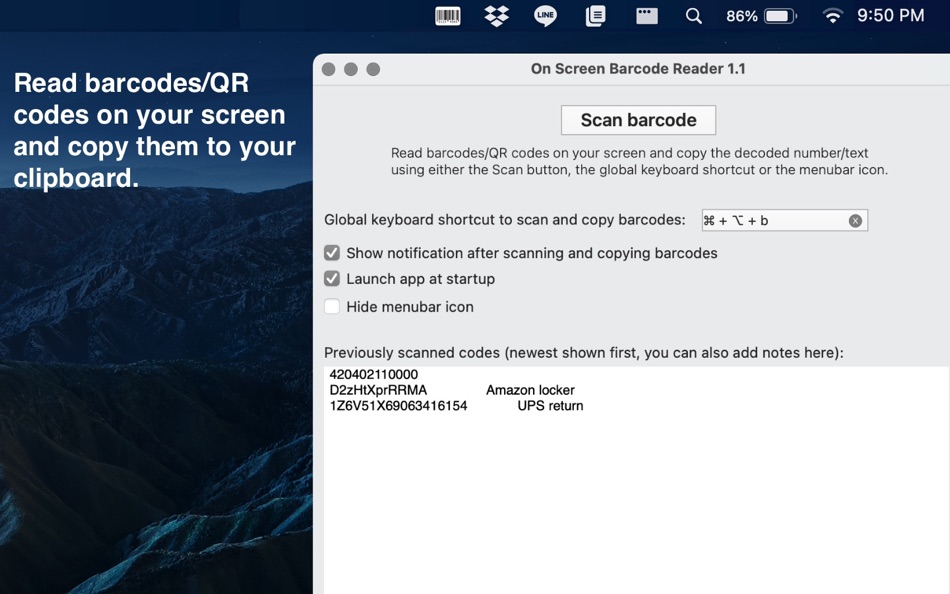
Note: The app supports reading the following industry standard barcodes
- PDF417
- QR
- UPC
- Code128
- Aztec
- Code39
- Code93/i
- DataMatrix
- EAN8/13
- I2of5
- ITF14
ภาพหน้าจอ
มีอะไรใหม่
- เวอร์ชัน: 1.2
- อัปเดต:
ราคา
- วันนี้: $3.99
- ต่ำสุด: $3.99
- มากที่สุด: $3.99
ติดตามราคา
ผู้พัฒนา
แต้มแล
0 ☹️
การจัดอันดับ
0 ☹️
รายการ
0 ☹️
ความเห็น
แสดงรีวิวเป็นคนแรกเลย 🌟
ข้อมูลเพิ่มเติม
On Screen Barcode Reader URL แบบสั้น: คัดลอกแล้ว!- 🌟 แชร์
- Mac App Store
คุณอาจชอบ
-
- Barcode Generator · CreateCode
- macOS แอป: ยูทิลิตี้ โดย: Xi'an 7kit Technology Co., Ltd.
- $0.99
- รายการ: 0 + 0 การจัดอันดับ: 0 ความเห็น: 0
- แต้มแล: 0 + 0 เวอร์ชัน: 26 Barcode Generator is an efficient and convenient tool for creating barcodes. It supports batch generation, features a simple operation, and can meet users' needs for large-scale and ... ⥯
-
- Barcode Express
- macOS แอป: ยูทิลิตี้ โดย: Efrain Garcia Rocha
- $9.99
- รายการ: 0 + 0 การจัดอันดับ: 0 ความเห็น: 0
- แต้มแล: 0 + 0 เวอร์ชัน: 1.10.02 Barcode Express es la forma más rápida, sencilla y elegante de generar códigos de barras en macOS. Diseñada para uso comercial o personal, esta app combina velocidad, ligereza y una ... ⥯
-
- Screen Guard
- macOS แอป: ยูทิลิตี้ โดย: Life Changing AI LLC
- ฟรี
- รายการ: 0 + 0 การจัดอันดับ: 0 ความเห็น: 0
- แต้มแล: 0 + 0 เวอร์ชัน: 1.2 Screen Guard keeps your private windows out of sight the moment you start screen mirroring or connect an external monitor or unlock your Mac so you can focus on your presentation ... ⥯
-
- Screen Shader for Safari
- macOS แอป: ยูทิลิตี้ โดย: Alfredo Grassau
- $2.99
- รายการ: 0 + 0 การจัดอันดับ: 0 ความเห็น: 0
- แต้มแล: 0 + 2 (5.0) เวอร์ชัน: 1.0.6 Screen Shader for Safari applies a color tint to any website, making it easier to read, especially at night. Here s what our safari extension offers: Features: · Color tint overlay: ... ⥯
-
- Reader | Basic
- macOS แอป: ยูทิลิตี้ โดย: The Augmented Text Company LTD
- ฟรี
- รายการ: 1 + 1 การจัดอันดับ: 0 ความเห็น: 0
- แต้มแล: 4 + 0 เวอร์ชัน: 4.6 Free version of the full Reader. Minimalist design with powerful tools for reading, particularly academic documents: Select text and cmd-F to see only the sentences in the document ... ⥯
-
- Barcode Server for Mac OS X
- macOS แอป: ยูทิลิตี้ โดย: Roberto Sonzogni
- ฟรี
- รายการ: 0 + 0 การจัดอันดับ: 0 ความเห็น: 0
- แต้มแล: 0 + 0 เวอร์ชัน: 1.0 NEW VERSION OF THIS APP CAN BE DOWNLOADED HERE: http://www.pw2.it/macOS/Barcode%20Server.dmg added a new option so now you can make app type the received data in your favourite ... ⥯
-
- Screen Expander
- macOS แอป: ยูทิลิตี้ โดย: Vitalii Vashchenko
- $6.99
- รายการ: 0 + 0 การจัดอันดับ: 0 ความเห็น: 0
- แต้มแล: 0 + 0 เวอร์ชัน: 1.3.2 Let the display of your MacBook to automatically adjust to the apps you're using. Screen Expander is not a resolution switcher even though it can be used as one. It was designed as a ... ⥯
-
- Screen Replay - 屏幕回放
- macOS แอป: ยูทิลิตี้ โดย: 冰心 李
- $0.99
- รายการ: 0 + 0 การจัดอันดับ: 0 ความเห็น: 0
- แต้มแล: 0 + 0 เวอร์ชัน: 1.0.8 Always On, Always Ready Screen Replay is a revolutionary app that transforms your screen into a powerful memory tool. With a single click, you can rewind and instantly replay the last ... ⥯
-
- Screen Annotation+
- macOS แอป: ยูทิลิตี้ โดย: 金玲 李
- $0.99
- รายการ: 1 + 0 การจัดอันดับ: 0 ความเห็น: 0
- แต้มแล: 8 + 0 เวอร์ชัน: 3.0.2 Screen Annotation+ is a lightweight but powerful screen annotation tool, especially suitable for users who need to frequently perform screen annotation and demonstration. It has the ... ⥯
-
- Screen Mirror
- macOS แอป: ยูทิลิตี้ โดย: 代莉 陈
- $4.99
- รายการ: 2 + 1 การจัดอันดับ: 0 ความเห็น: 0
- แต้มแล: 0 + 0 เวอร์ชัน: 4.0 Screen Mirror is the simplest and easiest way to capture, edit and share your iDevice's screen with friends. Screen Mirror is the most powerful app for mirroring and display your ... ⥯
-
- Screen Brush Ultra
- macOS แอป: ยูทิลิตี้ โดย: 君 许
- * ฟรี
- รายการ: 1 + 0 การจัดอันดับ: 0 ความเห็น: 0
- แต้มแล: 2 + 0 เวอร์ชัน: 7.1 Screen Brush Ultra is a useful utility which allows you to draw and write directly on your desktop above all of your running application windows. It is a tool which designed for ... ⥯
-
- Screen Recorder - App Recorder
- macOS แอป: ยูทิลิตี้ โดย: 裕涛 兰
- ฟรี
- รายการ: 1 + 0 การจัดอันดับ: 0 ความเห็น: 0
- แต้มแล: 2 + 0 เวอร์ชัน: 1.0.10 Screen Recorder is a powerful Mac screen recording software that allows you to record any on-screen activity in high definition. Features: - Record system sound - Record screen - ... ⥯
-
- Screen Recorder - RecordX
- macOS แอป: ยูทิลิตี้ โดย: 哲 魏
- ฟรี
- รายการ: 0 + 0 การจัดอันดับ: 0 ความเห็น: 0
- แต้มแล: 2 + 404 (4.5) เวอร์ชัน: 3.5 Screen Recorder - RecordX is a powerful professional recording application, including high-definition screen recording up to 4K resolution 60 frames, camera recording & voice ... ⥯
-
- Screen Annotation
- macOS แอป: ยูทิลิตี้ โดย: Nguyen Vu
- ฟรี
- รายการ: 1 + 0 การจัดอันดับ: 0 ความเห็น: 0
- แต้มแล: 1 + 0 เวอร์ชัน: 1.0 Screen Annotation, Drawing Desktop or Presentation Annotation You can draw line, arrow, rectangle, circle on Desktop Screen to help describe you presentation effectively and clearly. ... ⥯