
| ผู้พัฒนา: | Phil Trevor (30) | ||
| ราคา: | ฟรี | ||
| การจัดอันดับ: | 0 | ||
| ความเห็น: | 0 เขียนความเห็น | ||
| รายการ: | 0 + 0 | ||
| แต้มแล: | 0 + 0 ¡ | ||
| Mac App Store | |||
คำอธิบาย

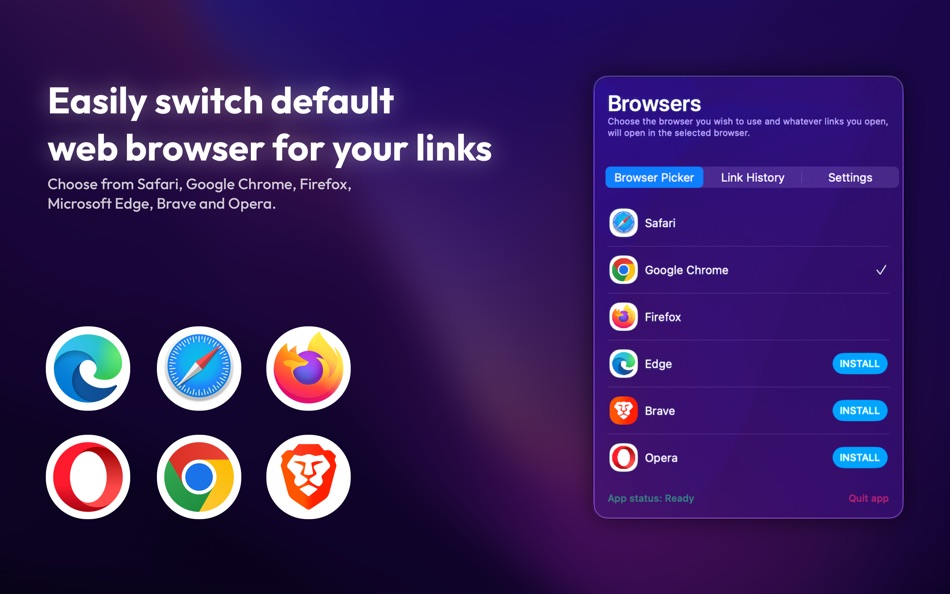
OpenWith: Link Browser Picker transforms the way you open links on your Mac. Normally, links launch in your default browser—but with OpenWith, you can quickly pick the browser you want, every time.
Key Features:
• Menu Bar Convenience – Quick access from your menu bar.
• Browser Selection Made Easy – Open links in Safari, Chrome, Firefox, Brave, Edge, Opera, or any other browser installed on your Mac.
• Fast & Effortless – Switch between browsers in seconds without opening additional apps.
• Completely Free – All features available with no hidden costs or subscriptions.
Whether you’re testing websites, managing multiple accounts, or just prefer different browsers for different tasks, OpenWith: Browser Picker makes it fast and effortless.
Disclaimer:
OpenWith: Browser Picker is an independent macOS app. It is not affiliated with, endorsed by, or connected to any web browsers including Google Chrome, Safari, Mozilla Firefox, Opera, Brave, or Microsoft Edge. All trademarks and logos are the property of their respective owners.
Download OpenWith: Browser Picker now and take full control of your browsing experience on macOS—fast, free, and simple.
ภาพหน้าจอ


มีอะไรใหม่
- เวอร์ชัน: 1.2
- อัปเดต:
- Thanks for using OpenWith, version 1.2 brings exciting new features:
- Fixed bug where app did not support light mode
- Added ‘links’ menu to contact developer.
If you have any problems or questions, get in touch at hello@appbypt.xyz.
ราคา
- วันนี้: ฟรี
- ต่ำสุด: ฟรี
- มากที่สุด: ฟรี
ติดตามราคา
ผู้พัฒนา
แต้มแล
0 ☹️
การจัดอันดับ
0 ☹️
รายการ
0 ☹️
ความเห็น
แสดงรีวิวเป็นคนแรกเลย 🌟
ข้อมูลเพิ่มเติม
OpenWith: Link Browser Picker URL แบบสั้น: คัดลอกแล้ว!- 🌟 แชร์
- Mac App Store
คุณอาจชอบ
-
- Open With -Browser/Mail picker
- macOS แอป: ยูทิลิตี้ โดย: Sai Praneeth
- $4.99
- รายการ: 1 + 1 การจัดอันดับ: 0 ความเห็น: 0
- แต้มแล: 0 + 0 เวอร์ชัน: 2.1 Use more than one web browser? Tired of opening links with your default browser? Open With lets you choose between the installed browsers and email clients on your Mac when you try to ... ⥯
-
- Open Any File
- macOS แอป: ยูทิลิตี้ โดย: Rocky Sand Studio Ltd.
- ฟรี
- รายการ: 4 + 1 การจัดอันดับ: 0 ความเห็น: 0
- แต้มแล: 5 + 0 เวอร์ชัน: 1.2.6 Open Any File shows compatible apps installed on your Mac and helps you to search on the web with the click of a button Open Any File also shows advanced information about your files: ... ⥯
-
- Browser Care
- macOS แอป: ยูทิลิตี้ โดย: Giovanni Maria Cusaro
- ฟรี
- รายการ: 0 + 0 การจัดอันดับ: 0 ความเห็น: 0
- แต้มแล: 3 + 0 เวอร์ชัน: 4.1.8 Hundreds of users have chosen the Pro Version! Thanks to all! The perfect app to take care your browsers and free up space. Browser Care keeps your browsers clean and under control ... ⥯
-
- Link to APP
- macOS แอป: ยูทิลิตี้ โดย: Lukas Reichart
- $6.99
- รายการ: 0 + 0 การจัดอันดับ: 0 ความเห็น: 0
- แต้มแล: 0 + 0 เวอร์ชัน: 1.3 Entdecke die revolutionäre "Link to App" - Dein Tor zur digitalen Welt! Bist du bereit, dein Surferlebnis auf ein ganz neues Level zu bringen? Mit "Link to App" kannst du jetzt deine ... ⥯
-
- Link Gopher - extract URL
- macOS แอป: ยูทิลิตี้ โดย: Pierre Stanislas
- $2.99
- รายการ: 0 + 0 การจัดอันดับ: 0 ความเห็น: 0
- แต้มแล: 1 + 0 เวอร์ชัน: 1.0 Streamline your web research and content curation with Link Gopher, the powerful Safari extension that instantly extracts and organizes all links from any webpage. Perfect for ... ⥯
-
- Browser Jumper
- macOS แอป: ยูทิลิตี้ โดย: 亦伦 谢
- $0.99
- รายการ: 0 + 0 การจัดอันดับ: 0 ความเห็น: 0
- แต้มแล: 0 + 0 เวอร์ชัน: 1.1 Add the Browser Jump icon to your Safari toolbar, and with a single click on the icon while browsing any webpage, you can switch that webpage to display in Chrome. ⥯
-
- Browser Note
- macOS แอป: ยูทิลิตี้ โดย: Dodo Apps
- $1.99
- รายการ: 1 + 4 การจัดอันดับ: 0 ความเห็น: 0
- แต้มแล: 3 + 4 (5.0) เวอร์ชัน: 1.2 Browser Note lets you add reminders and notes to webpages. Whether you're trying to break the habit of social media or remind yourself to order less from your local takeaway, Browser ... ⥯
-
- Link Unshortener
- macOS แอป: ยูทิลิตี้ โดย: Jeff Johnson
- $7.99
- รายการ: 1 + 2 การจัดอันดับ: 0 ความเห็น: 0
- แต้มแล: 2 + 0 เวอร์ชัน: 19.7 Link Unshortener expands shortened web links, following redirects until it reveals the destination URL. Never again click a link before you know where it's going! Made by indie ... ⥯
-
- Open Nettest Dekstop
- macOS แอป: ยูทิลิตี้ โดย: SPECURE GmbH
- ฟรี
- รายการ: 0 + 0 การจัดอันดับ: 0 ความเห็น: 0
- แต้มแล: 0 + 0 เวอร์ชัน: 1.0 Open Nettest is an independent and transparent tool for measurement of the Internet connection in fixed and WiFi networks. It has a strong focus on quality and reliability of the ... ⥯
-
- Browser Wall
- macOS แอป: ยูทิลิตี้ โดย: Yukiya Okuda
- * ฟรี
- รายการ: 0 + 0 การจัดอันดับ: 0 ความเห็น: 0
- แต้มแล: 0 + 0 เวอร์ชัน: 1.3 "Browser Wall" allows you to display any URL in full-screen easily. Equipped with features optimized for digital signage and information displays, it ensures smooth operation. Key ... ⥯
-
- Open Spoken
- macOS แอป: ยูทิลิตี้ โดย: Tal Aviram
- ฟรี
- รายการ: 0 + 0 การจัดอันดับ: 0 ความเห็น: 0
- แต้มแล: 1 + 0 เวอร์ชัน: 1.0.3 Open Spoken is an open-source app to transcribe audio from the microphone into text. It's designed to help communicating with the hearing impaired by showing transcribed text on the ... ⥯
-
- Open in Incognito
- macOS แอป: ยูทิลิตี้ โดย: Noizy
- $0.99
- รายการ: 0 + 0 การจัดอันดับ: 0 ความเห็น: 0
- แต้มแล: 0 + 0 เวอร์ชัน: 1.0 Open the current website in a new incognito window. ⥯
-
- Link HUB Lock Screen Widgets
- macOS แอป: ยูทิลิตี้ โดย: Cesare Forelli
- ฟรี
- รายการ: 1 + 1 การจัดอันดับ: 0 ความเห็น: 0
- แต้มแล: 3 + 18 (4.3) เวอร์ชัน: 2.2 Links are powerful: they open websites, allow to launch apps and Shortcuts, call friends and trigger any kind of automation. If something has a URL, Link HUB can give you a button, ... ⥯
-
- Open In Webmail
- macOS แอป: ยูทิลิตี้ โดย: Fred Potter
- $1.99
- รายการ: 0 + 1 การจัดอันดับ: 0 ความเห็น: 0
- แต้มแล: 1 + 0 เวอร์ชัน: 1.4 A fantastically simple tool to make email links open to your webmail service of choice. If you're frustrated that Apple Mail opens every time you click an email address in your web ... ⥯