
| Udvikler: | Ruizheng Liu (15) | ||
| Pris: | $14.99 | ||
| Rangeringer: | 0 | ||
| Anmeldelser: | 0 Skriv en anmeldelse | ||
| Kommentarer: | 0 Skriv kommentar | ||
| Lister: | 0 + 0 | ||
| Point: | 0 + 0 ¡ | ||
| Mac App Store | |||
Beskrivelse

==========
1. PDF± never change your original PDF document.
2. Batch merge multiple PDF files with drag & drop support.
3. Flexible ways to split PDF files:
Split to multiple single page files;
Split to two files with odd/even pages;
Split from any page;
Split to any parts;
4. Extract pages in multiple methods:
Extract single page or range of pages;
Extract duplicate pages with page numbers 1, 1, 6, 6;
Extract inverse pages with page number like 99-1;
5. Remove any single page or range of pages
6. Encrypt PDF document with password protection
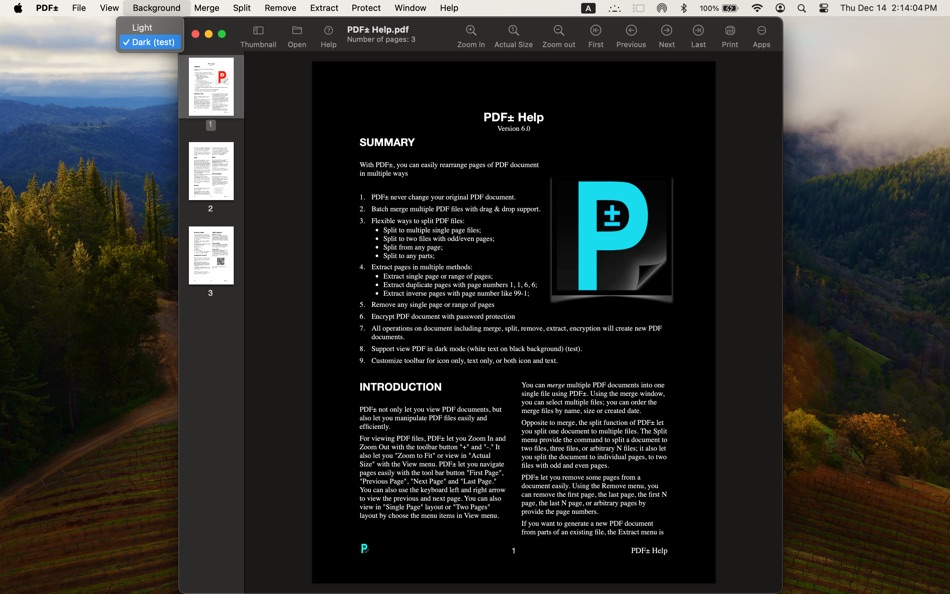
7. Support view PDF in dark mode (white text on black background) (test).
8. Customize toolbar for icon only, text only, or both icon and text.
VIEW
====
Zoom In, Zoom Out, Zoom to Fit, or view Actual Size with the View menu.
Navigate to First Page, Previous Page, Next Page and Last Page.
View in "Single Page" layout or "Two Pages" layout.
MERGE
=======
You can merge multiple PDF documents into one single file using PDF±.
To merge multiple files together, go to Merge > Merge PDF files. You can also click on “Merge PDF Documents” on the Welcome window when you first open the app. A new merge window will then appear, and you can click the "+" button to add PDF files or simply drag and drop the files you want to merge into the window. To delete a file, simply click to highlight the file and click the “-“ button. The order of the documents in the final merged file is identical to that displayed in the merge window (you can sort the files by file name, file size or last modified date).
SPLIT
=====
The split function of PDF± let you split a PDF document into multiple files. Click Split > before/after page allows you to split a document before page X or after page X.
You can also split a document into two files, three files, or arbitrary N files by input the number of files. PDF± will try to separate the pages evenly to multiple files.
You can also split a document so that each individual page is a separate file. In addition, you can split a document into two with odd and even pages.
REMOVE PAGES
===============
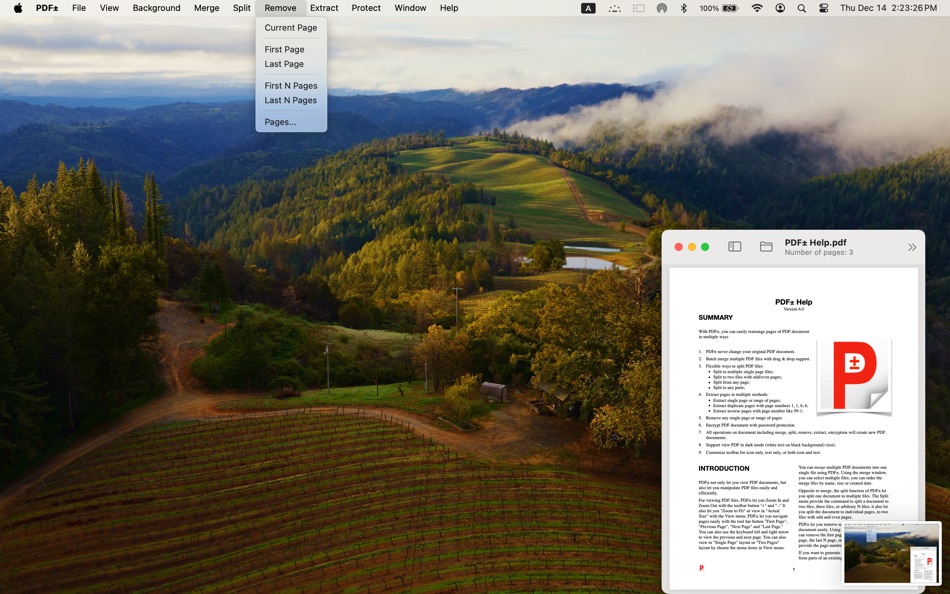
PDF± let you remove pages from a document easily. Using the Remove menu, you can remove the first page, the last page, the first N page, the last N page, or arbitrary pages that you specify by providing the page numbers.
When you click Remove > Pages..., a dialog box will appear let you type the pages or range of pages to remove. You can type the page or range of pages in variant ways. Here are some examples:
1,2,3,10: page 1,2,3,10.
1,4-6: page 1,4,5,6.
1-3,5-7: page 1,2,3,5,6,7.
-5: page 1,2,3,4,5.
50-: page 50 to last page.
EXTRACT PAGES
===============
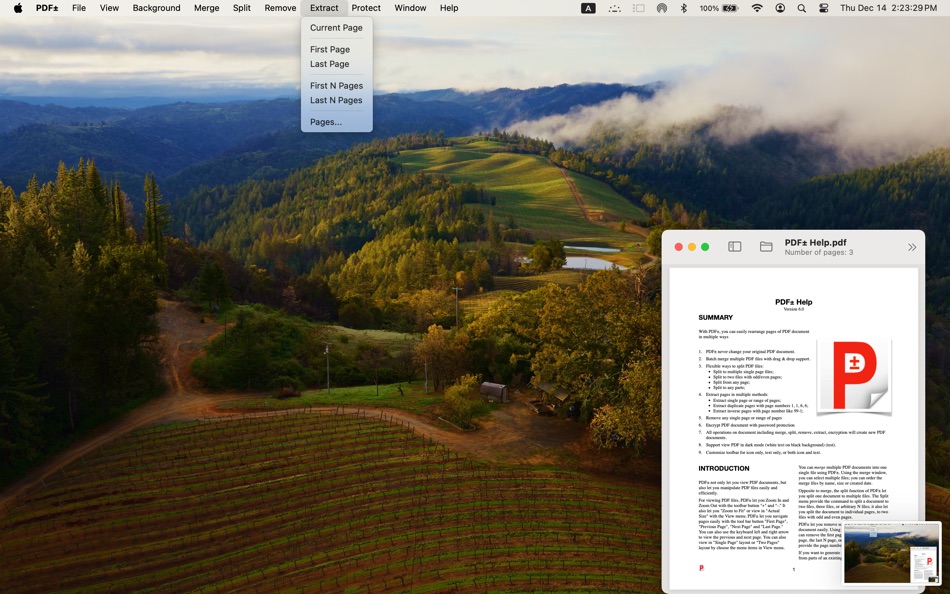
If you want to generate a new PDF document from parts of an existing file, the Extract menu is for you. With Extract, you can create a new PDF file using the first page, the last page, the first N pages, the last N pages, or any pages by provide the page numbers.
By clicking the "Page..." menu item, a dialog box will appear let you type the pages or range of pages to extract.
You can type the page or range of pages in variant ways. Here are some examples:
1,2,3,10: page 1,2,3,10.
1,4-6: page 1,4,5,6.
1-3,5-7: page 1,2,3,5,6,7.
-5: page1,2,3,4,5.
50-: Page 50 to last page.
1,1,,3-5: page 1,1,3,4,5 (yes, pages 1 duplicate)
5-1: page 5,4,3,2,1 (yes, inverse order)
PASSWORD PROTECT
====================
PDF± can also protect your PDF document with encryption by password. You can also remove the encryption if you know the password of a PDF document.
After clicking Protect > Encrypt with Password, a dialog box will appear to type the password. You need to type the password twice and they must be identical, or you will get the error message.
Clicking Protect > Remove Password will also let you remove the encryption of a PDF file if you know the password.
Ad
Skærmbilleder






Prishistorie
- I dag: $14.99
- Minimum: $9.99
- Maksimalt: $14.99
Overvåg priser
Udvikler
- Ruizheng Liu
- Platforme: iOS Apps (11) macOS Apps (4)
- Lister: 0 + 0
- Point: 1 + 5 ¡
- Rangeringer: 0
- Anmeldelser: 0
- Kommentarer: 0
- Rabatter: 0
- Videoer: 0
- RSS: Abonner
Point (0)
0 ☹️
Rangeringer (0)
0 ☹️
Lister (0)
0 ☹️
- PDF±
Anmeldelser (0)
Vær den første til at gennemgå 🌟
Yderligere oplysninger
- Version: 6.0
- Kategori:
macOS Apps›Hjælpeprogrammer - Operativsystem:
macOS,macOS 11.0 eller nyere - Størrelse:
1 Mb - Understøttet sprog:
English - Indholdsklassificering:
4+ - Mac App Store Bedømmelse:
0 - Opdateret:
- Udgivelsesdato:
«PDF±». Platform: macOS. Kategori: Hjælpeprogrammer. Udvikler: «Ruizheng Liu». Første udgivelse: . Sidste opdatering: . Nuværende pris: $14.99. Laveste registrerede pris: $9.99 (). Højeste registrerede pris: $14.99 (). Denne titel har endnu ikke modtaget vurderinger eller anmeldelser på AppAgg. Tilgængelige sprog: English. AppAgg sporer prishistorik, vurderinger og brugerfeedback for «PDF±». Følg fremtidige rabatter og opdateringer via RSS. AppAgg hoster ikke applikationer eller distribuerer software. Alle varemærker, logoer og skærmbilleder tilhører deres respektive ejere.
Kommentarer (0)
Vær den første til at kommentere 🌟
PDF± Kort webadresse: Kopieret!- 🌟 Del
- Mac App Store
Ad
Lignende
-
- PDF Reader Pro: Convert & Edit
- macOS Apps: Hjælpeprogrammer Ved: PDF Technologies, Inc.
- * Gratis
- Lister: 0 + 0 Rangeringer: 0 Anmeldelser: 0
- Point: 3 + 0 Kommentarer: 0 Version: 5.2.2 PDF Reader Pro, available on Mac, iPad, and iPhone, fulfills all your document needs across platforms. Building on features like AI tools, comment, text and image edit, merge, ... ⥯
-
- PDF Split-Page Number Split
- macOS Apps: Hjælpeprogrammer Ved: 崴 杨
- * Gratis
- Lister: 0 + 0 Rangeringer: 0 Anmeldelser: 0
- Point: 0 + 0 Kommentarer: 0 Version: 1.1.5 "PDF Split" can split PDF files in batches. Support splitting all pages of PDF files and save all pages separately. Support page number input, you can input a certain page or ... ⥯
-
- PDF Protector
- macOS Apps: Hjælpeprogrammer Ved: Daniel Witt
- $9.99
- Lister: 0 + 2 Rangeringer: 1 (1) Anmeldelser: 0
- Point: 0 + 0 Kommentarer: 0 Version: 1.6 PDF Protector is an easy-to-use tool to encrypt or decrypt your PDF documents. Set a password and let PDF Protector encrypt your documents to hinder others from opening it. You can ... ⥯
-
- PDF Edit & View
- macOS Apps: Hjælpeprogrammer Ved: 仁超 张
- Gratis
- Lister: 0 + 1 Rangeringer: 0 Anmeldelser: 0
- Point: 1 + 0 Kommentarer: 0 Version: 8.2.3 PDF Edit & View is a versatile all-in-one software solution designed to meet users' needs for a seamless experience of browsing and editing PDF documents. This tool combines an ... ⥯
-
- PDF Lock
- macOS Apps: Hjælpeprogrammer Ved: Joaquin Garcia
- $1.99
- Lister: 0 + 0 Rangeringer: 0 Anmeldelser: 0
- Point: 0 + 0 Kommentarer: 0 Version: 1.0.4 PDF Lock: Simple and Secure Protection for Your Documents Instant Protection: PDF Lock offers you a quick and hassle-free way to secure your PDF files. With our intuitive drag-and-drop ⥯
-
- PDF Metadata Editor
- macOS Apps: Hjælpeprogrammer Ved: Matusalem Marques
- $3.99
- Lister: 0 + 0 Rangeringer: 0 Anmeldelser: 0
- Point: 0 + 0 Kommentarer: 0 Version: 1.11 PDF Metadata Editor lets you gain control of the hidden metadata on your PDF files. Metadata helps your computer find documents for you, both in your system and online. Metadata is ... ⥯
-
- PDF Compressor - Reduce Sizes
- macOS Apps: Hjælpeprogrammer Ved: Cleverson
- * Gratis
- Lister: 0 + 0 Rangeringer: 0 Anmeldelser: 0
- Point: 0 + 0 Kommentarer: 0 Version: 1.0.1 PDF Compressor helps you dramatically reduce PDF file size while keeping your documents readable and sharp. It s built for fast, local processing on macOS, perfect for email ... ⥯
-
- PDF Pro Editor
- macOS Apps: Hjælpeprogrammer Ved: Alex Gameli Heyman
- Gratis
- Lister: 0 + 0 Rangeringer: 0 Anmeldelser: 0
- Point: 3 + 0 Kommentarer: 0 Version: 1.0.2 Introducing our powerful PDF Editor app that lets you edit, annotate, and manage your PDF documents on-the-go! With a user-friendly interface and a wide range of features, our app is ... ⥯
-
- PDF Converter: Reader & Editor
- macOS Apps: Hjælpeprogrammer Ved: Maham Naeem
- * Gratis
- Lister: 0 + 0 Rangeringer: 0 Anmeldelser: 0
- Point: 0 + 0 Kommentarer: 0 Version: 1.8 All-in-One PDF Converter, Reader Easily convert your documents and images with our powerful PDF Converter, Reader app! Supporting a wide range of formats, this app enables seamless ... ⥯
-
- PDF & Doc Image Extractor
- macOS Apps: Hjælpeprogrammer Ved: 论 李
- $0.99
- Lister: 0 + 0 Rangeringer: 0 Anmeldelser: 0
- Point: 0 + 0 Kommentarer: 0 Version: 1.0 Extract images from your PDF, Word, PPT, and Excel files with ease! Simply click or drag a document into the app, wait for the extraction to finish, and select the images you want to ... ⥯
-
- PDF to Image Converter Expert
- macOS Apps: Hjælpeprogrammer Ved: 路 张
- Gratis
- Lister: 0 + 1 Rangeringer: 0 Anmeldelser: 0
- Point: 1 + 0 Kommentarer: 0 Version: 3.1.0 PDF to Image Converter Expert is a program that is developed for converting PDF to image.The program can convert PDF to JPEG, GIF, PNG, BMP, TIFF. It also supports extract images from ... ⥯
-
- PDF Form Filler
- macOS Apps: Hjælpeprogrammer Ved: 科 姚
- $3.99
- Lister: 0 + 0 Rangeringer: 0 Anmeldelser: 0
- Point: 0 + 0 Kommentarer: 0 Version: 3.3 PDF Form Filler is an easy app where you can fill out PDF forms effortlessly. Your PDF is not an interactive PDF form? Don't worry. With PDF Form Filler, you can easily fill out forms ... ⥯
-
- PDF Merge+Split
- macOS Apps: Hjælpeprogrammer Ved: 群群 刘
- $1.99
- Lister: 0 + 0 Rangeringer: 0 Anmeldelser: 0
- Point: 0 + 0 Kommentarer: 0 Version: 1.1.0 PDF Merge+Split: the best tool to merge multiple PDF files into one PDF, split a PDF to multiple PDF files, reorder the pages of a PDF, keep or remove the specified pages of a PDF. KEY ⥯
-
- PDF Professional-Annotate,Sign
- macOS Apps: Hjælpeprogrammer Ved: Build to Connect, Inc.
- Gratis
- Lister: 0 + 1 Rangeringer: 0 Anmeldelser: 0
- Point: 4 + 0 Kommentarer: 0 Version: 2.10.0 PDF Professional is a feature-rich PDF Ultimate Solution for reading, annotating, form filling, editing, signing, and converting PDFs on your Mac, iPhone and iPad. PDF Professional ... ⥯