
| 개발자: | Pierre Stanislas (66) | ||
| 가격: | $2.99 | ||
| 순위: | 0 | ||
| 리뷰: | 0 리뷰 작성 | ||
| 목록: | 0 + 0 | ||
| 포인트: | 0 + 0 ¡ | ||
| Mac App Store | |||
기술

Built with Apple-native technologies, ThinPDF delivers fast, reliable performance and a beautiful, intuitive interface designed for macOS. Whether you’re managing a single file or compressing in bulk, ThinPDF simplifies the process with drag-and-drop ease and customizable settings.
** Key Features **
• Advanced Image Optimization
- Downsample high-resolution images
- Recompress JPEGs with adjustable quality settings
- Convert non-JPEG formats (e.g., PNG) to JPEG
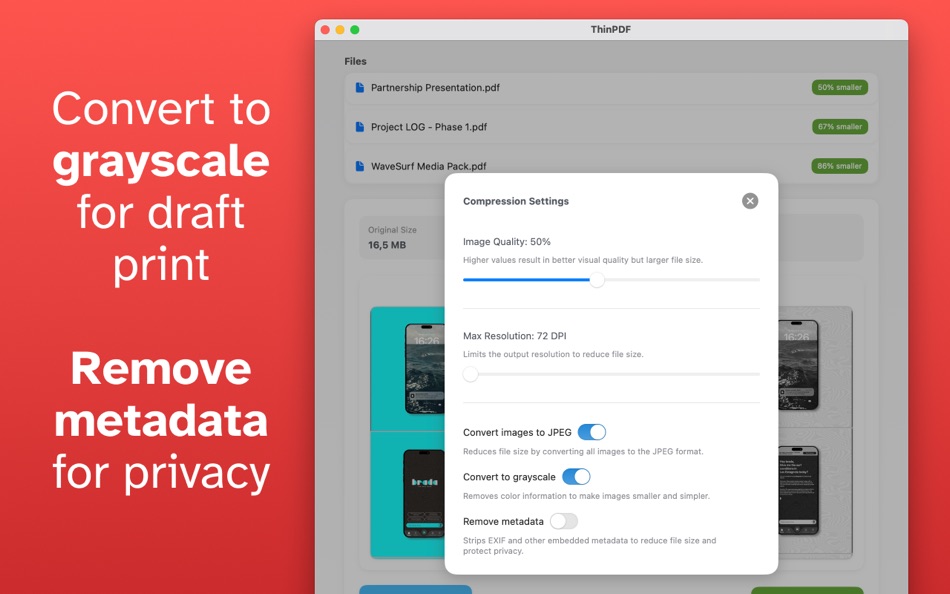
- Optional grayscale conversion for further size reduction
• Compression Settings Panel
- Fine-tune image quality (0–100 scale)
- Set maximum resolution by DPI or pixel size
- Toggle image format conversion
- Strip or retain PDF metadata (author, title, etc.)
• Live Preview and Comparison
- Instantly see original vs. compressed file sizes
- Thumbnail previews to compare before and after
- Real-time estimates of compression gains
• Simple Drag-and-Drop Interface
- Drop one or multiple PDF files into the app window
- Automatic file queue and processing
• Batch Processing Support
- Apply consistent compression settings across multiple PDFs
- Ideal for archiving, emailing, or uploading document collections
• Preserve Structure and Readability
- Maintain document layout, fonts, and accessibility
- Focused compression on images only—text and structure remain untouched
Why Choose ThinPDF?
• Native macOS experience with seamless performance
• Clean, modern interface built for usability
• Total control over compression quality and behavior
• Perfect for reducing file sizes for email, web upload, or storage
Take control of your PDF file sizes without the clutter or complexity. Whether you need to shrink a few documents or process large batches, ThinPDF makes it fast, smart, and simple.
스크린샷


가격
- 오늘: $2.99
- 최소: $2.99
- 최대: $2.99
가격 추적
개발자
포인트
0 ☹️
순위
0 ☹️
목록
0 ☹️
리뷰
첫 번째 리뷰를 남겨보세요 🌟
추가 정보
주소록
 https://pmstani.github.io/PDF Compressor - ThinPDF 단축 URL: 복사됨!
- 🌟 공유하기
- Mac App Store
당신은 또한 같은 수 있습니다
-
- PDF Compressor
- macOS 앱: 유틸리티 게시자: HurryApp LTD
- 무료
- 목록: 0 + 0 순위: 0 리뷰: 0
- 포인트: 1 + 52 (4.2) 버전: 1.9.3 Introducing the ultimate tool for compressing your PDF documents. With this app, you can easily compress, merge and share your PDF files from anywhere, anytime. ⥯
-
- PDF Compressor Star
- macOS 앱: 유틸리티 게시자: 顺华 吕
- 무료
- 목록: 0 + 0 순위: 0 리뷰: 0
- 포인트: 1 + 0 버전: 5.3.6 PDF Compressor Star is an easy-to-use and very efficient app that allows you to compress PDFs in batches quickly. PDF Compressor Star offers 4 compression methods: medium, low, minimal ⥯
-
- PDF Compressor - Reduce Size
- macOS 앱: 유틸리티 게시자: NextPixel apps
- 무료
- 목록: 0 + 0 순위: 0 리뷰: 0
- 포인트: 0 + 57 (4.4) 버전: 1.96 Unlock the full potential of your PDF files with our powerful PDF Compressor app! Seamlessly reduce the size of your PDF documents without compromising on quality. Whether you need to ... ⥯
-
- PDF Compressor - PDF to Image
- macOS 앱: 유틸리티 게시자: 万林 彭
- $2.99
- 목록: 0 + 0 순위: 0 리뷰: 0
- 포인트: 0 + 0 버전: 1.7 Compress PDF Convert PDF to Image Split PDF to several parts Main Functions [ Compress PDF ] SIMPLY drag and drop you PDF file into the app window CHOOSE from predefined compression ... ⥯
-
- PDF Reader Pro: Convert & Edit
- macOS 앱: 유틸리티 게시자: PDF Technologies, Inc.
- * 무료
- 목록: 0 + 0 순위: 0 리뷰: 0
- 포인트: 2 + 0 버전: 5.2.1 PDF Reader Pro, available on Mac, iPad, and iPhone, will fulfill all your document needs across all platforms. Building on solid features such as AI tool, comment, text and image edit, ⥯
-
- Cisdem PDF Compressor
- macOS 앱: 유틸리티 게시자: Cisdem Inc.
- $24.99
- 목록: 0 + 0 순위: 0 리뷰: 0
- 포인트: 0 + 0 버전: 5.0.0 Reduce your PDF file size smaller with PDF Compressor with ease! Cisdem PDF Compressor is an initial PDF squeezer to help you compress, reduce and optimize large PDF file size in ... ⥯
-
- TinyPDF - PDF Compressor
- macOS 앱: 유틸리티 게시자: 志勇 吴
- 무료
- 목록: 0 + 0 순위: 0 리뷰: 0
- 포인트: 0 + 0 버전: 2.7 TinyPDF is a professional PDF compression tool that can reduce the size of pdf documents by 50%~80%. Features: 1. Reduce the size by 50% to 80% 2. Keep the original structure of the ... ⥯
-
- PDF Split-Page Number Split
- macOS 앱: 유틸리티 게시자: 崴 杨
- * 무료
- 목록: 0 + 0 순위: 0 리뷰: 0
- 포인트: 0 + 0 버전: 1.1.5 "PDF Split" can split PDF files in batches. Support splitting all pages of PDF files and save all pages separately. Support page number input, you can input a certain page or ... ⥯
-
- PDF Professional-Annotate,Sign
- macOS 앱: 유틸리티 게시자: Build to Connect, Inc.
- 무료
- 목록: 1 + 0 순위: 0 리뷰: 0
- 포인트: 4 + 0 버전: 2.10.0 PDF Professional is a feature-rich PDF Ultimate Solution for reading, annotating, form filling, editing, signing, and converting PDFs on your Mac, iPhone and iPad. PDF Professional ... ⥯
-
- PDF Protector
- macOS 앱: 유틸리티 게시자: Daniel Witt
- $9.99
- 목록: 0 + 2 순위: 1 (1) 리뷰: 0
- 포인트: 0 + 0 버전: 1.6 PDF Protector is an easy-to-use tool to encrypt or decrypt your PDF documents. Set a password and let PDF Protector encrypt your documents to hinder others from opening it. You can ... ⥯
-
- PDF Lock
- macOS 앱: 유틸리티 게시자: Joaquin Garcia
- $1.99
- 목록: 0 + 0 순위: 0 리뷰: 0
- 포인트: 0 + 0 버전: 1.0.4 PDF Lock: Simple and Secure Protection for Your Documents Instant Protection: PDF Lock offers you a quick and hassle-free way to secure your PDF files. With our intuitive drag-and-drop ⥯
-
- PDF Metadata Editor
- macOS 앱: 유틸리티 게시자: Matusalem Marques
- $3.99
- 목록: 0 + 0 순위: 0 리뷰: 0
- 포인트: 0 + 0 버전: 1.11 PDF Metadata Editor lets you gain control of the hidden metadata on your PDF files. Metadata helps your computer find documents for you, both in your system and online. Metadata is ... ⥯
-
- PDF Pro Editor
- macOS 앱: 유틸리티 게시자: Alex Gameli Heyman
- 무료
- 목록: 0 + 0 순위: 0 리뷰: 0
- 포인트: 3 + 0 버전: 1.0.2 Introducing our powerful PDF Editor app that lets you edit, annotate, and manage your PDF documents on-the-go! With a user-friendly interface and a wide range of features, our app is ... ⥯
-
- PDF±
- macOS 앱: 유틸리티 게시자: Ruizheng Liu
- $14.99
- 목록: 0 + 0 순위: 0 리뷰: 0
- 포인트: 0 + 0 버전: 6.0 SUMMARY 1. PDF± never change your original PDF document. 2. Batch merge multiple PDF files with drag & drop support. 3. Flexible ways to split PDF files: Split to multiple single page ... ⥯