
| Sviluppatore: | Alexander Jaehrling (2) | ||
| Prezzo: | $19.99 | ||
| Classificazioni: | 0 | ||
| Recensioni: | 0 Scrivi una recensione | ||
| Listes: | 0 + 0 | ||
| Punti: | 0 + 0 ¡ | ||
| Mac App Store | |||
Descrizione
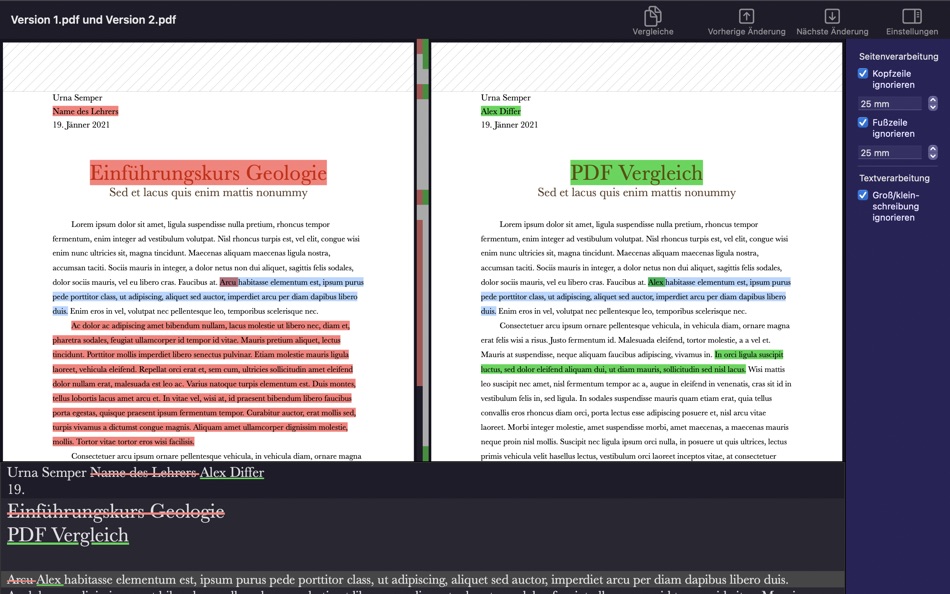
Just drag a document to the left and to the right and click compare.
Also allows to easily ignore headers and footers.
Differences can be copied to e.g. emails or text editors (drag & drop).
From the reviews:
map6567: "Impressive App, the app works with very large files. It is lightning fast an produces easy to understand outputs."
Wombloid: "Unbelievable! I've used a lot of PDF comparison software over the years, and always been disappointed. But here I am comparing two annual reports (2019 vs. 2020), both well over 100 pages long ... and PDFDiff is doing a truly impressive job of finding the differences/similarities."
Screenshot
Novità
- Versione: 1.2
- Aggiornata:
- Thanks for the great reviews. In this release I added the most important wishes:
- Added export to RTF and HTML to file menu.
- Added ability to compare form data.
- Added multi select support for differences table.
Prezzo
- Oggi: $19.99
- Minimo: $19.99
- Massimo: $19.99
Monitora prezzi
Sviluppatore
- Alexander Jaehrling
- Piattaforme: macOS App (2)
- Listes: 0 + 0
- Punti: 0 + 0 ¡
- Classificazioni: 0
- Recensioni: 0
- Sconti: 0
- Video: 0
- RSS: Sottoscrivi
Punti
0 ☹️
Classificazioni
0 ☹️
Listes
0 ☹️
Recensioni
Scrivi tu la prima recensione 🌟
Informazioni aggiuntive
PDF Diff URL breve: Copiato!- 🌟 Condividi
- Mac App Store
Ti potrebbero piacere anche
-
- PDF Reader Pro: Convert & Edit
- macOS App: Utility di: PDF Technologies, Inc.
- * Gratis
- Listes: 0 + 0 Classificazioni: 0 Recensioni: 0
- Punti: 2 + 0 Versione: 5.2.1 PDF Reader Pro, available on Mac, iPad, and iPhone, will fulfill all your document needs across all platforms. Building on solid features such as AI tool, comment, text and image edit, ⥯
-
- Compare PDF Diff: PDIFF
- macOS App: Utility di: Pierre Stanislas
- $14.99
- Listes: 0 + 0 Classificazioni: 0 Recensioni: 0
- Punti: 0 + 0 Versione: 1.1 PDIFF is an advanced PDF comparison tool designed for legal, business and research professionals, and anyone who demands meticulous accuracy in document review. Seamlessly identify ... ⥯
-
- PDF Split-Page Number Split
- macOS App: Utility di: 崴 杨
- * Gratis
- Listes: 0 + 0 Classificazioni: 0 Recensioni: 0
- Punti: 0 + 0 Versione: 1.1.5 "PDF Split" can split PDF files in batches. Support splitting all pages of PDF files and save all pages separately. Support page number input, you can input a certain page or ... ⥯
-
- PDF Protector
- macOS App: Utility di: Daniel Witt
- $9.99
- Listes: 0 + 2 Classificazioni: 1 (1) Recensioni: 0
- Punti: 0 + 0 Versione: 1.6 PDF Protector is an easy-to-use tool to encrypt or decrypt your PDF documents. Set a password and let PDF Protector encrypt your documents to hinder others from opening it. You can ... ⥯
- Nuova
- PDF Edit & View
- macOS App: Utility di: 仁超 张
- Gratis
- Listes: 0 + 1 Classificazioni: 0 Recensioni: 0
- Punti: 1 + 0 Versione: 8.2.3 PDF Edit & View is a versatile all-in-one software solution designed to meet users' needs for a seamless experience of browsing and editing PDF documents. This tool combines an ... ⥯
-
- PDF Lock
- macOS App: Utility di: Joaquin Garcia
- $1.99
- Listes: 0 + 0 Classificazioni: 0 Recensioni: 0
- Punti: 0 + 0 Versione: 1.0.4 PDF Lock: Simple and Secure Protection for Your Documents Instant Protection: PDF Lock offers you a quick and hassle-free way to secure your PDF files. With our intuitive drag-and-drop ⥯
-
- PDF Metadata Editor
- macOS App: Utility di: Matusalem Marques
- $3.99
- Listes: 0 + 0 Classificazioni: 0 Recensioni: 0
- Punti: 0 + 0 Versione: 1.11 PDF Metadata Editor lets you gain control of the hidden metadata on your PDF files. Metadata helps your computer find documents for you, both in your system and online. Metadata is ... ⥯
-
- PDF Compressor
- macOS App: Utility di: HurryApp LTD
- Gratis
- Listes: 0 + 0 Classificazioni: 0 Recensioni: 0
- Punti: 1 + 53 (4.2) Versione: 1.9.3 Introducing the ultimate tool for compressing your PDF documents. With this app, you can easily compress, merge and share your PDF files from anywhere, anytime. ⥯
-
- PDF Pro Editor
- macOS App: Utility di: Alex Gameli Heyman
- Gratis
- Listes: 0 + 0 Classificazioni: 0 Recensioni: 0
- Punti: 3 + 0 Versione: 1.0.2 Introducing our powerful PDF Editor app that lets you edit, annotate, and manage your PDF documents on-the-go! With a user-friendly interface and a wide range of features, our app is ... ⥯
-
- PDF±
- macOS App: Utility di: Ruizheng Liu
- $14.99
- Listes: 0 + 0 Classificazioni: 0 Recensioni: 0
- Punti: 0 + 0 Versione: 6.0 SUMMARY 1. PDF± never change your original PDF document. 2. Batch merge multiple PDF files with drag & drop support. 3. Flexible ways to split PDF files: Split to multiple single page ... ⥯
-
- PDF Converter: Reader & Editor
- macOS App: Utility di: Maham Naeem
- * Gratis
- Listes: 0 + 0 Classificazioni: 0 Recensioni: 0
- Punti: 0 + 0 Versione: 1.8 All-in-One PDF Converter, Reader Easily convert your documents and images with our powerful PDF Converter, Reader app! Supporting a wide range of formats, this app enables seamless ... ⥯
-
- PDF Converter: Word PDF Editor
- macOS App: Utility di: Saad Ali Sajid
- * Gratis
- Listes: 0 + 0 Classificazioni: 0 Recensioni: 0
- Punti: 0 + 0 Versione: 1.0.4 Transform your files effortlessly with PDF Converter & Image to Word, the ultimate tool for professionals, students, and everyday users who need fast, accurate, and secure file ... ⥯
- Nuova
- PDF Toolbox
- macOS App: Utility di: Yung Kei Simon MA
- * Gratis
- Listes: 0 + 0 Classificazioni: 0 Recensioni: 0
- Punti: 0 + 0 Versione: 2.0.0 A while back, I was chatting with friends who needed to submit documents to Home Office. What surprised me was how many of them were using free online tools to handle PDFs containing ... ⥯
-
- PDF & Doc Image Extractor
- macOS App: Utility di: 论 李
- $0.99
- Listes: 0 + 0 Classificazioni: 0 Recensioni: 0
- Punti: 0 + 0 Versione: 1.0 Extract images from your PDF, Word, PPT, and Excel files with ease! Simply click or drag a document into the app, wait for the extraction to finish, and select the images you want to ... ⥯