
| ผู้พัฒนา: | Danny Bolick (8) | ||
| ราคา: | $1.99 | ||
| การจัดอันดับ: | 0 | ||
| ความเห็น: | 0 เขียนความเห็น | ||
| ความเห็น: | 0 โพสต์ความคิดเห็น | ||
| รายการ: | 0 + 0 | ||
| แต้มแล: | 0 + 0 ¡ | ||
| Mac App Store | |||
คำอธิบาย

Ping Monkey is a lightweight network monitoring utility that gives you instant visibility
into your internet connection health. Track latency, detect outages, and identify network
issues before they impact your work or play.
Key Features
• Continuous Ping Monitoring — Real-time ICMP ping tracking to any host or IP address
• Live Latency Charts — Beautiful Swift Charts visualization of your connection performance
• Comprehensive Statistics — Average, minimum, maximum latency, jitter, and packet loss
percentage
• Event Detection — Automatic detection of latency spikes, outages, and packet loss events
• Quick Presets — One-click profiles for Gaming, Streaming, General use, and Low Power modes
• Flexible Export — Save your session data as CSV, JSON, or formatted PDF reports
Perfect For
• Gamers tracking connection stability during matches
• Remote workers monitoring video call quality
• Network administrators diagnosing connectivity issues
• Streamers ensuring reliable upload connections
• Anyone troubleshooting internet problems
Smart Monitoring
Configure your monitoring to match your needs. Adjust ping intervals from rapid 0.5-second
checks to battery-friendly 10-second intervals. Set custom thresholds for spike detection.
Monitor preset hosts like Google DNS, Cloudflare, or OpenDNS, or enter any custom hostname or
IP address.
Detailed Event Logging
Ping Monkey doesn't just show you numbers—it actively watches for problems. When your
connection experiences a latency spike, drops packets, or goes down entirely, events are
logged with precise timestamps so you can correlate network issues with other activities.
Export Your Data
Need to share your findings or analyze the data further? Export your entire monitoring
session including all ping results, detected events, and summary statistics. Choose from:
• CSV for spreadsheet analysis
• JSON for technical integration
• PDF for formatted reports
Clean, Native Design
Built with SwiftUI for a modern macOS experience. Ping Monkey feels right at home on your Mac
with a clean interface that shows you exactly what you need—nothing more, nothing less.
Privacy Focused
Ping Monkey operates entirely on your Mac. No accounts, no cloud services, no data
collection. Your network monitoring data stays on your computer.
Ad
ภาพหน้าจอ


มีอะไรใหม่
- เวอร์ชัน: 1.1.1
- อัปเดต:
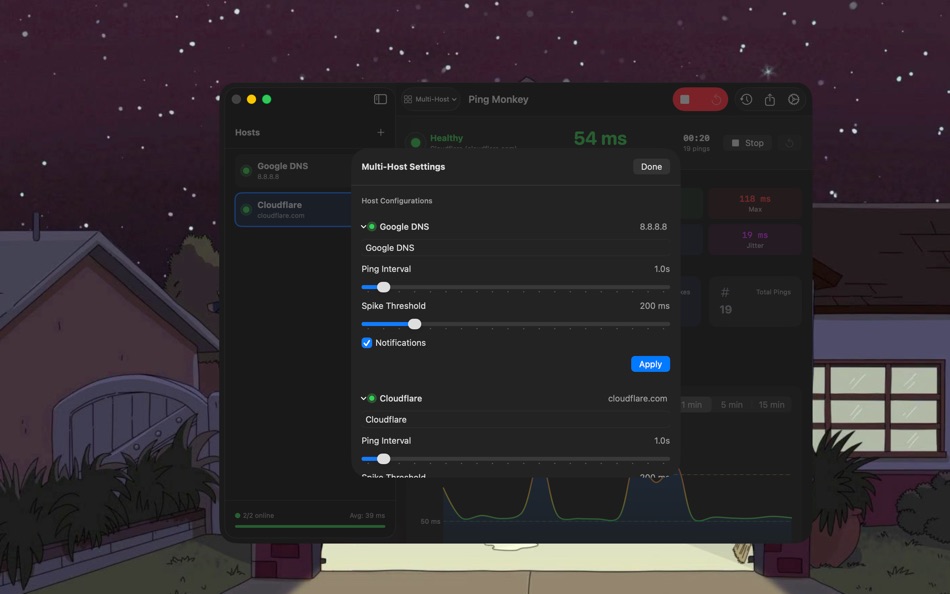
- Multi-Host Monitoring
Monitor up to 5 network targets simultaneously! Track multiple DNS servers, websites, or IP
addresses with independent statistics and alerts for each host.
- Sidebar + Detail Layout - New intuitive interface with a host list sidebar and detailed view
for the selected host
- Aggregate Statistics - See overall network health at a glance with combined metrics and health
score
- Per-Host Configuration - Customize ping intervals, spike thresholds, and notification
preferences for each host
- Quick Add Presets - Instantly add popular DNS servers like Google, Cloudflare, Quad9, and
OpenDNS
Mode Switching
Seamlessly switch between Single Host and Multi-Host modes using the toolbar menu or Settings.
Your existing single-host sessions remain accessible.
Improvements
- Enhanced session persistence for multi-host monitoring
- Improved notification messages now include the host name
- Updated settings interface with host configuration options
ราคา
- วันนี้: $1.99
- ต่ำสุด: $1.99
- มากที่สุด: $1.99
ติดตามราคา
Ad
ผู้พัฒนา
- Danny Bolick
- แพลตฟอร์ม: macOS แอป (8)
- รายการ: 0 + 0
- แต้มแล: 1 + 0 ¡
- การจัดอันดับ: 0
- ความเห็น: 0
- ลดราคา: 0
- วิดีโอ: 0
- RSS: ติดตาม
แต้มแล (0)
0 ☹️
การจัดอันดับ (0)
0 ☹️
รายการ (0)
0 ☹️
- Ping Monkey
ความเห็น (0)
แสดงรีวิวเป็นคนแรกเลย 🌟
ความเห็น (0)
เป็นคนแรกที่แสดงความเห็น 🌟
ข้อมูลเพิ่มเติม
Ping Monkey URL แบบสั้น: คัดลอกแล้ว!- 🌟 แชร์
- Mac App Store
คุณอาจชอบ
-
- Ping • Uptime Monitor
- macOS แอป: ยูทิลิตี้ โดย: Neat Software Co.
- * ฟรี
- รายการ: 0 + 2 การจัดอันดับ: 0 ความเห็น: 0
- แต้มแล: 7 + 0 ความเห็น: 0 เวอร์ชัน: 2.22.0 Ping is a simple uptime monitor that uses your Mac's internet connection. Keep track of the status & speed of websites, APIs, servers, routers or any network device and get feedback ... ⥯
-
- Ping • Network status
- macOS แอป: ยูทิลิตี้ โดย: Evgenii Sukhanov
- ฟรี
- รายการ: 0 + 1 การจัดอันดับ: 0 ความเห็น: 0
- แต้มแล: 8 + 0 ความเห็น: 0 เวอร์ชัน: 2.0 The minimalistic tool for monitoring your internet connection and ensuring optimal connectivity. With the app, you can easily keep an eye on your ping to Google.com and receive ... ⥯
-
- Ping Status
- macOS แอป: ยูทิลิตี้ โดย: Jon Cavallo
- * ฟรี
- รายการ: 0 + 0 การจัดอันดับ: 0 ความเห็น: 0
- แต้มแล: 0 + 0 ความเห็น: 0 เวอร์ชัน: 2.1.2 PingStatus 2.1 - The Ultimate Menu Bar Network Monitor PingStatus lives in your macOS menu bar, giving you instant, at-a-glance insight into your network connection health. Whether you ⥯
-
- ping?
- macOS แอป: ยูทิลิตี้ โดย: GONCA KAYA
- ฟรี
- รายการ: 0 + 0 การจัดอันดับ: 0 ความเห็น: 0
- แต้มแล: 0 + 0 ความเห็น: 0 เวอร์ชัน: 1.0 Your infrastructure deserves visibility not guesswork. This app gives you a powerful, simple way to monitor any domain, website, API, or online service and instantly see whether it's ... ⥯
-
- Ping Pong Score App
- macOS แอป: ยูทิลิตี้ โดย: Ronny Remesnik
- ฟรี
- รายการ: 0 + 0 การจัดอันดับ: 0 ความเห็น: 0
- แต้มแล: 0 + 0 ความเห็น: 0 เวอร์ชัน: 1.0 PingPongScore - The Ultimate Table Tennis Scoreboard App Transform your table tennis matches with PingPongScore, the advanced and customizable scoreboard app designed for players, ... ⥯
-
- Ping可视化工具
- macOS แอป: ยูทิลิตี้ โดย: 成都大有林泉文化传播有限公司
- $1.99
- รายการ: 0 + 0 การจัดอันดับ: 0 ความเห็น: 0
- แต้มแล: 0 + 0 ความเห็น: 0 เวอร์ชัน: 1.0.2 一键检测外网和内网网络问题 实时显示延迟和各延迟段分布 实时显示异常日志 ⥯
-
- Fast Ping & Network Checker
- macOS แอป: ยูทิลิตี้ โดย: 论 李
- $3.99
- รายการ: 0 + 0 การจัดอันดับ: 0 ความเห็น: 0
- แต้มแล: 0 + 0 ความเห็น: 0 เวอร์ชัน: 1.0 App Overview Fast Ping is a lightweight and powerful network diagnostic tool that helps you test and monitor network connectivity. With a clean interface and customizable settings, it ... ⥯
-
- Password-Monkey
- macOS แอป: ยูทิลิตี้ โดย: Danny Bolick
- * ฟรี
- รายการ: 0 + 0 การจัดอันดับ: 0 ความเห็น: 0
- แต้มแล: 0 + 0 ความเห็น: 0 เวอร์ชัน: 1.0.2 Password Monkey is a privacy-focused password generator that lives in your Mac's menu bar. Generate cryptographically secure passwords instantly no account required, no cloud sync, no ... ⥯
-
- SimplePing - Menu Bar Ping
- macOS แอป: ยูทิลิตี้ โดย: Sweatshop
- $0.99
- รายการ: 0 + 0 การจัดอันดับ: 0 ความเห็น: 0
- แต้มแล: 0 + 0 ความเห็น: 0 เวอร์ชัน: 1.6 Easily check your internet connection quality on the menu bar! The ping updates in realtime, so you can monitor the internet connection and know if something is wrong immediately. You ... ⥯
-
- Super Ping
- macOS แอป: ยูทิลิตี้ โดย: Circuit Europe OU
- * ฟรี
- รายการ: 0 + 0 การจัดอันดับ: 0 ความเห็น: 0
- แต้มแล: 0 + 0 ความเห็น: 0 เวอร์ชัน: 2.0.1 Master your network with SuperPing, the all-in-one professional tool for network scanning, monitoring, and analysis. Designed for IT professionals, developers, and tech enthusiasts ... ⥯
-
- Easy Authenticator 2FA
- macOS แอป: ยูทิลิตี้ โดย: App Monkey Development Studio GmbH
- ฟรี
- รายการ: 0 + 0 การจัดอันดับ: 0 ความเห็น: 0
- แต้มแล: 0 + 0 ความเห็น: 0 เวอร์ชัน: 2.1 Easy Manage 2FA Codes (TOTP). Import from Google Authenticator or QR Code via image. No Internet connection required. All secrets are stored local. Free Version has a limit of 3 codes. ⥯
-
- Just Quick Jot
- macOS แอป: ยูทิลิตี้ โดย: Juice Box Monkey Designs
- ฟรี
- รายการ: 0 + 0 การจัดอันดับ: 0 ความเห็น: 0
- แต้มแล: 0 + 0 ความเห็น: 0 เวอร์ชัน: 1.0.1 Quick Jot Extends Just Jot We often find ourselves questioning why note-taking apps have to be so complicated. They are often filled with endless features that only clutter the user ... ⥯
-
- NetStatus: Network Monitor
- macOS แอป: ยูทิลิตี้ โดย: Wlodzimierz Grzywacz
- $4.99
- รายการ: 2 + 1 การจัดอันดับ: 5 (2) ความเห็น: 5 (1)
- แต้มแล: 9 + 0 ความเห็น: 0 เวอร์ชัน: 1.5 NetStatus is a Menu Bar app that provides detailed information about Your network. NetStatus has 3 modules: - Interfaces: provides information about network interfaces. - Applications: ⥯
-
- Helm - Hosts file manager
- macOS แอป: ยูทิลิตี้ โดย: 金标 李
- $9.99
- รายการ: 1 + 2 การจัดอันดับ: 5 (1) ความเห็น: 0
- แต้มแล: 10 + 0 ความเห็น: 0 เวอร์ชัน: 3.2.0 Helm is a powerful and intuitive hosts file manager designed for developers, system administrators, and power users on macOS. It simplifies the process of editing, organizing, and ... ⥯