
| Udvikler: | Jon Cavallo (1) | ||
| Pris: | * Gratis | ||
| Rangeringer: | 0 | ||
| Anmeldelser: | 0 Skriv en anmeldelse | ||
| Kommentarer: | 0 Skriv kommentar | ||
| Lister: | 0 + 0 | ||
| Point: | 0 + 0 ¡ | ||
| Mac App Store | |||
Beskrivelse

PingStatus lives in your macOS menu bar, giving you instant, at-a-glance insight into your network connection health. Whether you are on a video call, gaming, or troubleshooting internet issues, PingStatus helps you quickly spot lag, jitter, and dropouts.
What's New in Version 2.1
This major update takes network monitoring to the next level with multi-target support, a compact gaming overlay, intelligent notifications, and powerful export capabilities.
Multi-Target Monitoring
Monitor up to four additional ping targets simultaneously. The new quadrant status bar icon displays the health of all your connections at once—perfect for tracking your ISP connection, gateway, DNS servers, and gaming servers all at the same time.
Compact Overlay for Gaming
New floating overlay window designed for fullscreen gaming. Keep an eye on your connection without cmd-tabbing or leaving your game.
Menu Bar Monitoring
• See your current ping latency in milliseconds directly in the menu bar
• Signal bar icon visually reflects latency, packet loss, and jitter in real time
• New optional sparkline icon shows a mini graph of recent history
• Clean and unobtrusive design that blends with macOS
Advanced History Graph
• Completely redesigned with modern interface and improved readability
• Packet loss percentage prominently displayed
• Color-coded state change markers for easier pattern identification
• Jitter monitoring reveals instability even when ping appears normal
• Pause, zoom, and scrub through history with full trackpad support
Smart Gateway Detection
PingStatus automatically detects and monitors your local gateway router alongside your target host, helping you determine whether issues are local or ISP-related.
• Automatically adapts when switching Wi-Fi networks or waking from sleep
• Improved VPN compatibility including Citrix and Cisco AnyConnect
Export & Analysis
• CSV export for sending data to your ISP or analyzing in Excel
• 24/7 statistics mode prevents sleep for true round-the-clock monitoring
• External IP address tracking helps identify network changes
Smart Notifications
• Enhanced intelligent alerts reduce notification fatigue while keeping you informed
• Smart Sleep Mode automatically mutes alerts when your display is asleep
Core Features
• Always-on background monitoring with minimal battery impact
• Redesigned settings window with improved organization
• Detailed logs for long-term performance analysis
• Modern native macOS preferences for alerts and thresholds
• Fully optimized for Apple Silicon also supports Intel
Pro Features
Unlock advanced diagnostics with a simple upgrade. A free 14-day trial is available.
• Multi-target monitoring with quadrant status icon
• Real-time signal bar and sparkline menu icons
• Compact overlay mode for gaming
• Interactive history graph with zoom, scrolling, and health overlays
• Advanced gateway monitoring and diagnostics
• CSV export for analysis
Stop guessing why your internet is slow. Download PingStatus 2.1 and take control of your connection.
Ad
Skærmbilleder




Nyheder
- Version: 2.1.2
- Opdateret:
- Version 2.1.2 adds DNS failure diagnostics, jitter controls, and several reliability fixes.
New in 2.1.2:
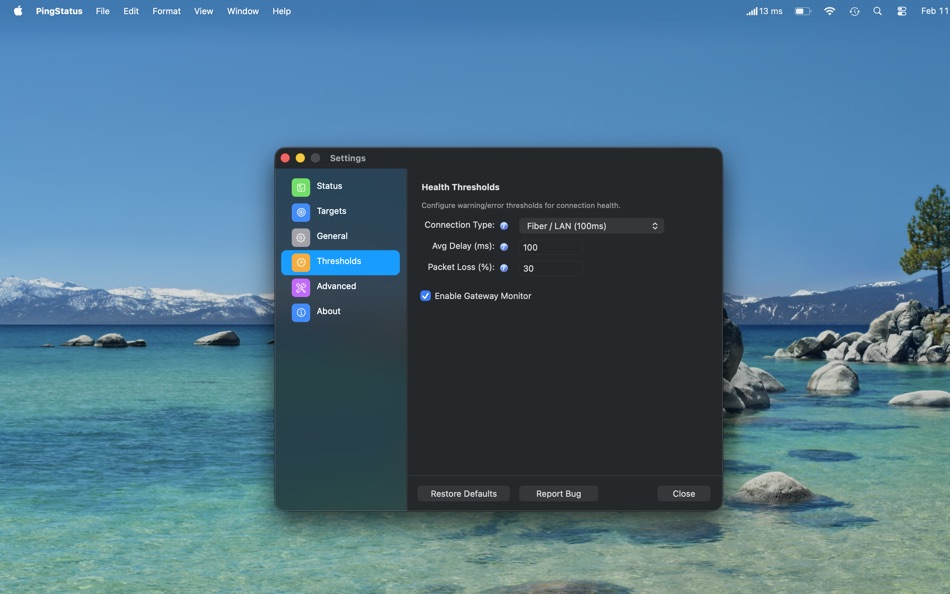
• Jitter Sensitivity Settings — Adjust jitter detection sensitivity in Settings → Thresholds. Choose Low (50ms), Medium (30ms, ITU-T standard), or High (15ms) presets, or enter a custom value.
• Disable Jitter Monitoring — A new toggle lets you turn off jitter-based health evaluation entirely. Jitter is still measured and displayed, but won't affect connection health status.
• DNS Failure Detection — PingStatus now distinguishes between a target being unreachable and DNS resolution failing. The status bar and notifications report "DNS Failure" specifically rather than a generic error. A critical notification is sent with guidance to check your DNS settings.
• Corporate Wi-Fi Compatibility — Networks that block the macOS system DNS resolver are handled automatically via direct DNS fallback, so monitoring continues uninterrupted.
• Graph State Change Toggle — Show or hide state change markers on the history graph with a new "State Changes" checkbox.
• Load Earlier Log Entries — Scroll to the top of the Log window to load historical entries from disk without leaving the app.
Bug Fixes:
• Fixed recurring false unhealthy/healthy oscillations caused by a single raw socket failure permanently switching to CLI mode. Three consecutive failures are now required.
• Fixed log window scrollbar disappearing when scrolling up; trackpad scrolling is now smooth.
• Raw socket mode now resets after system wake instead of remaining stuck in CLI fallback mode.
• Fixed CLI ping timeout flags on macOS that caused unreliable results in fallback mode.
• Fixed TCP ping timeouts leaving orphaned background tasks, causing recurring UnobservedTaskException log errors.
• Fixed stale jitter and reachability diagnostics after network changes such as LinkDown → LinkUp recovery.
• Fixed a locale bug in the CLI ping parser that could misread valid responses as timeouts on non-English systems.
Pris
-
* Indkøb i appen - I dag: Gratis
- Minimum: Gratis
- Maksimalt: Gratis
Overvåg priser
Ad
Udvikler
- Jon Cavallo
- Platforme: macOS Apps (1)
- Lister: 0 + 0
- Point: 0 + 0 ¡
- Rangeringer: 0
- Anmeldelser: 0
- Rabatter: 0
- Videoer: 0
- RSS: Abonner
Point (0)
0 ☹️
Rangeringer (0)
0 ☹️
Lister (0)
0 ☹️
- Ping Status
Anmeldelser (0)
Vær den første til at gennemgå 🌟
Kommentarer (0)
Vær den første til at kommentere 🌟
Yderligere oplysninger
- Version: 2.1.2
- Kategori:
macOS Apps›Hjælpeprogrammer - Operativsystem:
macOS,macOS 12.0 eller nyere - Størrelse:
58 Mb - Understøttet sprog:
English - Indholdsklassificering:
4+ - Mac App Store Bedømmelse:
0 - Opdateret:
- Udgivelsesdato:
Kontaktpersoner
- Websted:
 https://invokedquantum.com/
Ping Status Kort webadresse: Kopieret!- 🌟 Del
- Mac App Store
Du vil måske også kunne lide
-
- Ping • Uptime Monitor
- macOS Apps: Hjælpeprogrammer Ved: Neat Software Co.
- * Gratis
- Lister: 0 + 2 Rangeringer: 0 Anmeldelser: 0
- Point: 7 + 0 Kommentarer: 0 Version: 2.22.0 Ping is a simple uptime monitor that uses your Mac's internet connection. Keep track of the status & speed of websites, APIs, servers, routers or any network device and get feedback ... ⥯
- Ny
- status-monitor
- macOS Apps: Hjælpeprogrammer Ved: 俊琦 端木
- $1.99
- Lister: 0 + 0 Rangeringer: 0 Anmeldelser: 0
- Point: 0 + 0 Kommentarer: 0 Version: 1.0 status-monitor 一款简洁高效的 macOS 系统监控工具 实时掌握 Mac 运行状态 菜单栏常驻 一目了然。 主要功能 实时监控 CPU、内存、磁盘、电池、网络、温度全方位追踪 历史趋势 - 自动记录系统数据 可视化展示性能变化 进程管理 快速定位资源占用高的应用程序 智能通知 自定义阈值 系统异常时及时提醒 菜单栏显示 关键指标实时展示 一键查看详情 ⥯
-
- Ping Monkey
- macOS Apps: Hjælpeprogrammer Ved: Danny Bolick
- $1.99
- Lister: 0 + 0 Rangeringer: 0 Anmeldelser: 0
- Point: 0 + 0 Kommentarer: 0 Version: 1.1.1 Monitor Your Network in Real-Time Ping Monkey is a lightweight network monitoring utility that gives you instant visibility into your internet connection health. Track latency, detect ... ⥯
-
- ping?
- macOS Apps: Hjælpeprogrammer Ved: GONCA KAYA
- Gratis
- Lister: 0 + 0 Rangeringer: 0 Anmeldelser: 0
- Point: 0 + 0 Kommentarer: 0 Version: 1.0 Your infrastructure deserves visibility not guesswork. This app gives you a powerful, simple way to monitor any domain, website, API, or online service and instantly see whether it's ... ⥯
-
- Status Clock
- macOS Apps: Hjælpeprogrammer Ved: Pulsely Consulting
- Gratis
- Lister: 0 + 1 Rangeringer: 0 Anmeldelser: 0
- Point: 2 + 0 Kommentarer: 0 Version: 1.6.0 Status Clock shows an additional clock on your macOS status bar, with the time zone of your choice. You can enable and disable the seconds as necessary. ⥯
-
- Ping • Network status
- macOS Apps: Hjælpeprogrammer Ved: Evgenii Sukhanov
- Gratis
- Lister: 0 + 1 Rangeringer: 0 Anmeldelser: 0
- Point: 8 + 0 Kommentarer: 0 Version: 2.0 The minimalistic tool for monitoring your internet connection and ensuring optimal connectivity. With the app, you can easily keep an eye on your ping to Google.com and receive ... ⥯
-
- Ping Pong Score App
- macOS Apps: Hjælpeprogrammer Ved: Ronny Remesnik
- Gratis
- Lister: 0 + 0 Rangeringer: 0 Anmeldelser: 0
- Point: 0 + 0 Kommentarer: 0 Version: 1.0 PingPongScore - The Ultimate Table Tennis Scoreboard App Transform your table tennis matches with PingPongScore, the advanced and customizable scoreboard app designed for players, ... ⥯
-
- Ping可视化工具
- macOS Apps: Hjælpeprogrammer Ved: 成都大有林泉文化传播有限公司
- $1.99
- Lister: 0 + 0 Rangeringer: 0 Anmeldelser: 0
- Point: 0 + 0 Kommentarer: 0 Version: 1.0.2 一键检测外网和内网网络问题 实时显示延迟和各延迟段分布 实时显示异常日志 ⥯
-
- Fast Ping & Network Checker
- macOS Apps: Hjælpeprogrammer Ved: 论 李
- $3.99
- Lister: 0 + 0 Rangeringer: 0 Anmeldelser: 0
- Point: 0 + 0 Kommentarer: 0 Version: 1.0 App Overview Fast Ping is a lightweight and powerful network diagnostic tool that helps you test and monitor network connectivity. With a clean interface and customizable settings, it ... ⥯
-
- Ethernet Status
- macOS Apps: Hjælpeprogrammer Ved: Vikram Rao
- Gratis
- Lister: 0 + 0 Rangeringer: 0 Anmeldelser: 0
- Point: 1 + 0 Kommentarer: 0 Version: 4.5 Ethernet Status adds the missing icon in status bar to indicate the connection status of wired ethernet similar to WIFI icon. WIFI has an icon built in MacOS, but there is none for ... ⥯
-
- Simple Menu STATUS
- macOS Apps: Hjælpeprogrammer Ved: Duyo Son
- Gratis
- Lister: 0 + 0 Rangeringer: 0 Anmeldelser: 0
- Point: 1 + 0 Kommentarer: 0 Version: 1.4 **Simple Menu STATUS** is a lightweight, elegant system monitor that lives in your menu bar, providing real-time insights into your Mac's performance. **SYSTEM MONITORING** Real-time ... ⥯
-
- SRV Status
- macOS Apps: Hjælpeprogrammer Ved: Benjamin Wieland
- $9.99
- Lister: 0 + 0 Rangeringer: 0 Anmeldelser: 0
- Point: 0 + 0 Kommentarer: 0 Version: 1.3.3 Bring clarity to your network and local volumes directly in the macOS menu bar. Instantly see which shares are available, reconnect offline servers with a click, group and tag entries ... ⥯
-
- WiFi Status: Analyzer, Signal
- macOS Apps: Hjælpeprogrammer Ved: Wlodzimierz Grzywacz
- * $1.99
- Lister: 3 + 2 Rangeringer: 5 (2) Anmeldelser: 0
- Point: 5 + 0 Kommentarer: 0 Version: 1.7 WiFi Status is a Menu Bar app that provides detailed information about Your current Wi-Fi connection. Features: 1. Supports 2.4, 5, 6 GHz frequencies. 2. Information about current ... ⥯
-
- HowOnline · Monitor your WiFi status for Mac OS X
- macOS Apps: Hjælpeprogrammer Ved: Larry Gadea
- Gratis
- Lister: 0 + 0 Rangeringer: 0 Anmeldelser: 0
- Point: 1 + 0 Kommentarer: 0 Version: 1.01 HowOnline is a simple app to display your current ping to google.com or detailed error info (such as not being able to ping 8.8.8.8, being on a self-assigned ip, broken dns, etc). ... ⥯