
| 개발자: | ThinkerSnacks LLC (1) | ||
| 가격: | $2.99 | ||
| 순위: | 0 | ||
| 리뷰: | 0 리뷰 작성 | ||
| 목록: | 0 + 1 | ||
| 포인트: | 0 + 0 ¡ | ||
| Mac App Store | |||
기술

Apple's introduction of Apple Silicon delivers compelling performance in an incredibly efficient package for Mac users. It has also led to some confusion regarding which audio plug-ins are taking full advantage of the new hardware. While Apple's Rosetta allows most Intel code to run, it isn't as efficient as native code and can introduce compatibility issues. Some vendors try to confuse matters by describing Intel plug-ins as "M1 Compatible."
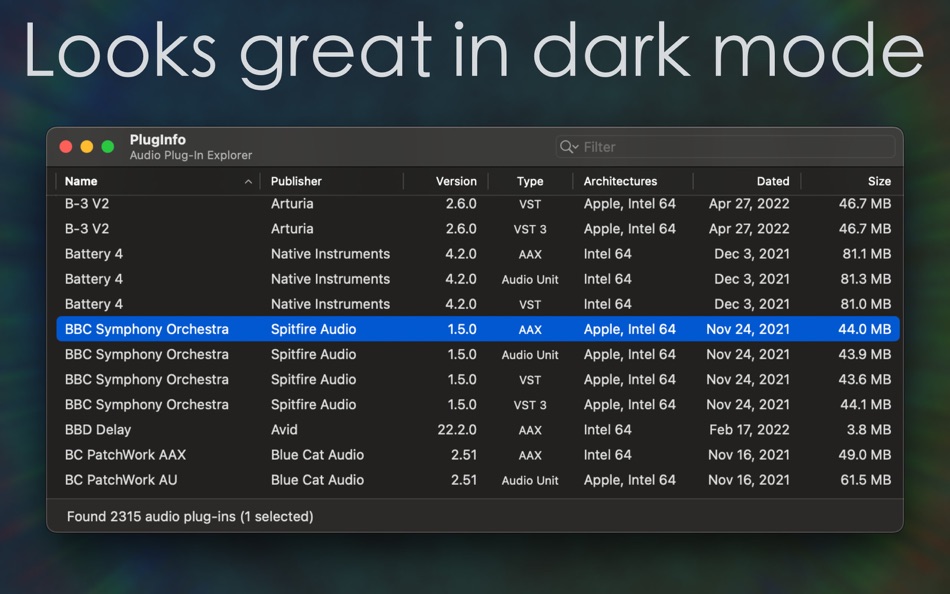
Plug-ins that include Apple Silicon code are sometimes called "M1 Native." They're actually well prepared for M2, M3, M4 and any future Apple Silicon revisions Apple may have planned, plus the inevitable future where Rosetta is no longer supported. It can be time-consuming to track down and evaluate every individual plug-in you have installed but, with PlugInfo, just run the app and you'll quickly see a list of installed audio plug-ins and their details:
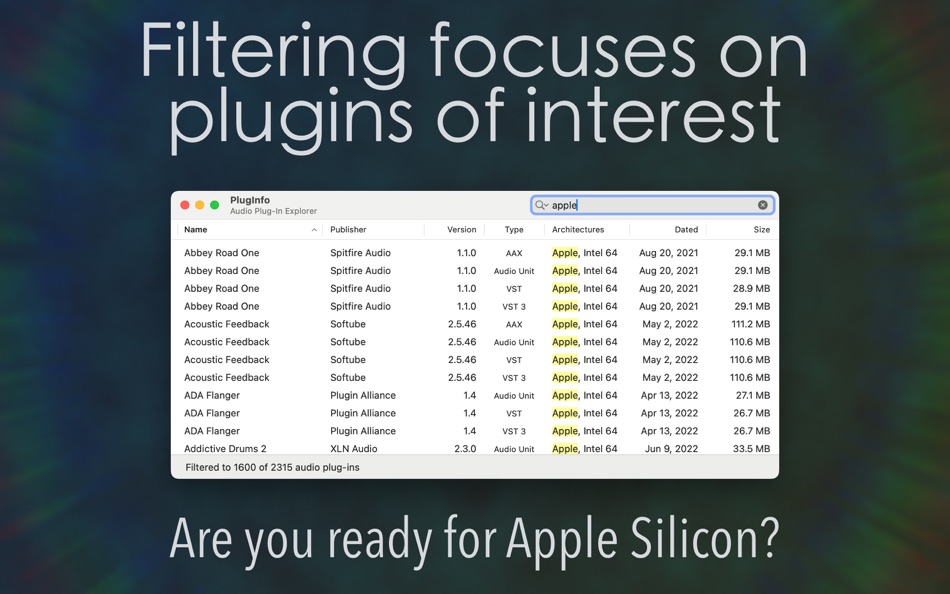
∙ See the CPU architectures directly supported by each plug-in, so you'll know which are optimized for Apple Silicon, and which are translated by Rosetta. Also invaluable for finding legacy plug-ins with just PowerPC or 32-bit Intel code.
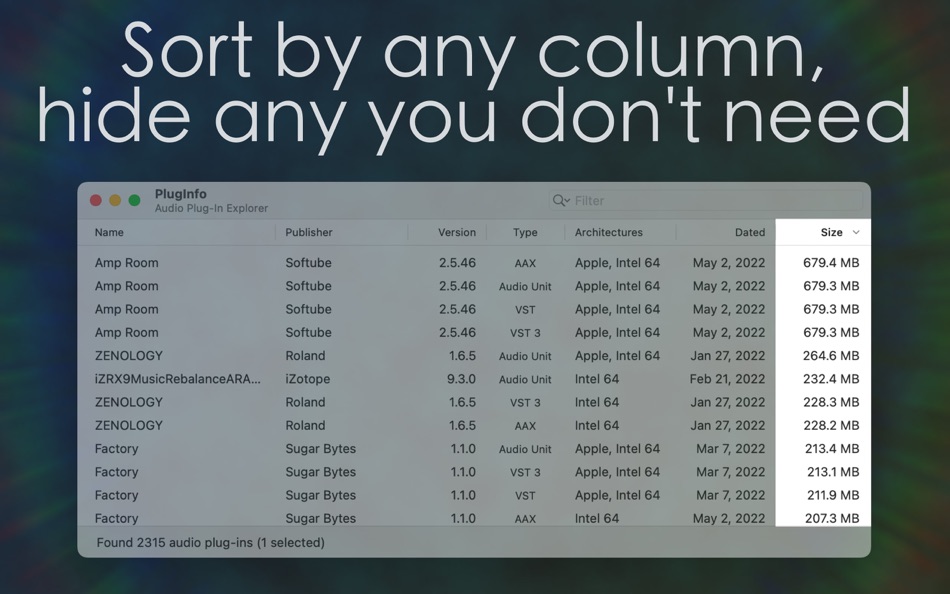
∙ Click any column header to sort the list, and click it again to sort in reverse order.
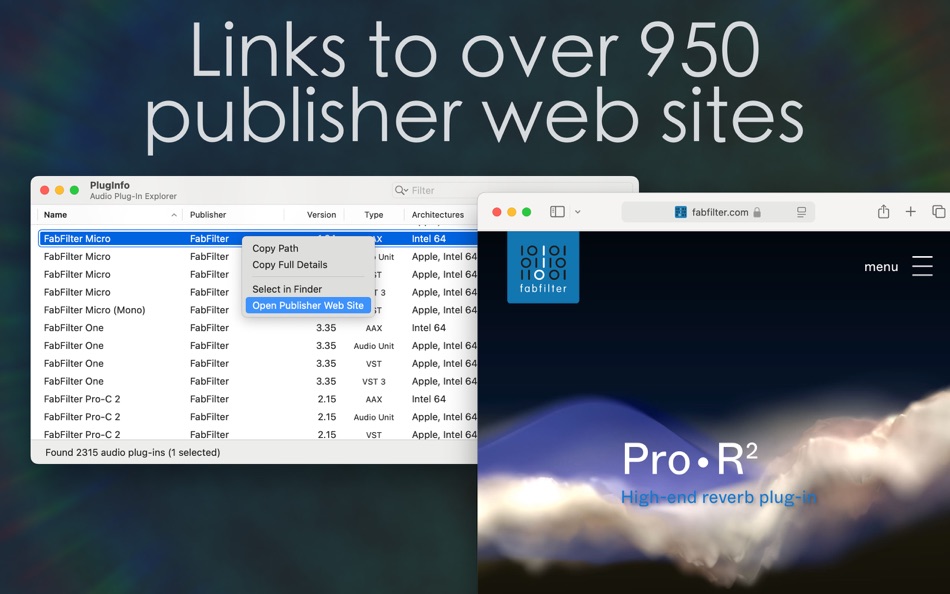
∙ See publisher names for hundreds of known publishers, and use File > Open Publisher Web Site (⇧⌘O) or double-click their name to open their web site.
∙ Remembers your preferred window size and layout, letting you focus on what matters most. Hide or show columns using the View menu, and rearrange them just by dragging or resizing column headers.
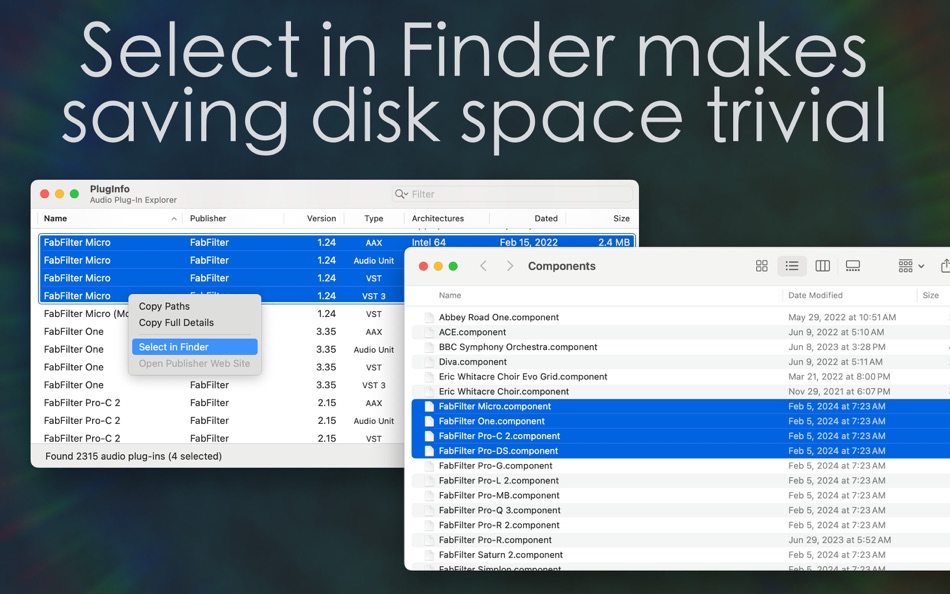
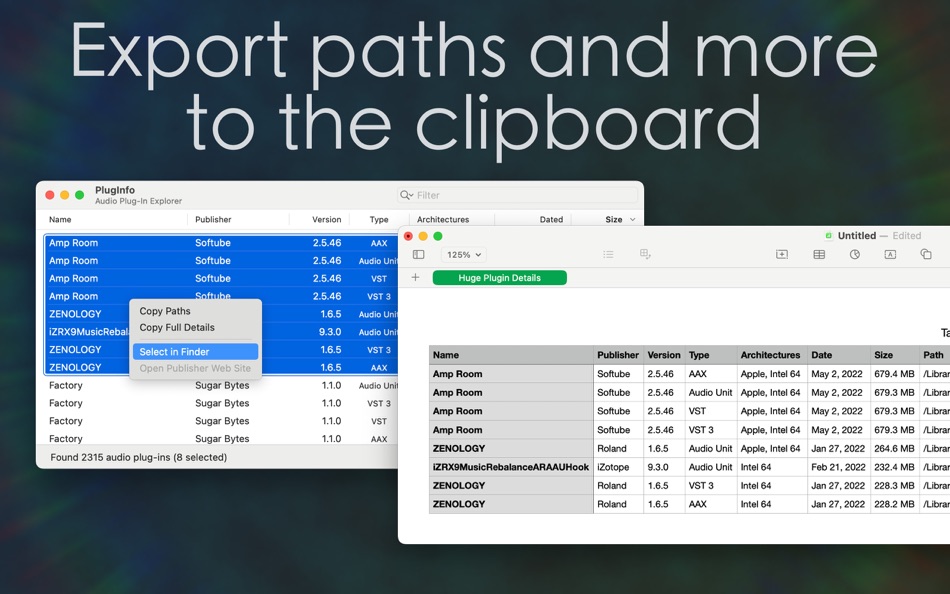
∙ File > Select in Finder (⇧⌘F) opens Finder windows with selected plug-ins already highlighted for easy backup or deletion.
∙ Edit > Copy Paths (⌘C) to quickly copy a list of paths for selected plug-ins to the clipboard.
∙ Edit > Copy Full Details (⇧⌘C) copies all information for selected plug-ins in a form that can be pasted into Numbers or Excel for further examination.
∙ Keep PlugInfo open and it will automatically refresh to reflect additions, removals, or changes in your collection.
∙ Edit > Edit Filter (⌘F) selects the filter field. Enter text to quickly narrow down your collection to plug-ins with matching names, publishers, architectures, or plug-in types. Remove filter text or use the shortcut (⌘⌥F) clear it again and restore the full list of plug-ins.
Enjoy!
스크린샷

새로운 기능
- 버전: 2.0.1
- 업데이트:
- Addresses an issue that would prevent the filter suggestions "Requires Rosetta on Apple Silicon" and "Obsolete" from being available on macOS Tahoe
가격
- 오늘: $2.99
- 최소: $2.99
- 최대: $2.99
가격 추적
개발자
- ThinkerSnacks LLC
- 플랫폼: macOS 앱 (1)
- 목록: 0 + 1
- 포인트: 0 + 0 ¡
- 순위: 0
- 리뷰: 0
- 할인: 0
- 동영상: 0
- RSS: 구독
포인트
0 ☹️
순위
0 ☹️
목록
0 ☹️
리뷰
첫 번째 리뷰를 남겨보세요 🌟
추가 정보
주소록
 https://www.thinkersnacks.com/pluginfo/PlugInfo 단축 URL: 복사됨!
- 🌟 공유하기
- Mac App Store
당신은 또한 같은 수 있습니다
-
- Silicon Info
- macOS 앱: 유틸리티 게시자: William Castelli
- 무료
- 목록: 0 + 1 순위: 0 리뷰: 0
- 포인트: 0 + 0 버전: 1.0.3 Silicon Info is a tiny menu bar utility that allows you to quickly determine if an application is running natively on an ARM processor or translated through Rosetta 2 Simply open ... ⥯
-
- InfoCard - Get More Info
- macOS 앱: 유틸리티 게시자: Alf Watt
- 무료
- 목록: 1 + 1 순위: 0 리뷰: 0
- 포인트: 4 + 0 버전: 1.3 InfoCard is a simple app for iOS and macOS which provides information about anything you can paste, drop, open, or share. Drag files, folders, volumes, and content; Paste images, text, ⥯
-
- Any File Info-EXIF&MEDIA Info
- macOS 앱: 유틸리티 게시자: 奇鹏 于
- 무료
- 목록: 1 + 0 순위: 0 리뷰: 0
- 포인트: 1 + 0 버전: 1.6.0 Any File Info is a professional tool to view and browse files information. It supports multiple types of files documents, images, audios and videos. Any File Info enables you to access ⥯
-
- Quick Info - One click info
- macOS 앱: 유틸리티 게시자: Kauntey Suryawanshi
- * 무료
- 목록: 0 + 0 순위: 0 리뷰: 0
- 포인트: 2 + 0 버전: 2.1.2 Quick Info will help you search your info with a spotlight like search view. Features - Launch with shortcut - Store records in folder - Preview record - Copy records to clipboard ... ⥯
-
- File Info Editor
- macOS 앱: 유틸리티 게시자: geheimwerk.de
- $1.99
- 목록: 1 + 0 순위: 0 리뷰: 0
- 포인트: 1 + 0 버전: 1.0.4 - If you have any questions or issues, please don t hesitate and contact me via the support link. The App Store doesn t provide a way for me to respond to reviews, so I can t get back ... ⥯
-
- File Info Professional
- macOS 앱: 유틸리티 게시자: Rocky Sand Studio Ltd.
- $0.99
- 목록: 1 + 0 순위: 0 리뷰: 0
- 포인트: 0 + 0 버전: 1.3 File Info Professional shows you advanced information about your files. Quickly access the following information about any file: - Checksums: SHA1, SHA256, MD2, MD5 - HEX Dump: raw ... ⥯
-
- Any Media Info
- macOS 앱: 유틸리티 게시자: Anand
- $0.99
- 목록: 1 + 0 순위: 0 리뷰: 0
- 포인트: 5 + 0 버전: 2.1.2 Super simple to use. Just Drag & Drop any number of video or audio files. All the vital information of any Video or Audio file are displayed beautifully. Supports all types of video & ... ⥯
-
- Arch Info
- macOS 앱: 유틸리티 게시자: Shaun Hirst
- $0.99
- 목록: 0 + 0 순위: 0 리뷰: 0
- 포인트: 0 + 0 버전: 1.0.2 Simple menu bar app that show if the currently selected application is an Apple Silicon or an Intel( translated via Rosetta 2 ) application the menu bar app also stored the last 4 ... ⥯
-
- Better Battery 2: Stats & Info
- macOS 앱: 유틸리티 게시자: agross Software e.U.
- * 무료
- 목록: 1 + 2 순위: 0 리뷰: 0
- 포인트: 4 + 0 버전: 2.9 Better Battery 2 shows information and stats of your MacBook battery in the menu bar. So you are always aware of the current battery stats, battery time and health. Standard Edition: ... ⥯
-
- Battery Health 2: Stats & Info
- macOS 앱: 유틸리티 게시자: FIPLAB Ltd
- 무료
- 목록: 1 + 0 순위: 0 리뷰: 0
- 포인트: 1 + 0 버전: 1.94 Battery Health 2 provides detailed stats and health information for your MacBook's battery! Used by millions of Mac users worldwide, it is considered by many as one of the essential ... ⥯
-
- System & Network Info
- macOS 앱: 유틸리티 게시자: Konstantinos Papadakis
- $0.99
- 목록: 0 + 0 순위: 0 리뷰: 0
- 포인트: 2 + 335 (4.1) 버전: 1.7.0 Ever wondered what's happening under the hood of your iOS device? System Monitor gives you comprehensive insights into your device's network and performance metrics. Network ... ⥯
-
- Lookup Whois Info
- macOS 앱: 유틸리티 게시자: shi ming gao
- 무료
- 목록: 0 + 0 순위: 0 리뷰: 0
- 포인트: 0 + 1 (5.0) 버전: 1.0 The Whois Lookup app is a powerful tool for anyone who needs to quickly and easily find owner information for IP addresses, domains, and Autonomous Systems (AS). This app utilizes a ... ⥯
-
- CamView
- macOS 앱: 유틸리티 게시자: Plug n play IP cameras
- 무료
- 목록: 0 + 0 순위: 0 리뷰: 0
- 포인트: 0 + 0 버전: 1.3.5 CamView is the innovative software for viewing the video of plug n play IP Cameras on iPhone/iPod touch/iPad. No public IP address is needed for the IP camera, no port mapping or DDNS ... ⥯
-
- Orthographe rationnelle
- macOS 앱: 유틸리티 게시자: https://orthographe-rationnelle.info
- 무료
- 목록: 0 + 0 순위: 0 리뷰: 0
- 포인트: 0 + 0 버전: 2.7 Cette extension pour Safari permet de répondre à la question « en pratique, une autre orthographe du français, ça donnerait quoi ? ». Plusieurs orthographes sont supportées : - par ... ⥯