
| Developer: | Fong Yee Long (3) | ||
| Price: | * Free | ||
| Rankings: | 0 | ||
| Reviews: | 0 Write a Review | ||
| Lists: | 0 + 0 | ||
| Points: | 2 + 0 ¡ | ||
| Mac App Store | |||
Description

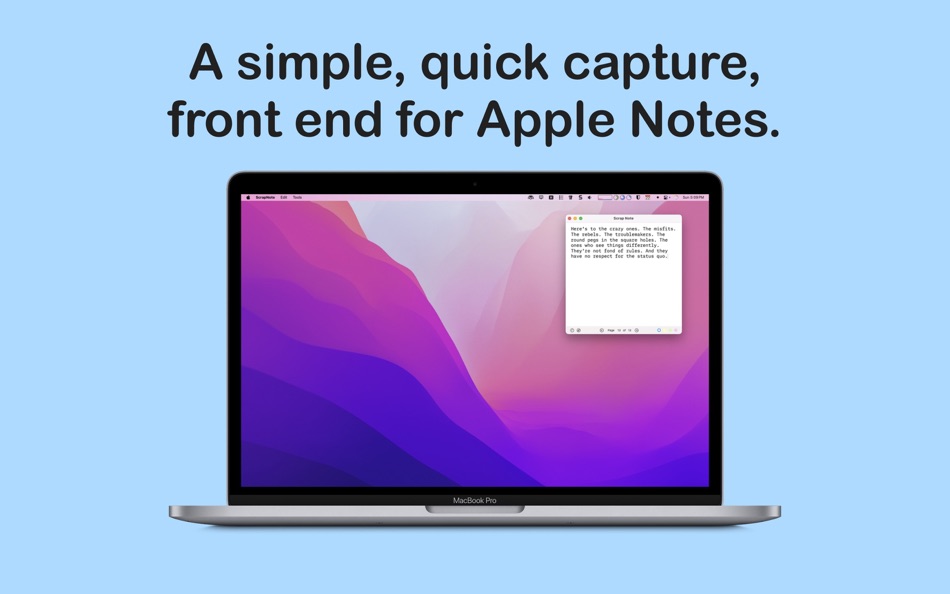
While Apple Notes has Quick Note, every word I jot down there is automatically saved into Apple Notes. This ends up piling a lot of junk notes that I have to manually clean up at the end of the day. I often find myself jotting down quick, temporary things - like a phone number, a serial number, or a quick calculation. These are scrap notes that I don’t really care to keep permanently inside Apple Notes.
That’s the purpose of this app.
It’s plain text only - no frills. It launches quickly (I suggest setting a global hotkey to ⌃ Space).
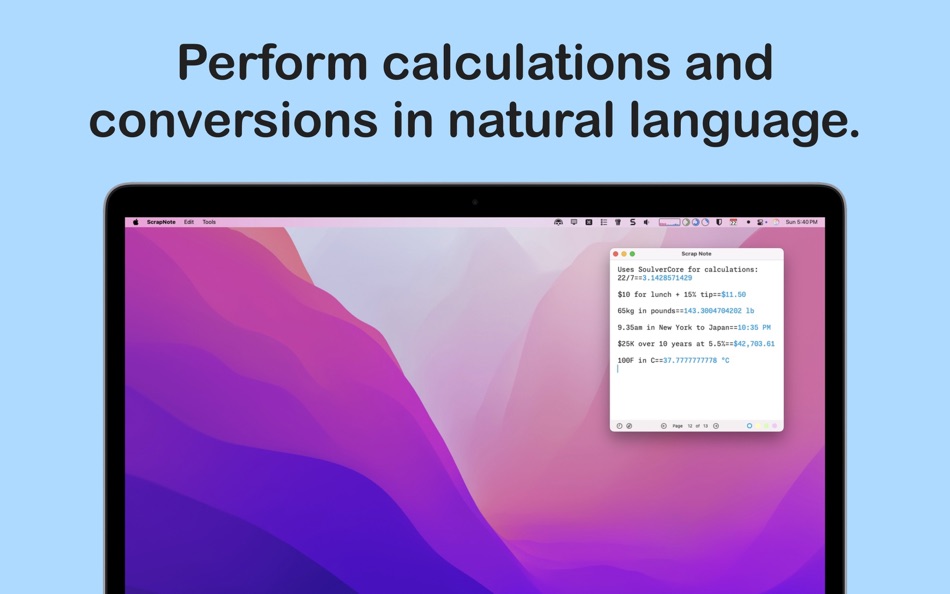
You can also perform quick calculations by typing an equation followed by ==.
(This is powered by SoulverCore, so you can do things like unit conversions, currency conversions, and even time zone calculations. See the screenshots for examples.)
Features:
• Quickly show and hide the Scrap Note window using a global shortcut
• Plain text only. Paste from Word/Excel and it will be converted to plain text
• Perform calculations and conversions
• URL scheme support, so Popclip users can send text to Scrap Note
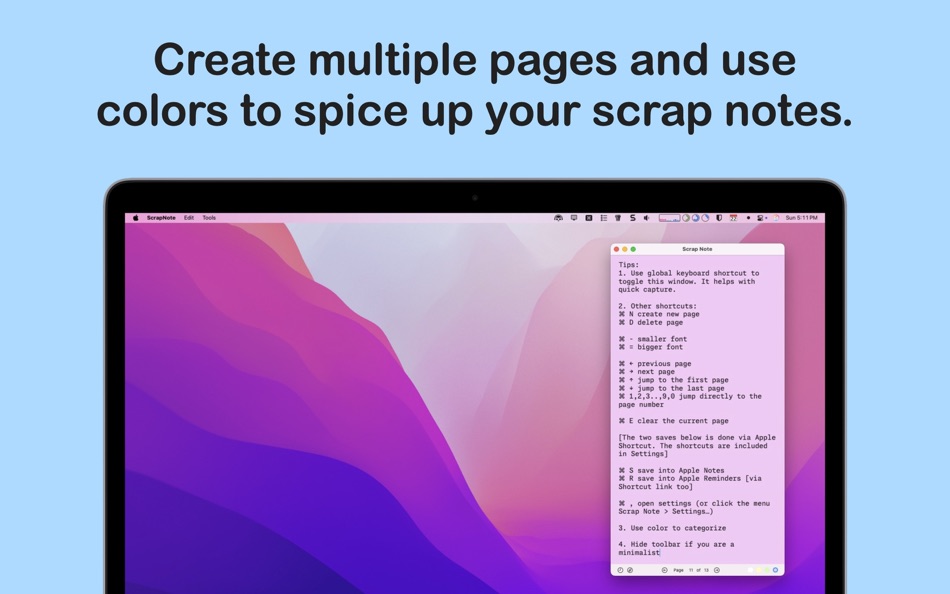
• Unlimited pages; navigate between pages using keyboard shortcuts
• Four background color options
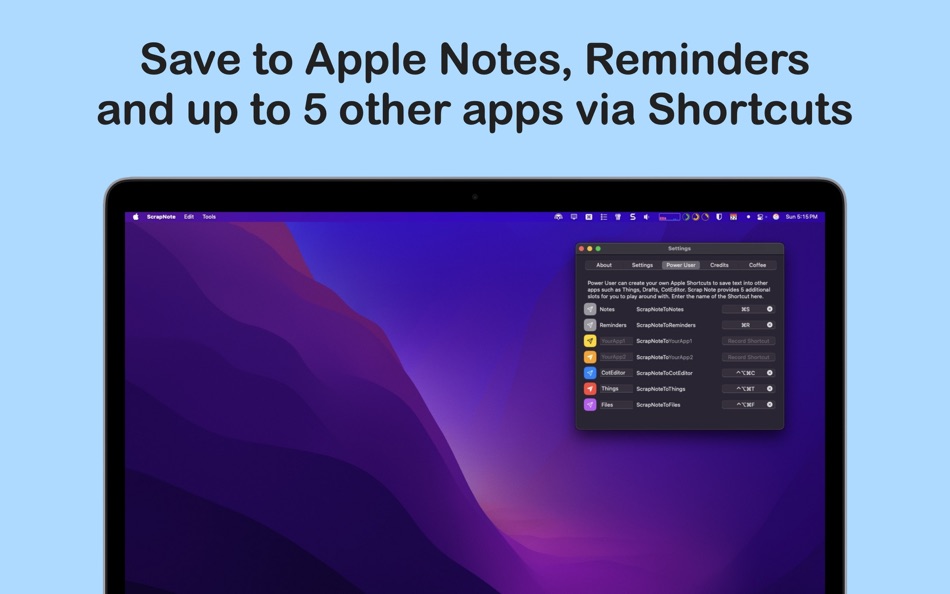
• Save into Apple Notes
• Save into Apple Reminders; each line becomes a separate reminder
• For Power Users, there are additional 5 slots to save notes into other apps like CotEditor, Things, Files (as long as they support Shortcuts)
• Keyboard shortcuts support and customizable toolbar
• One button press to insert the current date and time - for the diary junkies out there :)
• One button press to copy all text into clipboard
Oh, and it’s free to use. Enjoy! (The In-App Purchase you see are for Tip Jars purposes only)
Keyboard shortcuts:
⌘ N create new page
⌘ E clear the current page
⌘ D delete page
⌘ - smaller font
⌘ = bigger font
⌘ 1,2,3..9,0 jump directly to the page number
(Click on the Page x of x at the bottom bar and type the page number to jump to)
Navigations are customizable:
⌘ ← previous page
⌘ → next page
⌘ ↑ jump to the first page
⌘ ↓ jump to the last page
[The two saves below is executed with Apple Shortcut. The shortcuts are included in Settings]
⌘ S save into Apple Notes
⌘ R save into Apple Reminders
(Power Users have 5 additional slots to saves into other apps)
⌘ , open settings (or click the menu Scrap Note > Settings...)
Screenshots

What's new
- Version: 1.11
- Updated:
- [New] macOS 26 round window corner style. Which also means that the toolbar will look like other macOS 26 toolbar. I held off this change but, I cannot accept the window corners not being consistent with the rest of the OS. No changes if you are still on Sequoia or earlier macOS.
[Fixed] when user edits an existing ##Header or >>Quote, the cursor goes down one line and the first character of that line is still brown or italic. I have fixed this bug.
Price History
-
* In-App Purchases - Today: Free
- Minimum: Free
- Maximum: Free
Track prices
Developer
- Fong Yee Long
- Platforms: iOS Apps (1) macOS Apps (2)
- Lists: 0 + 0
- Points: 2 + 3 ¡
- Rankings: 0
- Reviews: 0
- Discounts: 0
- Videos: 0
- RSS: Subscribe


Rankings
0 ☹️
Lists
0 ☹️
Reviews
Be the first to review 🌟
Additional Information
- Version: 1.11
- Category:
macOS Apps›Utilities - OS:
macOS,macOS 13.5 and up - Size:
5 Mb - Supported Languages:
English - Content Rating:
4+ - Mac App Store Rating:
0 - Updated:
- Release Date:
Contacts
 https://www.ringgit.me/p/quick-scrap-note.html
 «Quick Scrap Note» is a Utilities app for macOS, developed by «Fong Yee Long». It was first released on and last updated on . This app is currently free. This app has not yet received any ratings or reviews on AppAgg. AppAgg has tracked 2 confirmed points plus 0 indirect points for this app. Available languages: English. AppAgg continuously tracks the price history, ratings, and user feedback for «Quick Scrap Note». Subscribe to this app or follow its RSS feed to get notified about future discounts or updates.
Quick Scrap Note Short URL: Copied!- 🌟 Share
- Mac App Store
You may also like
-
- Quick Reminder Note
- macOS Apps: Utilities By: Hong Wee Teo
- $1.99
- Lists: 0 + 0 Rankings: 0 Reviews: 0
- Points: 0 + 0 Version: 1.2 Quick Reminder Note is a simple sticky note app that sits on your menubar. Please note, this is a menubar app, so it will appear on your menubar. You will not see it on your dock. ... ⥯
-
- Quick New File Pro
- macOS Apps: Utilities By: Eduardo Revilla Vaquero
- $0.99
- Lists: 0 + 0 Rankings: 0 Reviews: 0
- Points: 0 + 0 Version: 1.2 Quick New File Pro transforms your macOS workflow and restores functionality that many users miss when migrating from Windows: the ability to create new files directly from the file ... ⥯
-
- Quick Translate Pro for Mac OS X
- macOS Apps: Utilities By: Bastian Roessler
- $1.99
- Lists: 0 + 0 Rankings: 0 Reviews: 0
- Points: 0 + 0 Version: 2.0.0 Quick Translate Pro is an intuitive and easy to use translation tool for quick translations into 80 languages. Thereby Quick Translate lives in your Mac's menu bar, so it is never more ⥯
-
- Quick Subtitles
- macOS Apps: Utilities By: Matt Birchler
- * Free
- Lists: 0 + 0 Rankings: 0 Reviews: 0
- Points: 0 + 1 (5.0) Version: 1.5 Quick Subtitles is a powerful, but simple app that transforms audio and video files into accurate text transcriptions and subtitle files using Apple's advanced Speech APIs, 100% on ... ⥯
-
- Quick Digest
- macOS Apps: Utilities By: 宇英 江
- $1.99
- Lists: 0 + 0 Rankings: 0 Reviews: 0
- Points: 0 + 0 Version: 1.1.0 Quick Digest is a lightweight and efficient hash tool for macOS. It lets you instantly calculate hash values for both text and files all from a clean, minimal interface. Features: ... ⥯
-
- Quick Launch Switcher
- macOS Apps: Utilities By: 泳诗 陈
- Free
- Lists: 0 + 1 Rankings: 0 Reviews: 0
- Points: 13 + 0 Version: 6.5.3 "Quick Launch Switcher" is a productivity tool designed for macOS, aiming to provide a fast and intuitive way to launch and switch applications. It uses a unique radial menu interface, ⥯
-
- Note Calculator - Text Editor
- macOS Apps: Utilities By: woojooin
- $0.99
- Lists: 0 + 0 Rankings: 0 Reviews: 0
- Points: 10 + 4 (5.0) Version: 2.3 Note Calculator is a text-based calculator. Sometimes, performing calculations involving multiple equations can be challenging with a basic calculator, right? Using an app like Excel ... ⥯
-
- Note Now2
- macOS Apps: Utilities By: 振强 劳
- Free
- Lists: 0 + 0 Rankings: 0 Reviews: 0
- Points: 1 + 0 Version: 1.0.1 Note Now is especially designed for lightweight note-taking. [Quick to add and edit] Add and edit note in the app [Quick to access] stay on the status bar , one-click to open [Quick to ⥯
-
- Quick Camera
- macOS Apps: Utilities By: Simon Guest
- Free
- Lists: 0 + 0 Rankings: 0 Reviews: 0
- Points: 2 + 0 Version: 1.5 Quick Camera is a utility to display the output from any supported USB web cameras. Quick Camera can be used for video conferences or presentations where you need to show an external ... ⥯
-
- Quick Info - One click info
- macOS Apps: Utilities By: Kauntey Suryawanshi
- * Free
- Lists: 0 + 0 Rankings: 0 Reviews: 0
- Points: 2 + 0 Version: 2.1.2 Quick Info will help you search your info with a spotlight like search view. Features - Launch with shortcut - Store records in folder - Preview record - Copy records to clipboard ... ⥯
-
- Quick Click - mouse clicker
- macOS Apps: Utilities By: Sai Praneeth
- $2.99
- Lists: 0 + 0 Rankings: 0 Reviews: 0
- Points: 1 + 0 Version: 1.4 Quick click has 2 modes of operation. ** Time based ** Repeated clicks (as slowly as once every 60 seconds to as rapidly as 10 times a second!) that keep sending mouse clicks ... ⥯
-
- Quick QR Generator
- macOS Apps: Utilities By: Takahide Noro
- $2.99
- Lists: 0 + 0 Rankings: 0 Reviews: 0
- Points: 0 + 0 Version: 1.0 Quick QR Generator is an app that allows you to swiftly generate your own QR codes. Simply launch the app and input your URL or text to instantly create a QR code. You also have the ... ⥯
-
- Quick New File
- macOS Apps: Utilities By: 兰桂 吴
- $1.99
- Lists: 0 + 0 Rankings: 0 Reviews: 0
- Points: 0 + 0 Version: 1.0 Quick New File allows you to create new files quickly. You can create any type of file, anywhere. Desktop and cloud storage folders (iCloud, OneDrive, Dropbox, Google Drive, etc.) are ... ⥯
-
- Quick Hash
- macOS Apps: Utilities By: xin jin
- $0.99
- Lists: 0 + 0 Rankings: 0 Reviews: 0
- Points: 0 + 0 Version: 1.0 Quick Hash is a files' hash calculator. Key Features: - MD5, SHA1, SHA256 and CRC32 - Hash code Check -Supports multiple files How to use: - Click the "Open File" button and choose the ⥯