
| ผู้พัฒนา: | System-i snc (7) | ||
| ราคา: | ฟรี | ||
| การจัดอันดับ: | 0 | ||
| ความเห็น: | 0 เขียนความเห็น | ||
| รายการ: | 0 + 0 | ||
| แต้มแล: | 0 + 0 ¡ | ||
| Mac App Store | |||
คำอธิบาย

---HOW IT WORKS---
NetworkTest simply does a lot of pings to your gateway and to an external and indipendent server.
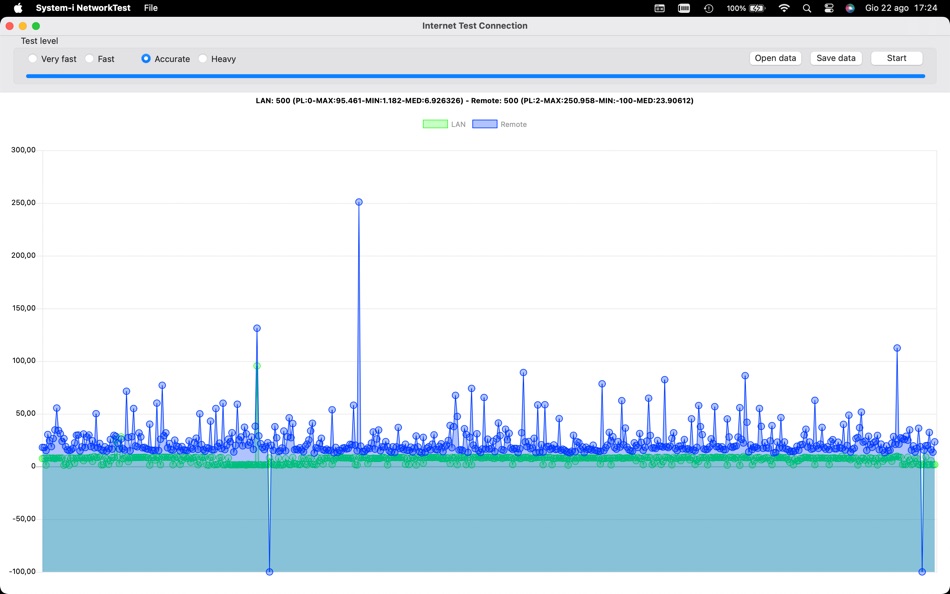
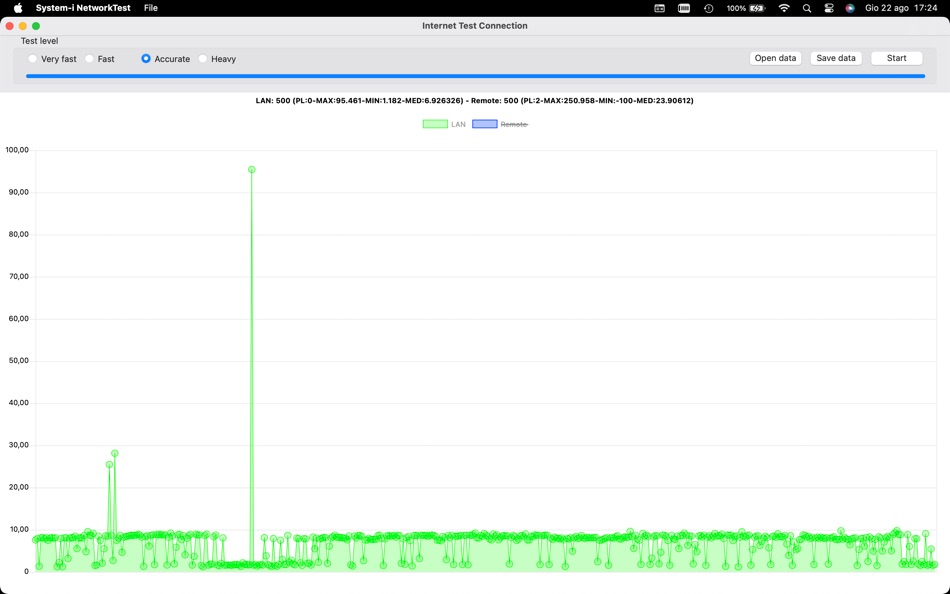
At the end of the test, you'll can see a chart that shows the ping result. You'll can see two lines: LAN and remote.
There are four choices:
* Very fast: only 10 pings, very quick (few seconds) but less precise
* Fast: 100 pings, you will have the result in less than 2 minutes and have more data to evaluate your connection
* Accurate: 500 pings will give you a nice quantity of data to know if (and where) you have connection issues; usually takes arount 10 minutes
* Heavy: 1000 pings! It takes around 20 minutes to have a complete and precise result.
A good internet connection will have remote values just a few over than the LAN values, and no packet loss (negative values).
If you see packet loss on the LAN, you may have a problem on. your own router or your Mac.
If you have very high values and packet loss on the remote, may be the problem is given by your internet service. provider!
You can save your data to compare with future tests.
ภาพหน้าจอ


ราคา
- วันนี้: ฟรี
- ต่ำสุด: ฟรี
- มากที่สุด: ฟรี
ติดตามราคา
ผู้พัฒนา
- System-i snc
- แพลตฟอร์ม: macOS แอป (7)
- รายการ: 0 + 1
- แต้มแล: 1 + 0 ¡
- การจัดอันดับ: 0
- ความเห็น: 0
- ลดราคา: 0
- วิดีโอ: 0
- RSS: ติดตาม
แต้มแล
0 ☹️
การจัดอันดับ
0 ☹️
รายการ
0 ☹️
ความเห็น
แสดงรีวิวเป็นคนแรกเลย 🌟
ข้อมูลเพิ่มเติม
รายชื่อติดต่อ
- เว็บไซท์:
 https://www.system-i.it
System-i NetworkTest URL แบบสั้น: คัดลอกแล้ว!- 🌟 แชร์
- Mac App Store
คุณอาจชอบ
-
- System Tools
- macOS แอป: ยูทิลิตี้ โดย: Stefan Van Damme
- $4.99
- รายการ: 1 + 1 การจัดอันดับ: 0 ความเห็น: 0
- แต้มแล: 1 + 0 เวอร์ชัน: 1.1 System Tools is a simple, beautiful, and innovative control panel app that is designed to look right at your Mac. The one place to adjust your screen brightness, toggle your ... ⥯
-
- System Monitor
- macOS แอป: ยูทิลิตี้ โดย: Marcel Bresink Software-Systeme
- $3.99
- รายการ: 0 + 1 การจัดอันดับ: 0 ความเห็น: 0
- แต้มแล: 1 + 0 เวอร์ชัน: 6.4 System Monitor is an application for the menu bar of your Mac, designed to inform you unobtrusively about the activity of your computer. You can retrieve up-to-date technical data any ... ⥯
-
- System Status Monitor: CPU RAM
- macOS แอป: ยูทิลิตี้ โดย: Igor Bidenko
- * ฟรี
- รายการ: 0 + 0 การจัดอันดับ: 0 ความเห็น: 0
- แต้มแล: 1 + 0 เวอร์ชัน: 3.0 System Monitor is the ultimate device monitor and system status tracker designed exclusively for macOS. Get comprehensive real-time insights into your Mac's CPU performance, RAM usage, ⥯
-
- System Cleaner - Disk Cleanup
- macOS แอป: ยูทิลิตี้ โดย: Wise Tech Labs Private Limited
- $6.99
- รายการ: 0 + 0 การจัดอันดับ: 0 ความเห็น: 0
- แต้มแล: 1 + 0 เวอร์ชัน: 2.0 System Cleaner is a brand new professional System utility app to keeping your Mac clean, healthy and optimized. Our latest app, System Cleaner, has been built with love for helping you ⥯
-
- System Indicators
- macOS แอป: ยูทิลิตี้ โดย: Binarycraft Pty Ltd
- $1.99
- รายการ: 0 + 0 การจัดอันดับ: 0 ความเห็น: 0
- แต้มแล: 1 + 0 เวอร์ชัน: 1.13 System indicators is a lightweight monitoring tool that resides on OS X menubar. It provides a glimpse of the current system status including CPU, RAM, disks, network and ... ⥯
-
- System Real-time Monitor
- macOS แอป: ยูทิลิตี้ โดย: 仁超 张
- $3.99
- รายการ: 0 + 0 การจัดอันดับ: 0 ความเห็น: 0
- แต้มแล: 0 + 0 เวอร์ชัน: 6.3.5 System Real-time Monitor is a powerful system monitoring tool that provides users with real-time monitoring and visual display of key computer performance indicators. This software has ⥯
-
- System Data Cleaner
- macOS แอป: ยูทิลิตี้ โดย: Behlulcan Sahin
- $2.99
- รายการ: 0 + 0 การจัดอันดับ: 0 ความเห็น: 0
- แต้มแล: 0 + 0 เวอร์ชัน: 1.1 System Data Cleaner Free Up Space from System Data! Is your System Data folder taking up too much space? Say goodbye to bloated storage! Find & Remove Cache Files Quickly scan and ... ⥯
-
- System utility. monitor status
- macOS แอป: ยูทิลิตี้ โดย: luca calciano
- $2.99
- รายการ: 0 + 0 การจัดอันดับ: 0 ความเห็น: 0
- แต้มแล: 0 + 0 เวอร์ชัน: 2.4 System Utility is the new app that allows you to keep everything under control! Optimize the status of your mac with this app! Take 100% advantage of your Mac s power. ⥯
-
- System Toolkit
- macOS แอป: ยูทิลิตี้ โดย: Sascha Simon
- $0.99
- รายการ: 2 + 1 การจัดอันดับ: 0 ความเห็น: 0
- แต้มแล: 9 + 0 เวอร์ชัน: 6.1.2 The System Toolkit is an all-in-one information and maintenance app designed for macOS. Information: System Information Keep track of all your system loads. This includes CPU load, ... ⥯
-
- System & Network Info
- macOS แอป: ยูทิลิตี้ โดย: Konstantinos Papadakis
- $0.99
- รายการ: 0 + 0 การจัดอันดับ: 0 ความเห็น: 0
- แต้มแล: 2 + 335 (4.1) เวอร์ชัน: 1.7.0 Ever wondered what's happening under the hood of your iOS device? System Monitor gives you comprehensive insights into your device's network and performance metrics. Network ... ⥯
-
- System Stamp
- macOS แอป: ยูทิลิตี้ โดย: Ten by Ten
- $2.99
- รายการ: 0 + 0 การจัดอันดับ: 0 ความเห็น: 0
- แต้มแล: 0 + 0 เวอร์ชัน: 1.9.0 Stamp your desktop with essential system information! System Stamp will apply information such as host name, operating system version, memory, and processor configuration onto your ... ⥯
-
- System Stats Pro for Menu Bar
- macOS แอป: ยูทิลิตี้ โดย: Jose Antonio Jimenez Campos
- $3.99
- รายการ: 0 + 0 การจัดอันดับ: 0 ความเห็น: 0
- แต้มแล: 0 + 0 เวอร์ชัน: 2.2 This is an advanced system monitor for your Mac. SympleStats uses your menubar to show relevant information about your system, and windows to show additional information. It can show ... ⥯
-
- System Audio Recorder
- macOS แอป: ยูทิลิตี้ โดย: Kenneth Kao
- $7.99
- รายการ: 0 + 0 การจัดอันดับ: 0 ความเห็น: 0
- แต้มแล: 0 + 0 เวอร์ชัน: 1.4 Record any audio that is playing on your Mac. Directly capture high quality audio from the system internally. Works with audio from any websites or apps. Supports M4A audio format. ... ⥯
-
- Stats Panel - System Monitor
- macOS แอป: ยูทิลิตี้ โดย: Andrew Moloney
- $3.99
- รายการ: 2 + 1 การจัดอันดับ: 0 ความเห็น: 0
- แต้มแล: 12 + 0 เวอร์ชัน: 3.5.0 System performance monitor for your menu bar. Native Apple Silicon (M Series) & Intel support Simple, lightweight and focused. Secure and privacy friendly. So efficient it's only 2.2MB ⥯