
| 개발자: | Ebey Tech LLC (57) | ||
| 가격: | $2.59 | ||
| 순위: | 0 | ||
| 리뷰: | 0 리뷰 작성 | ||
| 목록: | 1 + 0 | ||
| 포인트: | 1 + 0 ¡ | ||
| Mac App Store | |||
기술

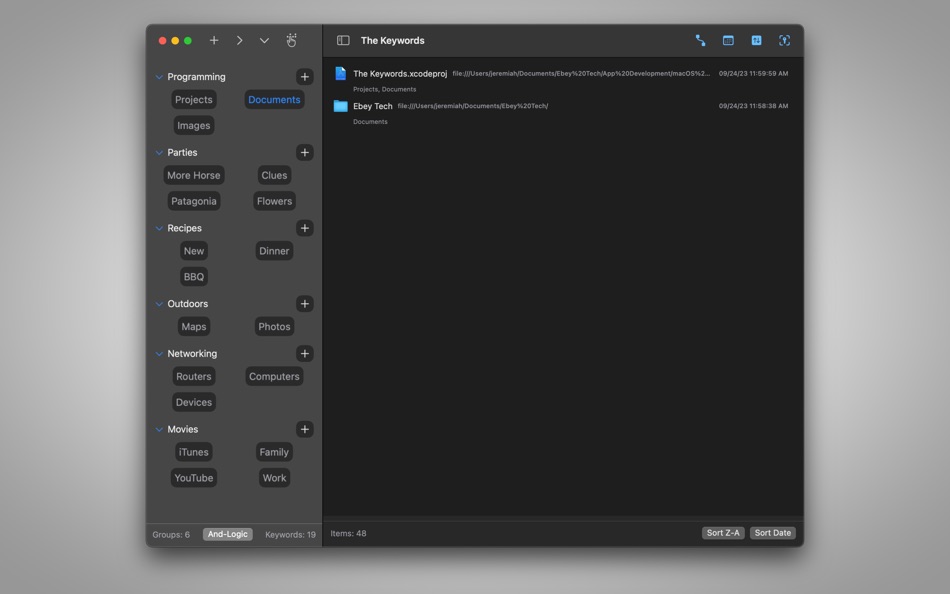
Click + button to create a new Tree Item. Click the Tree Item's + button to create new Keyword Items. In the navigation's toolbar, there are buttons for express operations, including Expand/Collapse Trees and Clear Keyword Selections. Tree Items can be Expanded/Collapse individually using the triangle next to them or by clicking the Tree Item Name. Tree Items have right-click options to Edit, Reorder, as well as some productivity buttons, for example turning the Group's Keywords on/off.
Keyword Items act like toggle button. Click them once to activate them. Click them again to de-activate them. Keyword Items have an important "key" feature for "Assigning Keywords" to a file/folder. A file/folder must be selected in the right-side Main View area before using the Assign Keywords functions. There are additional right-click features for Keyword Items too, like Clear Others - which de-activates other Keywords, and only activates the right-clicked Keyword.
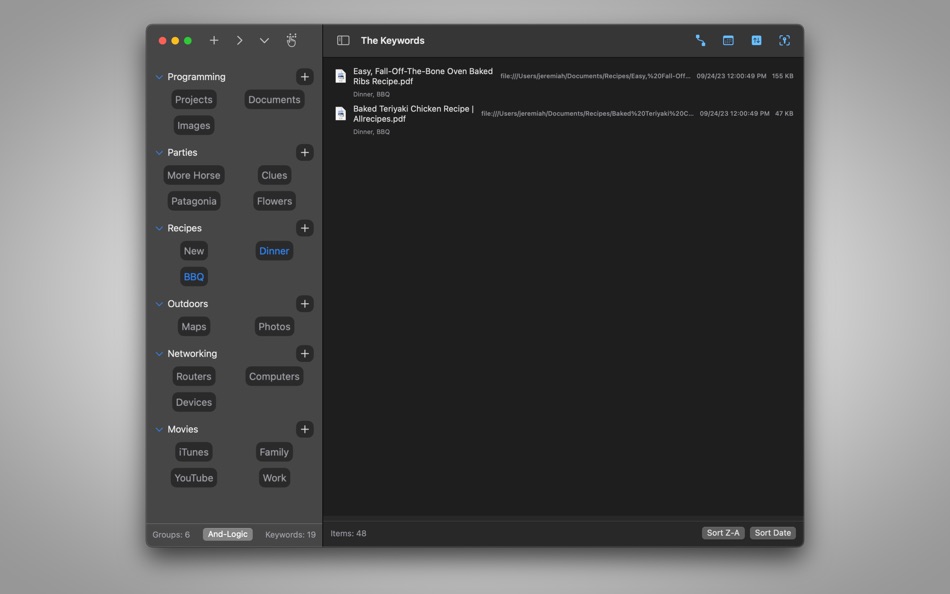
Drag/drop file(s)/Folder(s) to the Main View (right-side area) to include files/folders in the app. Once a file/folder has been dropped and appears in the Main View, users can click to select it. To assign a Keyword to that File/Folder, with the file/folder selected, right-click a Keyword and choose "Assign Keywords". This links the Keyword to the selected file(s)/folder(s). After a Keyword has been assigned, clicking the Keyword would initiate the Main View to filter only files/folders that include the activated Keyword(s).
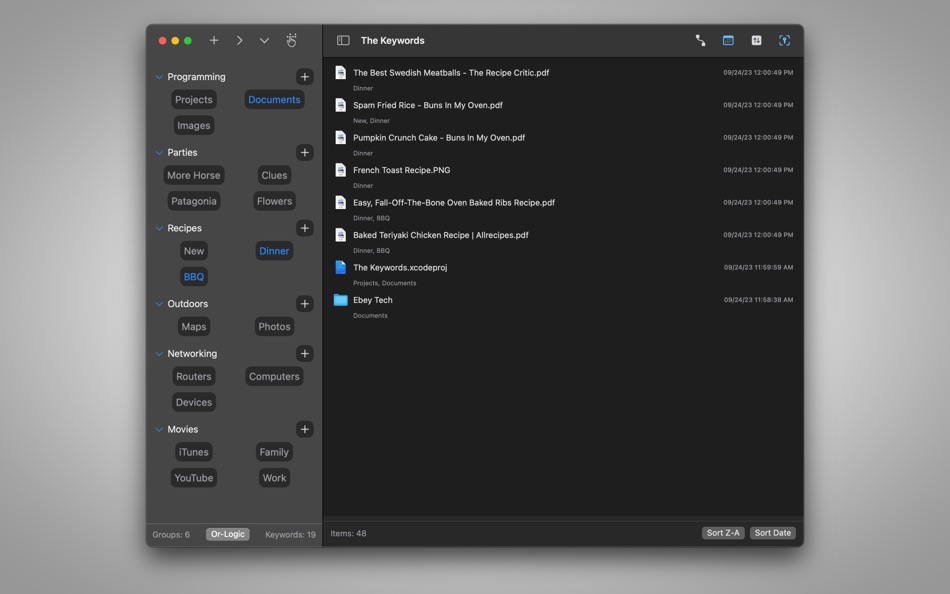
The Keywords app includes a toggle for filtering methods, referred to as "And-Logic" and "Or-Logic". And-Logic method would filter only files/folders that include ALL matching activated Keywords. Or-Logic method allows for filtering for ANY files/folders assigned to the activated Keywords.
For the Main View, along the top toolbar are optional toggles to hide/show file/folder properties, like Date Added and File Size. Date Added refers to the date of when the file/folder was dropped into The Keywords app. *Some files may not report a file size when read from the system. The macOS Finder may report the file's size, if true size is needed.
The Main View results can be sorted by Name or Date Added by clicking the Sort buttons along the bottom. The order can also be reversed by changing A-Z to Z-A.
스크린샷
새로운 기능
- 버전: 1.0
- 업데이트:
가격
- 오늘: $2.59
- 최소: 무료
- 최대: $2.59
가격 추적
개발자
포인트
-

- 10,385 Simon Chan
- +1

순위
0 ☹️
목록
리뷰
첫 번째 리뷰를 남겨보세요 🌟
추가 정보
주소록
- 웹사이트:
 https://ebeytech.com/
The Keywords 단축 URL: 복사됨!- 🌟 공유하기
- Mac App Store
당신은 또한 같은 수 있습니다
-
- Photo Exifer
- macOS 앱: 유틸리티 게시자: 栋 陈
- * 무료
- 목록: 1 + 0 순위: 0 리뷰: 0
- 포인트: 7 + 0 버전: 2.8.31 Photo Exifer allows you to view, add, delete and edit, copy and paste, export and import EXIF, TIFF, IPTC, GPS data from local photos, digital cameras, iPhone devices. You can use it ... ⥯
-
- Protego for Reddit
- macOS 앱: 유틸리티 게시자: Edgar Sanchez
- $1.99
- 목록: 2 + 2 순위: 0 리뷰: 0
- 포인트: 1 + 15 (4.7) 버전: 2.20 Transform your Reddit experience with Protego - a powerful Safari extension that lets you magically filter unwanted content from your feed. Like a shield charm for your mental health, ... ⥯
-
- Focus Sessions • Self control
- macOS 앱: 유틸리티 게시자: Denk Alexandru
- * 무료
- 목록: 1 + 0 순위: 0 리뷰: 0
- 포인트: 2 + 0 버전: 4.2.1 Focus Sessions is a simple utility that can block applications and websites. It can be used as a parental control system or a self control tool. It makes the computer safer for your ... ⥯
-
- Ad Blocker ·
- macOS 앱: 유틸리티 게시자: Anish Modan
- 무료
- 목록: 0 + 1 순위: 0 리뷰: 0
- 포인트: 0 + 5,629 (4.5) 버전: 3.1.1 Ad-Blocker permits you to block ads on your iOS device. Get rid of 99% of annoying popups, banners, and video ads. Save data and speed up your Safari. Block ads, trackers, and ... ⥯
-
- Dynamic Wallpaper Engine
- macOS 앱: 유틸리티 게시자: 豪 文
- * $4.99
- 목록: 1 + 3 순위: 0 리뷰: 0
- 포인트: 5 + 0 버전: 24.5 Dynamic Wallpaper Engine is the most popular live wallpaper app on Mac. Dynamic Wallpaper Engine redefines your desktop & screensaver experience by replacing static wallpapers with ... ⥯
-
- Tags and Description Viewer
- macOS 앱: 유틸리티 게시자: 亦伦 谢
- $0.99
- 목록: 0 + 0 순위: 0 리뷰: 0
- 포인트: 0 + 0 버전: 1.0 Tags and Description Viewer is a Safari extension that helps you easily display the original keywords and meta descriptions of any webpage with a single click, allowing you to ... ⥯
-
- typegear.ai
- macOS 앱: 유틸리티 게시자: Till Seyer
- * 무료
- 목록: 0 + 1 순위: 0 리뷰: 0
- 포인트: 3 + 0 버전: 1.4.0 Bring ChatGPT to your Mac: Introducing typegear.ai - the ultimate AI-powered text editing app for students, creators, office workers, and really anyone who types a lot on their Mac. ... ⥯
-
- RecognizeMe Web
- macOS 앱: 유틸리티 게시자: Aimer Shine Co. Ltd
- $0.99
- 목록: 0 + 0 순위: 0 리뷰: 0
- 포인트: 1 + 0 버전: 1.5.5 RecognizeMe is a Safari extension for making the target image stand out by 1. Add an extra text of results on the images. 2. Applying a filter of blur when the results do not match the ⥯
-
- Keyword Search
- macOS 앱: 유틸리티 게시자: Aurlien sang og data
- $0.99
- 목록: 2 + 3 순위: 0 리뷰: 0
- 포인트: 1 + 39 (4.5) 버전: 2.2 Keyword Search lets you set up keywords to search the web with any search engine directly from the Safari address bar. Searching Wikipedia for information on simians is as simple as ... ⥯
-
- ProdCom
- macOS 앱: 유틸리티 게시자: ProdCom, LLC
- * 무료
- 목록: 0 + 0 순위: 0 리뷰: 0
- 포인트: 0 + 0 버전: 1.9.2 ProdCom is a real-time, multi-channel speech-to-text transcription software for live production environments. Designed from the ground up by actual users in the production field, ... ⥯
-
- SpamOut
- macOS 앱: 유틸리티 게시자: xProline
- $29.00
- 목록: 1 + 1 순위: 0 리뷰: 0
- 포인트: 5 + 0 버전: 2.3.0 SpamOut is a powerful, intelligent email management tool designed to automatically protect your inbox from unwanted spam and promotional emails. Built specifically for macOS, this ... ⥯
-
- macOS Sonoma
- macOS 앱: 유틸리티 게시자: Apple
- 무료
- 목록: 2 + 1 순위: 0 리뷰: 0
- 포인트: 3 + 0 버전: 14.7.7 macOS Sonoma brings all new capabilities that elevate your productivity and creativity. Personalize your Mac with stunning screensavers and widgets that you can add to your desktop. ... ⥯
-
- Clipboard mini
- macOS 앱: 유틸리티 게시자: Kai Luo
- $4.99
- 목록: 0 + 0 순위: 0 리뷰: 0
- 포인트: 2 + 0 버전: 3.0.2 Clipboard mini is a full featured clipboard management application. It's lightweight, it's easy to use. Features - Search with keywords combination - Filters by keywords or ... ⥯
-
- SellerSprite
- macOS 앱: 유틸리티 게시자: Chengdu Yunya Information Technology Co., Ltd.
- 무료
- 목록: 0 + 0 순위: 0 리뷰: 0
- 포인트: 1 + 1 (5.0) 버전: 4.8.0 Join over a million sellers using SellerSprite to research, analyze, and optimize smarter directly from your browser. Built on powerful data and AI, SellerSprite's Chrome Extension ... ⥯