
| ผู้พัฒนา: | Thomas Wright (1) | ||
| ราคา: | * ฟรี | ||
| การจัดอันดับ: | 0 | ||
| ความเห็น: | 0 เขียนความเห็น | ||
| รายการ: | 0 + 0 | ||
| แต้มแล: | 0 + 0 ¡ | ||
| Mac App Store | |||
คำอธิบาย

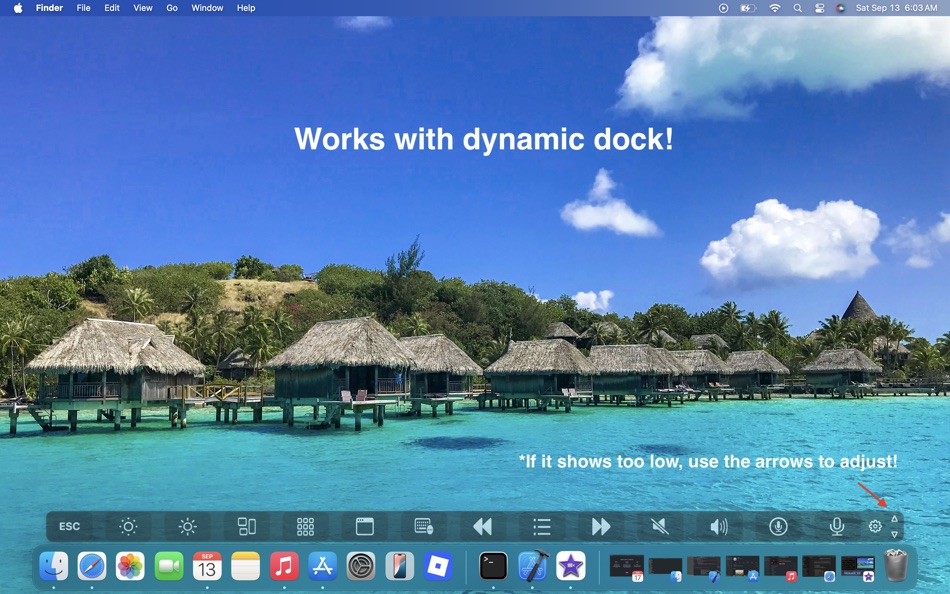
It’s perfect if your Touch Bar is unresponsive, dim, or completely broken, and also works as a convenient Touch Bar simulator.
Why you’ll love it
Quickly see where every Touch Bar button is
Click controls directly on screen, even if the hardware isn’t working
Customize the layout to match your Mac’s Touch Bar exactly
Keep it handy with a global hotkey (⌘⌥T) and menu bar access
Choose auto-hide timing or keep it always visible
Important to know
For most buttons, you can click them directly. Some system controls (like brightnesss, keyboard brightness, Night Shift, or AirPlay) will open their corresponding macOS settings panel instead (and allow you to adjust them there), due to Apple privacy rules.
Requirements
macOS Catalina (10.15) or later
Support
Need help or have feedback? Reach out anytime: chocksoutpublishing@gmail.com
ภาพหน้าจอ


ราคา
-
* การซื้อภายในแอพ - วันนี้: ฟรี
- ต่ำสุด: ฟรี
- มากที่สุด: ฟรี
ติดตามราคา
ผู้พัฒนา
- Thomas Wright
- แพลตฟอร์ม: macOS แอป (1)
- รายการ: 0 + 0
- แต้มแล: 0 + 0 ¡
- การจัดอันดับ: 0
- ความเห็น: 0
- ลดราคา: 0
- วิดีโอ: 0
- RSS: ติดตาม
แต้มแล
0 ☹️
การจัดอันดับ
0 ☹️
รายการ
0 ☹️
ความเห็น
แสดงรีวิวเป็นคนแรกเลย 🌟
ข้อมูลเพิ่มเติม
Virtual Bar Map URL แบบสั้น: คัดลอกแล้ว!- 🌟 แชร์
- Mac App Store
คุณอาจชอบ
-
- Map Connect 2
- macOS แอป: ยูทิลิตี้ โดย: 英轩 董
- ฟรี
- รายการ: 0 + 0 การจัดอันดับ: 0 ความเห็น: 0
- แต้มแล: 0 + 0 เวอร์ชัน: 1.1.3 Map Connect is an Infinite Flight 3rd party add-on, which allows you to operate your flight in Infinite Flight using joysticks and keyboard. It is completely free and easy to use. It ... ⥯
-
- Map Distances & Area
- macOS แอป: ยูทิลิตี้ โดย: Kyle Modesitt
- ฟรี
- รายการ: 0 + 0 การจัดอันดับ: 0 ความเห็น: 0
- แต้มแล: 1 + 0 เวอร์ชัน: 2.3 Map Distances & Area allows you to populate a map with map pins. The distance between the map pins is displayed as well as the area within the map pins. A circle can be displayed using ⥯
-
- Virtual Machines House
- macOS แอป: ยูทิลิตี้ โดย: Senthilkumar Eswaran
- ฟรี
- รายการ: 1 + 0 การจัดอันดับ: 0 ความเห็น: 0
- แต้มแล: 1 + 0 เวอร์ชัน: 1.3.0 This app facilitates creating and managing virtual machines. On Apple Silicon systems, both Mac and Linux virtual machines are supported. On Intel systems, only Linux virtual machines ... ⥯
-
- Bar Pilot
- macOS แอป: ยูทิลิตี้ โดย: Austin Brown
- $0.99
- รายการ: 0 + 0 การจัดอันดับ: 0 ความเห็น: 0
- แต้มแล: 0 + 0 เวอร์ชัน: 1.1 Bar Pilot is a Mac OS menu bar application that puts your favorite folders at your fingertips. It uses security scoped bookmarks to maintain access across launches with no additional ... ⥯
-
- Virtual Wall
- macOS แอป: ยูทิลิตี้ โดย: SopoNext
- $2.99
- รายการ: 0 + 0 การจัดอันดับ: 0 ความเห็น: 0
- แต้มแล: 1 + 0 เวอร์ชัน: 2.2 Virtual Wall confines the mouse cursor in one monitor per time without turning off or disconnecting the unused other monitors. Virtual Wall prevent to go in the near monitor ... ⥯
-
- Map Area Calculator - Marea
- macOS แอป: ยูทิลิตี้ โดย: Applorium Ltd
- ฟรี
- รายการ: 0 + 0 การจัดอันดับ: 0 ความเห็น: 0
- แต้มแล: 1 + 4,317 (4.5) เวอร์ชัน: 2.4.9 Marea helps estimating the area for a region given by a set of coordinates. Useful for plots, farm land, roof measurements and anything you can see with Maps. The total area is ... ⥯
-
- Virtual Desktops
- macOS แอป: ยูทิลิตี้ โดย: Elena Ilchenko
- $0.99
- รายการ: 0 + 0 การจัดอันดับ: 0 ความเห็น: 0
- แต้มแล: 0 + 0 เวอร์ชัน: 1.0 If the desktop on your Mac gets cluttered with open app windows, you can use Mission Control to create additional desktops, called spaces, to organize the windows. When you work in a ... ⥯
-
- Top Bar Timer for Mac OS X
- macOS แอป: ยูทิลิตี้ โดย: Martin Nash
- ฟรี
- รายการ: 0 + 0 การจัดอันดับ: 0 ความเห็น: 0
- แต้มแล: 3 + 0 เวอร์ชัน: 3 A powerful timer that lives in your status bar. Select a timer from the menu, and get to work. Create unlimited timers with in-app purchase. ⥯
- ใหม่
- Zone Bar
- macOS แอป: ยูทิลิตี้ โดย: Sindre Sorhus
- $4.00
- รายการ: 0 + 0 การจัดอันดับ: 0 ความเห็น: 0
- แต้มแล: 0 + 0 เวอร์ชัน: 1.0.3 Show multiple world clocks in your menu bar. Add clocks for any time zone, give them custom names and emoji, and see them at a glance. The time travel slider lets you check what time ... ⥯
-
- Geocoordinate Map
- macOS แอป: ยูทิลิตี้ โดย: Yutaro Yoshizawa
- ฟรี
- รายการ: 0 + 0 การจัดอันดับ: 0 ความเห็น: 0
- แต้มแล: 1 + 0 เวอร์ชัน: 1.0.3 Are you looking for a map app that allows you to quickly and easily obtain the precise latitude and longitude of any location? Geocoordinate Map is a specially designed app for this ... ⥯
-
- Shortcuts in Menu Bar
- macOS แอป: ยูทิลิตี้ โดย: Binh Nguyen
- $2.99
- รายการ: 1 + 0 การจัดอันดับ: 0 ความเห็น: 0
- แต้มแล: 0 + 0 เวอร์ชัน: 1.2.5 A small utility that provides links to your frequently used files, folders, websites, applications. Help you to keep your Desktop and Dock bar clean. Help you easier to organize your ... ⥯
-
- Block Screen Bar
- macOS แอป: ยูทิลิตี้ โดย: Matthew Ramsden
- ฟรี
- รายการ: 0 + 0 การจัดอันดับ: 0 ความเห็น: 0
- แต้มแล: 2 + 0 เวอร์ชัน: 1.0.7 Block Screen, an app to watch blocks. Block Screen allows you to tell block time in your Menu Bar. Just glance up at your Menu Bar to instantly know what block time it is. Plus ... ⥯
-
- Photo Bar
- macOS แอป: ยูทิลิตี้ โดย: Qneo
- $2.99
- รายการ: 0 + 0 การจัดอันดับ: 0 ความเห็น: 0
- แต้มแล: 0 + 0 เวอร์ชัน: 1.1.1 With Photo Bar you can easily place your beloved photos and videos on the system menu bar and view them with just one click. Add your sweetheart, kids, house or car as mini frames to ... ⥯
-
- Menu Bar Shortcuts
- macOS แอป: ยูทิลิตี้ โดย: Present Day Media LLC
- $3.99
- รายการ: 0 + 0 การจัดอันดับ: 0 ความเห็น: 0
- แต้มแล: 0 + 0 เวอร์ชัน: 1.14 Menu Bar Shortcuts brings four everyday productivity tools to the one place you check all day long the macOS menu bar. Instant Calculator A full-featured calculator that supports ... ⥯