
| Developer: | 敏 何 (8) | ||
| Price: | $2.99 | ||
| Rankings: | 0 | ||
| Reviews: | 0 Write a Review | ||
| Lists: | 0 + 0 | ||
| Points: | 0 + 0 ¡ | ||
| Mac App Store | |||
Description

Get folder icon done in three seconds! Support custom colors, photos, and intelligent cover generation, making your folder stand out from the crowd!
Detailed description:
One click icon change · Make your folder look higher in seconds
Still using the system's default blue folder? One click icon change "helps you completely bid farewell to monotony!
Changing colors is super simple - one click to switch folder colors, clearer classification, no matter how many files there are, there is no fear of chaos!
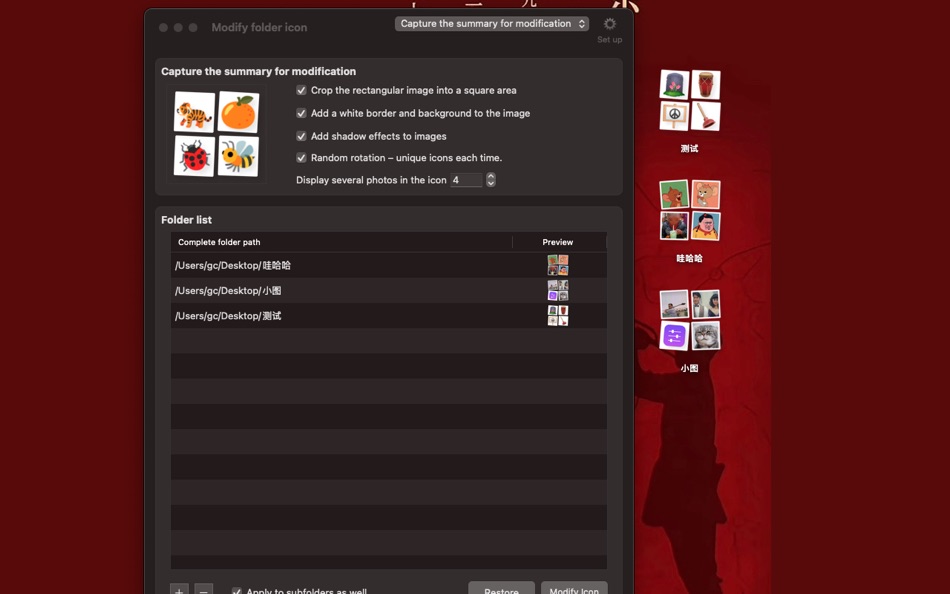
Photo icon transformation - supports dragging and dropping images to folders, instantly turning them into personalized icons and decorating the desktop with favorite photos!
Intelligent Cover Generation - Automatically select images from folders to generate overview icons, and the content can be recognized at a glance!
Why do you have to give it a try?
Just one word - simple and rough operation, changing icons takes less than 3 seconds.
Organizing artifacts - using colors to distinguish work/life/study, efficiency can be doubled directly.
Full of personality - your Mac desktop, of course, needs to be special!
These scenes are super useful:
Designer/Photographer - Use your work as a folder icon to enhance professionalism.
Document organization and control - red work, green life, with super intuitive classification.
Ordinary users - make boring folders interesting and attractive.
Download now and immediately have a special folder!
Screenshots


What's new
- Version: 1.0.2
- Updated:
- [Optimization] 1. Supplement translations for Traditional Chinese, Japanese, and Korean.
[Optimization] 2. Cancel the highlighted selection of text input boxes;
[Optimization] 3. Optimize some default parameters when modifying images.
Price History
- Today: $2.99
- Minimum: $2.99
- Maximum: $2.99
Track prices
Developer
Points
0 ☹️
Rankings
0 ☹️
Lists
0 ☹️
Reviews
Be the first to review 🌟
Additional Information
- Version: 1.0.2
- Category:
macOS Apps›Utilities - OS:
macOS,macOS 11.5 and up - Size:
1 Mb - Supported Languages:
Arabic,Bulgarian,Chinese,Czech,Danish,Dutch,English,Estonian,Finnish,French,German,Greek,Hungarian,Italian,Japanese,Korean,Lao,Polish,Portuguese,Romanian,Russian,Slovak,Spanish,Swedish,Thai,Vietnamese - Content Rating:
4+ - Mac App Store Rating:
0 - Updated:
- Release Date:
«一键换图标» is a Utilities app for macOS, developed by «敏 何». It was first released on and last updated on . The lowest historical price was $2.99, and the highest was $2.99. This app has not yet received any ratings or reviews on AppAgg. Available languages: Arabic, Bulgarian, Chinese, Czech, Danish, Dutch, English, Estonian, Finnish, French, German, Greek, Hungarian, Italian, Japanese, Korean, Lao, Polish, Portuguese, Romanian, Russian, Slovak, Spanish, Swedish, Thai, Vietnamese. AppAgg continuously tracks the price history, ratings, and user feedback for «一键换图标». Subscribe to this app or follow its RSS feed to get notified about future discounts or updates.
一键换图标 Short URL: Copied!- 🌟 Share
- Mac App Store
You may also like
-
- 北极象沉浸式翻译 - 沉浸式翻译 | 网页 | PDF翻译
- macOS Apps: Utilities By: 深圳市象塔科技有限公司
- * Free
- Lists: 0 + 0 Rankings: 0 Reviews: 0
- Points: 0 + 0 Version: 1.1 【北极象沉浸式翻译 - 带您走进沉浸式的双语对照体验】 这是一款沉浸体验感极强的翻译神器。精准的网页翻译 沉浸式的双语对照 随心划词翻译 图片文字瞬间转换 跨境电商卖家一致好评 PDF文档支持各类型学术领域 接入DeepL、谷歌、百度等强大引擎 字幕翻译助力YouTube等视频平台 搭配便捷在线翻译与实用单词本。让您在语言世界畅行无阻 尽享高效翻译体验。 ... ⥯
- New
- 简栏
- macOS Apps: Utilities By: 越 张
- Free
- Lists: 0 + 0 Rankings: 0 Reviews: 0
- Points: 0 + 0 Version: 1.0 简栏 ZenBar 是一款专为 macOS 设计的菜单栏图标折叠工具 让凌乱的状态栏瞬间变得干净、可控。无需复杂设置 也不修改系统 只用两个小图标 就能优雅地管理一整排菜单栏图标。 【它能帮你做什么】 把不常用的菜单栏图标 折叠 起来 只保留真正常用的几枚 一键在 折叠 / 展开 之间切换 需要时全部露出 用完再收回 让刘海屏顶部区域也不再拥挤 视觉更统一、更顺眼 ... ⥯
-
- iCopy-剪切板&快捷回复工具
- macOS Apps: Utilities By: 宁波上官科技有限公司
- Free
- Lists: 0 + 0 Rankings: 0 Reviews: 0
- Points: 2 + 0 Version: 1.3.2 【原生支持Apple M 系列和Intel芯片】 剪贴板、快捷回复 强强联合 效率倍增神器 iCopy 是Mac上一款优秀的剪贴板、快捷回复工具。 1.剪贴板 1.剪贴板面板支持横向、竖向两种模式。横向剪切板支持高度调节 竖向剪切板支持自动跟随光标/上次关闭的位置 2.记录历史剪贴板信息 按文本、图片、文件分类 支持收藏 搜索 3.支持光标悬浮切换分组 ... ⥯
-
- Nook X - 效率岛 Notch 番茄钟 刘海 Todo
- macOS Apps: Utilities By: 卓文 高
- * Free
- Lists: 1 + 0 Rankings: 0 Reviews: 0
- Points: 5 + 0 Version: 2025.11.20 Nook X 是一款专为 macOS 设计的高效灵动交互效率岛小工具 它能在 Mac 上模拟刘海屏 展示多种个性化功能 比如歌曲歌词、日期、时间、天气温度显示、快捷启动、快捷指令、待办事项、AI智能对话DeepSeek AI 等功能 通过 Nook X 用户可以将刘海Notch区域打造成一个小型信息中心 最大化屏幕空间利用率。Nook X 提供多样的自定义选项 ... ⥯