
저장됨
‘저장됨’ 메뉴에 표시할 이름을 입력하세요.
완료!
| 개발자: | Vincenzo Lentini (1) | ||
| 가격: | 무료 | ||
| 종합 점수: | 1,000 실버 | ||
| 순위: | 0 | ||
| 댓글: | 0 댓글 게시 | ||
| 목록: | 0 + 0 | ||
| 포인트: | 0 + 0 ¡ | ||
| +1 포인트 | |||
설명

Actify Studio turns manual browser testing into a maintainable Playwright suite — without writing code.
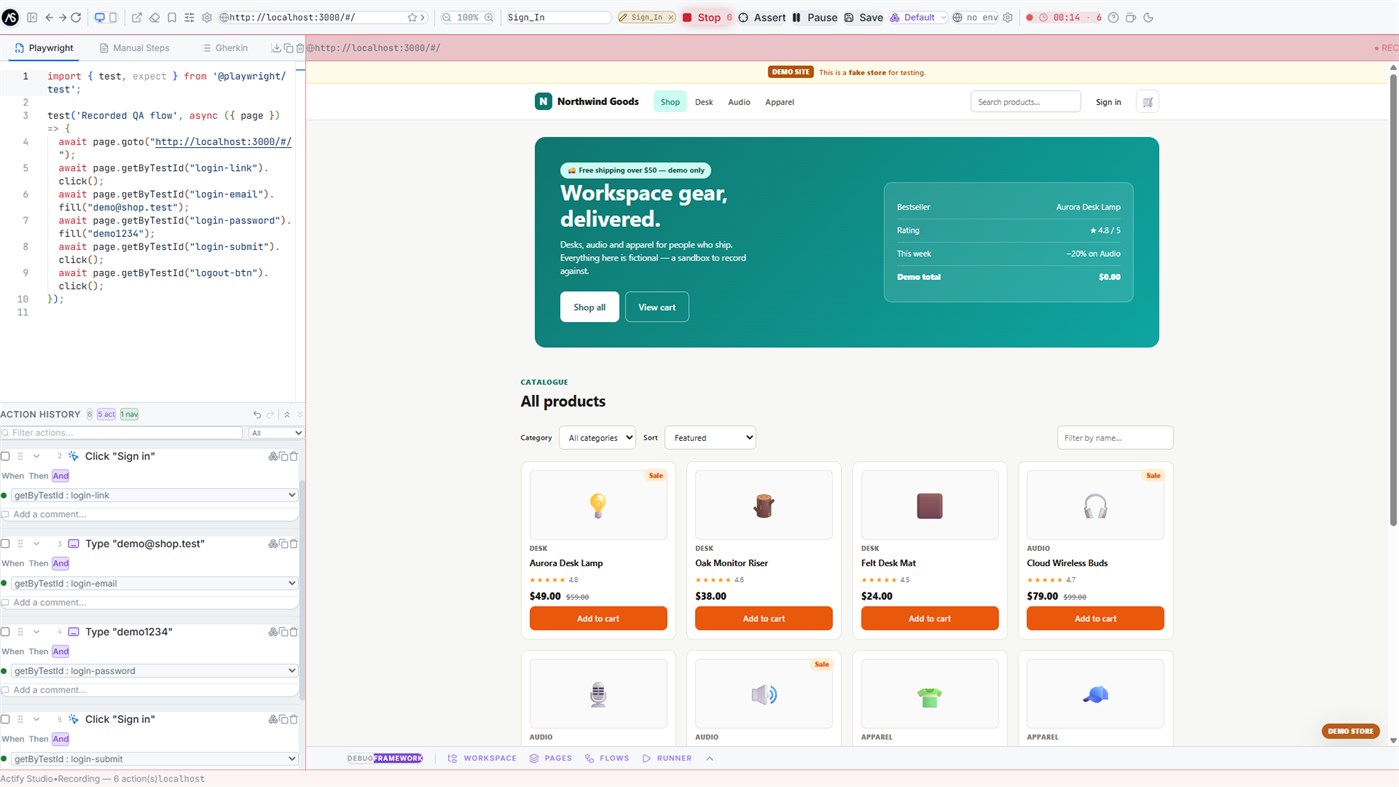
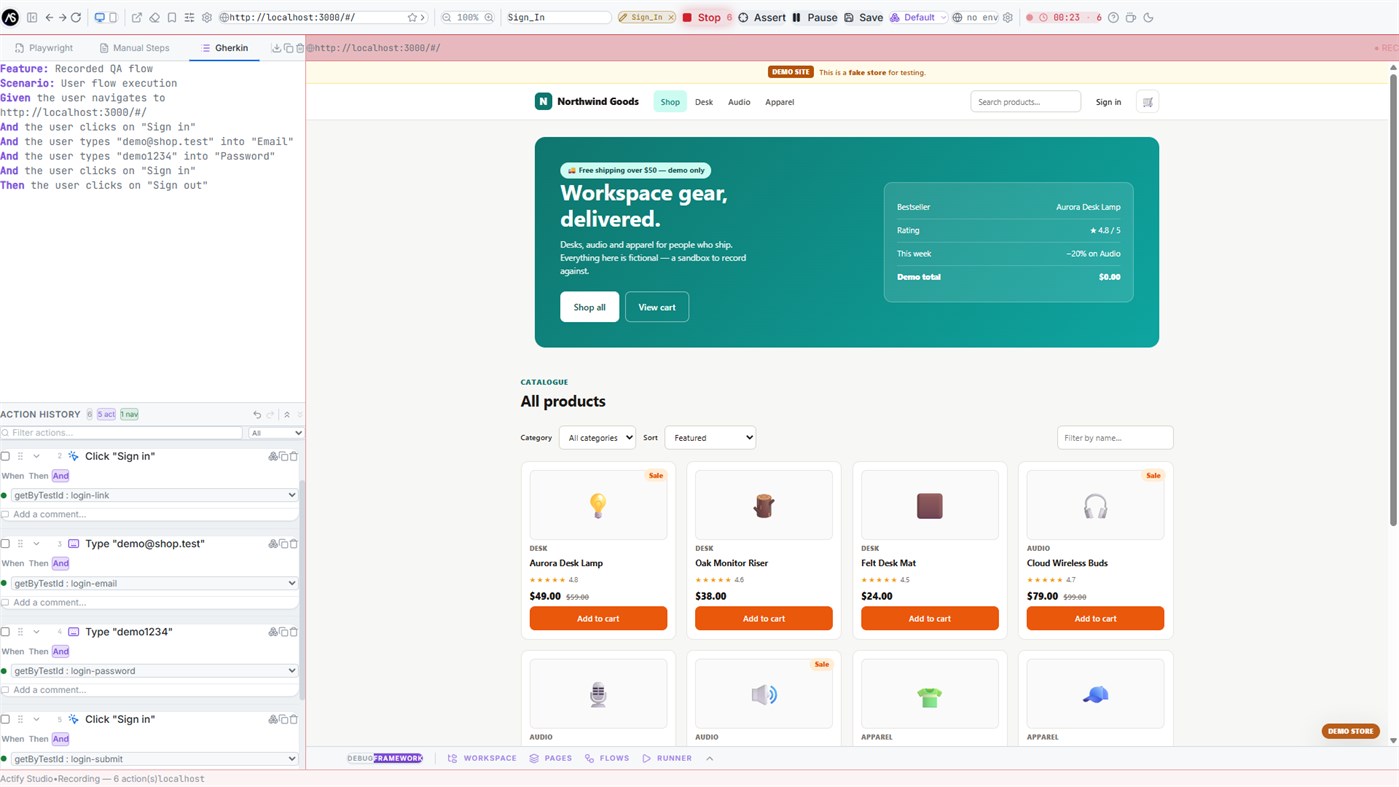
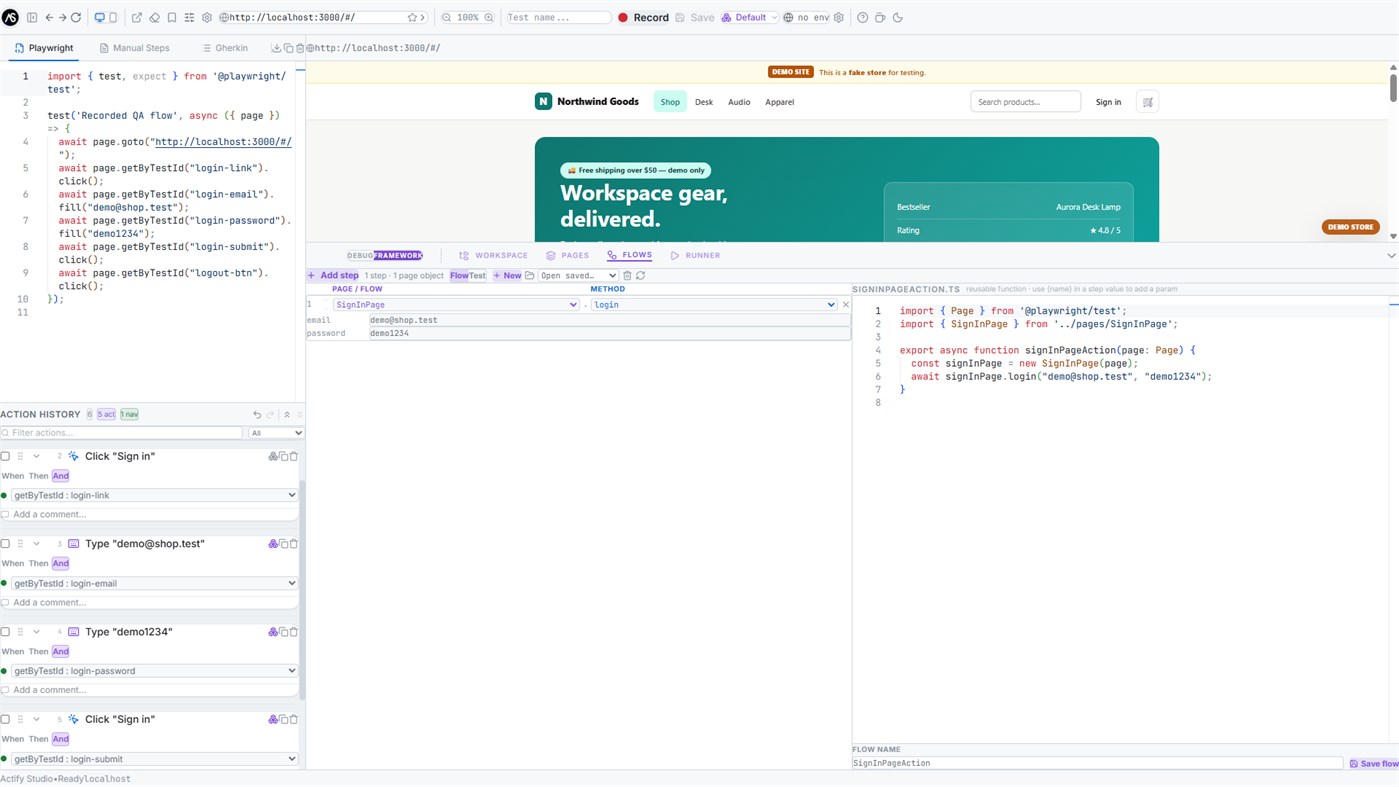
It is a desktop studio with a real Chromium browser embedded next to the editor. You navigate your application, and every click, input, dropdown, keypress and navigation is captured and translated live into three synchronized views: a runnable Playwright TypeScript spec, numbered steps in plain English, and a Gherkin scenario. Hover any recorded step and the matching line lights up in all three views and the element is highlighted in the browser.
RECORD WHAT YOU DO
- Click, fill, select, press and check events captured automatically, with input debouncing so a typed field becomes one clean step
- Recording survives navigation, single-page-app route changes and new tabs
- Links that open new tabs become managed tabs, and the generated code uses Playwright's real multi-page pattern
- Pause and resume mid-session; insert new steps at any point in an existing test instead of only at the end
- Optional session video capture saved alongside the test
LOCATORS YOU CAN TRUST
Every step is recorded with all valid, unique locator strategies at once — test id, ARIA role and name, label, placeholder, text, CSS id, CSS path and XPath. A health indicator shows at a glance how many alternatives a step has, and a dropdown swaps the one used in the generated code — so when the page changes you switch strategy instead of rewriting the test.
ASSERTIONS BY POINTING
Turn on assertion mode and click an element. Choose from fourteen matchers grouped by intent — visibility, text and value, enabled/disabled/checked state, element count, attributes and classes, and page URL — with global Not and Soft modifiers. Assertions can also be created directly from an existing click step.
RUN TESTS WITHOUT LEAVING THE APP
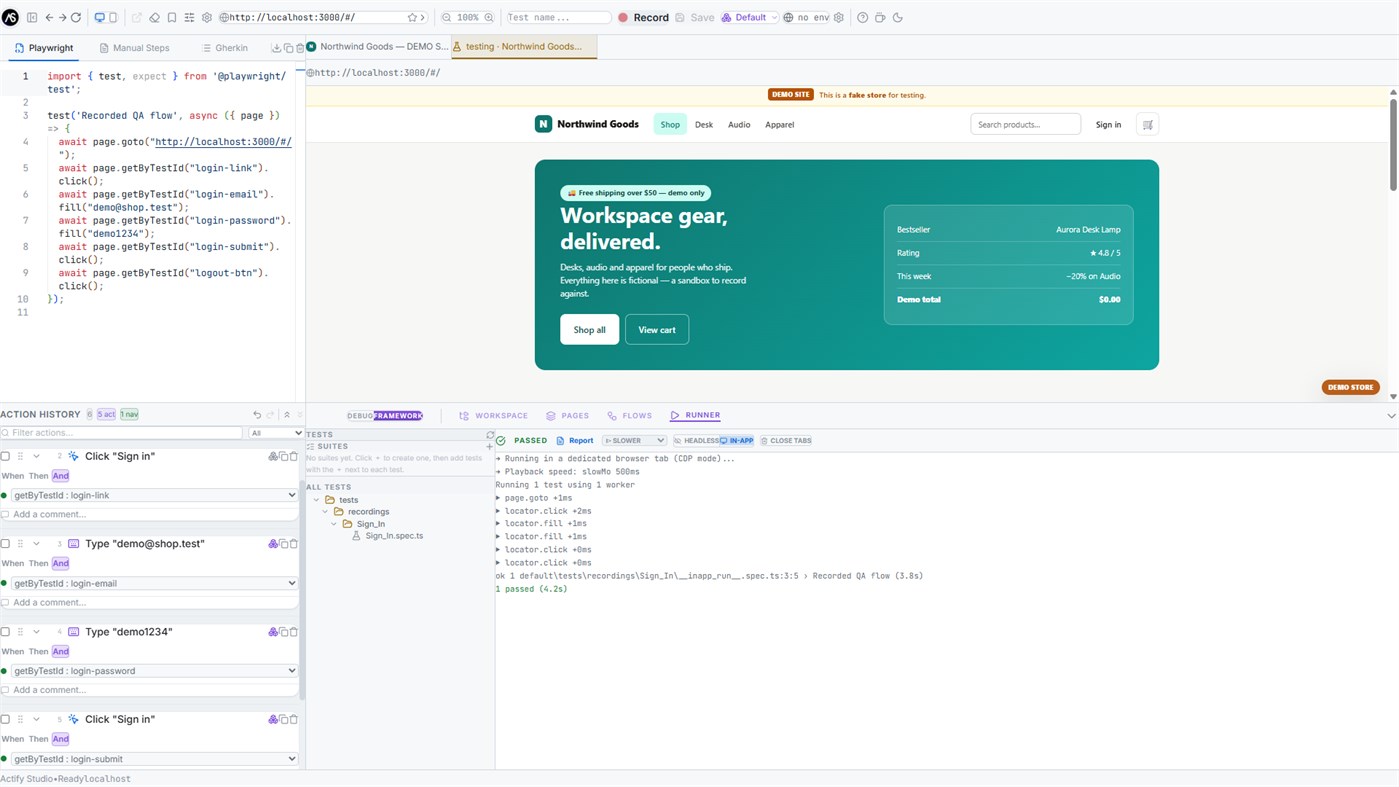
The built-in runner executes your specs headless, or in-app so you watch every action replay inside the embedded browser. Choose a playback speed to follow along, stream the output with pass/fail colouring, group specs into named suites, and run a whole folder or suite in one click.
A REAL FRAMEWORK, BUILT AS YOU RECORD
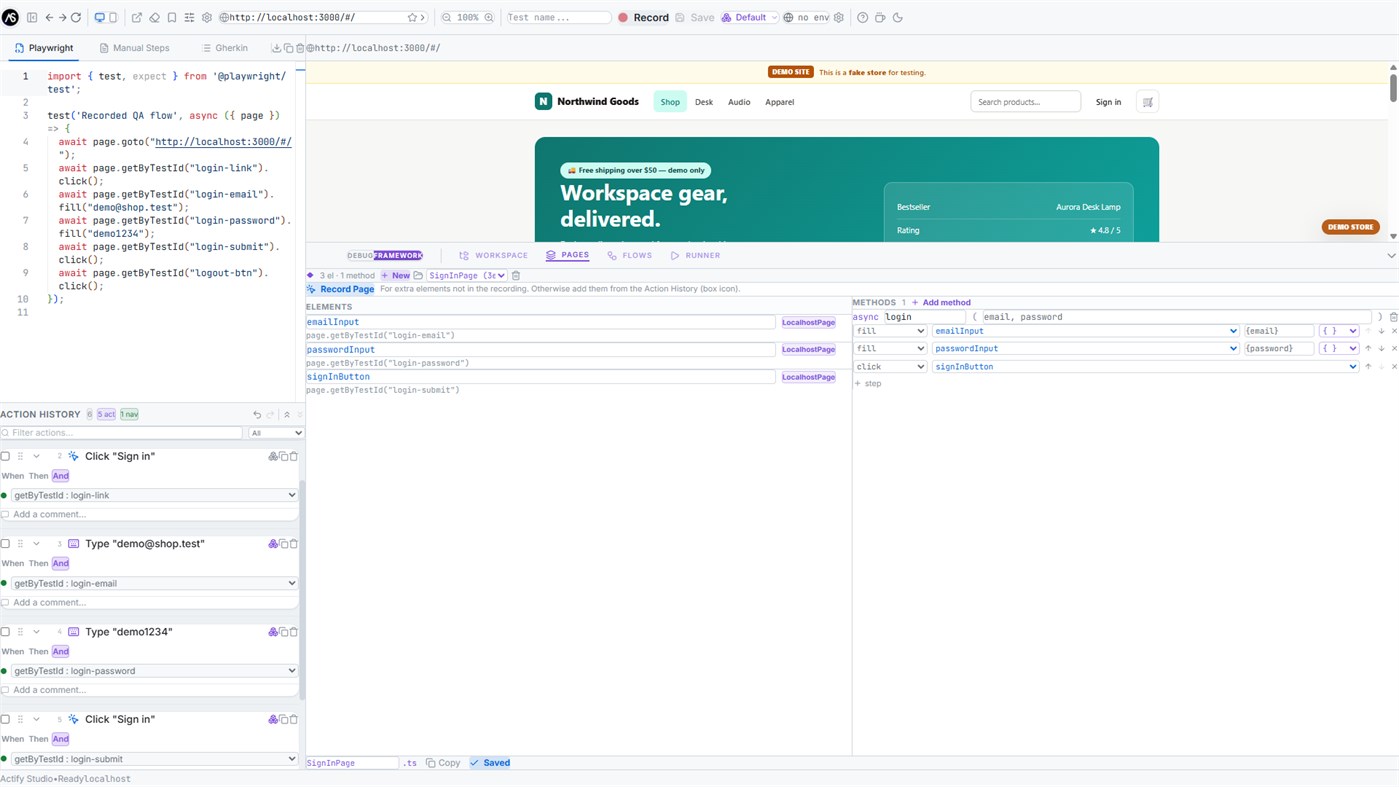
Promote recorded elements into Page Objects with typed getters, compose reusable methods from selected steps — parameters are inferred automatically, so two filled fields become login(username, password) — and chain methods from different Page Objects into end-to-end flows. A workspace file tree with a Monaco editor gives you full control of the generated project on disk.
PROJECTS AND ENVIRONMENTS
Organise work into projects, each with its own tests, page objects and flows. Define environments such as dev, staging and production, and recorded navigations become environment-relative automatically: record against one environment, run against another by changing a dropdown. Export any project as a standalone Playwright repository that runs anywhere with npm install and npx playwright test.
INSPECTION TOOLS BUILT IN
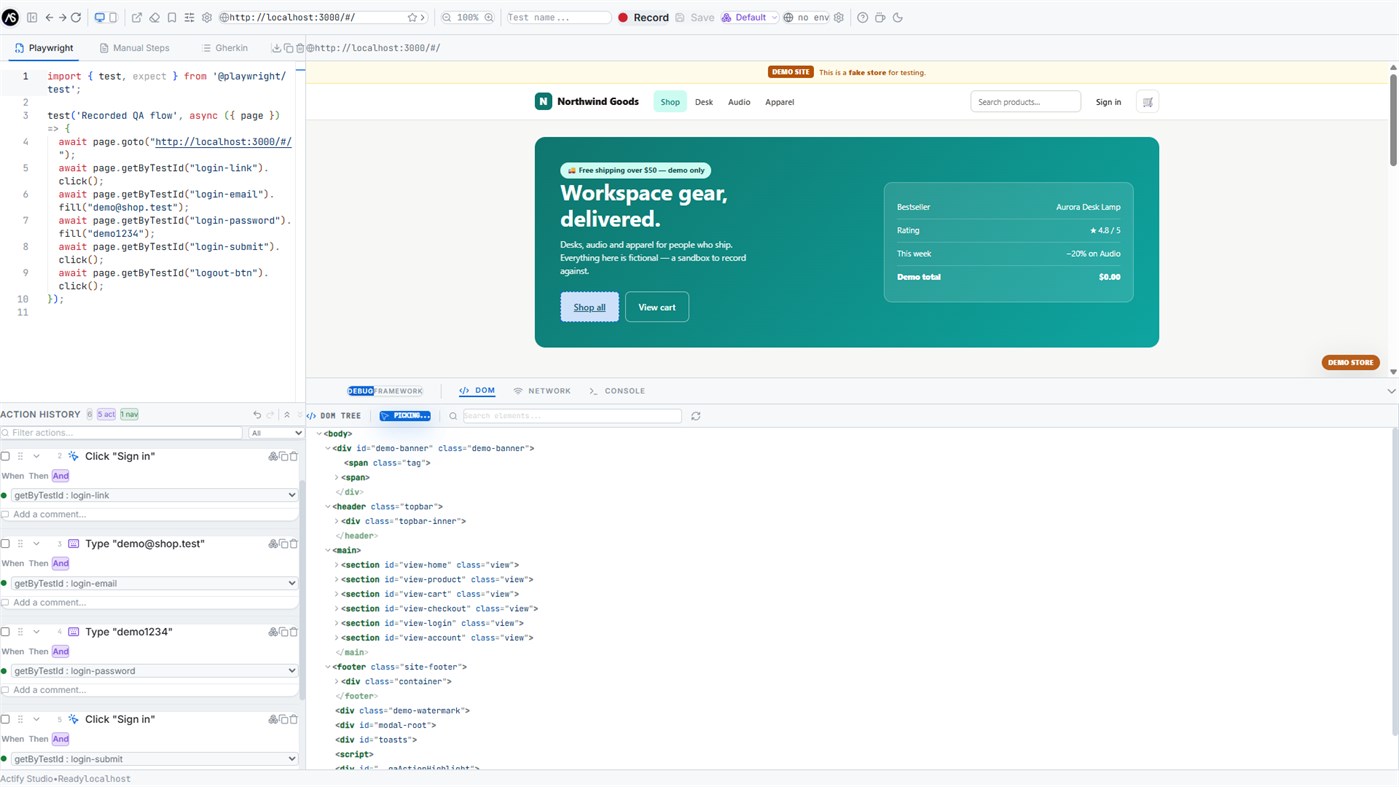
DOM tree with syntax highlighting and click-to-locate, network request monitor, console log stream with a JavaScript REPL, and custom HTTP headers injected into every request of the embedded browser.
EVERYTHING STAYS ON YOUR MACHINE
Actify Studio does not send your pages, recordings, credentials or test data anywhere. There is no account, no telemetry and no cloud service. Tests, videos and page objects are plain files in a folder you control.
REQUIREMENTS
Recording, code generation and inspection work out of the box. Running tests requires Node.js on your machine — the app detects it and provisions Playwright automatically on first use, and links you to the download if it is missing.
FEEDBACK WELCOME
This is the first public release. Found a bug or missing a feature? Write to info@actify-studio.com — reports go straight to the developer, and improvements ship as free Store updates.
광고
스크린샷
가격 내역
- 현재 가격: 무료
- 최소: 무료
- 최대: 무료
AppAgg 점수
1,000
AppAgg 예상 점수:
Actify Studio
개발자: Vincenzo Lentini
1,000 실버
점수가 높을수록 대체로 AppAgg의 여러 지표에서 좋은 결과를 보인다는 뜻입니다.
기준: 인기 · 사용자 평점 · 최신성 · 할인 · 스토어 데이터 · 커뮤니티 활동
최신 AppAgg 데이터를 바탕으로 매일 다시 계산됩니다.
AppAgg 점수 공유
단축 URL: 복사됨! 웹사이트용 배지: 새로운 기능
- 버전: PC
- 마지막 업데이트:
추가 정보
 https://actify-studio.com/
개발자
- Vincenzo Lentini
- 팔로워: 0
- 플랫폼: Windows 앱 (1)
- 할인: 0
- 목록: 0 + 0
- 포인트: 0 + 0 ¡
- 순위: 0
- 댓글: 0
- 동영상: 0
- RSS: 구독
목록 (0)
0
- Actify Studio
포인트 (0)
0
순위 (0)
0
댓글 (0)
가장 먼저 댓글을 남겨주세요
요약
Actify Studio 단축 URL: 복사됨!- Windows Store
AppAgg에서 앱 ‘Actify Studio’의 정보를 확인할 수 있습니다. 개발자: Vincenzo Lentini. 플랫폼: Windows. 카테고리: 개발자 도구. AppAgg 점수: 1,000 (실버). 이 앱의 AppAgg 포인트: 확인된 포인트 0, 간접 포인트 0. 이 앱이 포함된 공개 목록: 0개. 비공개 목록에 저장한 사용자: 0명. AppAgg 사용자가 아직 이 앱에 별점을 남기지 않았습니다. 확인된 포인트는 로그인한 AppAgg 사용자가 스토어로 이동한 기록을 반영합니다. 간접 포인트는 스토어 데이터를 바탕으로 합니다. 두 숫자는 공개 목록 수와 비공개 목록에 저장한 사용자 수를 나타냅니다. 이 앱의 최초 출시일은 입니다. 이 앱의 마지막 업데이트 날짜는 입니다. 이 앱은 현재 무료로 이용할 수 있습니다. 이 앱은 다음 기능을 지원합니다: Mixed reality. 이 앱은 다음 언어를 지원합니다: English. 가격 기록을 확인하거나 앱을 목록에 추가하고 개발자를 팔로우할 수 있습니다. 이 앱의 향후 할인과 업데이트는 RSS 피드에서 확인할 수 있습니다. AppAgg는 이 앱을 호스팅하거나 배포하지 않습니다. 이 앱과 관련된 모든 상표, 로고 및 스크린샷은 각 소유자에게 귀속됩니다.

