
Záložky
| Vývojář: | Munito (4) | ||
| Cena: | Zdarma Novinka | ||
| Skóre: | 680 Stříbro | ||
| Žebříčky: | 0 | ||
| Komentáře: | 0 Přidat komentář | ||
| Seznamy: | 0 0 | ||
| Body: | 0 | ||
| +1 Bod | |||
Shrnutí
Seznamte se: Adeorq, aplikace od vývojáře Munito z kategorie „Vývojářské nástroje“.
Novinka, vyšla , takže jste mezi prvními.
Zdarma, žádné reklamy, žádné nákupy v aplikaci. Jen vy a aplikace.
Microsoft Store je přímo součástí Windows, takže instalace je otázkou pár kliknutí.
Skóre AppAgg je 680. „Stříbro“, a to vůbec není špatné.
Jen 11 megabajtů, vejde se i na plný disk.
Věková kategorie „EVERYONE“, takže se hodí i pro děti.
Umí 2 jazyky, ale češtinu se zatím nenaučila.
Zatím tu panuje naprosté ticho: žádná hodnocení, žádné komentáře. Prolomte ho.
Tento vývojář má na AppAgg ještě 3 aplikace. Stojí za to se podívat.
Chcete se o aktualizacích a nových aplikacích dozvídat jako první? Sledujte vývojáře nebo odebírejte RSS kanál. Push oznámení chodí přes aplikaci AppAgg Alerts pro Android a iOS.
Snímky obrazovky 5
Další platformy 0
Historie cen 0
- Aktuální cena: Zdarma
- Minimum: Zdarma
- Maximum: Zdarma
Vlastní přehled na hlavní stránce
Popis

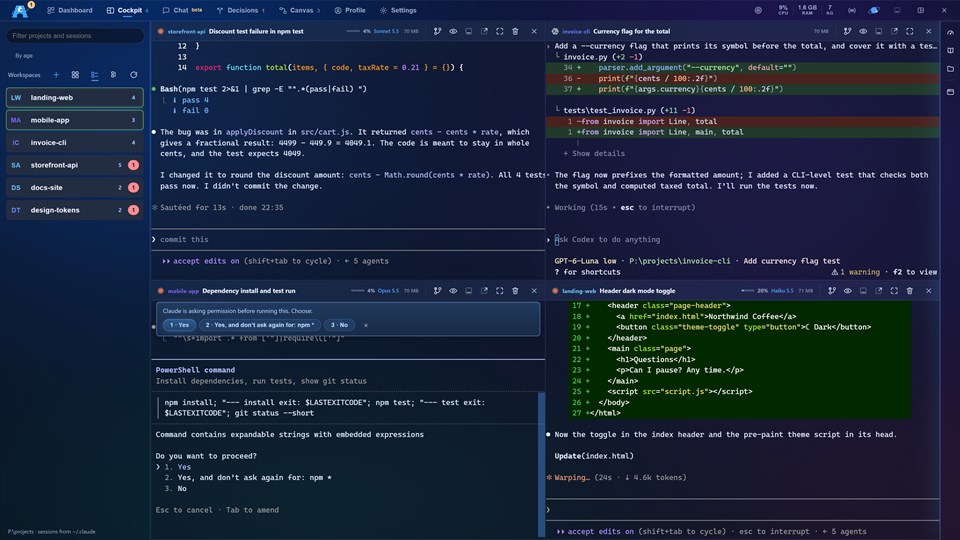
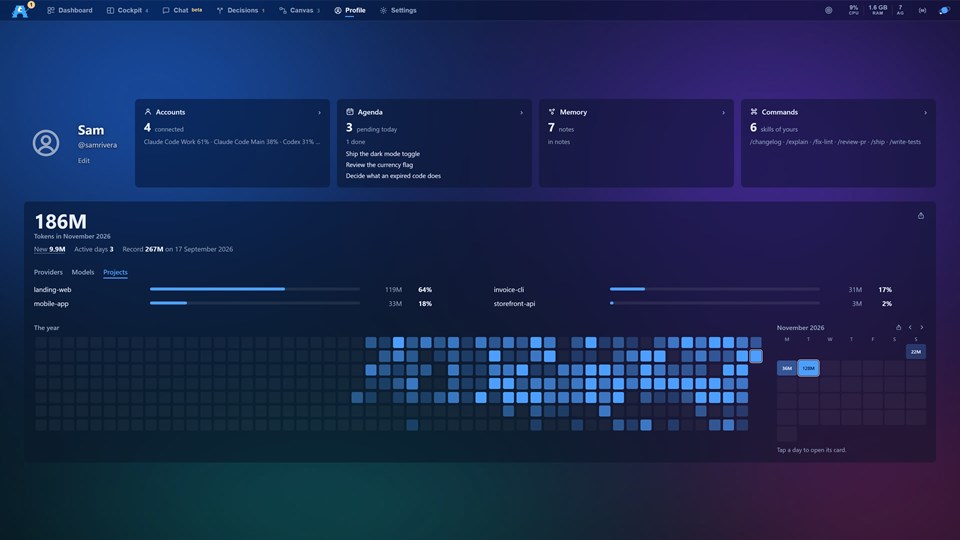
Adeorq is a desktop panel to work with several of those agents at the same time. Each one runs in a real terminal inside the folder of one of your projects, and you can see which ones are working, which are waiting for you and which have finished.
What you can do with it:
- Open a project and start a session in it, or open a plain terminal.
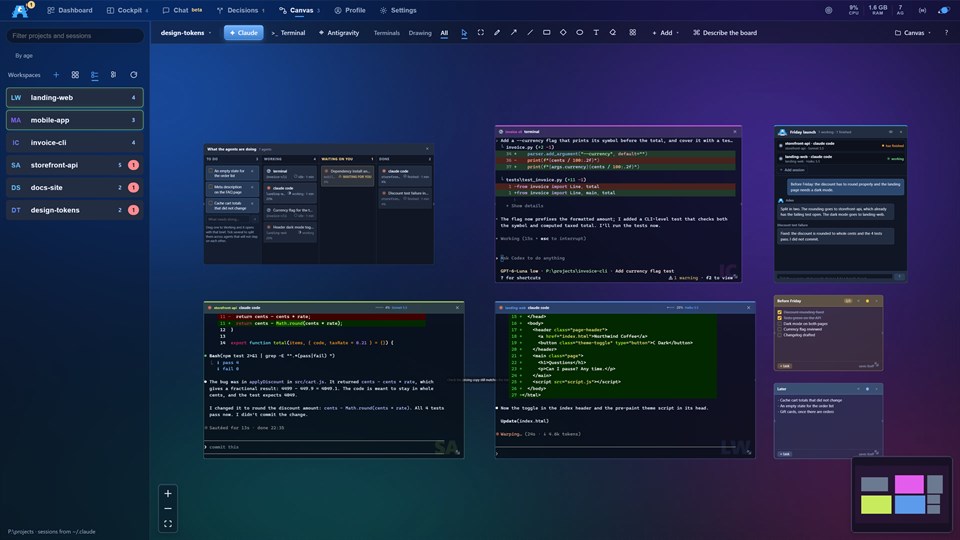
- Arrange the terminals in a grid, or place them on an infinite canvas next to notes, images and a task board.
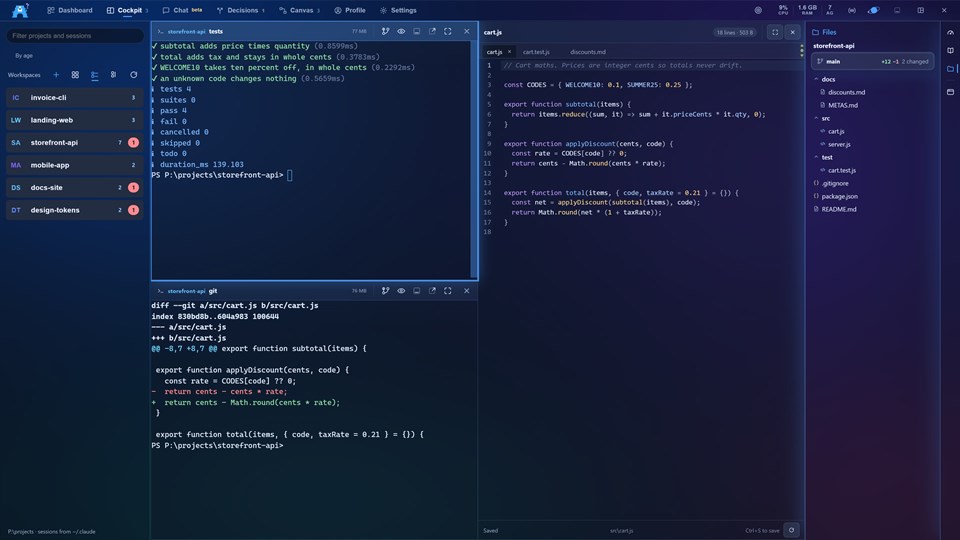
- Browse and edit the project's files, search inside them and see what each agent has touched.
- Give each agent its own Git worktree (Shadow Mode, it needs Git installed), read the changes and decide what is kept and what is thrown away.
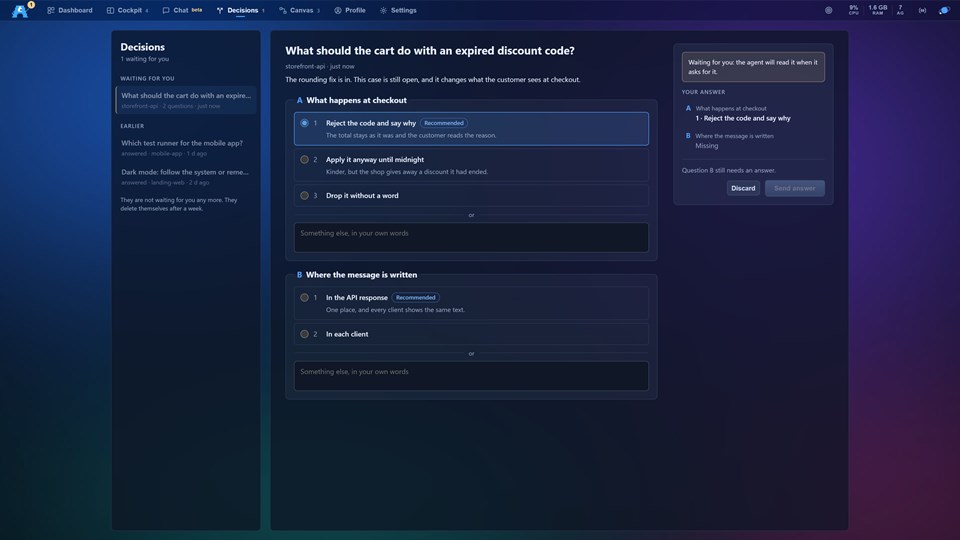
- Answer an agent's questions by choosing between numbered options.
- Keep your daily goals, the next steps of your projects and your scheduled tasks in the Agenda, and read what your agents propose.
- Use Adeorq from your phone or any browser through Tailscale, which you install separately. It is optional and stays off until you turn it on; while it is on, Adeorq asks Windows not to put the PC to sleep.
- Dictate by voice with whisper.cpp, which you install separately. Your voice is processed on your PC.
Adeo is the assistant built into Adeorq. You tell it in your own words what you want and it proposes or opens the sessions for you. Adeo uses live generative AI: what it writes is created by an AI model, in response to what you type, through the agent program and the account you connected, so it can be wrong. Under its box (on the first screen, in the Chat tab and on the phone page) there is a line that says so, a "Report an issue" button and an "or by email" link, and the button is also next to its answers. The canvas can also hold a chat with an AI model of your choice, through a key of your own; it also uses live generative AI, says so under its box and has the same "Report an issue" button.
Adeorq has no account of its own and no telemetry. It is available in English and Spanish. On Windows 10 it needs the Microsoft Edge WebView2 Runtime, which Windows 11 already includes.
To uninstall cleanly: if you connected Claude Code to Adeorq (Settings, Terminals, "Connect your Claude Code"), press Disconnect first, or Claude Code will keep an entry that points to a program that is gone. Your Adeorq data stays in the .adeorq folder of your user folder until you delete it.
Adeorq is not affiliated with, sponsored by or endorsed by Anthropic, OpenAI, Google, Microsoft, xAI or any other company whose products it may work with. Their names and logos are trademarks of their respective owners and are used here only to identify which tool you are working with. Adeorq works with command-line agents such as Claude Code, Codex and Gemini CLI, and with others.
Od vývojáře
Seznamy 0
-
 Adeorq
Body 0
-

- +1 Bod

Žebříčky 0
-
- Vaše hodnocení
Vývojář 4
- Munito
- Sledující: 0
- Platformy: Windows Aplikace (4)
- Slevy: 0
- Seznamy: 0 0
- Body: 0
- Žebříčky: 0
- Komentáře: 0
- Videa: 1
- RSS: Odebírat
Novinky
- Verze: PC
- Poslední aktualizace:
Další informace
- Datum vydání:
- Kategorie:
Aplikace pro Windows›Vývojářské nástroje - OS:
PC - Velikost:
11 Mb - Podporované jazyky:
Angličtina,Španělština - Hodnocení obsahu:
EVERYONE - Windows Store Hodnocení: ¡
0 - Web:
 https://adeorq.com
Skóre AppAgg
Odhadované skóre AppAgg pro
Adeorq
Vývojář: Munito
Vyšší skóre obvykle odráží lepší výsledky v ukazatelích sledovaných na AppAgg.
Na základě: popularity · uživatelských hodnocení · aktuálnosti · slev · dat obchodů · aktivity komunity
Denně se přepočítává z aktuálních dat AppAgg.
Komentáře 0 ¡
Sdílet
Adeorq Krátká adresa URL: Zkopírováno!- Windows Store

