
Bogmærker
| Udvikler: | Munito (4) | ||
| Pris: | Gratis Ny | ||
| Score: | 680 Sølv | ||
| Ranglister: | 0 | ||
| Kommentarer: | 0 Skriv kommentar | ||
| Lister: | 0 0 | ||
| Point: | 0 | ||
| +1 Point | |||
Kort fortalt
Mød Adeorq, en app fra Munito i kategorien »Udviklerværktøjer«.
Nyhed: den udkom , så du er blandt de første.
Gratis: ingen reklamer og ingen køb i appen. Kun dig og appen.
Microsoft Store er bygget ind i Windows, så installationen klares med et par klik.
AppAgg-scoren er 680. Sølv, og det er slet ikke dårligt.
Kun 11 megabyte. Der er plads, selv på en fyldt harddisk.
Aldersgrænse »EVERYONE«: også fint for børn.
Kan 2 sprog, men dansk er ikke blandt dem endnu.
Total stilhed her indtil videre: ingen bedømmelser, ingen kommentarer. Bryd tavsheden.
Udvikleren har yderligere 3 apps på AppAgg. Tag et kig.
Vil du høre om opdateringer og nye apps først? Følg udvikleren eller abonner på vores RSS-feed. Push-beskeder kommer via appen AppAgg Alerts til Android og iOS.
Andre platforme 0
Prishistorik 0
- Nuværende pris: Gratis
- Minimum: Gratis
- Maksimum: Gratis
Dit eget feed på forsiden
Skærmbilleder 5
Beskrivelse

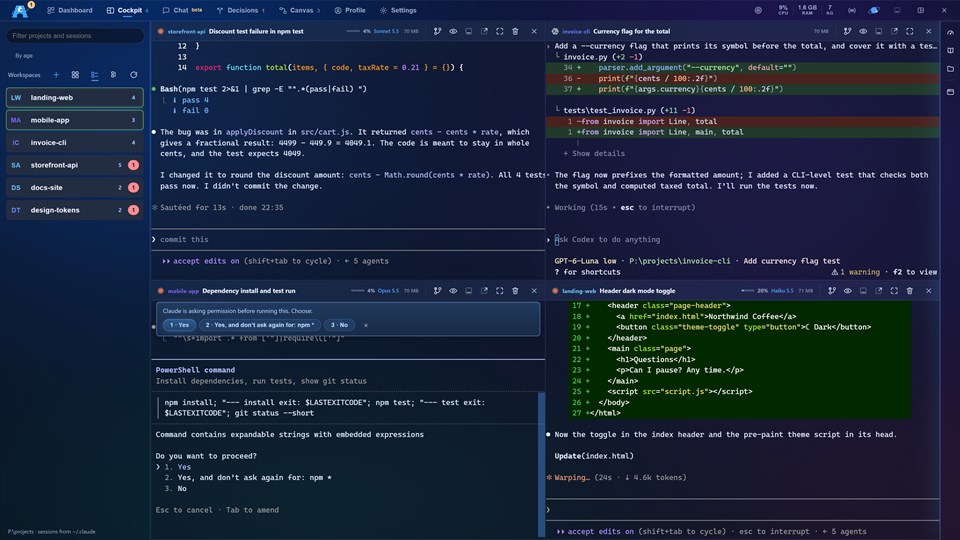
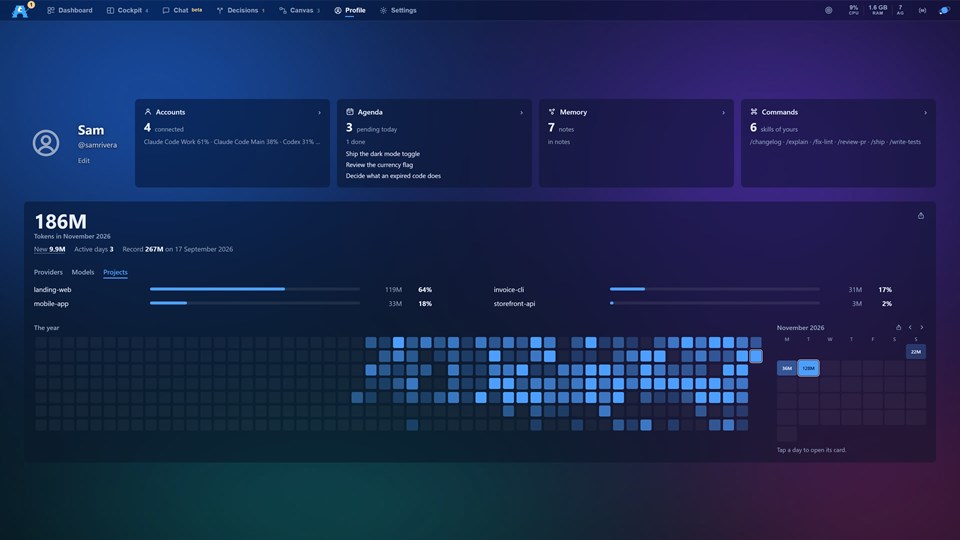
Adeorq is a desktop panel to work with several of those agents at the same time. Each one runs in a real terminal inside the folder of one of your projects, and you can see which ones are working, which are waiting for you and which have finished.
What you can do with it:
- Open a project and start a session in it, or open a plain terminal.
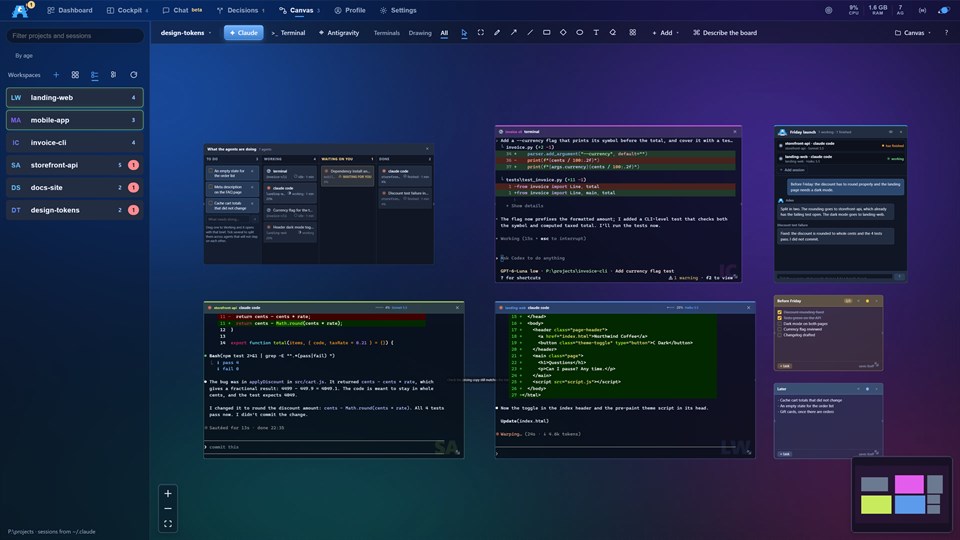
- Arrange the terminals in a grid, or place them on an infinite canvas next to notes, images and a task board.
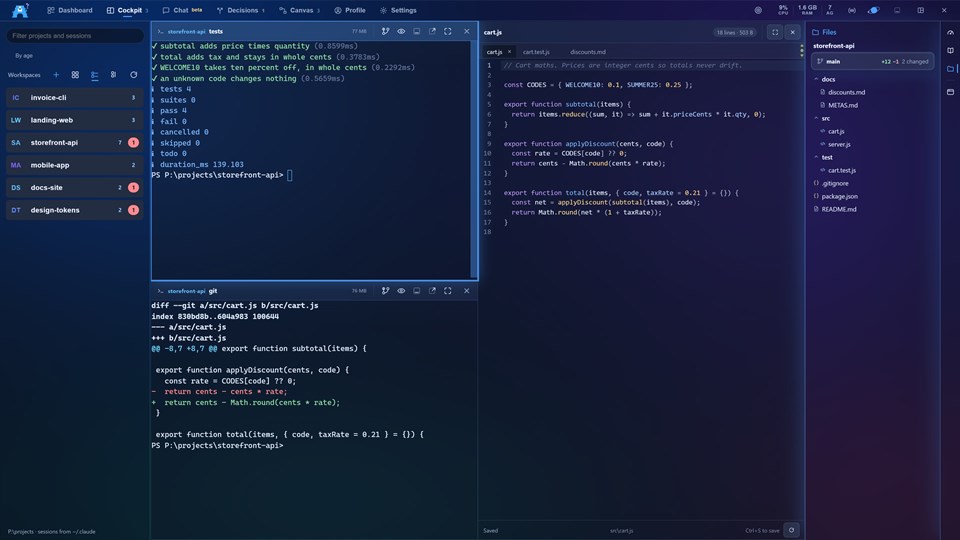
- Browse and edit the project's files, search inside them and see what each agent has touched.
- Give each agent its own Git worktree (Shadow Mode, it needs Git installed), read the changes and decide what is kept and what is thrown away.
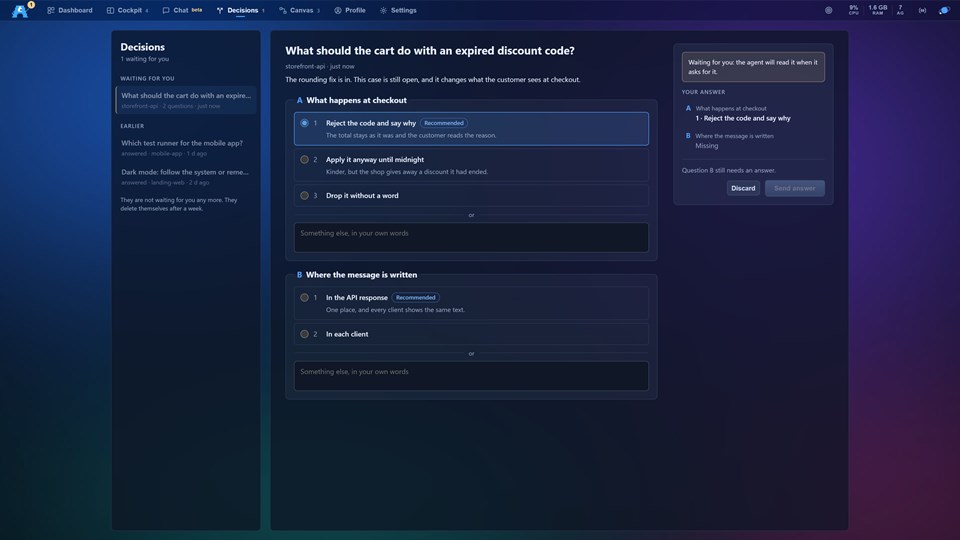
- Answer an agent's questions by choosing between numbered options.
- Keep your daily goals, the next steps of your projects and your scheduled tasks in the Agenda, and read what your agents propose.
- Use Adeorq from your phone or any browser through Tailscale, which you install separately. It is optional and stays off until you turn it on; while it is on, Adeorq asks Windows not to put the PC to sleep.
- Dictate by voice with whisper.cpp, which you install separately. Your voice is processed on your PC.
Adeo is the assistant built into Adeorq. You tell it in your own words what you want and it proposes or opens the sessions for you. Adeo uses live generative AI: what it writes is created by an AI model, in response to what you type, through the agent program and the account you connected, so it can be wrong. Under its box (on the first screen, in the Chat tab and on the phone page) there is a line that says so, a "Report an issue" button and an "or by email" link, and the button is also next to its answers. The canvas can also hold a chat with an AI model of your choice, through a key of your own; it also uses live generative AI, says so under its box and has the same "Report an issue" button.
Adeorq has no account of its own and no telemetry. It is available in English and Spanish. On Windows 10 it needs the Microsoft Edge WebView2 Runtime, which Windows 11 already includes.
To uninstall cleanly: if you connected Claude Code to Adeorq (Settings, Terminals, "Connect your Claude Code"), press Disconnect first, or Claude Code will keep an entry that points to a program that is gone. Your Adeorq data stays in the .adeorq folder of your user folder until you delete it.
Adeorq is not affiliated with, sponsored by or endorsed by Anthropic, OpenAI, Google, Microsoft, xAI or any other company whose products it may work with. Their names and logos are trademarks of their respective owners and are used here only to identify which tool you are working with. Adeorq works with command-line agents such as Claude Code, Codex and Gemini CLI, and with others.
Fra udvikleren
Lister 0
-
 Adeorq
Point 0
-

- +1 Point

Ranglister 0
-
- Din bedømmelse
Udvikler 4
- Munito
- Følgere: 0
- Platforme: Windows Apps (4)
- Tilbud: 0
- Lister: 0 0
- Point: 0
- Ranglister: 0
- Kommentarer: 0
- Videoer: 1
- RSS: Abonner
Nyheder
- Version: PC
- Sidst opdateret:
Yderligere oplysninger
- Udgivelsesdato:
- Kategori:
Windows-apps›Udviklerværktøjer - Operativsystem:
PC - Størrelse:
11 Mb - Understøttede sprog:
Engelsk,Spansk - Indholdsklassificering:
EVERYONE - Windows Store Bedømmelse: ¡
0 - Websted:
 https://adeorq.com
AppAgg-score
Estimeret AppAgg-score for
Adeorq
Udvikler: Munito
En højere score afspejler som regel bedre resultater på de områder, AppAgg måler.
Baseret på: popularitet · brugervurderinger · aktualitet · tilbud · butiksdata · fællesskabsaktivitet
Genberegnes dagligt ud fra aktuelle AppAgg-data.
Kommentarer 0 ¡
Del
Adeorq Kort webadresse: Kopieret!- Windows Store

