
Lesezeichen
| Entwickler: | Nicolas Pinzon (1) | ||
| Preis: | Kostenlos Neu | ||
| Score: | 710 Silber | ||
| Ranglisten: | 0 | ||
| Kommentare: | 0 Kommentar posten | ||
| Listen: | 0 0 | ||
| Punkte: | 0 | ||
| +1 Punkt | |||
Kurzinfo
Vorhang auf für Agents Keeper, eine App von Nicolas Pinzon aus der Kategorie „Entwicklungstools“.
Neuerscheinung: erst erschienen, du bist also ganz vorne mit dabei.
Gratis, keine Werbung, keine In-App-Käufe. Nur du und die App.
Der Microsoft Store ist in Windows eingebaut, die Installation ist also in ein paar Klicks erledigt.
Der AppAgg-Score liegt bei 710. Silber, und das ist gar nicht übel.
Altersfreigabe „EVERYONE“, also auch für Kinder geeignet.
Kann 2 Sprachen, aber Deutsch ist noch nicht dabei.
Hier herrscht noch Funkstille: keine Bewertungen, keine Kommentare. Brich das Schweigen.
Das ist die einzige App des Entwicklers auf AppAgg. Noch.
Willst du als Erstes von Updates und neuen Apps erfahren? Folge dem Entwickler oder abonniere den RSS-Feed. Push-Nachrichten kommen über die App AppAgg Alerts für Android und iOS.
Andere Plattformen 0
Preisentwicklung 0
- Aktueller Preis: Kostenlos
- Minimum: Kostenlos
- Maximum: Kostenlos
Dein eigener Feed auf der Startseite
Screenshots 4
Beschreibung

- Runs a background service that is part of the app. The Agents Keeper service runs your agent sessions and keeps them alive after the window closes. It ships inside the app, starts when you sign in, and is not a Windows service: it needs no administrator rights. You can turn the start at sign-in off in Settings → Apps → Startup.
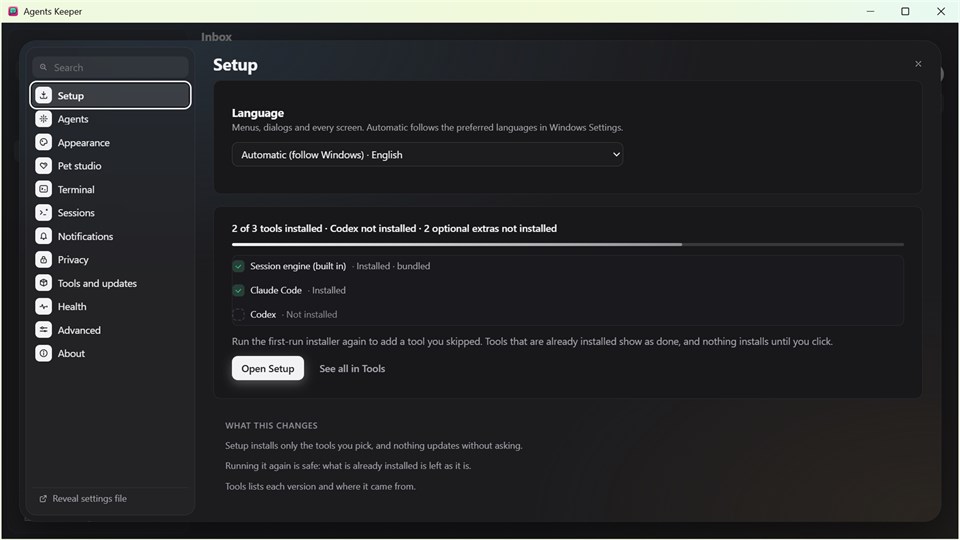
- Installs coding-agent command-line tools only when you ask. The first-run Setup can install Claude Code (Anthropic), Codex (OpenAI), Git, Node.js and the GitHub CLI with Windows Package Manager (winget) or the vendor's own installer, after checking the download. Nothing is installed without your confirmation, and you can skip any of them. Some of these installers may ask Windows for permission (a UAC prompt) because they install for all users.
- Each agent runs in a sandbox. Agents run at low integrity: they can work in the project folders you open in Agents Keeper, but not in the rest of your user profile. Because of this, each agent keeps its own settings and asks you to sign in once inside Agents Keeper, even if you already use it elsewhere on this computer.
- Needs your own accounts with the agent vendors. Claude Code needs an Anthropic account or API key; Codex needs an OpenAI account or API key. Agents Keeper never sees your passwords or keys and is not affiliated with Anthropic, OpenAI, Google or Amazon.
- Updates never close your terminals. When the Store has a new version ready, Agents Keeper says so and installs it the next time it restarts with no terminal open (or the next time you sign in).
- Uninstalling: use Settings → Advanced → Uninstall… in the app first. It stops the service, ends its terminals and removes the app's data, then opens Windows Settings → Apps, where you remove the app itself. Agent tools that Setup installed stay installed; remove them in Settings → Apps like any other program.
What Agents Keeper does
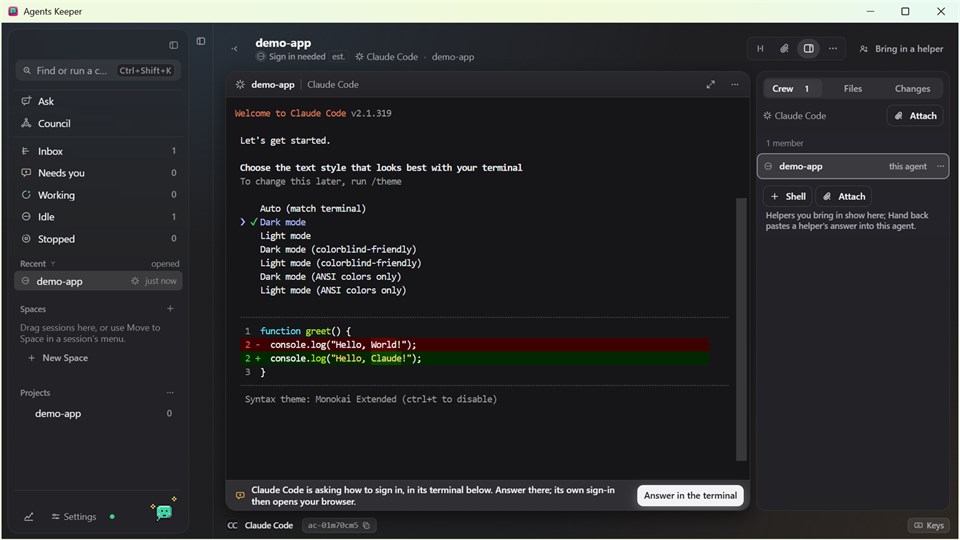
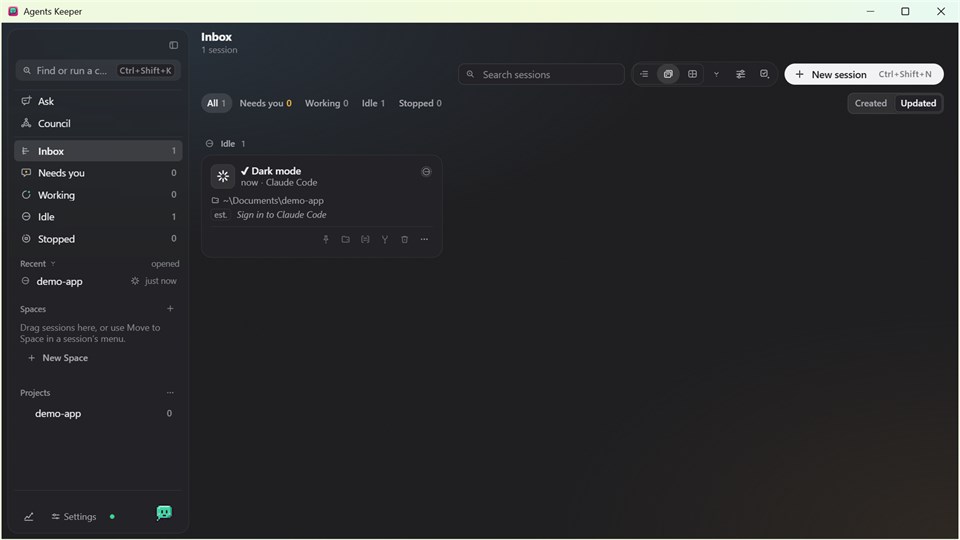
Agents Keeper is a home for the coding agents you run in your terminal. Start Claude Code or Codex sessions in your projects, leave them working, and come back when one needs you: questions, permission requests and finished work land in one inbox instead of being scattered across terminal windows.
- Every session in one list, with live status: working, waiting for you, done.
- Answer an agent's question or approve a step without hunting for the right terminal.
- Sessions keep running after you close the window, and you reattach to the exact terminal later.
- A real terminal for each session, with full scrollback.
- Ask: search your sessions in plain language.
- Spaces to group sessions by project.
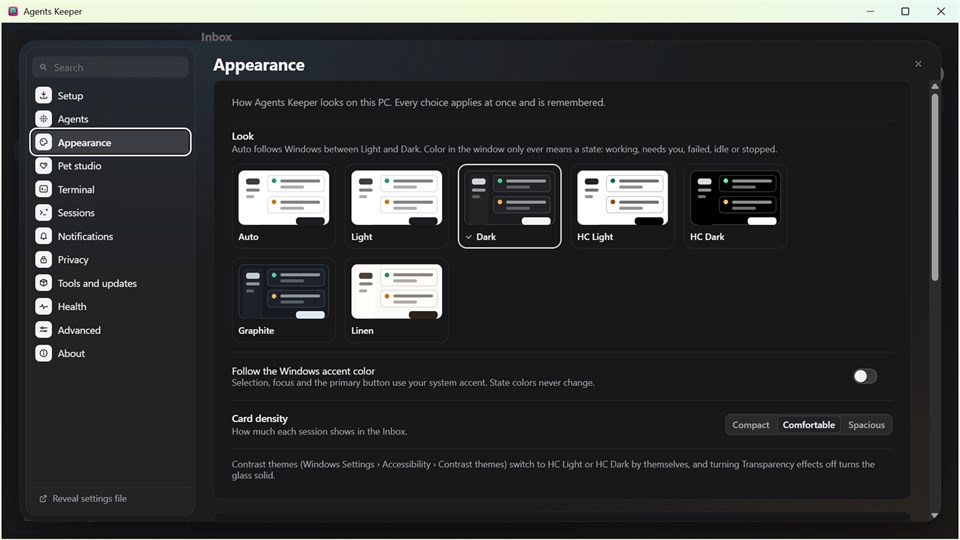
- English and Spanish.
Privacy: your prompts, code and replies stay on your computer and go only to the agent vendors you use. An anonymous daily check-in (on by default, off in Settings → Privacy) sends counts such as the app version and which features were used yesterday, never content. Details: the privacy policy linked on this page.
Agents Keeper is independent and not affiliated with Anthropic, OpenAI, Google or Amazon. Claude Code is a product of Anthropic; Codex is a product of OpenAI.
Vom Entwickler
Listen 0
-
 Agents Keeper
Punkte 0
-

- +1 Punkt

Ranglisten 0
-
- Deine Bewertung
Entwickler 1
- Nicolas Pinzon
- Follower: 0
- Plattformen: Windows Apps (1)
- Angebote: 0
- Listen: 0 0
- Punkte: 0
- Ranglisten: 0
- Kommentare: 0
- Videos: 0
- RSS: Abonnieren
Neue Funktionen
- Version: PC
- Zuletzt aktualisiert:
Weitere Informationen
- Veröffentlichungsdatum:
- Kategorie:
Windows-Apps›Entwicklungstools - Betriebssysteme:
PC - Größe:
176 Mb - Unterstützte Sprachen:
Englisch,Spanisch - Altersfreigabe:
EVERYONE - Windows Store Bewertung: ¡
0 - Webseite:
 https://agentskeeper.com/
AppAgg-Score
Geschätzter AppAgg-Score für
Agents Keeper
Entwickler: Nicolas Pinzon
Ein höherer Score weist meist auf bessere Werte bei den von AppAgg erfassten Kennzahlen hin.
Basierend auf: Popularität · Nutzerbewertungen · Aktualität · Angeboten · Store-Daten · Community-Aktivität
Wird täglich anhand aktueller AppAgg-Daten neu berechnet.
Kommentare 0 ¡
Teilen
Agents Keeper Kurz-URL: Kopiert!- Windows Store

