
Bookmarks
| Developer: | ShenTu QingChun (1) | ||
| Price: | Free | ||
| Score: | 570 Bronze | ||
| Rankings: | 0 | ||
| Comments: | 0 Add a comment | ||
| Lists: | 0 0 | ||
| Points: | 0 | ||
| +1 Point | |||
Summary
Meet AutoAllow, an app from ShenTu QingChun in the Developer tools category.
Released , still pretty fresh.
Free, no ads, no in-app purchases. Just you and the app.
The Microsoft Store is built into Windows, so it installs in a couple of clicks.
Its AppAgg Score is 570. Bronze for now, with plenty of room to grow.
Just 14 megabytes, it’ll fit even on a full drive.
Rated “EVERYONE”, so it’s fine for kids too.
Speaks 9 languages, English included.
Nobody on AppAgg has rated it yet. Your chance to be first is right now.
It’s the developer’s only app on AppAgg. For now.
Want to hear about updates and new apps first? Follow the developer or subscribe to the RSS feed. Push alerts come through the AppAgg Alerts app for Android and iOS.
Screenshots 1
Other platforms 0
Price History 0
- Current price: Free
- Minimum: Free
- Maximum: Free
Your own feed on the home page
Description

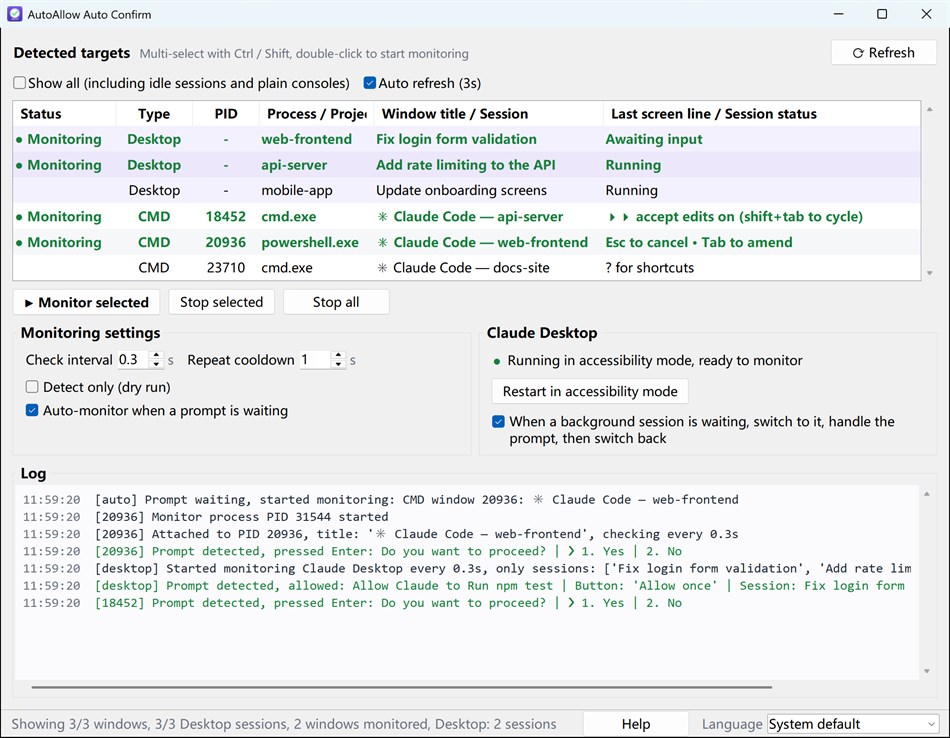
Pick the Claude Code console windows or Claude Desktop sessions you trust, and AutoAllow confirms their permission prompts for you: it presses Enter on the "Do you want to proceed?" prompt in the console, and clicks "Allow once" in Claude Desktop. Windows and sessions you did not select are never touched.
If you turn on automatic monitoring of waiting prompts (off by default), AutoAllow also confirms prompts in sessions you did not select; it asks you to confirm before turning this on.
Everything runs locally on your computer. AutoAllow makes no network connections and collects no data.
Important: approving a prompt lets the assistant run the requested command or action. Only monitor sessions whose work you trust, and use "Detect only" mode first if you want to see what would be approved.
AutoAllow is an independent tool and is not affiliated with or endorsed by Anthropic. Claude is a trademark of Anthropic.
What's new in 1.0.3:
• Claude Desktop split view: with two sessions open side by side, each prompt is matched to the right session
• Console windows: more confirmation prompts are recognized, such as the three-option prompts for editing or creating files (Yes / Yes, allow for this session / No)
• Larger text for easier reading; the detected-targets list now has a vertical scroll bar
• Only one copy runs per computer; opening it again shows the existing window
• Changing the display language takes effect immediately, no restart needed
• Lighter: all console windows share one monitor process, and the installed size dropped from 81 MB to 27 MB
• Fixed an occasional error while locating confirmation prompts
From the developer
Developer
- ShenTu QingChun
- Followers: 0
- Platforms: Windows Apps (1)
- Deals: 0
- Lists: 0 0
- Points: 0
- Rankings: 0
- Comments: 0
- Videos: 0
- RSS: Subscribe
Lists 0
-
 AutoAllow
Points 0
-

- +1 Point

Rankings 0
-
- Your rating
What's new
- Version: PC
- Last Updated:
- What's new in 1.0.3:
• Claude Desktop split view: with two sessions open side by side, each prompt is matched to the right session
• Console windows: more confirmation prompts are recognized, such as the three-option prompts for editing or creating files (Yes / Yes, allow for this session / No)
• Larger text for easier reading; the detected-targets list now has a vertical scroll bar
• Only one copy runs per computer; opening it again shows the existing window
• Changing the display language takes effect immediately, no restart needed
• Lighter: all console windows share one monitor process, and the installed size dropped from 81 MB to 27 MB
• Fixed an occasional error while locating confirmation prompts
- First release.
Additional Information
- Release Date:
- Category:
Windows Apps›Developer tools - OS:
PC - Size:
14 Mb - Supported Languages:
English,Chinese,French,German,Japanese,Korean,Portuguese,Russian,Spanish - Content Rating:
EVERYONE - Windows Store Rating: ¡
0 - Website:
 https://bkminer.github.io/AutoAllow
Comments 0 ¡
AppAgg Score
Estimated AppAgg Score for
AutoAllow
Developer: ShenTu QingChun
Higher scores usually reflect better results across AppAgg’s indicators.
Based on: popularity · ratings · freshness · deals · store data · community signals
Recalculated daily using fresh AppAgg data.
AutoAllow Short URL: Copied!- Windows Store
You may also like
Recent discussionsMore →
 AppTapeFlo this app is the best app i use in my life Because. you trade. journal. Discipline. rule's that you w...
 Shurem Boy35
 AppGame4Class Game4Class makes lesson review fun and interactive. I like how easily students can join from their o...
 Mehdi Gateway62
 AppAniMate Waifu - AI Anime Desktop Pet This is the best anime desktop pets I have ever had, The dancing feature is amazing.
 shaw chaney34
 AppSpark Motion Create 26 The graphics are amazing! Now I can design my ball layouts and watch then spin in 3D animation.
 Jim Kirker40
 AppLocalDub – Real-Time Game Dubbing Hello Kırtay Interactive, I am using LocalDub - Real-Time Game Dubbing. I would like to know if Hind...
 rashid game53
 AppNauticPlayer This app is absolute cinema. Honestly, it’s one of the best media players I’ve ever tried, and I’m s...
 Manuel92
 AppScreen Beings - Interactive Accessibility Companion This is my app so I’m a little bias but as someone from the ADHD community that teaches ADHD and neu...
 Tarelle Irwin54
 AppAadi vault good it ia a encrypter and good you my work on office
 Aditya Rai50
 AppTyping 365 | Daily Typing Trainer The best typing app ever. With Typing 365 you don’t have to force yourself for couple minutes traini...
 Ahmad Mozaffar50
 AppZefir Calendar — Calendar in the Taskbar excelente app! Superando todas as espectativas!
 Diógenes Magnus50

