
Закладки
| Разработчик: | ShenTu QingChun (1) | ||
| Цена: | Бесплатно | ||
| Оценка: | 570 Бронза | ||
| Рейтинги: | 0 | ||
| Комментарии: | 0 Оставить комментарий | ||
| Списки: | 0 0 | ||
| Очки: | 0 | ||
| +1 Очко | |||
Кратко
Знакомьтесь: AutoAllow, приложение от ShenTu QingChun из раздела «Средства разработчика».
Вышло , ещё вполне свежее.
Бесплатно: ни рекламы, ни встроенных покупок. Только вы и приложение.
Microsoft Store встроен в Windows, так что ставится в пару кликов.
Оценка AppAgg: 570. Пока «Бронза», но всё впереди.
Всего 14 мегабайт, поместится даже на забитый диск.
Возрастной рейтинг «EVERYONE», подходит и детям.
Говорит на 9 языках, и русский среди них есть.
На AppAgg его пока никто не оценил. Шанс стать первым прямо сейчас.
Это единственное приложение разработчика на AppAgg. Пока что.
Хотите первым узнавать об обновлениях и новых приложениях? Подпишитесь на разработчика или на RSS-канал. Push приходят в приложении AppAgg Alerts для Android и iOS.
Скриншоты 1
Другие платформы 0
История цен 0
- Текущая цена: Бесплатно
- Минимум: Бесплатно
- Максимум: Бесплатно
Своя лента на главной
Описание

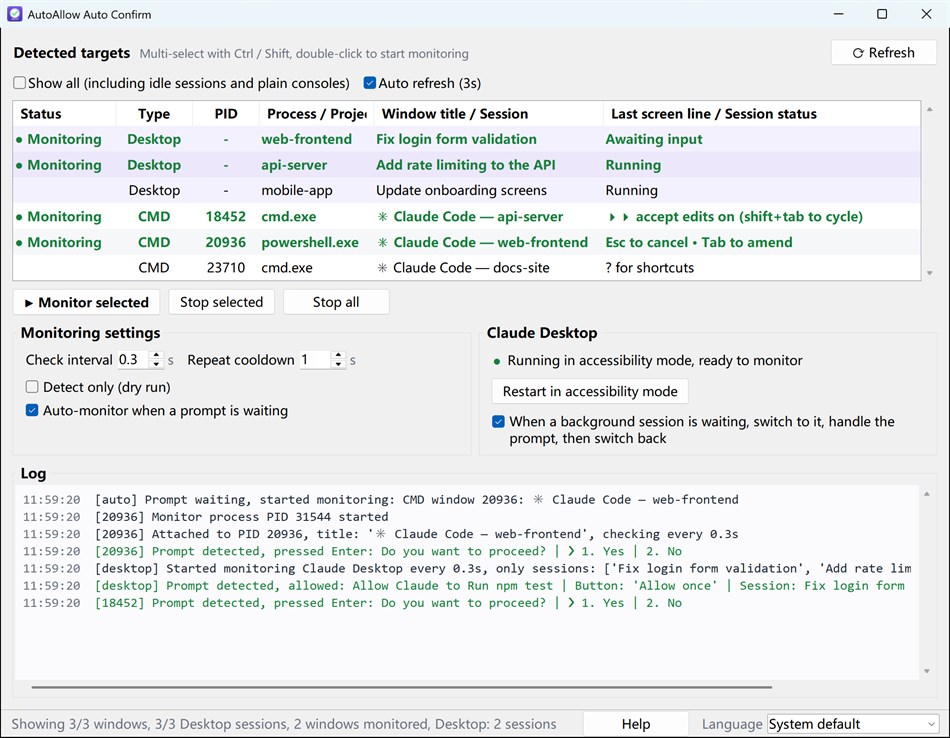
Pick the Claude Code console windows or Claude Desktop sessions you trust, and AutoAllow confirms their permission prompts for you: it presses Enter on the "Do you want to proceed?" prompt in the console, and clicks "Allow once" in Claude Desktop. Windows and sessions you did not select are never touched.
If you turn on automatic monitoring of waiting prompts (off by default), AutoAllow also confirms prompts in sessions you did not select; it asks you to confirm before turning this on.
Everything runs locally on your computer. AutoAllow makes no network connections and collects no data.
Important: approving a prompt lets the assistant run the requested command or action. Only monitor sessions whose work you trust, and use "Detect only" mode first if you want to see what would be approved.
AutoAllow is an independent tool and is not affiliated with or endorsed by Anthropic. Claude is a trademark of Anthropic.
What's new in 1.0.3:
• Claude Desktop split view: with two sessions open side by side, each prompt is matched to the right session
• Console windows: more confirmation prompts are recognized, such as the three-option prompts for editing or creating files (Yes / Yes, allow for this session / No)
• Larger text for easier reading; the detected-targets list now has a vertical scroll bar
• Only one copy runs per computer; opening it again shows the existing window
• Changing the display language takes effect immediately, no restart needed
• Lighter: all console windows share one monitor process, and the installed size dropped from 81 MB to 27 MB
• Fixed an occasional error while locating confirmation prompts
От разработчика
Разработчик
- ShenTu QingChun
- Подписчики: 0
- Платформы: Windows Приложения (1)
- Скидки: 0
- Списки: 0 0
- Очки: 0
- Рейтинги: 0
- Комментарии: 0
- Видео: 0
- RSS: Подписаться
Списки 0
-
 AutoAllow
Очки 0
-

- +1 Очко

Рейтинги 0
-
- Ваша оценка
Что нового
- Версия: PC
- Последнее обновление:
- What's new in 1.0.3:
• Claude Desktop split view: with two sessions open side by side, each prompt is matched to the right session
• Console windows: more confirmation prompts are recognized, such as the three-option prompts for editing or creating files (Yes / Yes, allow for this session / No)
• Larger text for easier reading; the detected-targets list now has a vertical scroll bar
• Only one copy runs per computer; opening it again shows the existing window
• Changing the display language takes effect immediately, no restart needed
• Lighter: all console windows share one monitor process, and the installed size dropped from 81 MB to 27 MB
• Fixed an occasional error while locating confirmation prompts
- First release.
Дополнительная информация
- Дата выпуска:
- Категория:
Приложения для Windows›Средства разработчика - Операционные системы:
PC - Размер:
14 Mb - Поддерживаемые языки:
Русский,Английский,Испанский,Китайский,Корейский,Немецкий,Португальский,Французский,Японский - Возрастные ограничения:
EVERYONE - Windows Store Рейтинг: ¡
0
 https://bkminer.github.io/AutoAllow
Комментарии 0 ¡
Оценка AppAgg
Примерная оценка AppAgg для
AutoAllow
Разработчик: ShenTu QingChun
Более высокая оценка обычно означает лучшие результаты по показателям AppAgg.
На основе: популярности · оценок пользователей · актуальности · скидок · данных магазинов · активности сообщества
Пересчитывается ежедневно на основе актуальных данных AppAgg.
AutoAllow Короткий URL: Скопировано!- Windows Store

