
Uložené
Zvolte název, který se bude zobrazovat v nabídce Uložené.
Hotovo!
| Vývojář: | Telestang (1) | ||
| Cena: | Zdarma | ||
| Hodnocení: | 580 Bronz | ||
| Žebříčky: | 0 | ||
| Komentáře: | 0 Přidat komentář | ||
| Seznamy: | 0 + 0 | ||
| Body: | 0 + 0 ¡ | ||
| +1 Body | |||
Popis

Rather than simply mirroring an entire vehicle interior, BeamXP provides a semi-automated workflow for moving, mirroring, swapping and reusing the parts that actually need to change. It can handle meshes, textures, controls, interactive triggers, mirrors, cameras, configuration parts, licence plates and supported headlight patterns.
BeamXP analyses the selected vehicle and recommends suitable transforms as a starting point. The result can then be reviewed and adjusted using an interactive 3D preview before the finished conversion is built and installed into BeamNG.drive.
Automatic texture correction can be enabled for flipped meshes to correct text, symbols, directional markings and surface details that would otherwise appear reversed. BeamXP can also reuse existing opposite-side meshes or authored left/right parts where available instead of relying on visual mirroring.
The aim is to automate the repetitive work involved in an LHD/RHD conversion while keeping vehicle-specific decisions visible and under the user's control.
BeamXP operates locally on your computer. Vehicle files and conversion data are processed locally and are not uploaded to the developer.
QUICK START
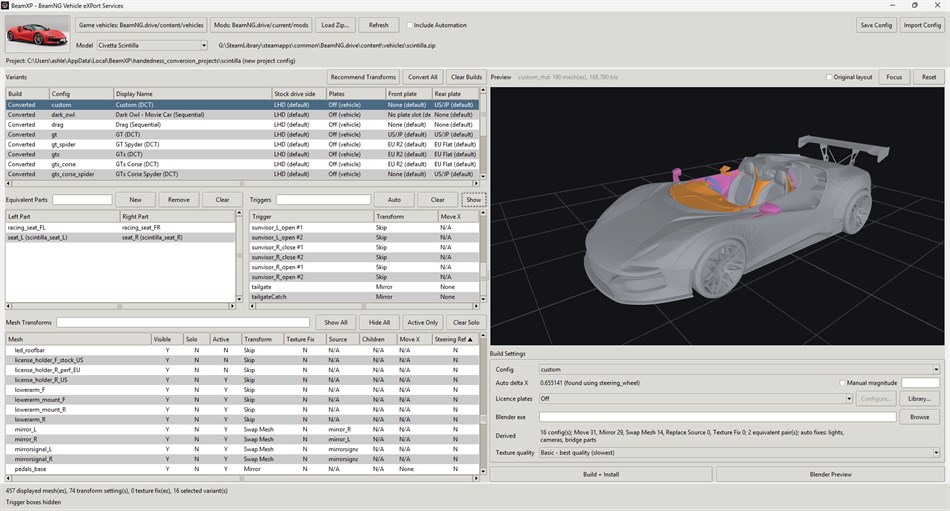
BeamXP has four main configuration tables: Variants, Equivalent Parts, Triggers and Mesh Transforms.
Variants - Choose which vehicle trims/configurations you want to convert and configure custom front and rear licence plates.
Equivalent Parts - Configure pairs of corresponding left/right parts. This is particularly useful when one side may be absent from a configuration, such as a single-seat race vehicle.
Triggers - Configure the positions of BeamNG's clickable interaction regions. Triggers are used for controls and actions such as the hood release, handbrake, ignition, ESC/TC buttons, doors and other interactive vehicle components.
Mesh Transforms - Configure how each visual mesh should be transformed. This table also contains the Texture Fix column.
TRANSFORM MODES
Move
Moves a mesh or trigger across the vehicle by a distance derived from the position of the steering wheel relative to the vehicle.
Move is intended for components such as the steering wheel, stalks, pedals, gauge cluster and other parts that need to change sides without being flipped.
Mirror
Mirrors a mesh or trigger across the centre of the vehicle.
For meshes, this is typically used for larger asymmetric components such as the dashboard and centre console. Mirror is also suitable for many cabin triggers.
Swap Mesh
Swaps the visual meshes between corresponding left/right parts, such as door cards or wing mirrors.
This allows BeamXP to reuse the authored opposite-side mesh while retaining the structural component of the original part.
Swap Mesh is available for meshes only and does not apply to triggers.
Skip
Skip is a no-op. The selected mesh or trigger is left unchanged.
HOTKEYS AND SELECTION
Transforms can be assigned using the following hotkeys:
Q - Skip
W - Move
E - Mirror
R - Swap Mesh
The hotkeys work on both meshes and triggers where the selected transform is applicable. Swap Mesh is mesh-only.
Meshes and triggers can be selected from their respective tables or by clicking directly on them in the in-app 3D vehicle preview.
Use Ctrl+Click to select multiple meshes or multiple triggers. A transform can then be applied to the whole selection at once.
This is useful for assemblies made from several separate components that all require the same transform.
TEXTURE CORRECTION
The Texture Fix column in the Mesh Transforms table toggles between N and Y.
Texture correction is used only with Mirror and Swap Mesh transforms, as these are the transforms that result in flipped mesh geometry.
Set Texture Fix to Y where a flipped mesh contains text, symbols, directional markings, normal-map details or other surface features that would otherwise appear reversed after conversion.
When enabled, BeamXP analyses the affected texture regions and attempts to correct directional surface detail while preserving the converted mesh geometry.
YOUR FIRST CONVERSION
1. Open Build Settings and configure the paths to the BeamNG.drive vehicle-content directory and your BeamNG mods folder.
2. Select the vehicle model you want to convert from the drop-down menu.
3. In the Variants table, choose which configurations you want to convert, or select Convert All. Converting a single configuration first is recommended while learning the workflow.
4. Click Recommend Transforms. BeamXP will analyse the vehicle and open a window containing its recommended transforms.
5. Click Apply All to accept the recommendations.
6. Review the result in the 3D preview. Select meshes directly in the preview or from the tables and adjust any transforms that are not appropriate for that particular vehicle.
7. Use Ctrl+Click where several meshes or triggers require the same transform, then use the Q, W, E and R hotkeys to apply transforms quickly.
8. Review the Texture Fix column for meshes using Mirror or Swap Mesh. Enable it where flipped text, symbols, markings or directional surface detail need correction.
9. Review the Equivalent Parts table and configure any left/right part pairs that should use authored opposite-side parts.
10. Review the Triggers table and move or mirror any clickable regions that need to follow relocated controls.
11. If required, configure custom front and rear licence plates in the Variants table.
12. Use the 3D preview to make a final visual check of the conversion.
13. Click Build + Install. BeamXP will generate the converted vehicle files and install the finished conversion into your configured BeamNG.drive mods folder.
14. Launch BeamNG.drive and select the generated configuration.
BeamXP's recommendations are intended as a starting point rather than a guarantee that every vehicle will require no manual adjustment. Vehicles and mods vary significantly in how their interiors and components are constructed, so vehicle-specific review remains an important part of the conversion process.
Reklama
Snímky obrazovky
Historie cen
- Aktuální cena: Zdarma
- Minimální: Zdarma
- Maximální: Zdarma
Sledovat ceny Přidejte do seznamu a dostávejte upozornění na slevy e-mailem nebo push oznámením
Skóre AppAgg
580
Odhadované hodnocení AppAgg pro
BeamXP
Vývojář: Telestang
580 Bronz
Vyšší hodnocení obvykle znamená silnější signály na AppAgg.
Na základě: popularity · uživatelských hodnocení · aktuálnosti · nabídek · dat obchodů · aktivity komunity
Denně se přepočítává z aktuálních dat AppAgg.
Krátká adresa URL: Zkopírováno!
Novinky
- Verze: PC
- Poslední aktualizace:
Další informace
- Datum vydání:
- Kategorie:
Aplikace pro Windows›Vývojářské nástroje - OS:
PC - Velikost:
72 Mb - Podporovaný jazyk:
English - Hodnocení obsahu:
EVERYONE - Windows Store Hodnocení: ¡
0
 https://github.com/Telestang/BeamXP
Vývojář
- Telestang
- Sledující: 0
- Platformy: Windows Aplikace (1)
- Slevy: 0
- Seznamy: 0 + 0
- Body: 0 + 0 ¡
- Žebříčky: 0
- Komentáře: 0
- Videa: 0
- RSS: Odebírat
Seznamy (0)
0
- BeamXP
Body (0)
0
Žebříčky (0)
0
Komentáře (0)
Buďte první, kdo okomentuje
Stručně
BeamXP Krátká adresa URL: Zkopírováno!- Windows Store
Na AppAgg můžete sledovat „BeamXP“, aplikaci od Telestang pro Windows v kategorii Vývojářské nástroje. Hodnocení AppAgg: 580 (Bronz). Body AppAgg aplikace — potvrzené: 0; nepřímé: 0. Veřejné seznamy s touto aplikací: 0. Uživatelé, kteří si ji uložili do soukromých seznamů: 0. Uživatelé AppAgg zatím tuto aplikaci nehodnotili. Potvrzené body zaznamenávají přechody přihlášených uživatelů AppAgg do obchodu. Nepřímé body vycházejí z údajů obchodů. Dvě počítadla ukazují počet veřejných seznamů a uživatelů, kteří si aplikaci nebo hru uložili do soukromých seznamů. Aplikace poprvé vyšla . Poslední aktualizace aplikace: . Aplikace je nyní k dispozici zdarma. Aplikace podporuje tyto jazyky: English. Prohlédněte si historii cen, přidejte aplikaci do seznamu nebo sledujte vývojáře. Budoucí slevy a aktualizace aplikace můžete sledovat přes RSS kanál. AppAgg tuto aplikaci nehostuje ani nedistribuuje. Všechny ochranné známky, loga a snímky obrazovky související s aplikací patří příslušným vlastníkům.

