
Bookmarks
| Developer: | Aelyo Softworks (14) | ||
| Price: | * Free | ||
| Score: | 1,420 Gold | ||
| Rankings: | 0 | ||
| Comments: | 0 Add a comment | ||
| Lists: | 0 0 | ||
| Points: | 0 | ||
| +1 Point | |||
Summary
Meet Code Contour, an app from Aelyo Softworks in the Developer tools category.
Released , still pretty fresh.
Free to download. After that it’s up to you (there are in-app purchases).
The Microsoft Store is built into Windows, so it installs in a couple of clicks.
Its AppAgg Score is 1,420. That’s Gold.
Rated “EVERYONE”, so it’s fine for kids too.
Only one language, and it’s English.
Total silence here so far: no ratings, no comments. Break the silence.
The developer has 13 more apps on AppAgg. Worth a look.
By the way, this developer has 1 deal right now.
Want to hear about updates and new apps first? Follow the developer or subscribe to the RSS feed. Push alerts come through the AppAgg Alerts app for Android and iOS.
Other platforms 0
Price History 0
- Current price: Free
- Minimum: Free
- Maximum: Free
Your own feed on the home page
Screenshots 10
Description

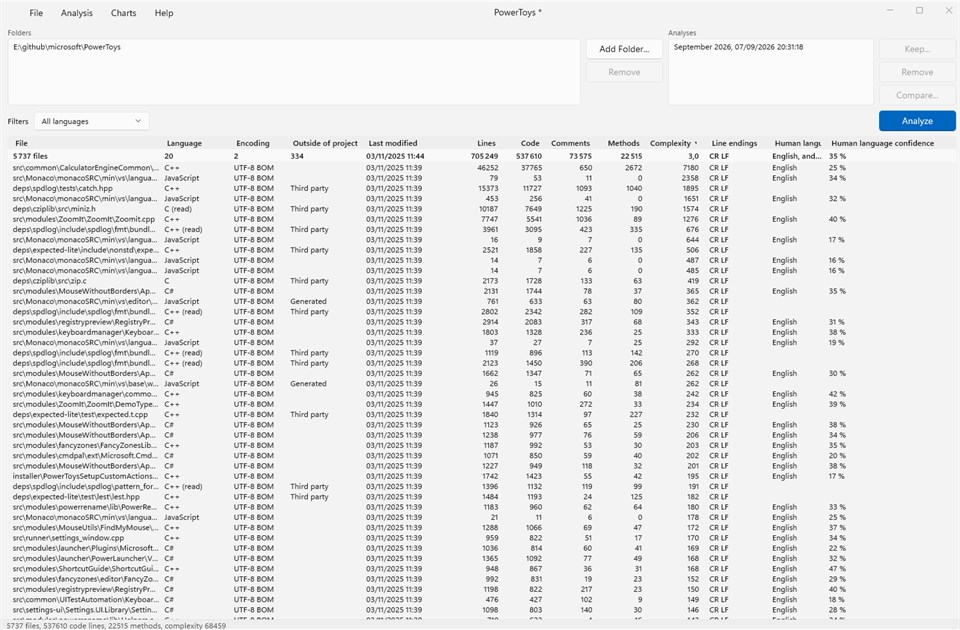
Point it at a folder and it reads every file it finds, in 81 programming, markup and data languages at once, and reports lines, code lines, comments, statements, methods, block depth, calls, cyclomatic and cognitive complexity, Halstead volume and maintainability, file by file and method by method. A codebase of five thousand files is measured in seconds, and what comes back is a table you can sort, filter and act on.
Numbers with a source
Every measure here is somebody's published work rather than this tool's idea of one. Cyclomatic complexity is McCabe's, cognitive complexity is Campbell's, the maintainability index is the form used in Visual Studio, and the volume is Halstead's. The user guide states exactly how each number is arrived at, including where we knowingly differ, so you can check any figure against your own reading of the code.
The counting rules belong to the project rather than to the application. Whether a whole switch counts as one, whether blank lines and comment lines leave the code count, whether markup and data files are looked at, all of it is settled before the first analysis and frozen with it, so a history is never measured two different ways.
Charts you can act on
Seven charts, all drawn from the rows on screen and all of them clickable.
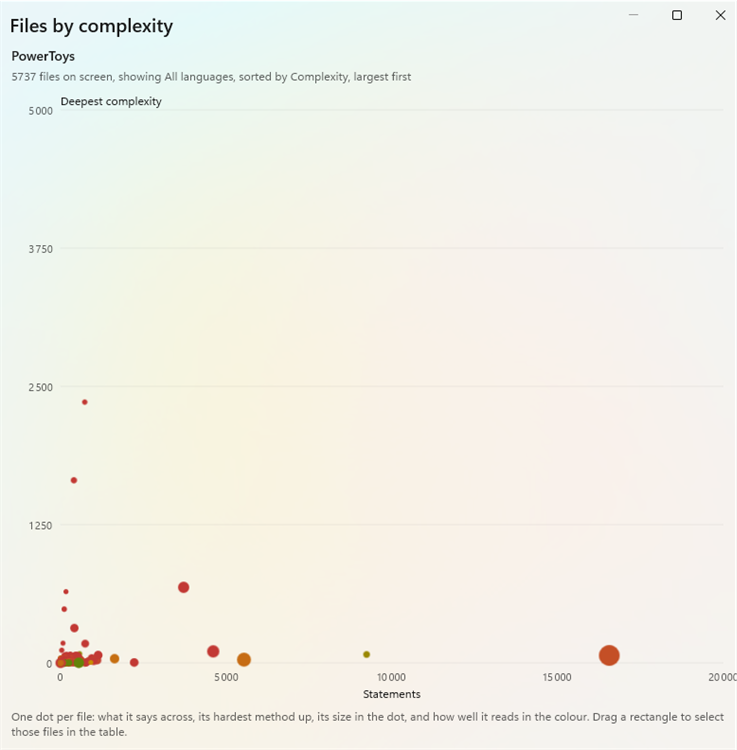
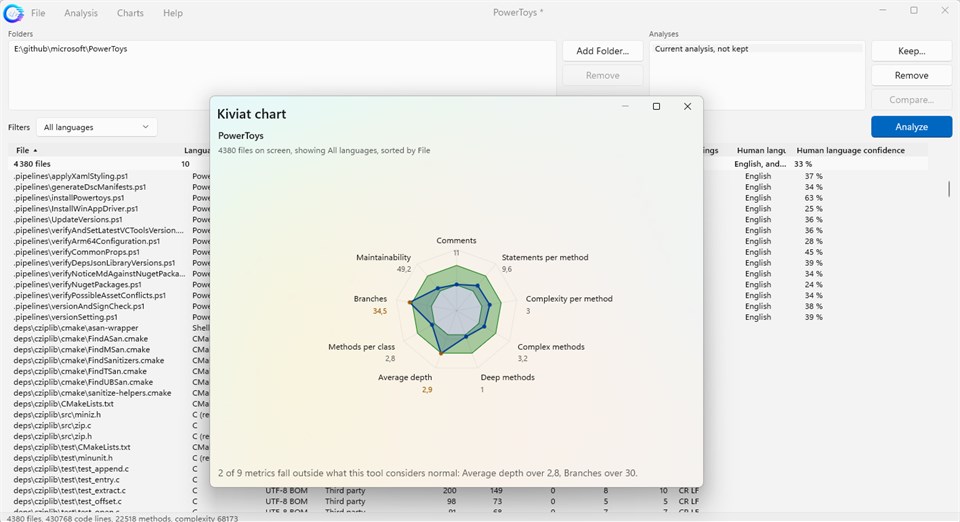
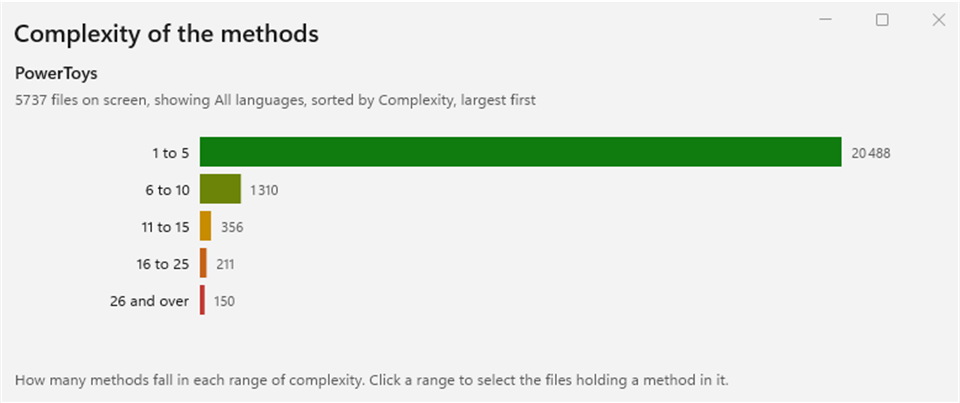
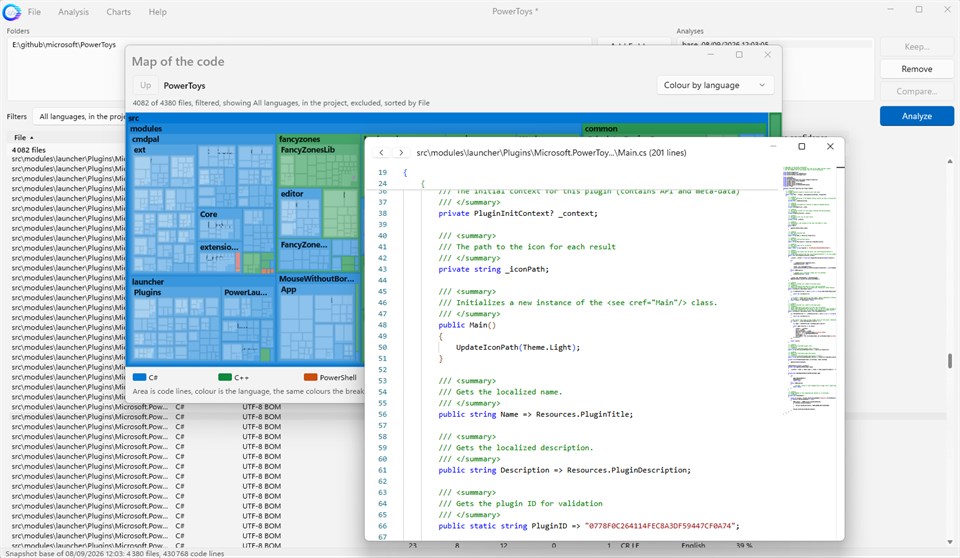
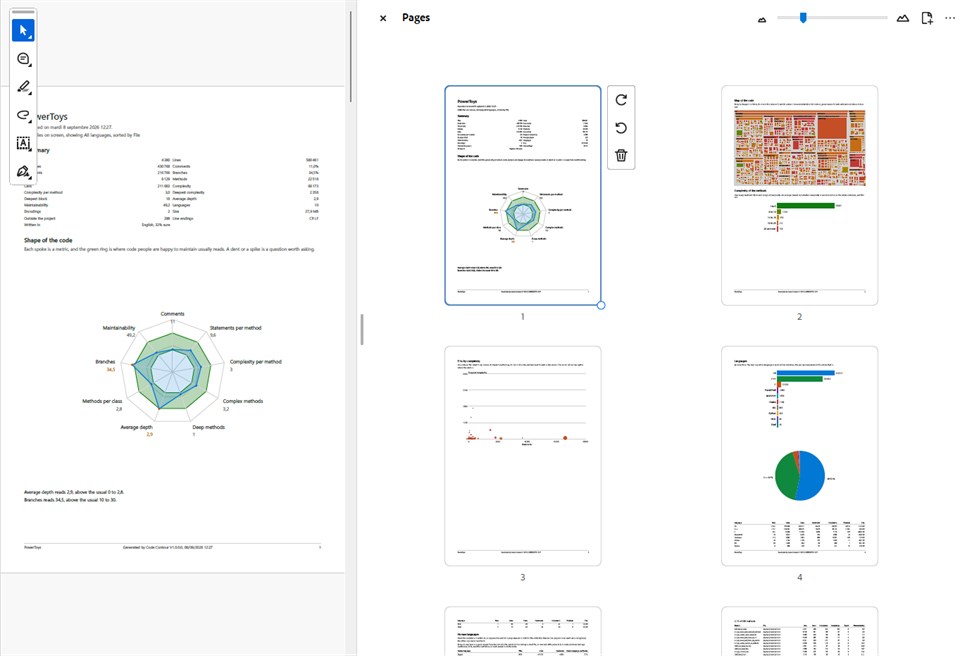
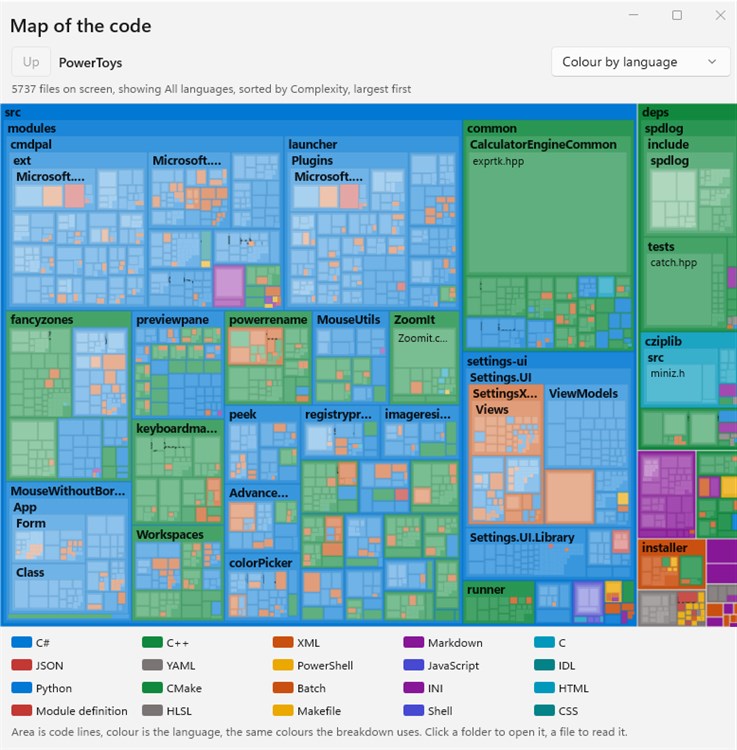
The Kiviat chart puts the whole codebase against what your project calls normal, and clicking a spoke selects the files that pushed it out. The map of the code draws every file as a rectangle, sized by its lines and nested inside its folders, coloured by language, complexity, maintainability, change or by how much of it is your team's work. The complexity histogram turns "we have complex code somewhere" into a list of files. The scatter puts size against difficulty so the outliers stand out, and a rectangle swept over it selects them.
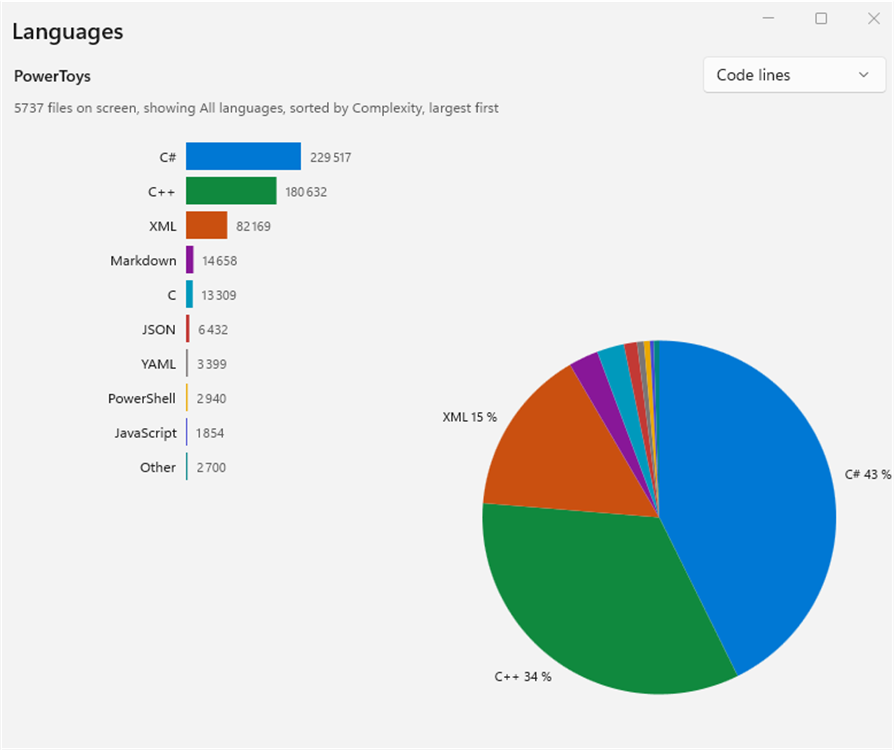
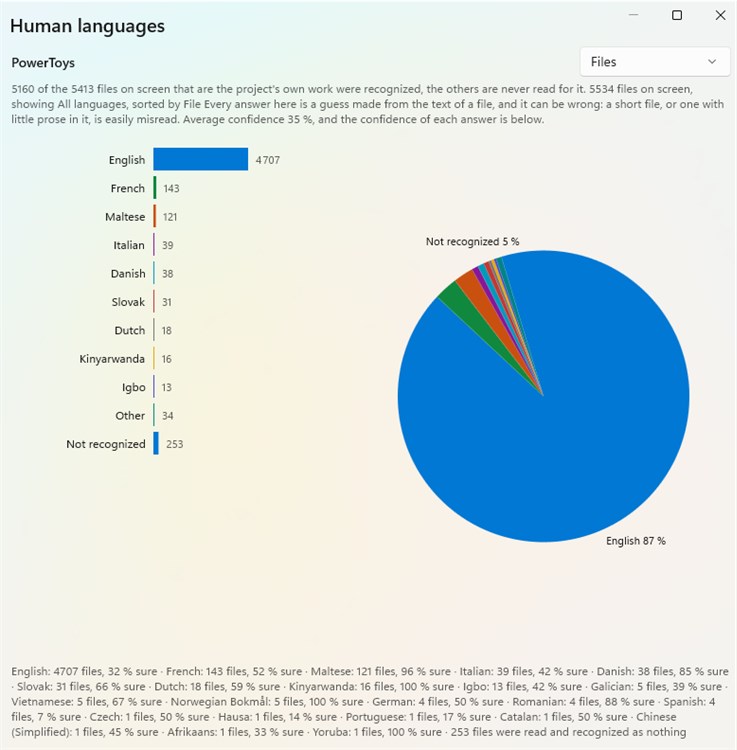
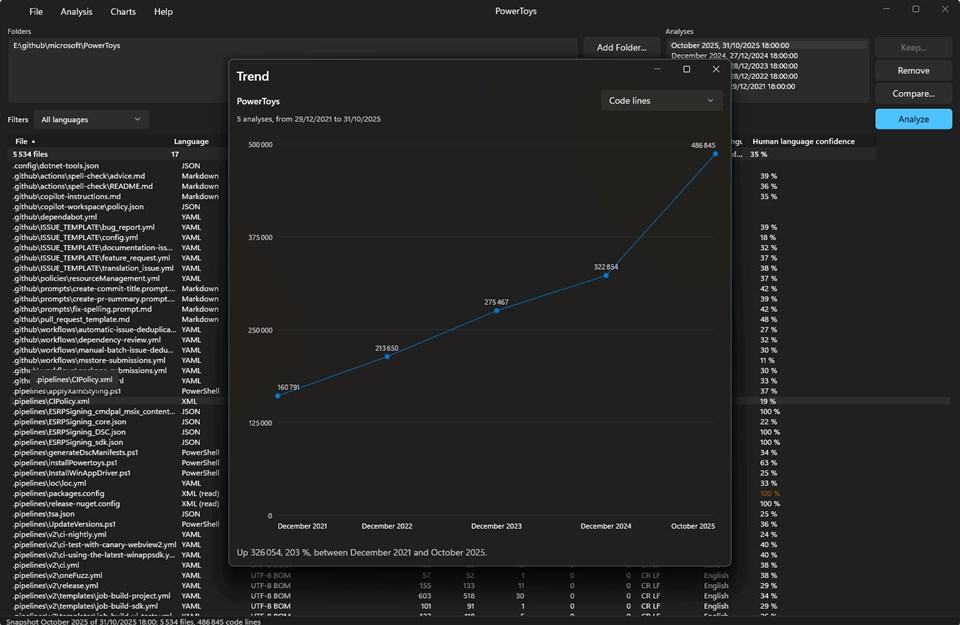
Two more say what a codebase is made of, one for the languages it is programmed in and one for the language its people write in, and the trend chart shows where a number went across everything the project has kept.
Honest about what it found
A file that could not be read is listed with the reason rather than quietly dropped from the totals. A language it is not certain of carries a certainty. Code that is not your team's work, generated files, vendored third party code, anything the repository ignores, is marked in its own column rather than silently counted, and it stays countable so the totals remain honest.
Rather than guess from file names, Code Contour reads the rules the repository already keeps, its .gitignore and its .gitattributes, implementing git's own glob so a rule behaves exactly as it does for git.
It also reports the encoding of every file, out of the 116 Windows knows, and how each file ends its lines, including how many disagree with the rest. And it can tell you what human language the comments and strings are written in, with a confidence for each answer, which on a codebase worked on by several teams is often the most surprising column in the table.
A history, not a snapshot
Keep an analysis in the project and it becomes a point you can return to. Show it again months later with its own numbers, its own charts and its own reports, compare any two, and read the work report: how many lines were written, deleted and rewritten between them, which files absorbed the effort, and which way complexity and maintainability went. The period is named at the top, because the same amount of work over a week and over a year describes two different codebases.
What the repository already knows
Your repository has been keeping its own account since the first commit, and Code Contour reads it. The churn chart shows what was written into it month by month, lines added above the line and removed below it, or person by person with names resolved through the repository's own .mailmap. A moved file is counted as a move, the way git counts it, so an afternoon of tidying does not read as a heroic week.
It needs no analysis and no setup: a folder inside a checkout is enough, and a project spanning several repositories adds them up. The same history goes into the HTML, PDF and JSON reports when the project asks for it.
Nothing leaves your computer for any of this. The library Code Contour reads repositories with is built without any network transport at all, so it reads the checkout on your machine and cannot contact a server even if it were asked to.
Reports people can read
The whole report exports as one self contained HTML page, charts included, drawn as vectors so it prints and zooms cleanly, with nothing fetched from anywhere when it opens. The file names in it are links that open the file in Code Contour at the right line, so a report you hand to somebody is a report they can walk into.
The rows export as CSV in the dialect Excel opens as columns on a double click. The analysis exports as JSON with a versioned schema, written field by field so it is a contract rather than an internal type, which is what a build reads. And the report prints as a real PDF, laid out the way a document should be, with no browser anywhere in it.
Built into your build
Code Contour carries a command line tool that measures from a script under the same rules the window uses. It writes any of the four shapes, keeps its runs in the project so a build gets a history of its own, and answers with an exit code: nought when the run was made, one when it could not be, two when something it was asked to watch crossed a limit. Set a maximum complexity or a minimum maintainability and the build fails the day the codebase does.
Yours, and quiet
Code Contour is a native Windows application with no runtime to install. It works entirely offline. There is no cloud service, no telemetry, nothing to sign in to, and your source never leaves your PC. Files are opened read only and shared as widely as a reader can share them, so a file another program is still writing is read without getting in its way, and nothing here ever edits your code.
Free, and Premium
The whole of the analysis is free: every language, every metric, every chart, the source viewer, and the CSV, HTML, JSON and PDF reports of the current analysis. A free project keeps three analyses, a baseline, the previous one and the current one, which is enough to see a trend.
Code Contour Premium, a one time purchase, keeps the complete history of your codebase, compares any two analyses, explains the work between them in detail, reads the churn of your git history, and lets you write the command line tool out for your build. Nothing you have already measured is ever hidden or taken away.
From the developer
Lists 0
-
 Code Contour
Points 0
-

- +1 Point

Rankings 0
-
- Your rating
Developer 14
- Aelyo Softworks
- Followers: 0
- Platforms: Windows Apps (14)
- Deals: 1
- Lists: 0 0
- Points: 0
- Rankings: 0
- Comments: 0
- Videos: 0
- RSS: Subscribe
What's new
- Version: PC
- Last Updated:
Additional Information
- Release Date:
- Category:
Windows Apps›Developer tools - OS:
PC - Size:
68 Mb - Capabilities:
Mixed reality - Supported Languages:
English - Content Rating:
EVERYONE - Windows Store Rating: ¡
0
AppAgg Score
Estimated AppAgg Score for
Code Contour
Developer: Aelyo Softworks
Higher scores usually reflect better results across AppAgg’s indicators.
Based on: popularity · ratings · freshness · deals · store data · community signals
Recalculated daily using fresh AppAgg data.
Comments 0 ¡
Share
Code Contour Short URL: Copied!- Windows Store
You may also like
Recent discussionsMore →
 AppGame4Class Game4Class makes lesson review fun and interactive. I like how easily students can join from their o...
 Mehdi Gateway62
 AppAniMate Waifu - AI Anime Desktop Pet This is the best anime desktop pets I have ever had, The dancing feature is amazing.
 shaw chaney34
 AppSpark Motion Create 26 The graphics are amazing! Now I can design my ball layouts and watch then spin in 3D animation.
 Jim Kirker40
 AppLocalDub – Real-Time Game Dubbing Hello Kırtay Interactive, I am using LocalDub - Real-Time Game Dubbing. I would like to know if Hind...
 rashid game53
 AppNauticPlayer This app is absolute cinema. Honestly, it’s one of the best media players I’ve ever tried, and I’m s...
 Manuel92
 AppScreen Beings - Interactive Accessibility Companion This is my app so I’m a little bias but as someone from the ADHD community that teaches ADHD and neu...
 Tarelle Irwin54
 AppAadi vault good it ia a encrypter and good you my work on office
 Aditya Rai50
 AppTyping 365 | Daily Typing Trainer The best typing app ever. With Typing 365 you don’t have to force yourself for couple minutes traini...
 Ahmad Mozaffar50
 AppZefir Calendar — Calendar in the Taskbar excelente app! Superando todas as espectativas!
 Diógenes Magnus50
 AppBlazin IPTV Player This compact IPTV player is amazing. I threw multiple playlists at it and it handles it with no issu...
 Mike Anderson40

