
Bookmarks
| Developer: | Anton Horbatiuk (2) | ||
| Price: | $2.99 | ||
| Score: | 670 Silver | ||
| Rankings: | 0 | ||
| Comments: | 0 Add a comment | ||
| Lists: | 0 0 | ||
| Points: | 0 | ||
| +1 Point | |||
Summary
Meet Code Vault – offline code snippets manager, an app from Anton Horbatiuk in the Developer tools category.
Released , still pretty fresh.
$2.99, and not a single discount on AppAgg so far. Tough nut to crack.
The Microsoft Store is built into Windows, so it installs in a couple of clicks.
Its AppAgg Score is 670. Silver, and that’s not bad at all.
Rated “EVERYONE”, so it’s fine for kids too.
Speaks 2 languages, English included.
Used it? Your review would be the first one here.
The developer has 1 more app on AppAgg. Worth a look.
Want to hear about deals, updates and new apps first? Set a price alert, follow the developer or subscribe to the RSS feed. Push alerts come through the AppAgg Alerts app for Android and iOS.
Other platforms 0
 | Code Vault – offline code snippets managerWindows Store670 SilverWindows | $2.99 |
Only in this store right now.
Price History 0
- Current price: $2.99
- Minimum: $2.99
- Maximum: $2.99
Your own feed on the home page
Screenshots 4
Description
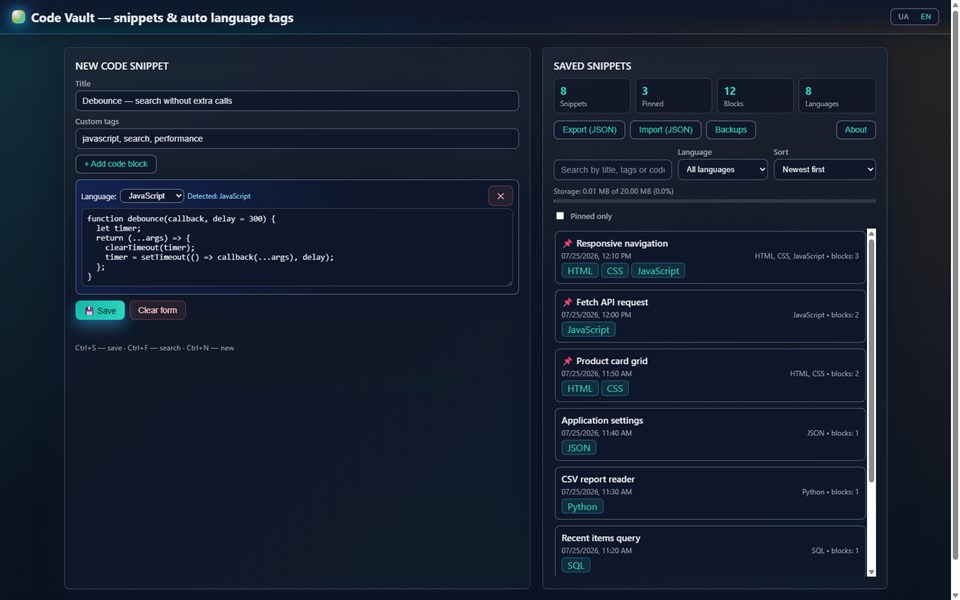
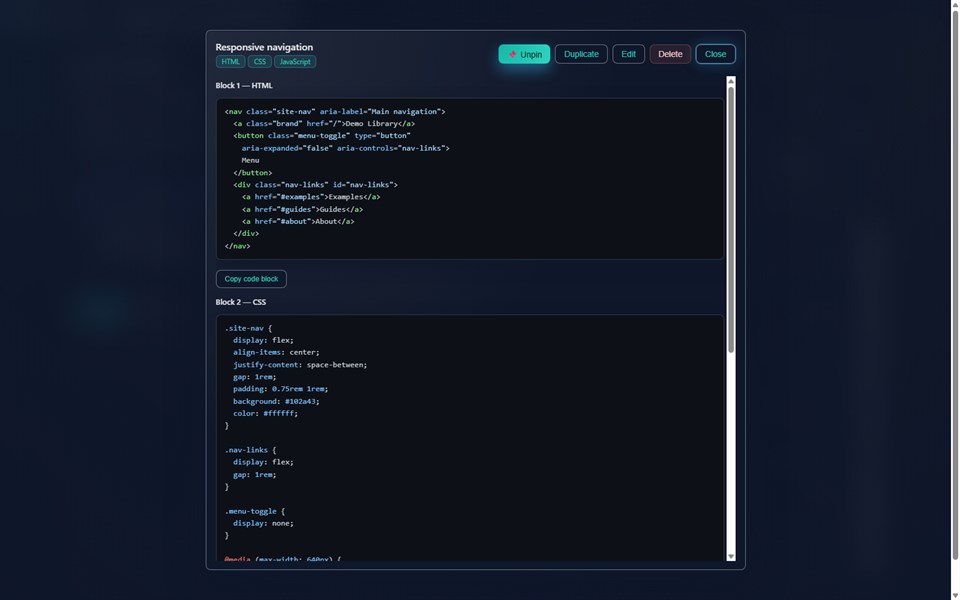
Keep reusable code in one place with multiple blocks per snippet, local syntax highlighting, automatic detection for 22 programming and markup languages, and manual language selection. Organize snippets with custom tags, filter by language or pinned status, search titles, tags, and code using multiple words, and sort or duplicate entries for faster reuse.
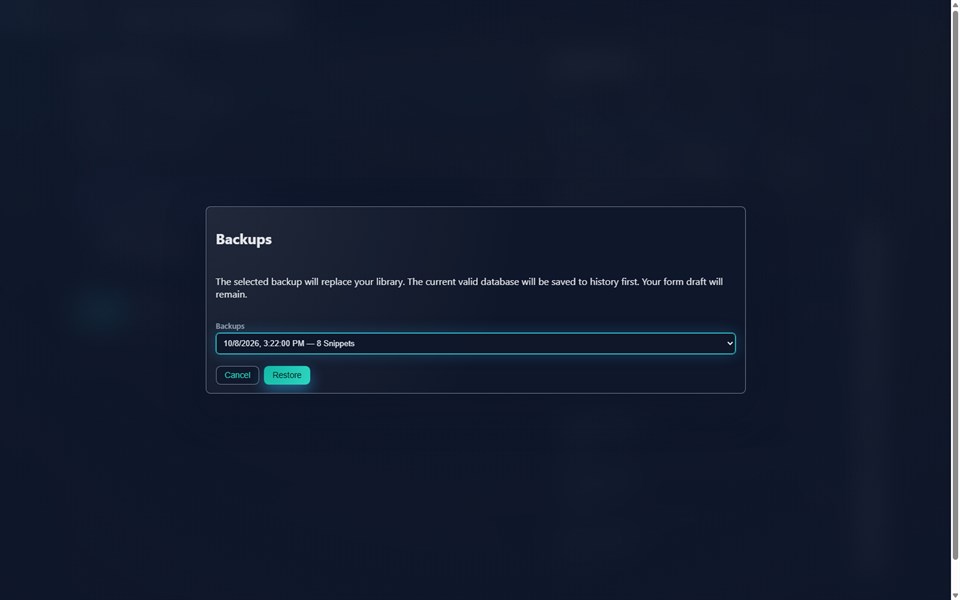
Pick up where you left off: unfinished forms are saved locally as drafts and restored after restarting the app. Undo the last deletion during the current session, or restore an earlier library state from a history of up to 10 local backups. If the primary database is missing or damaged, Code Vault can load a valid backup when one is available.
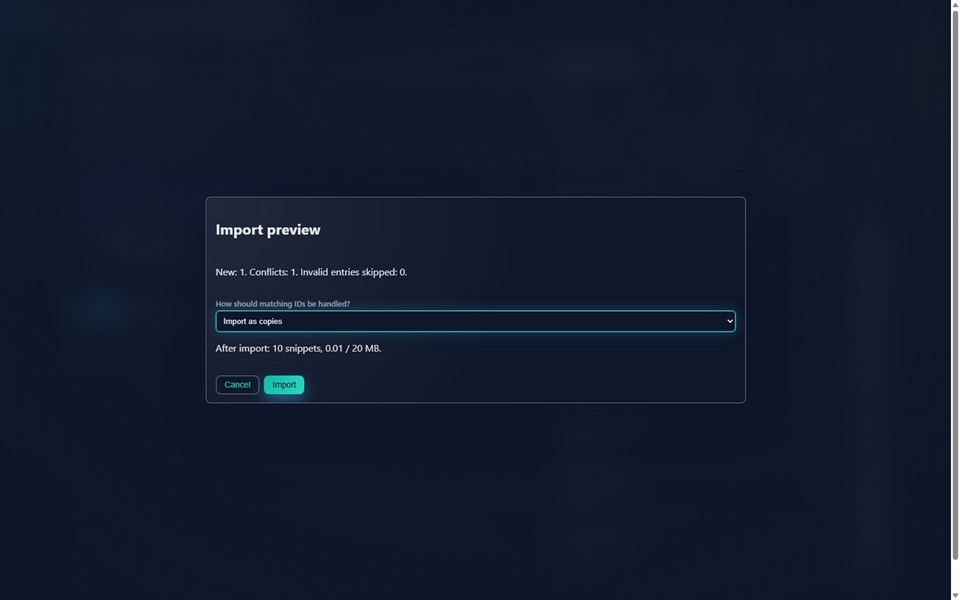
Preview JSON imports before changing your library. Review new entries, conflicts, skipped data, and the resulting database size. Keep existing entries, replace them, or import conflicting entries as copies. Export your library to a portable JSON file whenever needed.
Work faster with Ctrl+S to save, Ctrl+F to search, Ctrl+N to start a new snippet, and keyboard navigation. Soft neon focus highlights active fields, and the app remembers your window size and position. Larger libraries are displayed in pages of 100 entries.
Your library is stored in Documents\CodeVault\Data\snippets.json. The same folder holds a previous database copy, backup history, and your form draft. These JSON files are not encrypted by Code Vault. If Windows synchronizes Documents with OneDrive, they may be copied according to your system settings; Code Vault does not connect to OneDrive directly. A storage meter tracks the 20 MiB database limit.
Available in Ukrainian and English. Core features work without an internet connection or account. No advertising, telemetry, analytics, or tracking.
From the developer
Lists 0
-
 Code Vault – offline code snippets manager
Points 0
-

- +1 Point

Rankings 0
-
- Your rating
Developer 2
- Anton Horbatiuk
- Followers: 0
- Platforms: Windows Apps (2)
- Deals: 0
- Lists: 0 0
- Points: 0
- Rankings: 0
- Comments: 0
- Videos: 0
- RSS: Subscribe
What's new
- Version: PC
- Last Updated:
- Code Vault 1.2.1
- Autosaved local drafts restore your unfinished form after restarting the app.
- Backup history keeps up to 10 previous library snapshots, with a picker for restoring an earlier state.
- JSON import preview shows new entries, conflicts, skipped data, and the resulting database size. Keep existing entries, replace them, or import conflicts as copies.
- Undo the last snippet deletion during the current session.
- Search using multiple words, filter pinned snippets, and browse larger libraries in pages of 100 entries.
- Use Ctrl+S to save, Ctrl+F to search, Ctrl+N for a new snippet, and improved keyboard navigation.
- Soft neon focus highlights input fields and selections. Window size and position are remembered.
- Improved save handling and recovery from valid local backups when the primary database is missing or damaged.
- Visual improvements: refreshed icons, clearer navigation, an improved search layout, and fixes to the app icon appearance in Windows.
Additional Information
- Release Date:
- Category:
Windows Apps›Developer tools - OS:
PC - Size:
144 Mb - Supported Languages:
English,Ukrainian - Content Rating:
EVERYONE - Windows Store Rating: ¡
0 - Website:
 https://teacher.cv.ua/codevault
AppAgg Score
Estimated AppAgg Score for
Code Vault – offline code snippets manager
Developer: Anton Horbatiuk
Higher scores usually reflect better results across AppAgg’s indicators.
Based on: popularity · ratings · freshness · deals · store data · community signals
Recalculated daily using fresh AppAgg data.
Comments 0 ¡
Share
Code Vault – offline code snippets manager Short URL: Copied!- Windows Store
You may also like
Recent discussionsMore →
 AppGame4Class Game4Class makes lesson review fun and interactive. I like how easily students can join from their o...
 Mehdi Gateway62
 AppAniMate Waifu - AI Anime Desktop Pet This is the best anime desktop pets I have ever had, The dancing feature is amazing.
 shaw chaney34
 AppSpark Motion Create 26 The graphics are amazing! Now I can design my ball layouts and watch then spin in 3D animation.
 Jim Kirker40
 AppLocalDub – Real-Time Game Dubbing Hello Kırtay Interactive, I am using LocalDub - Real-Time Game Dubbing. I would like to know if Hind...
 rashid game53
 AppNauticPlayer This app is absolute cinema. Honestly, it’s one of the best media players I’ve ever tried, and I’m s...
 Manuel92
 AppScreen Beings - Interactive Accessibility Companion This is my app so I’m a little bias but as someone from the ADHD community that teaches ADHD and neu...
 Tarelle Irwin54
 AppAadi vault good it ia a encrypter and good you my work on office
 Aditya Rai50
 AppTyping 365 | Daily Typing Trainer The best typing app ever. With Typing 365 you don’t have to force yourself for couple minutes traini...
 Ahmad Mozaffar50
 AppZefir Calendar — Calendar in the Taskbar excelente app! Superando todas as espectativas!
 Diógenes Magnus50
 AppBlazin IPTV Player This compact IPTV player is amazing. I threw multiple playlists at it and it handles it with no issu...
 Mike Anderson40

