
已保存
选择将在你的已保存菜单中显示的名称。
完成!
说明

Built for developers, testers, analysts, and support teams who work with large, messy, minified, or deeply nested files every day. Open an API payload, a minified bundle, a huge log export, or a config file and start working in seconds.
Works locally with JSON, JSONC, JSON Lines / NDJSON, TOML, YAML, XML, RSS, Atom, CSV, Markdown, JavaScript, TypeScript, CSS, and HTML.
🚀 OPEN IT AND START READING
• Multi-file tabs with drag and drop, file associations, Explorer context menu, and command-line opening
• Paste & Prettify (Ctrl+N) detects the format of whatever is on your clipboard
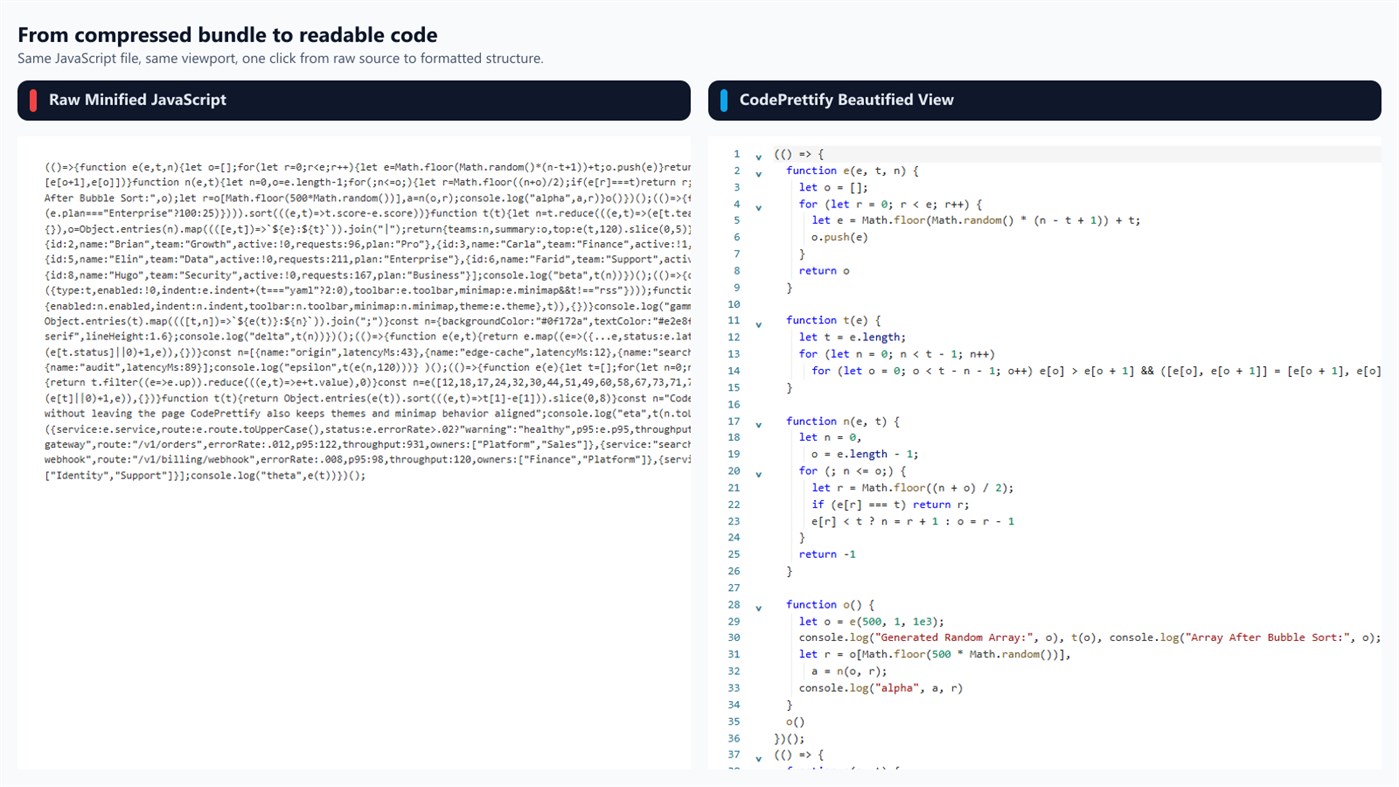
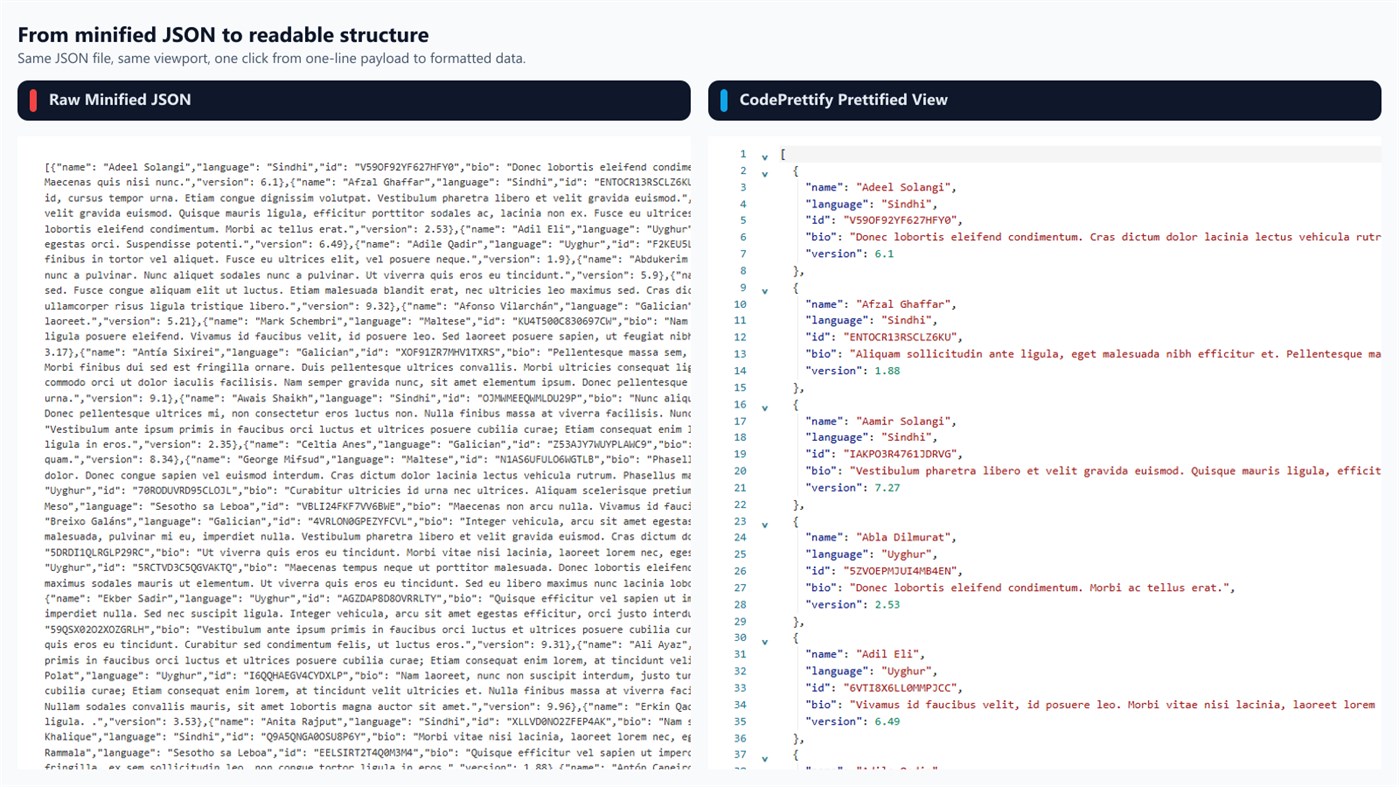
• Automatic minification detection formats dense files instantly
• Raw, Prettified, Rendered, and Table representations with a clear toggle — no reload
• Session restore brings back your window, tabs, and active tab, even after a crash
• A file watcher reloads a tab when the file changes on disk and follows renames
📄 FORMATS & CONVERSION
• JSON, JSONC, JSON Lines / NDJSON, TOML, YAML, XML, RSS, Atom, CSV, Markdown, JavaScript, TypeScript, CSS, and HTML
• Convert the open document to JSON, YAML, or TOML and save the result
• Only target formats the document can actually be serialized into are offered
🧩 JSON TO CODE GENERATOR
• Turn a JSON sample into TypeScript, Zod, C#, Java, Kotlin, Python/Pydantic, Go, Rust, Swift, Dart, or JSON Schema
• Reads every record in a sample array to tell required, optional, and nullable fields apart
• Builds nested models, safe identifiers, and exact JSON field-name mappings
• Set the root type name plus namespace or package, then copy, export, or open as a document
• Generation runs entirely on the device
🩹 JSON REPAIR & TRANSFORM
• Recovers Markdown fences, comments, single quotes, unquoted keys, Python/JavaScript literals, missing commas and brackets, trailing commas, and raw control characters
• Every change appears in a confidence-rated repair report before you use the result
• Optional salvage mode for JSON Lines never discards invalid records silently
• Build an ordered pipeline — filter, sort, pick fields, and more — with a live preview
• The source document is never modified
🗺️ DIAGRAM GENERATOR
• Turn JSON, JSON Lines, YAML, TOML, XML/RSS, and CSV into a zoomable map of connected field cards
• Search across cards and fields with match highlighting and one-keystroke jumps between hits
• Limit the scene to two, three, or four levels, or collapse and expand every branch at once
• Export as SVG, PNG, or a Mermaid class diagram for wikis and issue trackers
🔐 SECURITY SCAN
• Finds likely cloud and API keys, tokens, JWTs, private-key blocks, credential-bearing URLs, and connection strings — locally
• Secret findings are masked and sorted by severity, and every finding links to its source line
• Extracts API routes, endpoints, paths, and file references hidden inside script bundles
• Heuristic assistance rather than a security guarantee
🔎 VALIDATION & DIAGNOSTICS
• Line-accurate validation for JSON, JSONC, JSON Lines, TOML, JavaScript, TypeScript, CSS, multi-document YAML, XML, and HTML
• JSON Schema Validator checks the document against a pasted schema on-device, with a JSON path and line link for every violation
• Flags duplicate JSON keys, mixed indentation, long lines, suspicious timestamps, and feed problems with quick-fix guidance
• Statistics for size, lines, characters, JSON depth, JavaScript declarations, CSS rules, and XML element, attribute, and namespace counts
📊 TABLE VIEW
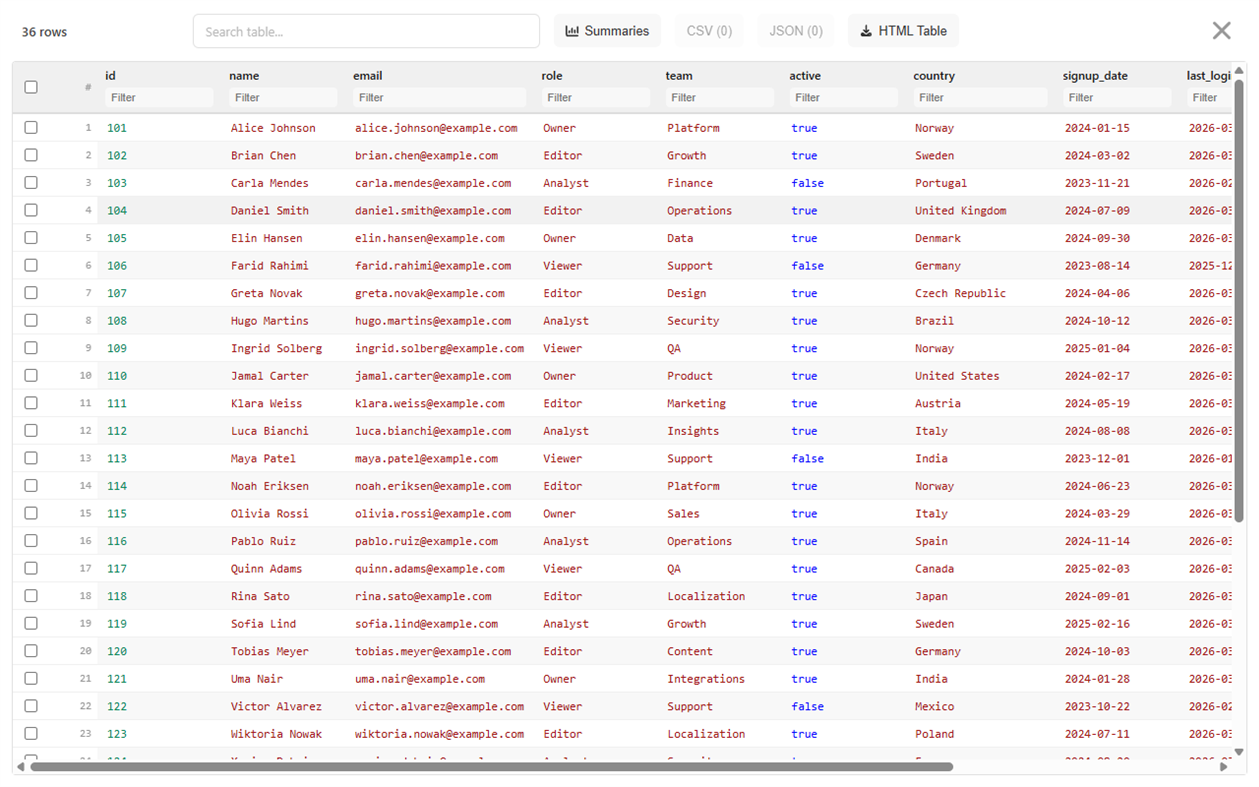
• JSON arrays, CSV, RSS/Atom, repeating XML, and tabular HTML become sortable, searchable tables
• Per-column filters, drag-and-drop column reordering, and summaries such as dominant type, unique values, and empty counts
• Select rows and export the selection as CSV or JSON in the current column and sort order
• Export the filtered, sorted table as HTML
• Virtualized rendering keeps large tables responsive
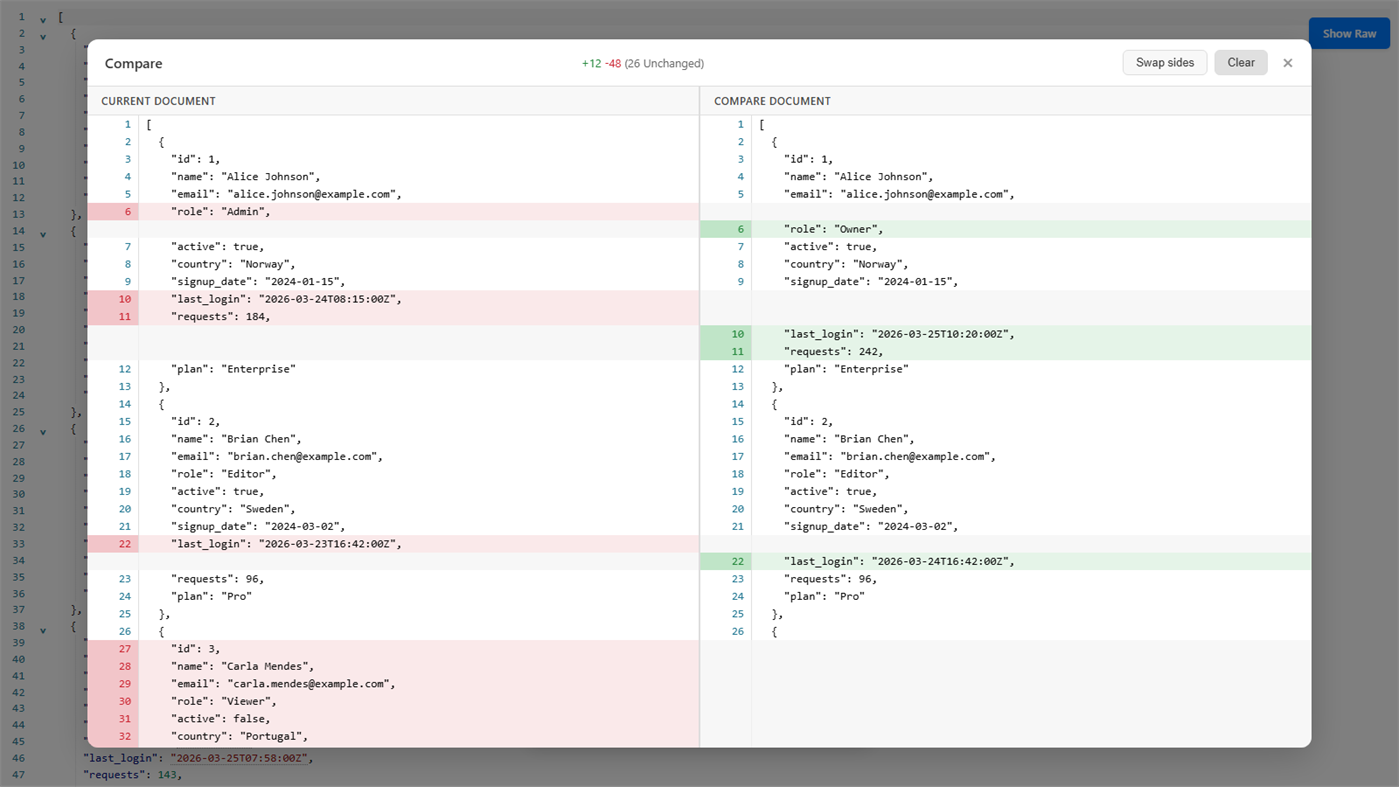
🧬 COMPARE & DIFF (Ctrl+Alt+D)
• Full-screen split view with synchronized scrolling, line stats, and swap sides
• Semantic mode compares the data structure itself, so reformatting or reordering keys is not reported as noise
• Text mode adds Ignore whitespace plus Previous and Next difference buttons
• Compare two files, or the current document against your clipboard
🛠️ DATA CONVERTER
• SHA-256, SHA-384, and SHA-512 hashes and HMAC with hex or Base64 output
• Unix seconds, Unix milliseconds, and ISO 8601 conversion with UTC and local results
• UUID v4, UUID v7, and ULID generation in batches of up to 100
• Base64 and URL encoding and decoding, all offline
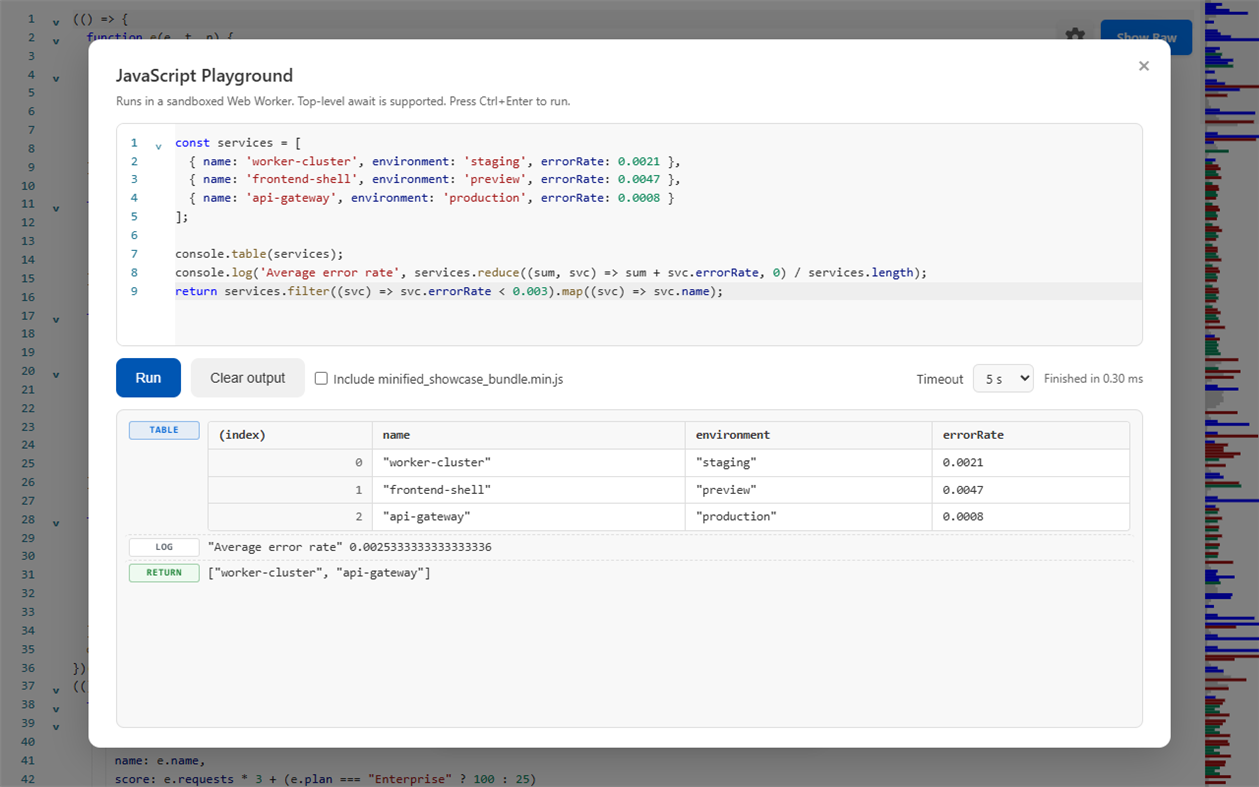
🧪 JAVASCRIPT PLAYGROUND (Ctrl+Alt+P)
• Sandboxed Web Worker with configurable 1 / 5 / 15 second timeouts and top-level await
• Captures console.log, info, warn, error, debug, and renders console.table as a real table
• JSON and JSON Lines documents arrive as a ready-made json variable
• Include the current file to call its top-level functions, with a safe-definitions mode that skips side effects
• Autocomplete, error stacks, and autosaved sessions
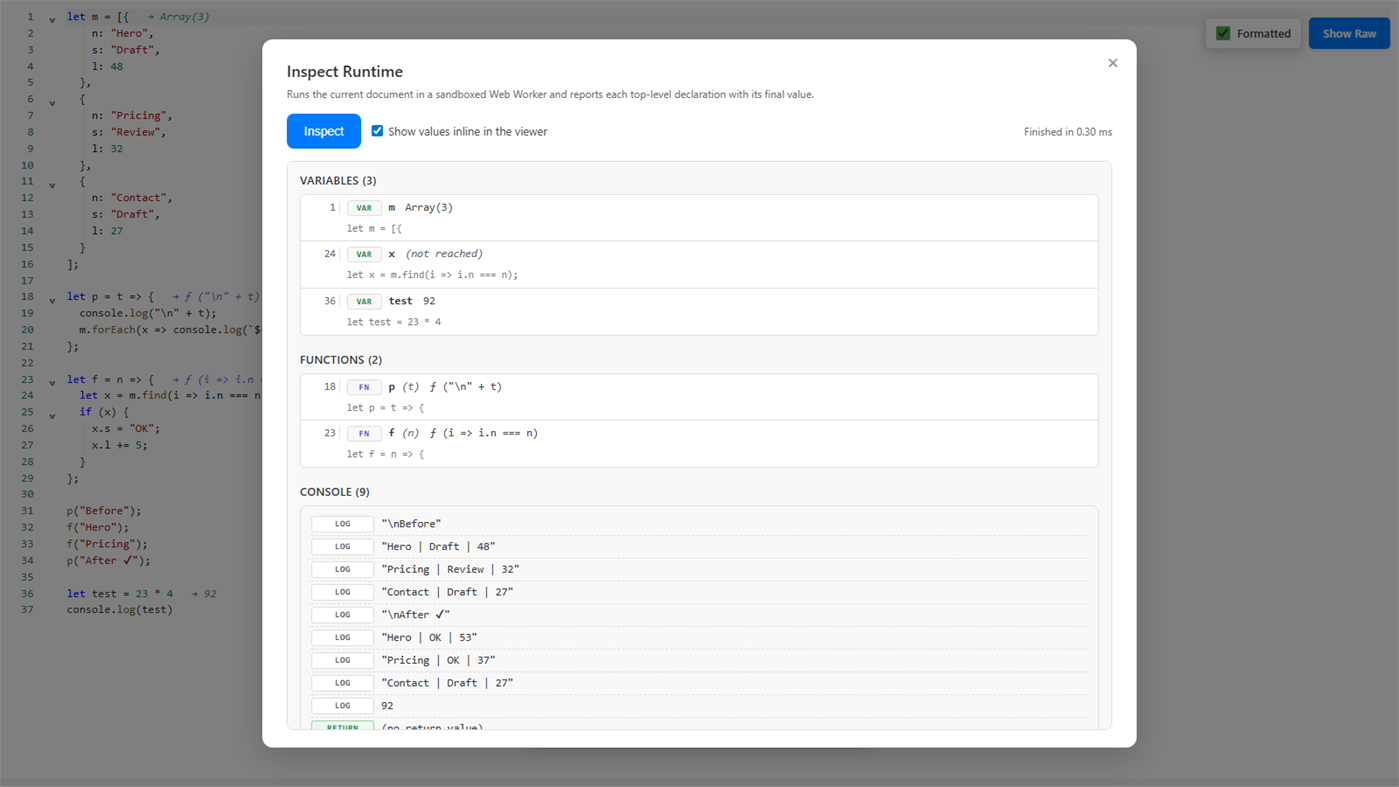
🧭 INSPECT RUNTIME (Ctrl+Alt+I)
• Runs a JavaScript file once and lists every top-level declaration with its captured value
• Inline value annotations in the viewer, hover details, and jump-to-line
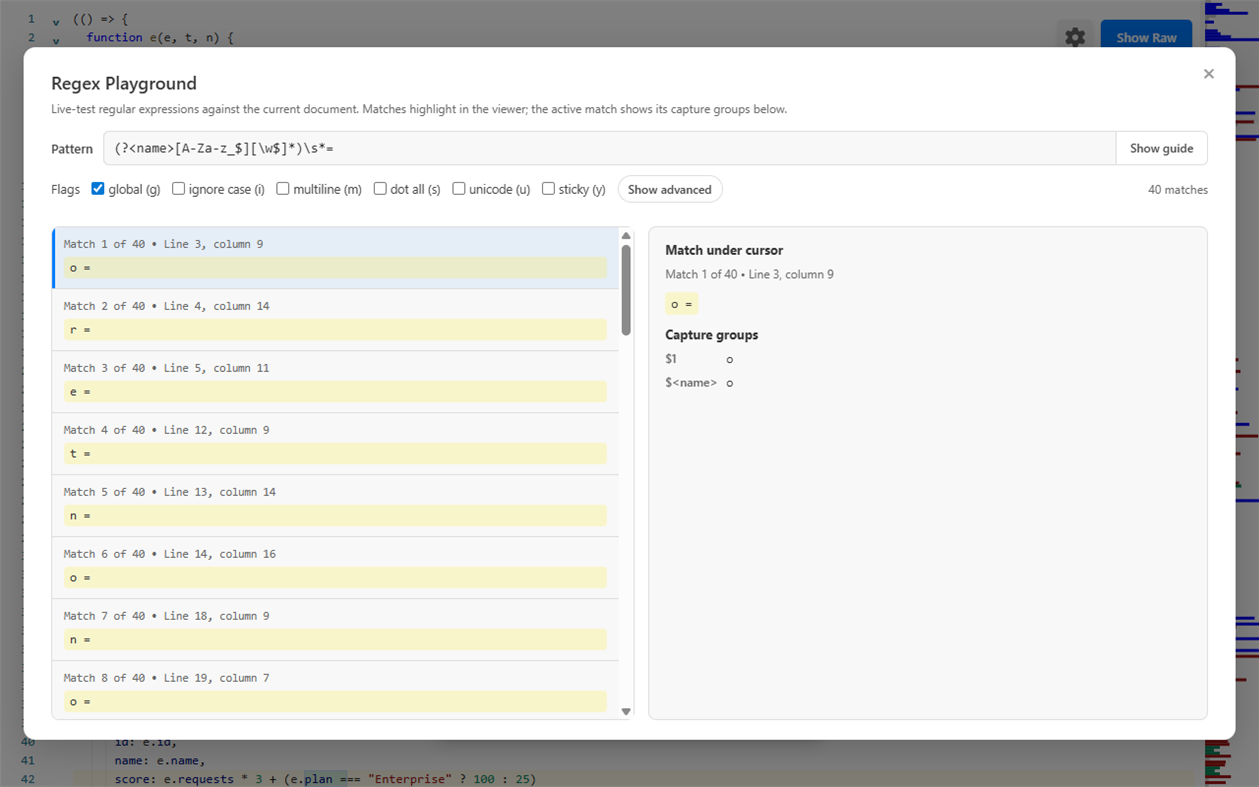
🔎 REGEX PLAYGROUND (Ctrl+Alt+R)
• Live match highlighting in the viewer with capture groups and named groups
• Replacement preview, saved named patterns, recent history, and pass/fail test cases
• Copy ready-made snippets for JavaScript, C#, and PowerShell
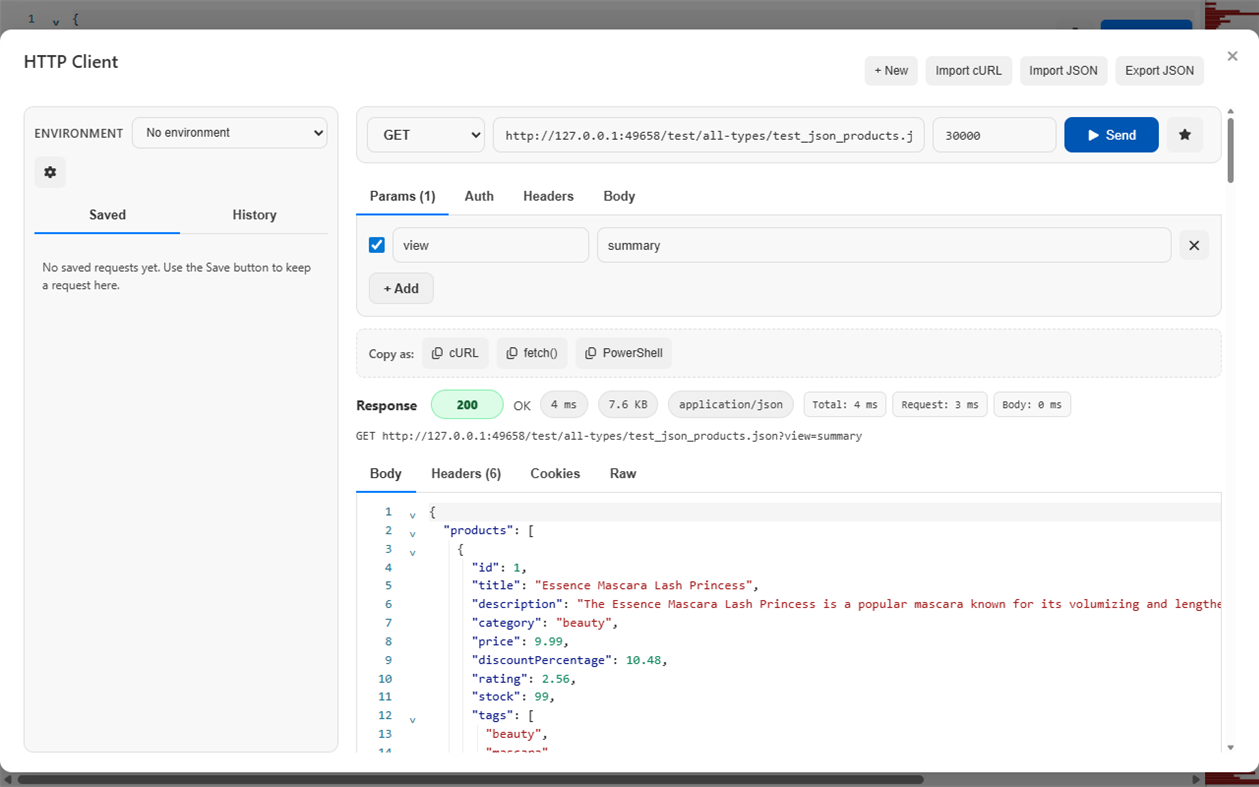
🌐 HTTP CLIENT
• Postman-style requests with Params, Auth, Headers, and Body tabs (JSON, raw, form-urlencoded, multipart, GraphQL)
• Saved requests, history, environments, and {{variable}} interpolation with secret masking
• Response body, headers, cookies, and raw view plus status, size, and timing breakdown
• Import cURL and copy requests as cURL, fetch(), or PowerShell Invoke-RestMethod
• Clear explanations for timeout, cancellation, DNS, certificate, and offline errors
🔍 SEARCH & NAVIGATION
• Command Palette (Ctrl+Shift+P) to fuzzy-find and run any action
• Floating search with live result count and regex support via /pattern/flags
• Go to Line (Ctrl+G), code folding, Document Navigator, and a syntax-aware minimap
📤 COPY & EXPORT
• Copy original, formatted, or minified content with feedback naming exactly what was copied
• Export CSV with spreadsheet-safe quoting, HTML tables, and PNG images of the viewport or full file
• Download the open document converted to JSON, YAML, or TOML
🪟 BUILT FOR WINDOWS
• Save and Save As preserve the original encoding, BOM, and line endings, with atomic writes
• Detects UTF-8/BOM, UTF-16, UTF-32, and legacy encodings, and lets you reopen with an explicit encoding from the status bar
• Convert line endings between Windows (CRLF), Unix (LF), and Mac (CR) from the status bar
• Files of 64 MiB and larger open in a read-only paged native viewer that stays responsive, with paged search and Go to line
• Native File, Edit, View, and Tools menus, zoom, and Windows Recent Documents integration
🔒 PRIVACY & SECURITY
• Formatting, validation, repair, conversion, code generation, diagramming, schema checks, security scanning, and playgrounds all run on your machine
• No telemetry and no upload of your files
• The HTTP Client only contacts the URLs you explicitly send requests to, and CodePrettify never proxies them
• Playground and Inspect Runtime execute in a sandbox with networking, page DOM, and file-system access disabled
• Safe for sensitive files, tokens, internal systems, logs, and production data
⚙️ CUSTOMIZATION
• Light, Dark, and System themes
• 14 interface languages: English, Norwegian, Swedish, Danish, German, French, Spanish, Italian, Portuguese, Russian, Chinese, Japanese, Korean, and Vietnamese
• Adjustable font size, indent size, line numbers, word wrap, minimap, and toolbar
• Per-file-type defaults and restored per-file view state
⌨️ KEYBOARD SHORTCUTS
• Ctrl+N — Paste & Prettify
• Ctrl+O — Open file
• Ctrl+B — Raw / Pretty
• Ctrl+F — Search
• Ctrl+G — Go to Line
• Ctrl+Alt+C — Copy
• Ctrl+Alt+D — Compare / Diff
• Ctrl+Alt+P — JavaScript Playground
• Ctrl+Alt+R — Regex Playground
• Ctrl+Alt+I — Inspect Runtime
• Ctrl+Alt+T — Toggle toolbar
• Ctrl+Shift+P — Command Palette
⚡ BUILT FOR PERFORMANCE
CodePrettify is engineered for large, complex, minified, and structured files. Native preprocessing, cached document processing, virtualized tables, a rebuilt minimap, and optimized startup paths keep the app responsive where traditional editors start to struggle.
Complete user manual: https://prettify.cloud/manual.html
广告
屏幕截图
价格历史
- 目前价格: 免费
- 最小值: 免费
- 最大值: 免费
AppAgg 评价
1,160
AppAgg 预估评价:
CodePrettify
开发人员: FixQuotes
1,160 白银
评价越高,通常表示在 AppAgg 上的信号越强。
基于: 热度 · 用户评分 · 新鲜度 · 优惠 · 商店数据 · 社区活跃度
根据最新 AppAgg 数据每日重新计算。
短网址: 已复制!
新版变化
- 版本: PC
- 最后更新:
其他信息
 https://prettify.cloud/
开发人员
- FixQuotes
- 关注者: 0
- 平台: Windows 应用 (2)
- 折扣: 0
- 列表: 0 + 0
- 积分: 0 + 0 ¡
- 排名: 0
- 评论: 0
- 视频: 0
- RSS: 订阅
列表 (0)
0
- CodePrettify
积分 (0)
0
排名 (0)
0
评论 (0)
成为第一个发表评论的人
简要
CodePrettify 短网址: 已复制!- 分享
- Windows Store
«CodePrettify». 平台: Windows. 类别: 开发人员工具. 开发商: «FixQuotes». 首次发布: . 最后更新: . 目前价格: 免费. 该条目尚未在 AppAgg 上获得评分或评论。 可用语言: Chinese, Danish, English, French, German, Italian, Japanese, Korean, Norwegian, Portuguese, Russian, Spanish, Swedish, Vietnamese. AppAgg 会跟踪 «CodePrettify»的价格历史、评分和用户反馈。 AppAgg 不托管应用程序或分发软件。 所有商标、徽标和屏幕截图均属于其各自所有者。 关注未来折扣和更新: RSS
类似
-
- #Code
- Windows 应用: 开发人员工具 来自: Shahul Hameed
- * 免费
- 列表: 0 + 1 0 0
- 积分: 1 + 283 10K · 黄金 版本: PC #Code is an online compiler that that lets you compile and execute code snippets on your Windows 10 device. As of now, #Code supports over 12 programming languages and is a ...
-
- Code Graph
- Windows 应用: 开发人员工具 来自: 淹死的鱼ysdy44
- 免费
- 列表: 0 + 1 0 0
- 积分: 2 + 0 630 · 白银 版本: PC Code Graph is a reference relationship visualizer that finds all the .csproj (C# project) files in a folder and draws the reference relationships between them.
-
- Code Tree Indexer
- Windows 应用: 开发人员工具 来自: ptl1998naganodevall
- $1.59
- 列表: 0 0 0
- 积分: 0 + 0 590 · 青铜 版本: PC Code Tree Indexer is a desktop developer tool that scans a project folder and turns source code into structured code maps. It helps developers, reviewers, and AI-assisted coding ...
- 新
- Code::Blocks
- Windows 应用: 开发人员工具 来自: Martin Halle
- 免费
- 列表: 0 0 0
- 积分: 0 + 48 3K · 黄金 版本: PC Code::Blocks The Open-Source IDE for C, C++, and Fortran Code::Blocks is a powerful, open-source Integrated Development Environment (IDE) designed for flexibility, performance, and ...
-
- Code to Prompt
- Windows 应用: 开发人员工具 来自: Vossel
- * 免费
- 列表: 0 0 0
- 积分: 0 + 0 780 · 白银 版本: PC Code to Prompt is a Windows utility that consolidates an entire codebase into a single, structured text file ready to paste into ChatGPT, Claude, Gemini, or any large language model. ...
-
- Code Reader+
- Windows 应用: 开发人员工具 来自: CodeRobin Ltd
- $5.99
- 列表: 0 0 0
- 积分: 0 + 0 1K · 白银 版本: PC Do you Read Source Code? Are you a Developer, Project Manager or Programming Learner? Want to read source code with your Surface/Tablet while travelling underground or 30000 ft above? ...
-
- Visual Studio Code
- Windows 应用: 开发人员工具 来自: Microsoft Corporation
- 免费
- 列表: 0 + 3 0 0
- 积分: 1 + 8,457 12K · 黄金 版本: PC Visual Studio Code is a free, lightweight, and extensible code editor for building web, desktop, and mobile applications, using any programming language and framework. Visual Studio ...
-
- Chicote Code
- Windows 应用: 开发人员工具 来自: RENANT BERNABE DESENVOLVIMENTO DE SOFTWARE LTDA
- 免费
- 列表: 0 0 0
- 积分: 0 + 0 590 · 青铜 版本: PC Chicote Code is a transparent desktop overlay that triggers playful whip animations on top of your screen driven by Twitch Channel Points redemptions, Claude Code hooks, or any ...
-
- Serris Code Editor
- Windows 应用: 开发人员工具 来自: Seeriis
- 免费
- 列表: 1 0 0
- 积分: 3 + 41 2K · 黄金 版本: PC Serris Code Editor is a open source code editor for UWP (compatible with Windows 10 S, ARM, Desktop and Hololens) and available for free with no ads in the Microsoft Store ! The editor
-
- Visual FoxPro Code Converter
- Windows 应用: 开发人员工具 来自: .com Solutions Inc.
- $19.49
- 列表: 0 0 0
- 积分: 1 + 0 670 · 白银 版本: PC The Visual FoxPro Code Converter converts/migrates/translates the contents of Visual FoxPro .PRG files into LiveCode or Servoy JavaScript code. Scripts can be selected and converted ...
-
- JSON to Code
- Windows 应用: 开发人员工具 来自: CronBlocks
- 免费
- 列表: 0 + 1 0 0
- 积分: 2 + 0 930 · 白银 版本: PC A simple app to convert an object represented in JSON to various code elements including C representation through structures, and class representations in Java, C#, C++ and Python.
-
- Screenshot to Code
- Windows 应用: 开发人员工具 来自: 韵华软件
- * 免费
- 列表: 0 0 0
- 积分: 0 + 0 1K · 白银 版本: PC "Screenshot to Code": The Intelligent AI Tool for Transforming Design Images into Code Overview: "Screenshot to Code" offers designers and front-end developers a revolutionary solution
- 新
- ATM AI Code Portable Deployer
- Windows 应用: 开发人员工具 来自: ATM AI
- $10.49
- 列表: 0 0 0
- 积分: 0 + 0 1K · 白银 版本: PC The ultimate tool for one-click deployment of AI APIs for Claude Code Portable. It supports one-click switching and deployment of AI models including Xiaomi MiMo, ZHIPU GLM5.2, ...
- -33%
- SCORPIOX CODE
- Windows 应用: 开发人员工具 来自: SCORPIOX, INC
- $3.34
$4.99-33% - 列表: 0 0 0
- 积分: 0 + 0 600 · 白银 版本: PC SCORPIOX CODE is your AI-powered coding companion, built right into a native Windows app. Chat with advanced AI models to build, debug, and fix code all from a sleek, integrated ...

