
Záložky
| Vývojář: | OPO Add Dreams (9) | ||
| Cena: | ▼ $1.59 | ||
| Skóre: | 590 Bronz | ||
| Žebříčky: | 0 | ||
| Komentáře: | 0 Přidat komentář | ||
| Seznamy: | 0 0 | ||
| Body: | 0 | ||
| +1 Bod | |||
Shrnutí
CustomIconFileCreator je aplikace od vývojáře OPO Add Dreams z kategorie „Vývojářské nástroje“.
$1.59 místo $3.99. Takhle levná na AppAgg ještě nikdy nebyla. Vážně, prošli jsme celou historii cen.
Běží dokonce i na HoloLens: Windows ve smíšené realitě.
Vyšla , takže je pořád docela čerstvá.
Existuje dokonce verze pro Windows Mobile. Zdravíme z minulosti.
Zvládne i Surface Hub, pro velké zasedačky.
Skóre AppAgg je 590. Zatím „Bronz“, ale je kam růst.
Věková kategorie „EVERYONE“, takže se hodí i pro děti.
Mluví jen jedním jazykem a čeština to není.
Na AppAgg ji zatím nikdo neohodnotil. Můžete být první, a to hned teď.
Tento vývojář má na AppAgg ještě 2 hry a 6 aplikací. Stojí za to se podívat.
Mimochodem, tento vývojář má právě teď 2 slevy.
Chcete se o slevách, aktualizacích a nových aplikacích dozvídat jako první? Zapněte hlídání ceny, sledujte vývojáře nebo odebírejte RSS kanál. Push oznámení chodí přes aplikaci AppAgg Alerts pro Android a iOS.
Snímky obrazovky 2
Další platformy 0
Historie cen 1
- Aktuální cena: $1.59
$3.99-60% - Minimum: ▼ $1.59
- Maximum: $3.99
Vlastní přehled na hlavní stránce
Popis

■Overview
CustomIconFileCreator is a WPF desktop application for Windows that generates a single multi-size “.ico” format icon file from PNG images at six standard sizes: 256 / 128 / 64 / 48 / 32 / 16 px.
Why use size-specific PNGs? Automatically converting a single 256×256 image into 128×128, 64×64, 48×48, 32×32, 16×16 images produces blurry results on small size images, for example 32×32, 16×16 images. For crisp icons, inputting each size images individually created from a vector application such as Adobe Illustrator, Affinity Designer, or Inkscape into this application, and generate an icon file containing fine images.
#icon
#.ico
■How to Launch
Double-click EachSizeImageIconMakerApp.exe to start the application.
■Step-by-Step Instructions
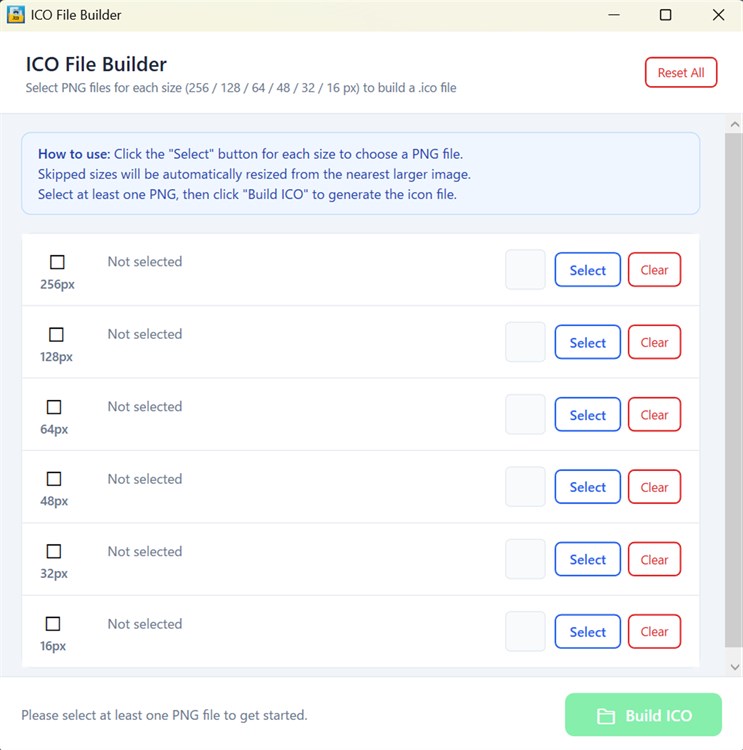
① Launch the application. Six size rows are displayed: 256 / 128 / 64 / 48 / 32 / 16.
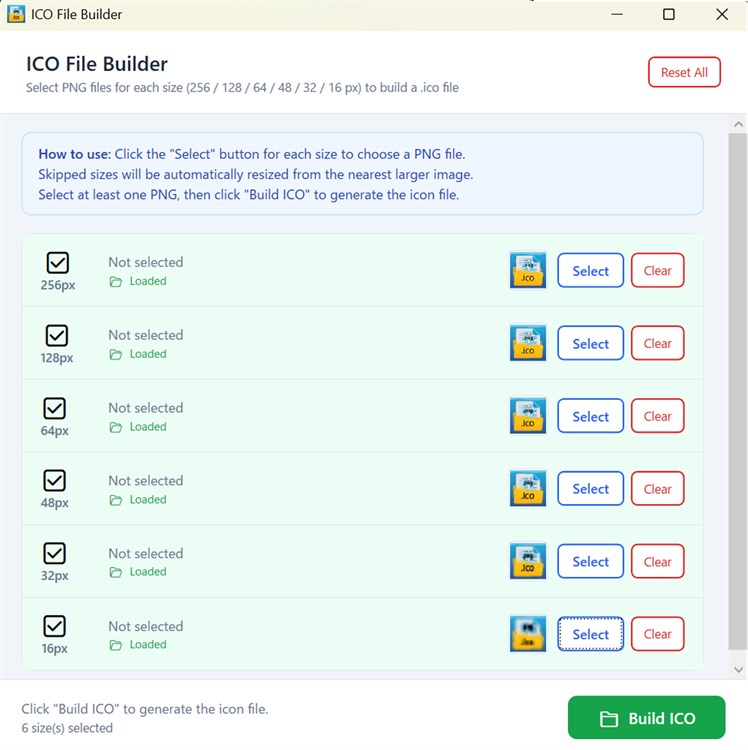
② Click the "Select" button on each row to choose the corresponding PNG file. A thumbnail preview appears immediately after loading.
③ Sizes you skip are automatically filled in by resizing the nearest larger image. Those rows turn orange and show "Will be auto-resized".
④ Once at least one PNG is loaded, the "Build ICO" button at the bottom becomes active.
⑤ Click "Build ICO", choose a destination folder and filename in the save dialog, then click Save. The .ico file is created instantly.
■ Color meanings
• ✅ Green (Loaded) — PNG file loaded successfully.
• 🔄 Orange (Auto-resize) — This size will be generated by resizing a larger loaded image.
• ⬜ White (Not set) — No source available; this size will not be included in the ICO.
■ Other Controls
• "Clear" button — Removes the PNG selection for that individual size row.
• "Reset All" button — Clears all size selections at once. A confirmation dialog is shown before clearing.
■ Auto-Resize Logic
When a size is skipped, the application scans the size array from largest to smallest (256 → 128 → 64 → 48 → 32 → 16) and uses the smallest loaded size that is still larger than the target as the resize source.
Example: If only 256 px and 64 px are loaded, then 128 px is auto-resized from 256 px, while 48, 32, and 16 px are auto-resized from 64 px.
If no larger loaded size exists for a given target (e.g., only 32 px and 16 px are provided, and 256 px is skipped), that size is omitted from the ICO entirely.
■ System Requirements
• Windows 10 or Windows 11
• .NET 8 Desktop Runtime (net8.0-windows)
• WPF (Windows Presentation Foundation)
■ Distribution
This application is available on the Microsoft Store. It can also be installed using the provided setup installer (EachSizeImageIconMakerApp_Setup_x.x.x.exe).
Od vývojáře
Vývojář
- OPO Add Dreams
- Sledující: 0
- Platformy: Windows Aplikace (7) Windows Hry (2)
- Slevy: 2
- Seznamy: 0 0
- Body: 0
- Žebříčky: 0
- Komentáře: 0
- Videa: 0
- RSS: Odebírat
Seznamy 0
-
 CustomIconFileCreator
Body 0
-

- +1 Bod

Žebříčky 0
-
- Vaše hodnocení
Novinky
- Verze: PC
- Poslední aktualizace:
Další informace
- Datum vydání:
- Kategorie:
Aplikace pro Windows›Vývojářské nástroje - OS:
HoloLensMobilePCSurface Hub - Velikost:
197 Mb - Dostupné funkce:
Mixed reality - Podporované jazyky:
Angličtina - Hodnocení obsahu:
EVERYONE - Windows Store Hodnocení: ¡
0
Komentáře 0 ¡
Skóre AppAgg
Odhadované skóre AppAgg pro
CustomIconFileCreator
Vývojář: OPO Add Dreams
Vyšší skóre obvykle odráží lepší výsledky v ukazatelích sledovaných na AppAgg.
Na základě: popularity · uživatelských hodnocení · aktuálnosti · slev · dat obchodů · aktivity komunity
Denně se přepočítává z aktuálních dat AppAgg.
CustomIconFileCreator Krátká adresa URL: Zkopírováno!- Windows Store

