
Bogmærker
| Udvikler: | OPO Add Dreams (9) | ||
| Pris: | ▼ $1.59 | ||
| Score: | 590 Bronze | ||
| Ranglister: | 0 | ||
| Kommentarer: | 0 Skriv kommentar | ||
| Lister: | 0 0 | ||
| Point: | 0 | ||
| +1 Point | |||
Kort fortalt
CustomIconFileCreator er en app fra OPO Add Dreams i kategorien »Udviklerværktøjer«.
$1.59 i stedet for $3.99. Så billig har den aldrig været på AppAgg. Helt ærligt, vi har tjekket hele prishistorikken.
Den kører endda på HoloLens: Windows i mixed reality.
Udkom og er stadig ret frisk.
Der findes endda en version til Windows Mobile. Hilsner fra fortiden.
Virker endda på Surface Hub, til de store mødelokaler.
AppAgg-scoren er 590. Bronze indtil videre, med masser af plads til at vokse.
Aldersgrænse »EVERYONE«: også fint for børn.
Taler kun ét sprog, og det er ikke dansk.
Ingen på AppAgg har bedømt den endnu. Din chance for at blive den første er lige nu.
Udvikleren har yderligere 2 spil og 6 apps på AppAgg. Tag et kig.
Forresten har denne udvikler 2 tilbud lige nu.
Vil du høre om tilbud, opdateringer og nye apps først? Opret en prisalarm, følg udvikleren eller abonner på vores RSS-feed. Push-beskeder kommer via appen AppAgg Alerts til Android og iOS.
Skærmbilleder 2
Andre platforme 0
Prishistorik 1
- Nuværende pris: $1.59
$3.99-60% - Minimum: ▼ $1.59
- Maksimum: $3.99
Dit eget feed på forsiden
Beskrivelse

■Overview
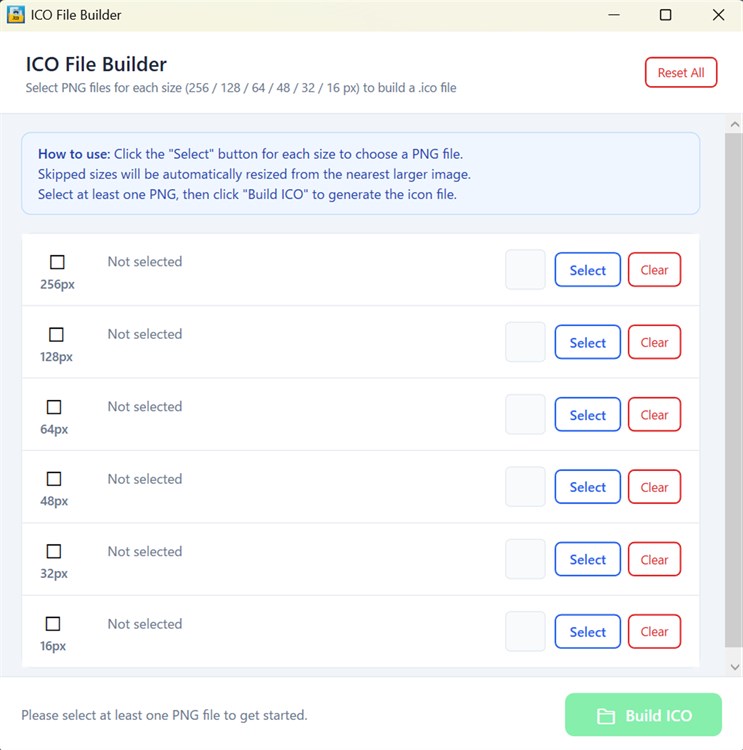
CustomIconFileCreator is a WPF desktop application for Windows that generates a single multi-size “.ico” format icon file from PNG images at six standard sizes: 256 / 128 / 64 / 48 / 32 / 16 px.
Why use size-specific PNGs? Automatically converting a single 256×256 image into 128×128, 64×64, 48×48, 32×32, 16×16 images produces blurry results on small size images, for example 32×32, 16×16 images. For crisp icons, inputting each size images individually created from a vector application such as Adobe Illustrator, Affinity Designer, or Inkscape into this application, and generate an icon file containing fine images.
#icon
#.ico
■How to Launch
Double-click EachSizeImageIconMakerApp.exe to start the application.
■Step-by-Step Instructions
① Launch the application. Six size rows are displayed: 256 / 128 / 64 / 48 / 32 / 16.
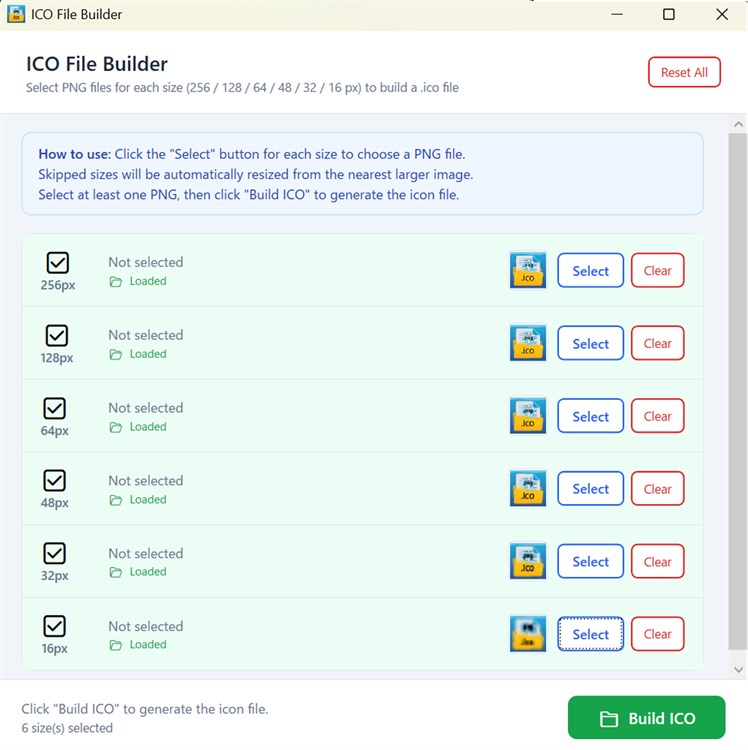
② Click the "Select" button on each row to choose the corresponding PNG file. A thumbnail preview appears immediately after loading.
③ Sizes you skip are automatically filled in by resizing the nearest larger image. Those rows turn orange and show "Will be auto-resized".
④ Once at least one PNG is loaded, the "Build ICO" button at the bottom becomes active.
⑤ Click "Build ICO", choose a destination folder and filename in the save dialog, then click Save. The .ico file is created instantly.
■ Color meanings
• ✅ Green (Loaded) — PNG file loaded successfully.
• 🔄 Orange (Auto-resize) — This size will be generated by resizing a larger loaded image.
• ⬜ White (Not set) — No source available; this size will not be included in the ICO.
■ Other Controls
• "Clear" button — Removes the PNG selection for that individual size row.
• "Reset All" button — Clears all size selections at once. A confirmation dialog is shown before clearing.
■ Auto-Resize Logic
When a size is skipped, the application scans the size array from largest to smallest (256 → 128 → 64 → 48 → 32 → 16) and uses the smallest loaded size that is still larger than the target as the resize source.
Example: If only 256 px and 64 px are loaded, then 128 px is auto-resized from 256 px, while 48, 32, and 16 px are auto-resized from 64 px.
If no larger loaded size exists for a given target (e.g., only 32 px and 16 px are provided, and 256 px is skipped), that size is omitted from the ICO entirely.
■ System Requirements
• Windows 10 or Windows 11
• .NET 8 Desktop Runtime (net8.0-windows)
• WPF (Windows Presentation Foundation)
■ Distribution
This application is available on the Microsoft Store. It can also be installed using the provided setup installer (EachSizeImageIconMakerApp_Setup_x.x.x.exe).
Fra udvikleren
Udvikler
- OPO Add Dreams
- Følgere: 0
- Platforme: Windows Apps (7) Windows Spil (2)
- Tilbud: 2
- Lister: 0 0
- Point: 0
- Ranglister: 0
- Kommentarer: 0
- Videoer: 0
- RSS: Abonner
Lister 0
-
 CustomIconFileCreator
Point 0
-

- +1 Point

Ranglister 0
-
- Din bedømmelse
Nyheder
- Version: PC
- Sidst opdateret:
Yderligere oplysninger
- Udgivelsesdato:
- Kategori:
Windows-apps›Udviklerværktøjer - Operativsystem:
HoloLensMobilePCSurface Hub - Størrelse:
197 Mb - Tilgængelige funktioner:
Mixed reality - Understøttede sprog:
Engelsk - Indholdsklassificering:
EVERYONE - Windows Store Bedømmelse: ¡
0
Kommentarer 0 ¡
AppAgg-score
Estimeret AppAgg-score for
CustomIconFileCreator
Udvikler: OPO Add Dreams
En højere score afspejler som regel bedre resultater på de områder, AppAgg måler.
Baseret på: popularitet · brugervurderinger · aktualitet · tilbud · butiksdata · fællesskabsaktivitet
Genberegnes dagligt ud fra aktuelle AppAgg-data.
CustomIconFileCreator Kort webadresse: Kopieret!- Windows Store

