
Lesezeichen
| Entwickler: | OPO Add Dreams (9) | ||
| Preis: | ▼ $1.59 | ||
| Score: | 590 Bronze | ||
| Ranglisten: | 0 | ||
| Kommentare: | 0 Kommentar posten | ||
| Listen: | 0 0 | ||
| Punkte: | 0 | ||
| +1 Punkt | |||
Kurzinfo
CustomIconFileCreator ist eine App von OPO Add Dreams aus der Kategorie „Entwicklungstools“.
$1.59 statt $3.99. So günstig war die App auf AppAgg noch nie. Ehrlich, wir haben die ganze Preisentwicklung durchforstet.
Läuft sogar auf HoloLens: Windows in Mixed Reality.
Erst erschienen, also noch ziemlich frisch.
Es gibt sogar eine Version für Windows Mobile. Grüße aus der Vergangenheit.
Sogar fit für Surface Hub, für große Besprechungsräume.
Der AppAgg-Score liegt bei 590. Vorerst Bronze, aber mit viel Luft nach oben.
Altersfreigabe „EVERYONE“, also auch für Kinder geeignet.
Spricht nur eine Sprache, und das ist nicht Deutsch.
Auf AppAgg hat die App noch niemand bewertet. Jetzt ist deine Chance, den Anfang zu machen.
Der Entwickler hat noch 2 weitere Spiele und 6 Apps auf AppAgg. Ein Blick lohnt sich.
Übrigens, dieser Entwickler hat gerade 2 Angebote.
Willst du als Erstes von Angeboten, Updates und neuen Apps erfahren? Richte einen Preisalarm ein, folge dem Entwickler oder abonniere den RSS-Feed. Push-Nachrichten kommen über die App AppAgg Alerts für Android und iOS.
Screenshots 2
Andere Plattformen 0
Preisentwicklung 1
- Aktueller Preis: $1.59
$3.99-60% - Minimum: ▼ $1.59
- Maximum: $3.99
Dein eigener Feed auf der Startseite
Beschreibung

■Overview
CustomIconFileCreator is a WPF desktop application for Windows that generates a single multi-size “.ico” format icon file from PNG images at six standard sizes: 256 / 128 / 64 / 48 / 32 / 16 px.
Why use size-specific PNGs? Automatically converting a single 256×256 image into 128×128, 64×64, 48×48, 32×32, 16×16 images produces blurry results on small size images, for example 32×32, 16×16 images. For crisp icons, inputting each size images individually created from a vector application such as Adobe Illustrator, Affinity Designer, or Inkscape into this application, and generate an icon file containing fine images.
#icon
#.ico
■How to Launch
Double-click EachSizeImageIconMakerApp.exe to start the application.
■Step-by-Step Instructions
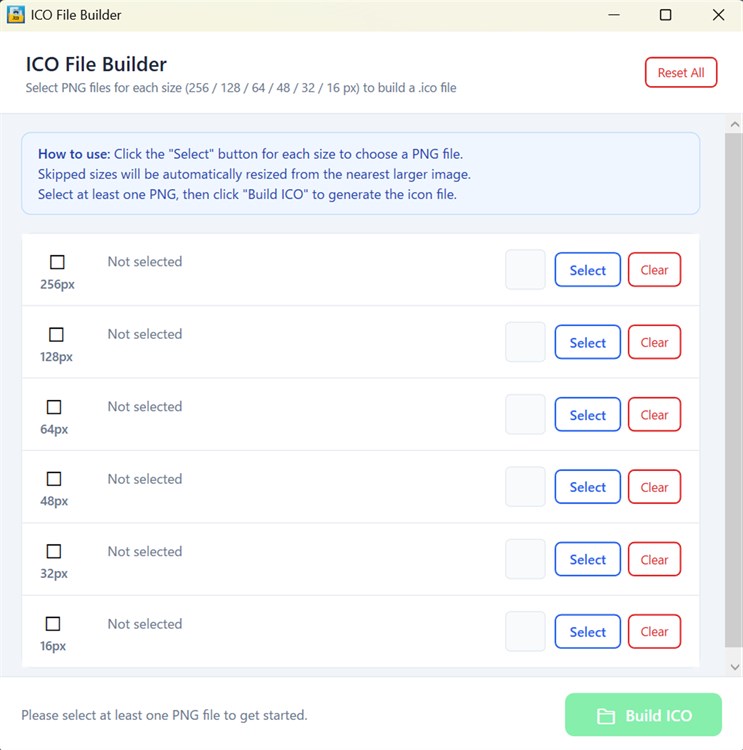
① Launch the application. Six size rows are displayed: 256 / 128 / 64 / 48 / 32 / 16.
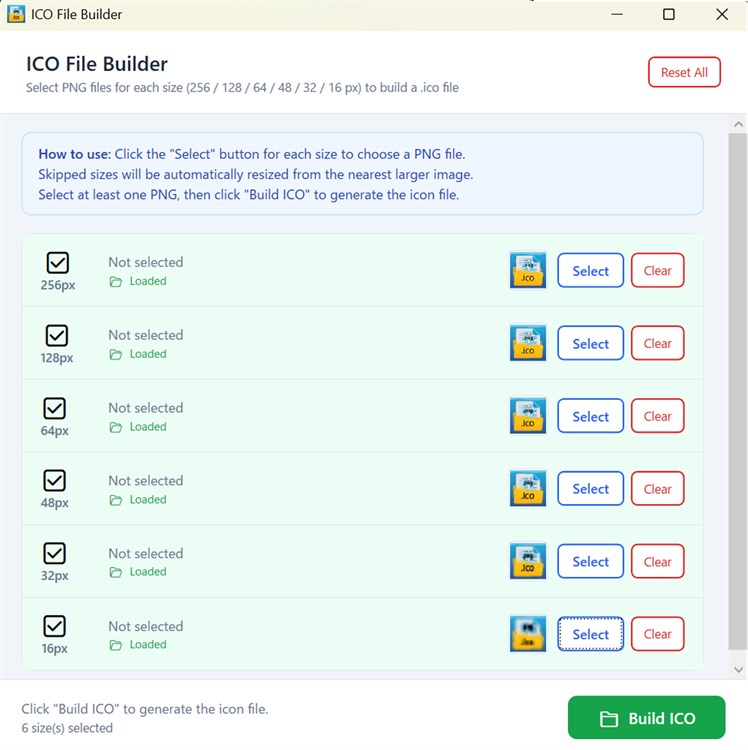
② Click the "Select" button on each row to choose the corresponding PNG file. A thumbnail preview appears immediately after loading.
③ Sizes you skip are automatically filled in by resizing the nearest larger image. Those rows turn orange and show "Will be auto-resized".
④ Once at least one PNG is loaded, the "Build ICO" button at the bottom becomes active.
⑤ Click "Build ICO", choose a destination folder and filename in the save dialog, then click Save. The .ico file is created instantly.
■ Color meanings
• ✅ Green (Loaded) — PNG file loaded successfully.
• 🔄 Orange (Auto-resize) — This size will be generated by resizing a larger loaded image.
• ⬜ White (Not set) — No source available; this size will not be included in the ICO.
■ Other Controls
• "Clear" button — Removes the PNG selection for that individual size row.
• "Reset All" button — Clears all size selections at once. A confirmation dialog is shown before clearing.
■ Auto-Resize Logic
When a size is skipped, the application scans the size array from largest to smallest (256 → 128 → 64 → 48 → 32 → 16) and uses the smallest loaded size that is still larger than the target as the resize source.
Example: If only 256 px and 64 px are loaded, then 128 px is auto-resized from 256 px, while 48, 32, and 16 px are auto-resized from 64 px.
If no larger loaded size exists for a given target (e.g., only 32 px and 16 px are provided, and 256 px is skipped), that size is omitted from the ICO entirely.
■ System Requirements
• Windows 10 or Windows 11
• .NET 8 Desktop Runtime (net8.0-windows)
• WPF (Windows Presentation Foundation)
■ Distribution
This application is available on the Microsoft Store. It can also be installed using the provided setup installer (EachSizeImageIconMakerApp_Setup_x.x.x.exe).
Vom Entwickler
Entwickler
- OPO Add Dreams
- Follower: 0
- Plattformen: Windows Apps (7) Windows Spiele (2)
- Angebote: 2
- Listen: 0 0
- Punkte: 0
- Ranglisten: 0
- Kommentare: 0
- Videos: 0
- RSS: Abonnieren
Listen 0
-
 CustomIconFileCreator
Punkte 0
-

- +1 Punkt

Ranglisten 0
-
- Deine Bewertung
Neue Funktionen
- Version: PC
- Zuletzt aktualisiert:
Weitere Informationen
- Veröffentlichungsdatum:
- Kategorie:
Windows-Apps›Entwicklungstools - Betriebssysteme:
HoloLensMobilePCSurface Hub - Größe:
197 Mb - Verfügbare Funktionen:
Mixed reality - Unterstützte Sprachen:
Englisch - Altersfreigabe:
EVERYONE - Windows Store Bewertung: ¡
0
Kommentare 0 ¡
AppAgg-Score
Geschätzter AppAgg-Score für
CustomIconFileCreator
Entwickler: OPO Add Dreams
Ein höherer Score weist meist auf bessere Werte bei den von AppAgg erfassten Kennzahlen hin.
Basierend auf: Popularität · Nutzerbewertungen · Aktualität · Angeboten · Store-Daten · Community-Aktivität
Wird täglich anhand aktueller AppAgg-Daten neu berechnet.
CustomIconFileCreator Kurz-URL: Kopiert!- Windows Store

