
Záložky
Zvolte název této záložky.
Záložka uložena
| Vývojář: | J.E Herizon LLC (8) | ||
| Cena: | Zdarma Novinka | ||
| Skóre: | 580 Bronz | ||
| Žebříčky: | 0 | ||
| Komentáře: | 0 Přidat komentář | ||
| Seznamy: | 0 + 0 | ||
| Body: | 0 + 0 ¡ | ||
| +1 Body | |||
Snímky obrazovky
Reklama
Popis

technicians, and small support teams handling a PC move. After the files
are migrated by your usual method, CutoverCheck answers the question the
customer actually asks: did everything I care about arrive intact? Capture
a baseline from agreed folders, map destination locations, compare selected
file hashes, and keep a local report of exactly what was checked.
Who this is for
---------------
This workflow fits bench technicians verifying a shop migration, IT staff
cutting over a small office, and support techs who hand a PC back to its
owner with proof of care. The job is always the same shape: agree what
matters, measure it before the move, measure it again after, and report
the comparison. CutoverCheck carries the measuring and the reporting; your
migration tools, your judgment, and your application testing carry the
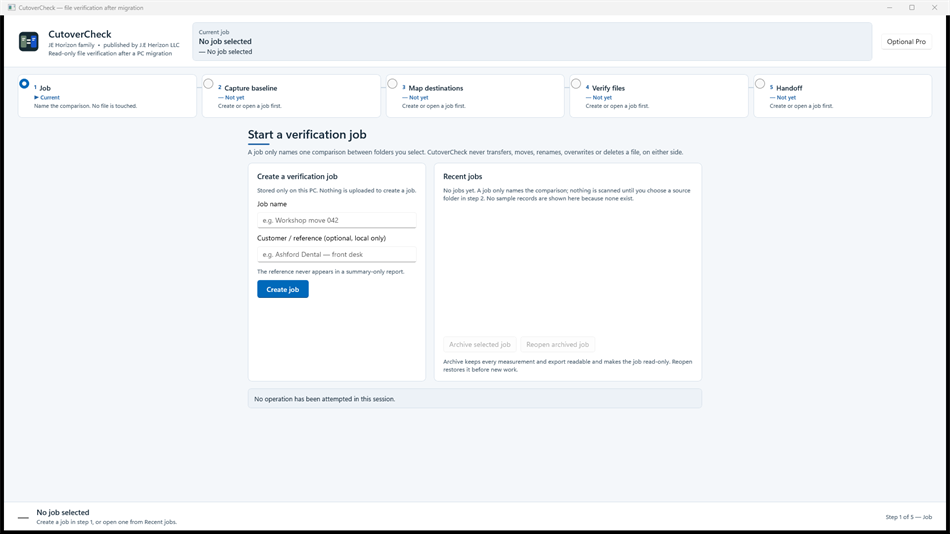
rest. Use it alongside your usual migration method, not instead of it. Five stages—job, baseline, mapping, verification, handoff—organize each check. Review results before a report export.
Agree the folders before you measure
--------------------------------------
Verification starts with agreement, not software. Sit with the PC owner —
or the ticket — and decide which folders belong in the check and which are
excluded: documents and photos in, caches and temp folders out, line-of-
business data by explicit decision. Create a job, select the source
folders and exclusions you intend to check, and capture the source
baseline before moving files with your own migration method. The baseline
is read-only: capturing it changes nothing on the source machine. What it
gives you is a fixed point of truth — names, locations, and hashes — that
every later comparison measures against.
Map first, compare second
--------------------------
After migration, map each source root to its destination folder and review
the mapping preview before comparison. Drive letters change, usernames
change, folder layouts get tidied mid-move; the mapping step absorbs all
of that so the comparison judges content, not paths. A careful mapping
means a missing file reads as genuinely missing rather than merely moved.
Review the mapping the way you reviewed the folder agreement — slowly, and
before you press Verify.
Read the result categories honestly
------------------------------------
The comparison reports each selected file by category: matched,
missing, different, unreadable, and unchecked. Matched means the selected
bytes agreed at the times measured. Missing means the destination has no
file at the mapped location. Different means both sides exist but the
hashes disagree. Unreadable means the file could not be opened for
reading. Unchecked means it fell outside the comparison for an explicit
reason. Keep these categories distinct in your head and in your report: a
different file is not a missing file, and an unchecked file is not a
passed file. Open the result categories, identify each group separately,
correct file placement or access with your own migration tools, then run
verification again against the retained baseline and export an updated
report.
Separate measured files from human attestations
------------------------------------------------
Files are only half the handoff. Applications must be opened, logged into,
and exercised by a person — no hash comparison can do that. CutoverCheck
keeps manual application attestations separate from measured file results
on purpose: the checklist records what the technician tested, and the
comparison records what the bytes said, and the report never mingles the
two. Test applications yourself, record the checklist honestly, and let
the customer see which confidence comes from measurement and which comes
from a human trying the thing.
Carry a baseline to the destination PC
---------------------------------------
When source and destination are different machines, finish the source
capture and export the portable baseline bundle. Move that bundle to the
destination PC by your chosen secure method, import it there, select the
destination roots, and verify the mapping preview before comparison. The
bundle carries measurement records, not the selected files, and
carries no customer data beyond names and hashes. The destination-side
comparison then runs against the same fixed point of truth the source
established.
Reports with the right privacy detail
--------------------------------------
Export the local HTML handoff report with full-detail or summary-only
choices, and choose the detail appropriate for its recipient. The bench
gets full detail: every file, every category, every hash. The customer
gets the summary: what was checked, what matched, what needs attention —
without the internals they cannot act on. Review the report before
sharing it either way. The report documents the selected verification
work; your team decides what else the PC move needs.
Honest limits — read before you rely
-------------------------------------
- CutoverCheck verifies selected files. It does not copy, move, delete,
repair, launch, or test applications.
- A matching hash means selected bytes agreed at the times measured. It
does not establish application functionality, logical database validity,
coverage of omitted folders, or that the old PC is safe to erase.
- Only agreed folders are checked. Anything excluded or unselected is
outside the verification, whatever the report total says.
- Keep matched, missing, different, unreadable, and unchecked results
distinct; never present a partial comparison as a complete one.
- File capture, mapping, verification, checklist, and reporting run
locally; no customer file content is uploaded for these checks.
- Review the Microsoft Store listing for availability and system requirements, including runtime prerequisites.
Getting started
----------------
Verify a PC move
1. Create a job and select the source folders and exclusions you intend to
check.
2. Capture the source baseline before moving files with your own migration
method.
3. Map each source root to its destination folder and run Verify.
4. Review matched, missing, different, unreadable, and unchecked results;
test applications yourself and record the checklist.
5. Export the local HTML handoff report, choosing the privacy detail
appropriate for its recipient.
Carry a baseline to the destination PC
1. Finish the source capture and export the portable baseline bundle.
2. Move that bundle to the destination PC by your chosen secure method.
3. Import the bundle, select the destination roots, and verify the mapping
preview before comparison.
Resolve a partial verification
1. Open the result categories and identify missing, different, unreadable,
and unchecked files separately.
2. Correct file placement or access with your own migration tools.
3. Run verification again against the retained baseline and export an
updated report.
Questions shops ask
--------------------
Does this replace our migration tool? No. Migrate with your own tools,
then verify with CutoverCheck. Measurement and movement are separate
jobs, done by separate tools.
The report shows missing files — now what? Fix placement or access with
your migration tools, re-run verification against the retained baseline,
and export the updated report. Iterate until the categories read clean.
Can the customer erase the old PC now? Not on the hash report alone. A
matching comparison covers selected files, not applications, databases,
or omitted folders. Say so on the handoff, in writing.
Where does customer data go? Nowhere off the bench. Capture, mapping,
verification, and reporting run locally; the portable bundle carries
measurements, not contents.
Download, help, and publisher
------------------------------
Download CutoverCheck for Windows from the Microsoft Store via the Store
button on the product landing page (jehorizon.com/cutovercheck). Help and
illustrated guides: https://jehorizon.com/help/cutovercheck. Product
overview: https://jehorizon.com/cutovercheck. Contact support@jehorizon.com
with your app version and the step you are working on. Published by J.E.
Herizon LLC, doing business as JE Horizon.
Další platformy
| CutoverCheckWindows StoreJste zde | Zdarma |
Zatím jen v tomto obchodě.
Historie cen
- Aktuální cena: Zdarma
- Minimální: Zdarma
- Maximální: Zdarma
Sledovat ceny Přidejte do seznamu a dostávejte upozornění na slevy e-mailem nebo push oznámením
Seznamy (0)
0
- CutoverCheck
Body (0)
0
Žebříčky (0)
-

- Vaše hodnocení

Komentáře (0) ¡
Napište první komentář
Vývojář
- J.E Herizon LLC
- Sledující: 0
- Platformy: Windows Aplikace (8)
- Slevy: 1
- Seznamy: 0 + 1
- Body: 1 + 0 ¡
- Žebříčky: 0
- Komentáře: 0
- Videa: 0
- RSS: Odebírat
Novinky
- Verze: PC
- Poslední aktualizace:
Další informace
- Datum vydání:
- Kategorie:
Aplikace pro Windows›Vývojářské nástroje - OS:
PC - Velikost:
66 Mb - Podporované jazyky:
English - Hodnocení obsahu:
EVERYONE - Windows Store Hodnocení: ¡
0
 http://jehorizon.com/
Skóre AppAgg
580
Odhadované skóre AppAgg pro
CutoverCheck
Vývojář: J.E Herizon LLC
580 Bronz
Vyšší skóre obvykle odráží lepší výsledky v ukazatelích sledovaných na AppAgg.
Na základě: popularity · uživatelských hodnocení · aktuálnosti · nabídek · dat obchodů · aktivity komunity
Denně se přepočítává z aktuálních dat AppAgg.
Odznak na web:  Zkopírováno!
Stručně
CutoverCheck Krátká adresa URL: Zkopírováno!- Windows Store
Na AppAgg můžete sledovat „CutoverCheck“, aplikaci od J.E Herizon LLC pro Windows v kategorii Vývojářské nástroje. Skóre AppAgg: 580 (Bronz). Body AppAgg aplikace — potvrzené: 0; nepřímé: 0. Veřejné seznamy s touto aplikací: 0. Uživatelé, kteří si ji uložili do soukromých seznamů: 0. Uživatelé AppAgg zatím tuto aplikaci nehodnotili. Potvrzené body zaznamenávají přechody přihlášených uživatelů AppAgg do obchodu. Nepřímé body vycházejí z údajů obchodů. Dvě počítadla ukazují počet veřejných seznamů a uživatelů, kteří si aplikaci nebo hru uložili do soukromých seznamů. Aplikace poprvé vyšla . Poslední aktualizace aplikace: . Aplikace je nyní k dispozici zdarma. Aplikace podporuje tyto jazyky: English. Prohlédněte si historii cen, přidejte aplikaci do seznamu nebo sledujte vývojáře. Budoucí slevy a aktualizace aplikace můžete sledovat přes RSS kanál. AppAgg tuto aplikaci nehostuje ani nedistribuuje. Všechny ochranné známky, loga a snímky obrazovky související s aplikací patří příslušným vlastníkům.
Mohlo by se vám také líbit
Nedávné diskuze
 AplikaceLocalDub – Real-Time Game Dubbing Hello Kırtay Interactive, I am using LocalDub - Real-Time Game Dubbing. I would like to know if Hind...
  rashid game5
  AplikaceNauticPlayer This app is absolute cinema. Honestly, it’s one of the best media players I’ve ever tried, and I’m s...
  Manuel16
  AplikaceScreen Beings - Desktop Pet & Study Companion This is my app so I’m a little bias but as someone from the ADHD community that teaches ADHD and neu...
  Tarelle Irwin6
  AplikaceAadi vault good it ia a encrypter and good you my work on office
  Aditya Rai5
  AplikaceTyping 365 | Daily Typing Trainer The best typing app ever. With Typing 365 you don’t have to force yourself for couple minutes traini...
  Ahmad Mozaffar5
  AplikaceZefir Calendar — Calendar in the Taskbar excelente app! Superando todas as espectativas!
  Diógenes Magnus5
  AplikaceLockinRa LockinRa 리뷰 LockinRa는 작업 관리, 집중력 도구, AI 코칭을 하나의 데스크톱 앱으로 통합한 무료 Windows 생산성 프로그램입니다. 클라우드 동기화 없이 로컬 ...
  abhilok reddy6
  AplikaceCN Vault I Love this app CN Vault is a user-friendly app that helps keep your passwords safe and secure. If y...
  Marjuk Amin5
