
Segnalibri
| Sviluppatore: | Ashutosh Vijay (1) | ||
| Prezzo: | Gratis | ||
| Punteggio: | 890 Argento | ||
| Classifiche: | 0 | ||
| Commenti: | 0 Pubblica commento | ||
| Liste: | 0 0 | ||
| Punti: | 0 | ||
| +1 Punto | |||
In breve
Ti presentiamo DataWeave Studio, un’app di Ashutosh Vijay della categoria «Strumenti di sviluppo».
Uscita , è ancora bella fresca.
Gratis: niente pubblicità, niente acquisti in-app. Solo tu e l’app.
Il Microsoft Store è integrato in Windows, quindi si installa in un paio di clic.
Il suo Punteggio AppAgg è 890. Livello Argento, e non è affatto male.
Classificazione «EVERYONE»: va bene anche per i bambini.
Parla una sola lingua, e non è l’italiano.
L’hai usata? La tua recensione sarebbe la prima qui.
È l’unica app dello sviluppatore su AppAgg. Per ora.
Vuoi sapere prima di tutti di aggiornamenti e nuove app? Segui lo sviluppatore o iscriviti al feed RSS. Le notifiche push arrivano tramite l’app AppAgg Alerts per Android e iOS.
Altre piattaforme 0
Cronologia dei prezzi 0
- Prezzo attuale: Gratis
- Minimo: Gratis
- Massimo: Gratis
Il tuo feed personale nella home
Screenshot 5
Descrizione

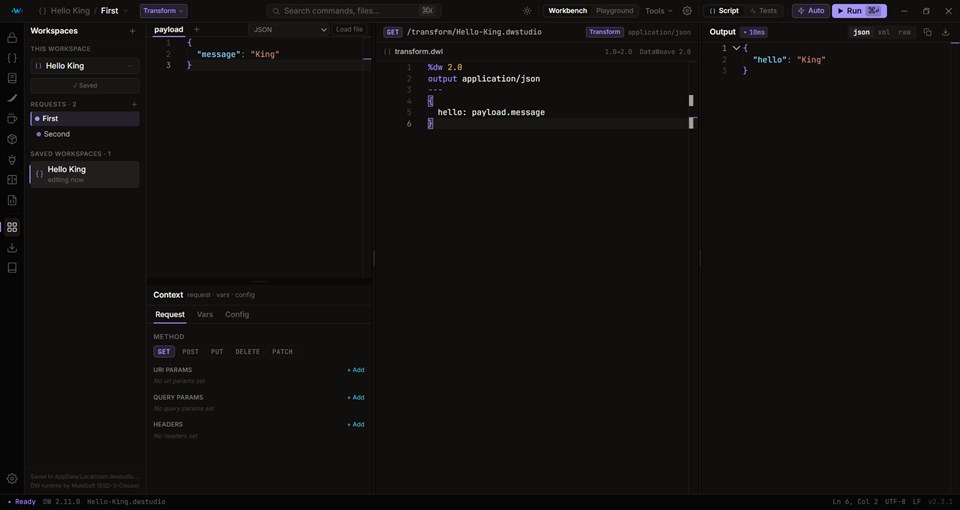
Paste a payload, write a script, press Run. That is the whole loop, and it takes milliseconds.
There is no account to create and nothing to configure: install it and start typing.
Bundled with its own Java runtime - nothing else to install, no JAVA_HOME, no Maven, no PATH changes.
LEARN DATAWEAVE FROM ZERO
• DataWeave Academy: nine short lessons for people who have never written DataWeave, from what a payload is and what mapping means to a first real transform.
• Something to click or type in every lesson and a check at the end. Practice's 40 topics follow in order, each tagged with the MCD exam objective it covers.
PRACTICE
• 739 problems across 40 topics and six levels, from picking fields out of a payload up to recursive tree walks.
• Write a script, fix a broken one, predict what a snippet returns, or pick the right answer. Your solution runs against test cases you cannot see.
• Hints, a trace of every value, the reference solution and a worked explanation when you are stuck. What you typed and what you solved are kept between sessions.
SEE WHAT YOUR SCRIPT ACTUALLY DID
• A Trace panel lists what every expression in your script evaluated to, in source order - no log() calls, no edits to the script. Click a row to jump to it.
• A map body that ran five hundred times is one row with a count, not five hundred rows, and a script that throws still shows everything it worked out first.
• A real step debugger: click the gutter to set a breakpoint and the script stops there, with the call stack, every variable in scope, step over / into / out, and a box to evaluate any expression against the paused frame.
• It is the DataWeave engine's own debugger, running in-process - no port to open and no second process to attach.
CHECK AGAINST THE MULE YOU DEPLOY TO
• Point it at your runtime - Mule 4.1 through 4.13 - and a function your server does not have fails here, in the editor, naming the version that introduced it.
• It gates the compiler and the runtime's own version-dependent behaviour, not just a lint, and it applies to Run, the test suites and the editor's diagnostics alike.
THE EDITOR
• Monaco editor with DataWeave 2.0 syntax highlighting and bracket-pair colouring.
• Autocomplete over all 361 DataWeave functions with signature hints, grouped by module.
• Suggestions drawn from your own data: payload fields, variables, attributes and config properties, so completions match what you actually loaded.
• Reader and writer options for all 16 formats complete as you type - including the ones nobody can ever remember, like skipNullOn.
• Errors highlighted inline with line and column, and the editor scrolls to the failure.
• Pick the output format from a menu above the output, or leave the output line out and get what Mule would produce.
• Configurable font, size, line height, tab width, word wrap and minimap.
INPUT, IN ANY SHAPE
• 14+ formats as both input and output: JSON, XML, CSV, YAML, NDJSON, plain text, form-urlencoded, DataWeave, Java properties, Excel, Avro, Protocol Buffers, Flat File (COBOL copybooks) and raw binary.
• Named inputs - add extra input streams as tabs, each with its own editor and MIME type.
• Multipart form-data builder with real MIME boundaries, mixing text and file parts.
• Load any file from disk as the payload, with no size limit on binary.
• Full HTTP context: method, headers, query parameters and flow variables, each row individually enabled or disabled - exposed to your script exactly as attributes.
SECURE PROPERTIES, OFFLINE
• Encrypt and decrypt secure-property values locally: AES, Blowfish, DES, DESede and RC2 across CBC, CFB, ECB and OFB, byte-for-byte compatible with Mule's secure-properties-tool.
• Paste a real secure-config.yaml or .properties file with ![encrypted] values, supply the key, and run scripts against the genuinely decrypted result. The key is checked against your values as you type.
• Encrypt a whole config at once - paste a YAML or .properties file and every value is encrypted in place, with anything already written as ![...] left alone and your comments and layout untouched. Decrypt the same way to read one back.
• Every field is listed with what will happen to it before anything runs.
• A typed key is held for the session only. Save one in your operating system's keychain to pick it by name next time; it never goes into a workspace file or a share link.
• No website to be down or blocked by your corporate network, and your production secrets never go into someone else's web form.
MESSAGE FLOW DESIGNER
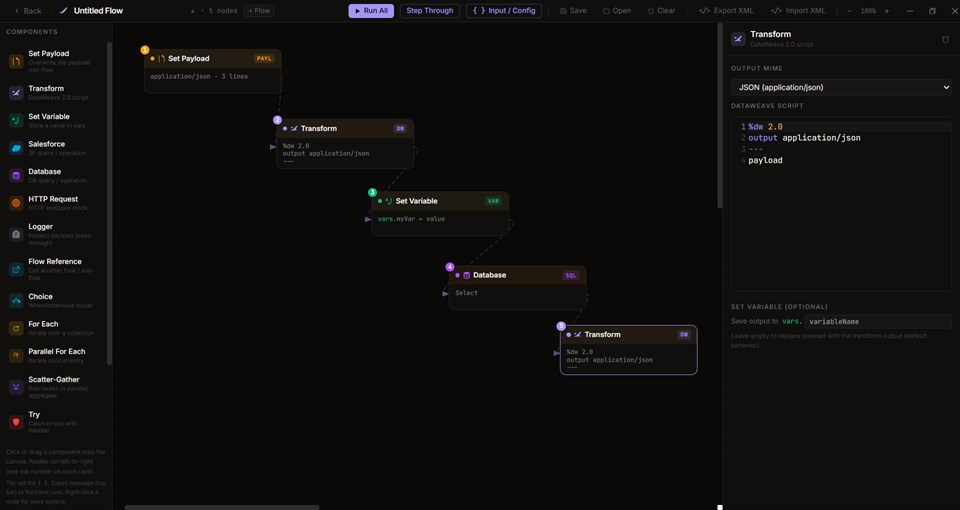
• Drag-and-drop canvas for chaining Set Payload, Transform, Set Variable, HTTP Request, Salesforce, Database and Logger nodes.
• Run the whole flow, or step through node by node and inspect the payload, variables and attributes at every stage.
• Import real Mule flow XML and run it locally; export your canvas back out as XML.
• Variables carry through the pipeline just as they do in a Mule app.
SALESFORCE AND DATABASE QUERIES
• Write SOQL or SQL with :paramName placeholders, bind the parameters from a DataWeave script, and see the final rendered query.
• JDBC-style auto-quoting for SQL: strings quoted, numbers bare, null becomes NULL.
SHARE A WHOLE SETUP IN ONE LINK
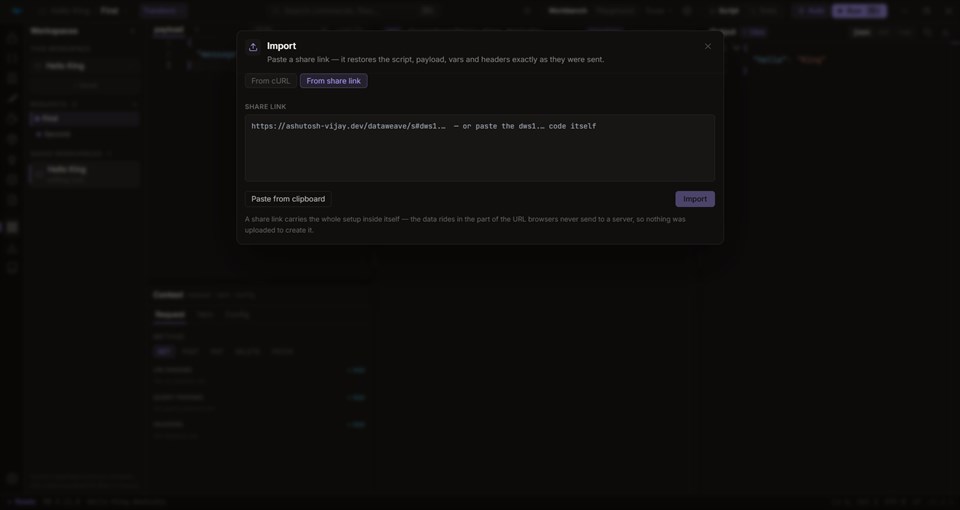
• Copy a link carrying the script, payload, variables, headers and query parameters - one request or an entire workspace.
• Whoever opens it gets an identical setup and can press Run, instead of a snippet they have to rebuild from a chat message.
• The data rides in the part of a URL that browsers never send to a server, so nothing is uploaded to create a link.
BUILT-IN MCP SERVER
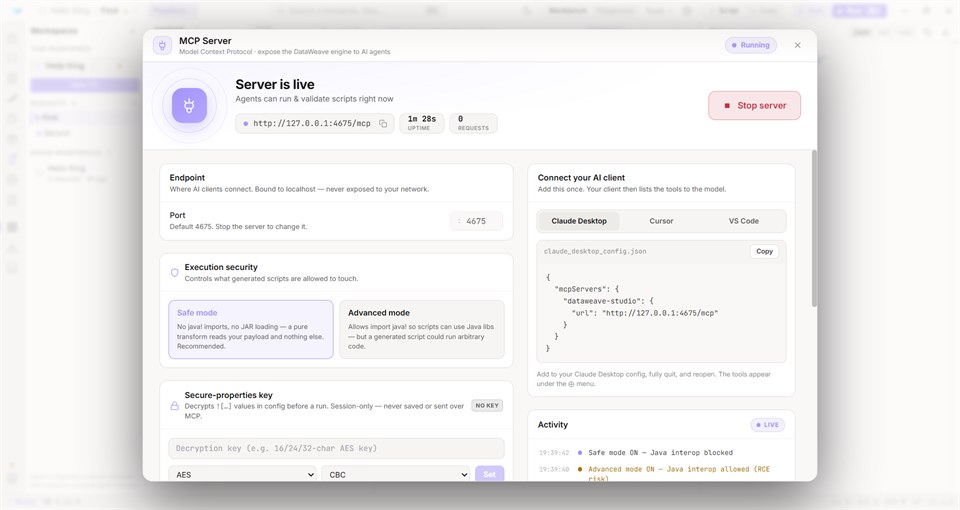
• Let AI assistants in Claude Code, Cursor, VS Code or any MCP client compile and run DataWeave, so they verify their transforms instead of inventing syntax that does not exist.
• Nine tools, not one: run a script, type-check it without running, run a dw::test suite and read which assertions passed, and ask what every expression evaluated to when a transform compiles but the output is wrong.
• An offline reference the assistant can actually consult - all 361 functions, and a cookbook of verified recipes - so it stops guessing signatures.
• Answers plain HTTP too: POST a script and a payload, or a whole array of rows, and drive the engine from a script in any language.
• Bound to localhost, never exposed to your network, and off until you start it.
• Safe mode blocks Java imports so a generated script can only read your payload.
TOOLS
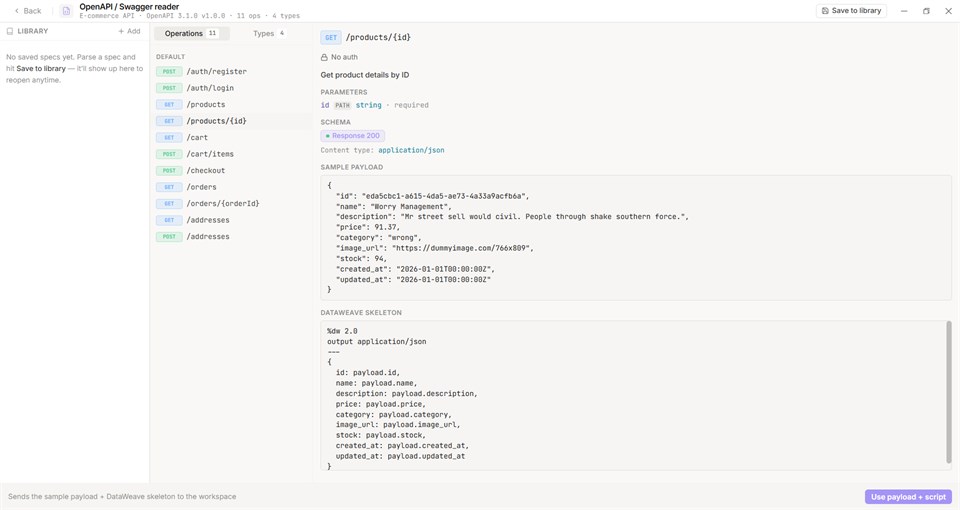
• OpenAPI / Swagger reader - open a 3.x or 2.0 spec, browse operations and types, and turn any request, response or named example into a sample payload plus a matching DataWeave skeleton. Resolves $ref, enums and allOf/oneOf/anyOf.
• cURL importer - paste a curl command from Postman or devtools; method, headers, query params and body fill in automatically with a matching script scaffold.
• Java tester - compile your own Java classes and call them from DataWeave with import java!, exactly as a Mule app would.
• Module library - write reusable .dwl modules and import them across workspaces.
• Compare - side-by-side diff for payloads and Mule XML, with an Ignore IDs toggle that blanks the generated doc:id and UUID churn so you see the change that matters.
• DataWeave 1.0 to 2.0 migration with a one-click diff.
• Secure-properties encrypt/decrypt dialog, snippets library and command palette.
TESTING
• Real dw::test suites - the same framework MuleSoft ships - written as ordinary DataWeave.
• Named assertions with clear failure messages and the line each one failed on, not a diff you have to interpret.
• Suites live beside your scripts in the same workspace, and each one times individually so a slow assertion is obvious.
• Self-contained by design: a suite defines its own fixtures, so it runs here, in your build, and on a teammate's machine identically.
WORKSPACES
• Postman-style collections: group related transforms in one workspace, each request with its own script, payload, context, named inputs, query template and tests.
• Search inside workspaces by request name, pin the ones you live in, and resume exactly where you left off.
REFERENCE
• Every DataWeave function, searchable and offline, with signatures and descriptions.
• A cookbook of worked recipes including MuleSoft's official examples - each one runs as shipped.
ALSO
• Dusk and Paper themes with five accent colours, and Workbench or Playground layouts.
• Also available as a VS Code extension, if you would rather not install a desktop app.
Free and open source under the MIT licence: https://github.com/Ashutosh-Vijay/DataWeave-Studio
DataWeave Studio is an independent tool. It is not affiliated with, endorsed by or sponsored by MuleSoft or Salesforce. DataWeave, Mule, MuleSoft and Anypoint are trademarks of their respective owners.
Dallo sviluppatore
Liste 0
-
 DataWeave Studio
Punti 0
-

- +1 Punto

Classifiche 0
-
- La tua valutazione
Sviluppatore 1
- Ashutosh Vijay
- Follower: 0
- Piattaforme: Windows App (1)
- Offerte: 0
- Liste: 0 0
- Punti: 0
- Classifiche: 0
- Commenti: 0
- Video: 0
- RSS: Iscriviti
Novità
- Versione: PC
- Ultimo aggiornamento:
- Check a Mule upgrade before you make it
• Upgrade check. Tools → Upgrade check: pick a Mule project, or a folder holding many, and the Mule version you run today and the one you are moving to. Every .dwl file and every Transform in your flow XML is compiled with both DataWeave versions, and anything that works today but breaks on the new version is listed first, with the error, the line and a hint where one helps. Click a row to open the script. Each DataWeave version is downloaded once from MuleSoft's repository; your scripts never leave your machine.
• DataWeave 2.13.1. Scripts now run on DataWeave 2.13.1, the version in Mule 4.13. That brings the new JWT modules (dw::util::jwt), and the function reference and completions cover them. If Settings → Target runtime is set to a Mule version without them, a script that imports them is flagged.
• Your project's modules and schemas. A script opened from a Mule project finds the modules in its src/main/resources, and jsonschema! and xmlschema! types read the project's schema files, both when it runs and in the editor's checks. The Module library can also hold JSON Schema and XSD files, and exports a module's docs as Markdown.
• Two more formats. Payloads and output can now be text/event-stream (server-sent events) and application/dwb (DataWeave binary).
More in What’s new, inside the app.
- Work on your Mule project, in place
• Edit transforms inside your Mule XML. Workspace menu → Open transform from Mule XML: pick a flow file and it lists every Transform in it by flow and target. Open one, edit and run it against a sample payload, and Save writes it back into the same place in the file. Nothing else in the XML changes.
• Open and save .dwl files in place. Workspace menu → Open .dwl file edits a script file where it lives, and Workspace menu → Save script as .dwl links a script to a file. Save writes the script back to that path. Sample payloads and context stay in the workspace, so only the script changes on disk. If the file changed outside the app, Save asks before overwriting.
• Browse a project folder. Pick a folder in the sidebar, such as a Mule project, to list its flow XML and .dwl files and open them with a click. Test files sit in a group of their own, and the list can be collapsed.
• Choose your fonts. Settings → Editor → Editor font: JetBrains Mono, Fira Code, Cascadia Code, IBM Plex Mono, Geist Mono, Consolas, or any font installed on your computer. Code names and paths across the app follow it. Settings → Appearance → Interface font sets the font for menus, buttons and labels.
• Choose where workspaces are saved. Settings → Advanced → Workspace folder: keep saved workspaces in any folder, such as another drive or a project folder. The workspaces you already have are copied there.
More in What’s new, inside the app. - Learn DataWeave from zero
• DataWeave Academy. Nine short lessons for anyone who has never written DataWeave, or never heard the word mapping. They start with what a payload is and what mapping means, then cover selectors, building the output, lists, formats and where data comes from in a Mule flow, all on one running example. Every lesson has something to click or type and a check at the end. Practice’s 40 topics follow in order, each tagged with the MCD exam objective it covers. Open it from the start screen, the rail or Tools.
• Fixes. A variable set to a DataWeave script now runs properly, including a whole script with its own header or one that reads an earlier variable, and a failing one now says so instead of quietly becoming null. ${key} properties resolve inside variables. A property value with a quote or backslash no longer breaks a JSON payload. p() calls are no longer underlined as errors, and a script saved with a byte-order mark runs. Once you have rated the app, the rating card no longer comes back after an update. The welcome screen’s window buttons are real, so the window can be moved and closed before you skip the intro. - Linux builds run on older systems again
• Fixes. The Linux AppImage, .deb and .rpm start on Ubuntu 22.04, Debian 12, Linux Mint 21 and other older distributions again. They were being built against a newer system library and refused to open there.
Informazioni aggiuntive
- Data di uscita:
- Categoria:
App per Windows›Strumenti di sviluppo - Sistemi operativi:
PC - Dimensioni:
108 Mb - Lingue supportate:
Inglese - Classificazione contenuti:
EVERYONE - Windows Store Valutazione: ¡
0 - Sito web:
 https://ashutosh-vijay.dev/dataweave/
Punteggio AppAgg
Punteggio AppAgg stimato per
DataWeave Studio
Sviluppatore: Ashutosh Vijay
Un punteggio più alto riflette in genere risultati migliori negli indicatori di AppAgg.
Basato su: popolarità · valutazioni degli utenti · freschezza · offerte · dati degli store · attività della community
Ricalcolato ogni giorno con dati AppAgg aggiornati.
Commenti 0 ¡
Condividi
DataWeave Studio URL breve: Copiato!- Windows Store

