
Bookmarks
| Developer: | JK Global Enterprises (1) | ||
| Price: | * Free | ||
| Score: | 580 Bronze | ||
| Rankings: | 0 | ||
| Comments: | 0 Add a comment | ||
| Lists: | 0 0 | ||
| Points: | 0 | ||
| +1 Point | |||
Summary
Meet DevWorkroom, an app from JK Global Enterprises in the Developer tools category.
Released , still pretty fresh.
Free to download. After that it’s up to you (there are in-app purchases).
The Microsoft Store is built into Windows, so it installs in a couple of clicks.
Its AppAgg Score is 580. Bronze for now, with plenty of room to grow.
Rated “EVERYONE”, so it’s fine for kids too.
Only one language, and it’s English.
Total silence here so far: no ratings, no comments. Break the silence.
It’s the developer’s only app on AppAgg. For now.
Want to hear about updates and new apps first? Follow the developer or subscribe to the RSS feed. Push alerts come through the AppAgg Alerts app for Android and iOS.
Screenshots 1
Other platforms 0
Price History 0
- Current price: Free
- Minimum: Free
- Maximum: Free
Your own feed on the home page
Description

IMPORTANT: Downloading and installing DevWorkroom is free. A confirmed DevWorkroom account and a paid DevWorkroom All Tools subscription are required to run tests. The subscription is purchased and managed at devworkroom.com, outside Microsoft Store, and includes all nine DevWorkroom tools. There is no free trial. Check devworkroom.com for current pricing and availability before downloading.
HOW IT WORKS
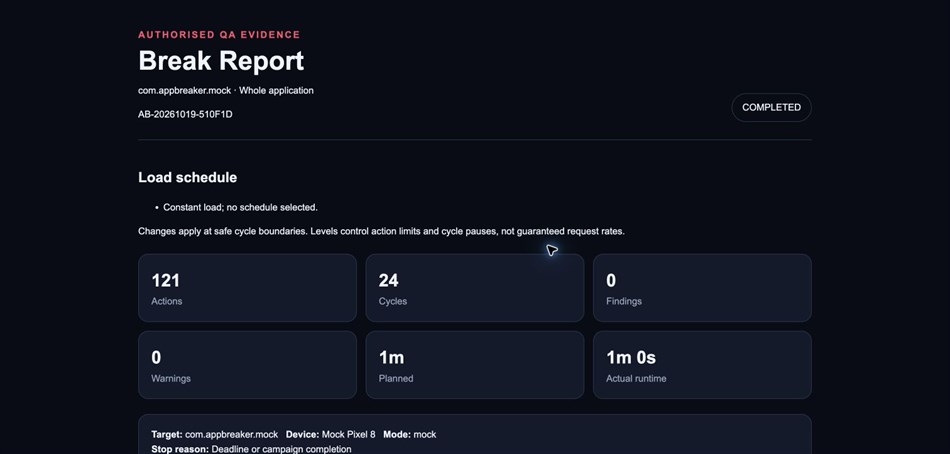
1. Open DevWorkroom to view the App Breaker dashboard and reports inside the desktop app.
2. Sign in with your DevWorkroom account and active subscription.
3. Choose an authorised target, the available testing mode, campaigns and duration.
4. Start the test and follow its progress, action history and captured evidence.
5. Review the report and export the evidence for your investigation or development workflow.
App Breaker supports timed campaigns, a manual stop control and reports that record what the test actually observed. Browser testing uses a bundled browser runtime. Other target modes require compatible devices, local development tools or platform-specific setup; see the guide before choosing a mode.
Tests can interact with the selected target. Use a test environment and test accounts, and only test systems you own or have explicit permission to test. A passing run means no covered problem was observed; it is not a security certificate or a guarantee that your app has no bugs.
The testing runner works locally on your computer. Internet access is required for account and subscription verification. Reports and screenshots can contain information from your test target; review them before sharing.
Guide and support: https://devworkroom.com/help/
Privacy: https://devworkroom.com/privacy/
Subscription terms: https://devworkroom.com/terms/
From the developer
Developer
- JK Global Enterprises
- Followers: 0
- Platforms: Windows Apps (1)
- Deals: 0
- Lists: 0 0
- Points: 0
- Rankings: 0
- Comments: 0
- Videos: 0
- RSS: Subscribe
Lists 0
-
 DevWorkroom
Points 0
-

- +1 Point

Rankings 0
-
- Your rating
What's new
- Version: PC
- Last Updated:
- DevWorkroom desktop branding with the DW icon. Dashboard and reports stay inside the app window. App Breaker remains the testing tool within DevWorkroom.
Additional Information
- Release Date:
- Category:
Windows Apps›Developer tools - OS:
PC - Size:
250 Mb - Supported Languages:
English - Content Rating:
EVERYONE - Windows Store Rating: ¡
0 - Website:
 https://devworkroom.com
Comments 0 ¡
AppAgg Score
Estimated AppAgg Score for
DevWorkroom
Developer: JK Global Enterprises
Higher scores usually reflect better results across AppAgg’s indicators.
Based on: popularity · ratings · freshness · deals · store data · community signals
Recalculated daily using fresh AppAgg data.
DevWorkroom Short URL: Copied!- Windows Store
You may also like
Recent discussionsMore →
 AppTapeFlo this app is the best app i use in my life Because. you trade. journal. Discipline. rule's that you w...
 Shurem Boy35
 AppGame4Class Game4Class makes lesson review fun and interactive. I like how easily students can join from their o...
 Mehdi Gateway62
 AppAniMate Waifu - AI Anime Desktop Pet This is the best anime desktop pets I have ever had, The dancing feature is amazing.
 shaw chaney34
 AppSpark Motion Create 26 The graphics are amazing! Now I can design my ball layouts and watch then spin in 3D animation.
 Jim Kirker40
 AppLocalDub – Real-Time Game Dubbing Hello Kırtay Interactive, I am using LocalDub - Real-Time Game Dubbing. I would like to know if Hind...
 rashid game53
 AppNauticPlayer This app is absolute cinema. Honestly, it’s one of the best media players I’ve ever tried, and I’m s...
 Manuel92
 AppScreen Beings - Interactive Accessibility Companion This is my app so I’m a little bias but as someone from the ADHD community that teaches ADHD and neu...
 Tarelle Irwin54
 AppAadi vault good it ia a encrypter and good you my work on office
 Aditya Rai50
 AppTyping 365 | Daily Typing Trainer The best typing app ever. With Typing 365 you don’t have to force yourself for couple minutes traini...
 Ahmad Mozaffar50
 AppZefir Calendar — Calendar in the Taskbar excelente app! Superando todas as espectativas!
 Diógenes Magnus50

