
Segnalibri
| Sviluppatore: | Gen. (6) | ||
| Prezzo: | $9.99 | ||
| Punteggio: | 580 Bronzo | ||
| Classifiche: | 0 | ||
| Commenti: | 0 Pubblica commento | ||
| Liste: | 0 0 | ||
| Punti: | 0 | ||
| +1 Punto | |||
In breve
Ti presentiamo Doc-Scanner, un’app di Gen. della categoria «Strumenti di sviluppo».
Uscita , è ancora bella fresca.
$9.99, e finora neanche uno sconto su AppAgg. Un osso duro.
Il Microsoft Store è integrato in Windows, quindi si installa in un paio di clic.
Il suo Punteggio AppAgg è 580. Per ora livello Bronzo, con tanto margine per crescere.
Solo 12 megabyte. Ci sta anche su un disco pieno zeppo.
Classificazione «EVERYONE»: va bene anche per i bambini.
Parla una sola lingua, e non è l’italiano.
L’hai usata? La tua recensione sarebbe la prima qui.
Lo sviluppatore ha 5 altre app su AppAgg. Vale la pena dare un’occhiata.
Vuoi sapere prima di tutti di offerte, aggiornamenti e nuove app? Imposta un avviso di prezzo, segui lo sviluppatore o iscriviti al feed RSS. Le notifiche push arrivano tramite l’app AppAgg Alerts per Android e iOS.
Screenshot 2
Altre piattaforme 0
Cronologia dei prezzi 0
- Prezzo attuale: $9.99
- Minimo: $9.99
- Massimo: $9.99
Il tuo feed personale nella home
Descrizione

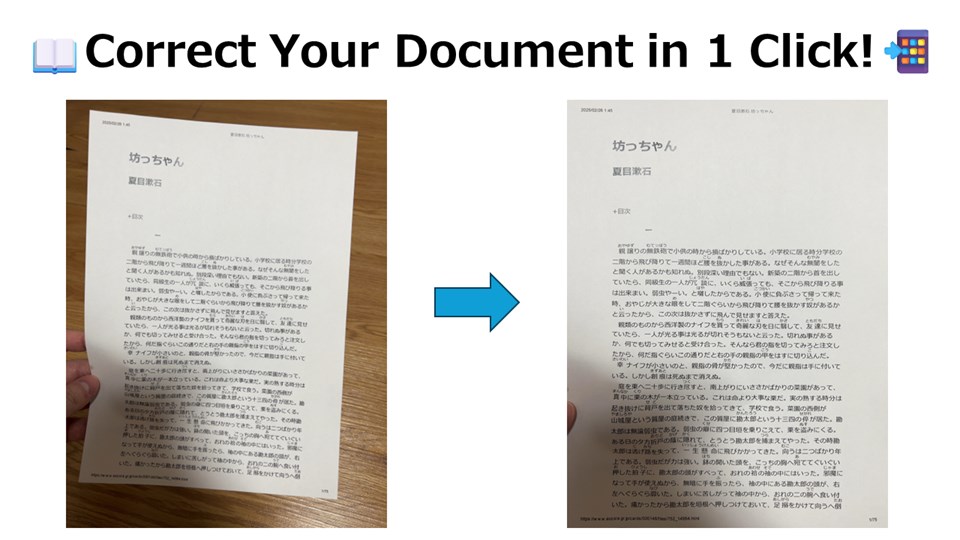
Doc-Scanner is the ultimate tool for transforming paper documents and books into professional-quality digital files. Using advanced image enhancement technology, it automatically corrects distortions, shadows, and uneven lighting, ensuring perfectly readable digital content.
Key Features
🔍 Professional-Grade Image Enhancement
Automatically enhances photos of documents taken with your smartphone or camera, making them look as if they were scanned with a high-quality scanner.
📚 Single & Batch Processing
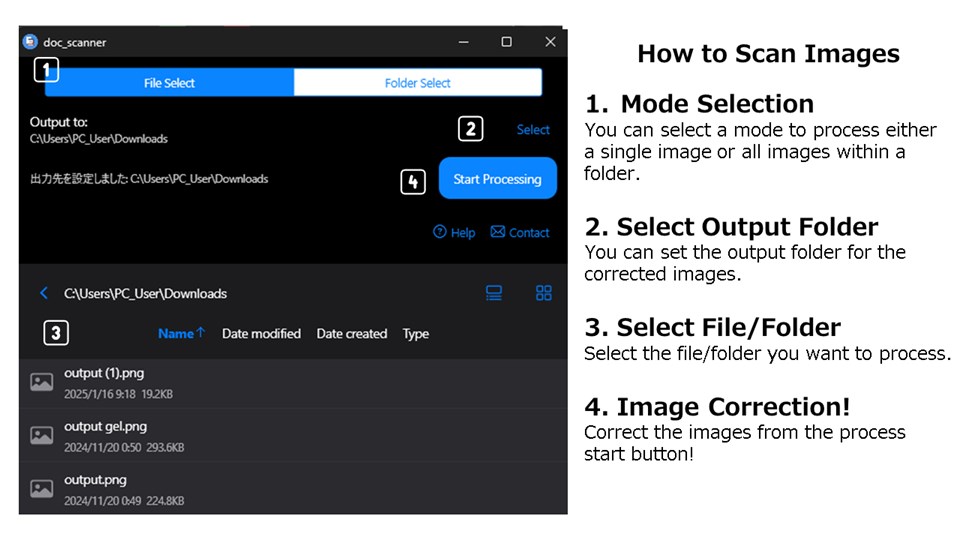
- File Selection Mode: Manually adjust individual images for precise control.
- Folder Selection Mode: Process multiple documents or book pages at once.
👁️ Real-Time Preview
Check the results before finalizing, allowing you to optimize settings while saving time.
💼 Easy File Management
- Drag & drop support
- Intuitive folder navigation
- Customizable output destination
🖼️ Supports Multiple Formats
Compatible with JPG, PNG, and other popular image formats.
Perfect for:
✅ Digitizing paper documents and books
✅ Professionals and students who want to store materials digitally
✅ Organizing household paperwork
✅ Creating high-quality eBooks
✅ Users who don’t own a scanner but need digital copies of documents
System Requirements
- Windows 10/11
- 2GB RAM or more
- At least 100MB of free storage (depends on the number of documents you want to scan)
Upgrade your document management with Doc-Scanner! Download now and easily create professional-quality digital books and documents.
Dallo sviluppatore
Sviluppatore
- Gen
- Follower: 0
- Piattaforme: Android App (2) iOS App (1) Windows App (3)
- Offerte: 0
- Liste: 0 0
- Punti: 0
- Classifiche: 0
- Commenti: 0
- Video: 1
- RSS: Iscriviti
Liste 0
-
 Doc-Scanner
Punti 0
-

- +1 Punto

Classifiche 0
-
- La tua valutazione
Novità
- Versione: PC
- Ultimo aggiornamento:
Informazioni aggiuntive
- Data di uscita:
- Categoria:
App per Windows›Strumenti di sviluppo - Sistemi operativi:
PC - Dimensioni:
12 Mb - Lingue supportate:
Inglese - Classificazione contenuti:
EVERYONE - Windows Store Valutazione: ¡
0 - Sito web:
 https://gen-gen33.github.io/
Commenti 0 ¡
Punteggio AppAgg
Punteggio AppAgg stimato per
Doc-Scanner
Sviluppatore: Gen.
Un punteggio più alto riflette in genere risultati migliori negli indicatori di AppAgg.
Basato su: popolarità · valutazioni degli utenti · freschezza · offerte · dati degli store · attività della community
Ricalcolato ogni giorno con dati AppAgg aggiornati.
Doc-Scanner URL breve: Copiato!- Windows Store

